Hornslet-Ebeltoft Pharmacy: Two online stores, one login, and prices from Nomeco
Hornslet-Ebeltoft Pharmacy operates sundapotek.dk and dhapotek.dk using a single login in Shoporama. Every night, a single integration pulls prices from Nomeco into both online stores, ensuring that the same product costs the same in both places, and no one has to manually adjust prices. The pharmacy determines its own special offers and promotions, store by store.
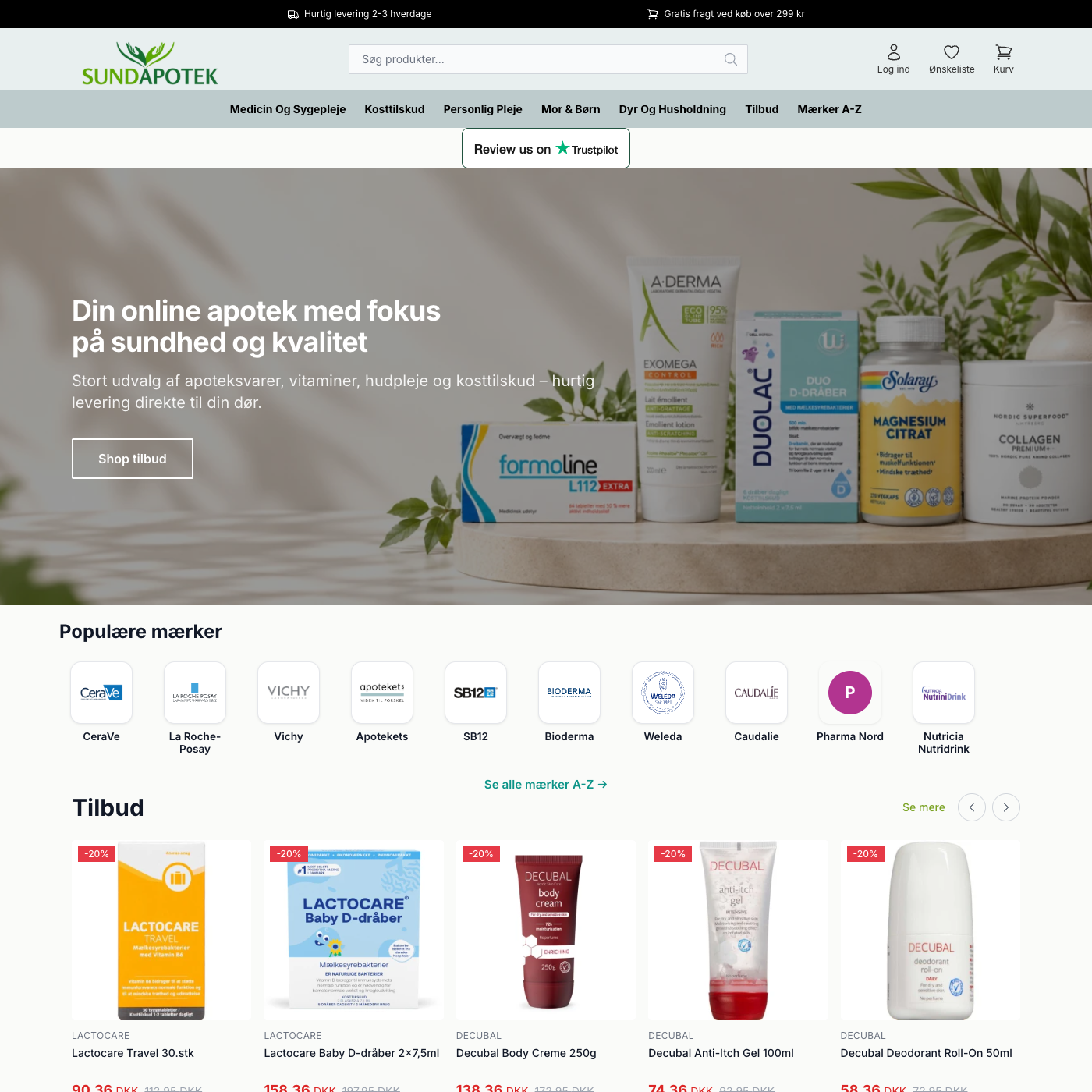

In the background: sundapotek.dk; in the foreground: dhapotek.dk. Same theme, different styles.
We have several teams that will be using Shoporama. That’s why it’s important for us to set everything up correctly from the start.
About Hornslet-Ebeltoft Pharmacy: A History Dating Back to 1857 and Two Online Stores
Hornslet Pharmacy opened in 1857. Today, Hornslet-Ebeltoft Pharmacy has locations in Hornslet, Ebeltoft, Kolind, Auning, Løgten, and Rønde, and a dedicated team of pharmacists and pharmacy technicians provides advice both in-store and online.
The pharmacy has two online stores, each with its own role, and both moved to Shoporama in 2026.
sundapotek.dk
- Health Care, Dietary Supplements, and Over-the-Counter Medications
- Popular brands on the front page, such as CeraVe, La Roche-Posay, and Vichy
- Free shipping threshold: Free shipping on orders of 299 kr. or more.
- Free pickup at pharmacy locations
dhapotek.dk
- Homeopathy first: drops, ampoules, globules, ointment, and liniment, and Bach Flower Remedies
- Plus a wide selection of pharmacy products
- Free shipping threshold: Free shipping on orders of 349 kr. or more.
- Free pickup at pharmacy locations
One login for both online stores
Both shops are operated by the same company on Shoporama. Staff log in in one place and switch between the shops, and both subscriptions appear on the same monthly invoice. Each shop retains its own name, logo, colors, homepage, shipping threshold, promotions, and customers.
Change stores, stay on the page
If you’re viewing the order list on sundapotek.dk and switch stores, you’ll be taken to the order list on dhapotek.dk. The store selector displays each store’s logo, name, and domain, as well as whether its revenue over the past 7 days has increased or decreased.
Access to the Right Stores
The employees have their own login, And for each employee, you choose which of the shops they have access to. If the company creates a new shop, the company's users automatically gain access to it.
Same theme, different expressions
Both shops use the Shoporama theme Montana. Colors, logos, home pages, and menus are customized for each store, so that sundapotek.dk showcases the brands, while Dansk Homøopatisk Apotek features a green color scheme and opens with tiles for drops, ampoules, and globules.
Copy items from one store to another
Products can be copied directly from the product list into the other store. The copy includes images, descriptions, price, and product ID, and starts offline; any missing categories can be created along the way. Because the product ID is included, the copy’s price is also kept up to date from Nomeco.
Each store has its own shipper
The two stores share a single DAO agreement, but each store has its own name and address on the label. This way, the customer can see which store the package is coming from.
Company Information
Each store can have its own company information, which is used on invoices and in emails to customers, even though both stores belong to the same company in Shoporama.
Price synchronization from Nomeco every night
The pharmacy uses the pharmaceutical wholesaler Nomeco. When a price changes there, it must also be changed in the online store, and with two stores, that’s two places to keep track of. Here, we handle The Nomeco Integration, which Shoporama has set up, every night in both stores.

It happens every night
- 1The Nomeco catalog, featuring over 7,000 items, is available for download.
- 2The store's products are matched by product number, with the EAN as a backup.
- 3The price is updated based on Nomeco's price data, but only where it differs.
- 4Items that Nomeco has marked as discontinued are set to "hidden." They are not deleted.
- 5New Nomeco products that the store doesn't carry are added to a list. They are never created automatically.
There are few changes from night to night, but they happen automatically. On October 10, for example, the system updated 3 prices and removed 7 discontinued items from the website in each of the two stores.
This is never touched
- Sale Prices. An offer that the pharmacy has posted itself will never be changed.
- Promotions. They still belong to the pharmacy, each in its own store.
- Names, descriptions, images, and categories. The items in the store belong to the pharmacy.
- Inventory. Nomeco does not have access to the pharmacy's inventory, so the pharmacy manages it on its own.
- Items with the same item number as another item. The integration leaves those prices as they are, so that a price the pharmacy has deliberately set does not disappear.
If you adjust the price directly on an item linked to Nomeco, the next run will revert it to the original price. The integration does not apply to special offers and promotions.
One integration, two stores
The same Nomeco agreement and the same integration cover both online stores. When dhapotek.dk was launched, the online store was incorporated into the integration that was already in place for sundapotek.dk, rather than building a new one.
Each store has its own runtime and its own log, so an error in one store does not affect the other. The integration communicates with the stores through Shoporama's Open REST API.
The pharmacy can see for itself what happened last night
The integration has its own dashboard that consolidates both stores. Here, the pharmacy can see how many prices were updated and which discontinued items were taken offline. If the nightly run does not occur, a warning is displayed.
For items that cannot be matched automatically, the pharmacy links them to the correct Nomeco item. New Nomeco items can be created as "invisible" using the name, item number, EAN, and price, and the pharmacy then adds images and text on its own.
Same product, same price, two ways of saying it
Decubal Body Cream 100g has item number 224986 and cost 92.95 DKK at both stores when the screenshots were taken. In a random sample of six items, the price was also the same at both stores.


The screenshots were taken on October 14, 2026.
The sales are still specific to each store. For example, an item might be on sale at one store but not at another.
Shipping labels for the entire pharmacy, not just the online store
The online store is just one of the teams at the pharmacy that ships packages. Regular customers, the pharmacy’s dose-dispensing team, and return shipments also get their labels from Shoporama, so the pharmacy doesn’t need an additional shipping tool.
Labels without an order
Shipping labels can be created for PostNord, GLS, and DAO without an order from the online store—for example, for regular customers who receive a package on a regular basis.
One whole team at a time
Customers can be organized into groups, such as by municipality, and labels can be created for the entire group directly from the customer list. You can choose delivery to the address or to the nearest package pickup location, and Shoporama will find the pickup location for you.
The same shipments again
Scheduled shipments can be cloned in bulk, and each run is grouped separately so that the entire batch can be printed at once.
Return Label Without an Order
If a customer needs to return an item, the pharmacy can create a DAO return label without an order. The return address is filled in automatically, and the customer drops off the package at a DAO package shop.
What Other Pharmacies and Online Stores Can Learn from This Case Study
Consolidate your stores under one company
Located multiple online stores under the same company, You'll get one login, one invoice, and one place to manage who has access to what. Each store retains its own look and feel, its own product selection, and its own promotions.
Let the wholesaler set the fixed prices
If you get your fixed prices from a wholesaler, check to see if they can be retrieved automatically. At the pharmacy, the integration only updates prices that differ, and with two stores, they avoid having to correct the same price in two places. Use the wholesaler’s item number for the products, and assign the same item number to the same product in all stores so it can be matched.
Prepare all packages in the same place
If you also ship packages outside of the online store, create the shipping labels in the same place as the orders. That way, you’ll use the same shipping agreements, have a single place to find all your shipping labels, and won’t need an additional shipping tool.
Use the offers to set your own prices
Since fixed prices are set automatically, your own pricing decisions should be reflected in special offers and promotions. The integration never affects those, and they can vary from store to store.
Read more about it
More online stores, shipping labels, and integrations in Shoporama.
Multiple online stores with a single login
Run multiple online stores under the same company and switch between them with a single login.
Create an additional webshop
Here's how to add a store to your company in Shoporama.
Print shipping labels without an order
Labels for PostNord, GLS, and DAO, including for customers who haven't shopped in the online store.
Nomeco and Other Integrations
The systems Shoporama works with.
"I would highly recommend this to other pharmacies. Most of them use Nomeco as their wholesaler."
Do you operate multiple online stores, or do you get your prices from a wholesaler?
Tell us how many stores you have and where your prices come from. We’ll then see if the stores can be consolidated under a single login and if the prices can be retrieved automatically. If your pharmacy also uses Nomeco, we can set up the same system for you.