Emergency situation

In case of emergencies or breakdowns, you can send an SMS to our emergency hotline

On-call phone (SMS only)

+45 29 70 15 95

Send an SMS with the following information:

  • Your name and webshop
  • Description of the problem
  • Your callback phone number

Notes: This service is only for critical situations where your webshop is down or has serious problems. For regular support, please use our normal support channels.

Included in all packages

13+ payment gateways for your webshop

OnPay, QuickPay, Stripe, Mollie, Nets Easy and many more. Automatic capture, partial payment with Klarna/ViaBill and refunds.

Read more about it

Payment gateways that fit your business

Choose from 13+ payment gateways, ranging from Danish favorites like OnPay and QuickPay to international solutions like Stripe and Mollie. With automatic capture, refunds, and installment payments.

The right payment options are crucial

Your customers have their preferred payment methods. If they can’t pay the way they’re used to, they’ll abandon their cart. Shoporama integrates with more than 13 payment gateways, so you can offer exactly the payment methods your customers expect, whether they’re shopping from Denmark, Sweden, or the rest of Europe.
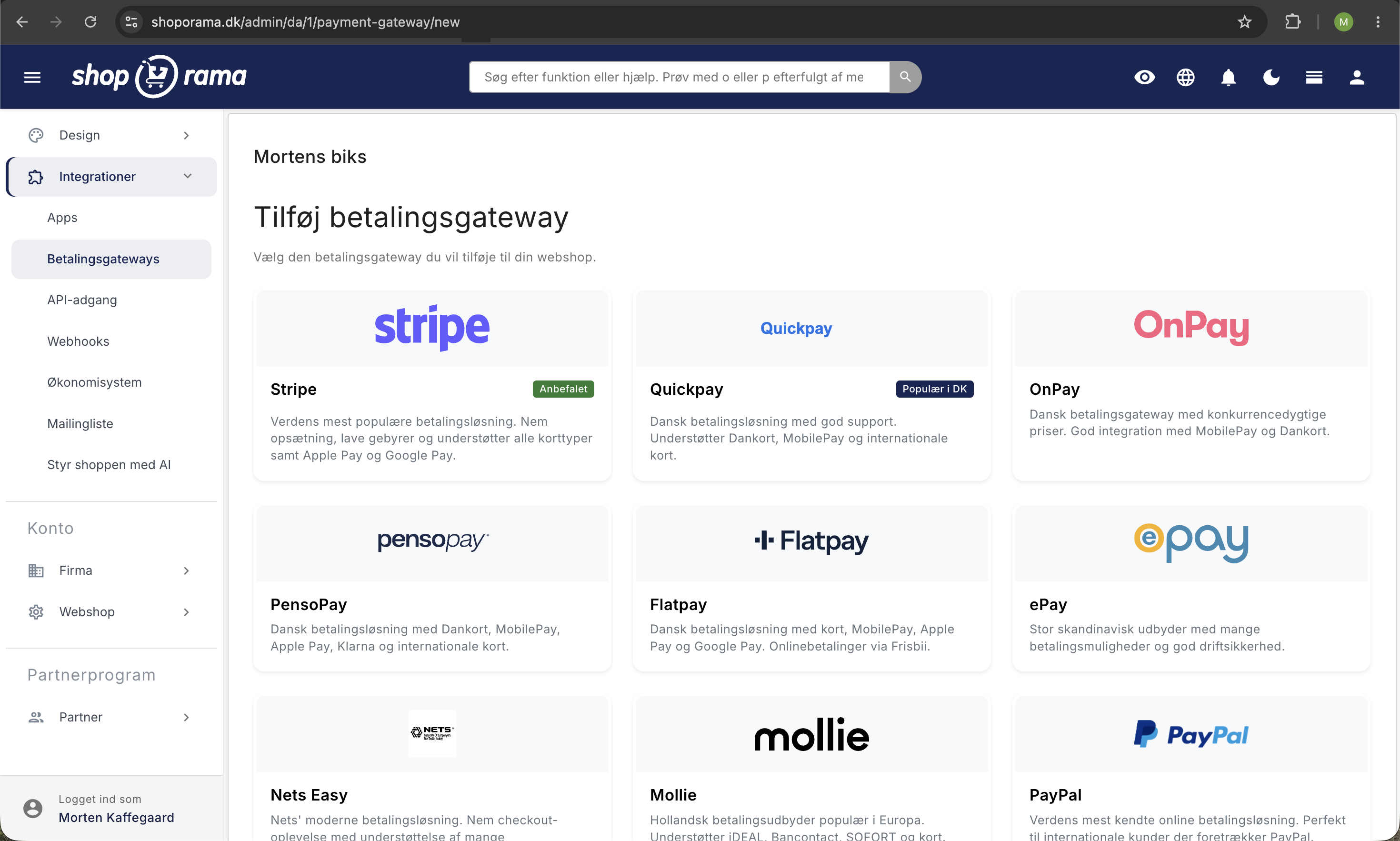
Gitter af betalingsgateways i Shoporama admin med Stripe, Quickpay, OnPay, PensoPay, Flatpay, ePay, Nets Easy, Mollie, og PayPal klar til opsætning
The “Add Payment Gateway” setup page displays the full range of providers, such as Stripe, Quickpay, OnPay, PensoPay, Flatpay, and Mollie, from which you can select the gateway you want to connect to your online store.

Supported gateways

  • OnPay — a popular Danish gateway supporting Dankort, MobilePay, and international cards
  • QuickPay — a Danish gateway with broad card support
  • PensoPay — a Danish gateway with low fees
  • Flatpay — a Danish gateway with competitive rates and payment via card, MobilePay, Apple Pay, and Google Pay
  • Stripe — international payment gateway supporting 135+ currencies
  • Mollie — popular in Europe with iDEAL, Bancontact, and more
  • Nets Easy — from the well-known Danish payment provider
  • ePay / Bambora / Worldline — established Danish payment gateway
  • PayPal — the world’s most well-known online payment service
  • Payson — popular in Sweden
  • Przelewy24 — Poland’s preferred payment method

Installment payments with Klarna and ViaBill

Offer your customers installment plans through Klarna or ViaBill. The customer pays over time, but you receive your money immediately. This increases the average order value and removes the price barrier for more expensive products.

Smart features

  • Automatic capture — automatically process the payment when the order is fulfilled
  • Capture upon shipment — don’t process the payment until the item is actually shipped
  • Country restrictions — offer different payment gateways in different countries
  • Automatic invoicing — send an invoice automatically after payment
  • Refunds — issue refunds directly from Shoporama to the customer’s card

Easy setup

You set up your payment gateway directly in the Shoporama admin panel using your API keys. Most gateways are ready in just a few minutes. Read our guide to accepting online payments to get started.

Try it for free - no strings attached

Start your free trial today and see for yourself how this feature can boost your online store. No credit card required.

See all features

Support articles

Read our guides and get started

Consumers' Association as a payment method

How to accept the Spending Credit in your Shoporama online shop. The Spending Credit is activated as a card type in...

How do I receive payment online?

What does it take to accept credit card or MobilePay payments online? Read about acquiring agreements, payment...

Can my developer integrate with a payment gateway himself?

Explanation of why payment gateway integrations require Shoporama to perform them and what you can do.

Customers skip payment and land directly on the order confirmation

Troubleshooting when customers skip the payment in your webshop and land directly on the order confirmation. Almost...

Pink orders - missing transaction ID

Explanation of what it means when orders are pink and it says 'Missing trans. id'.

Create EAN payment as a payment method

Guide to setting up EAN payment (invoice payment for businesses) on your Shoporama online store.

Create invoice payment

Guide to setting up invoice payment as a payment method in Shoporama.

Setting up OnPay

Step-by-step guide to setting up OnPay as a payment gateway on your Shoporama online store. Supports payment links,...

Payson payment gateway

Guide to setting up Payson as a payment gateway in Shoporama. Accept payments from Swedish and Nordic customers.

Unclaimed Transactions: Find Payments You Haven't Claimed

See which OnPay payments have been authorized but never withdrawn, and withdraw or cancel them directly. Explains the...

Set up ePay as a payment gateway

Step-by-step guide to setting up ePay as a payment gateway in your Shoporama webshop. Fill in Merchant ID, Secret...

Order queue

Guide to the order queue in Shoporama. See the status of automatic order actions such as capture, invoicing and stock...

Stripe payment gateway

Learn how to set up and use Stripe as a payment gateway in your Shoporama online shop. Stripe supports card payment,...

Setting up PensoPay

Step-by-step guide to setting up PensoPay as a payment gateway on your Shoporama online shop.

When will I get my money paid out?

Find out when you get paid from your sales through the payment gateway.

Setting up QuickPay

Guide to setting up QuickPay as a payment gateway on your Shoporama online shop. Supports Dankort, MobilePay, Visa,...

Setting up Nets Easy

Guide to setting up Nets Easy (Nexi) as a payment gateway on your Shoporama online shop.

Set up Klarna as payment method

Learn how to set up Klarna as a payment method in your Shoporama webshop.

Set up ViaBill on Shoporama

Guide to setting up ViaBill as a payment option on your Shoporama online shop. Learn how to add the ViaBill script,...

Collect payments on orders (capture)

Guide to capture payments on orders in Shoporama. Understand the difference between authorization and capture and...

Setting Up Flatpay

Step-by-step guide to setting up Flatpay as a payment gateway on your Shoporama online store.