Subscriptions
Learn how to set up subscriptions in Shoporama so your customers can create recurring orders with automatic payment and delivery at set intervals.
With Shoporama’s subscription feature, your customers can set up recurring orders that automatically renew at fixed intervals. This is ideal for consumables, meal kits, subscription boxes, or other products that customers order regularly.
How Subscriptions Work
When a customer sets up a subscription, their payment information is securely stored with the payment gateway. On each delivery date, a new order is automatically created, payment is processed, and the item is shipped to the customer—without the customer having to do anything.
Setting up subscription products
To offer subscriptions, you must enable this feature for the products you want to make available as subscriptions. You’ll find the subscription settings in the product editor:
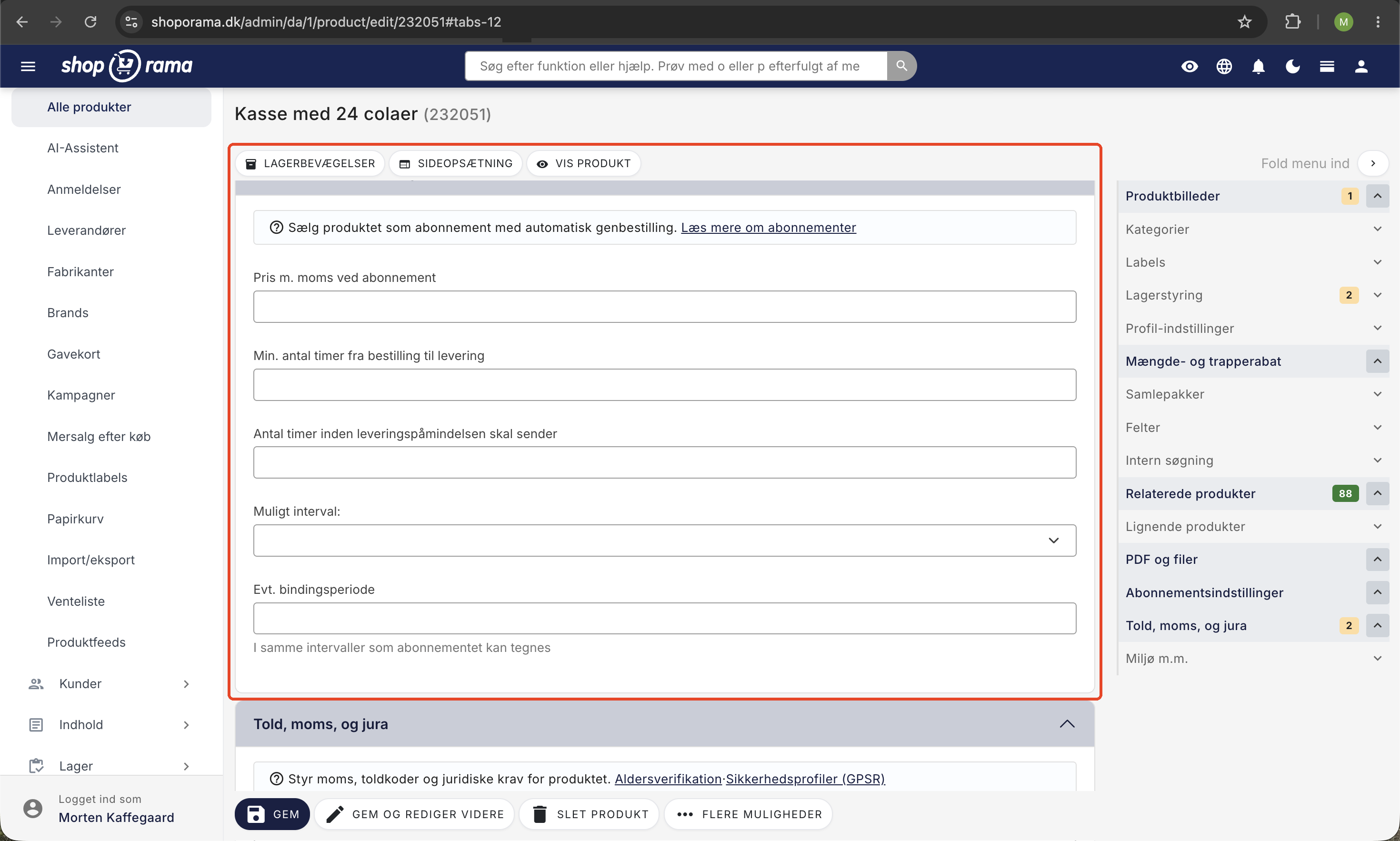
- Subscription Interval — Choose whether delivery should be daily, weekly, or monthly
- Subscription price — Set a special price for the subscription (may differ from the one-time price)
- Commitment period — Specify the minimum number of intervals the customer must keep the subscription (e.g., 3 months)
- Minimum Notice Period — Specify the earliest the customer can cancel, in hours, before the next delivery
- Reminder time — Specify how many hours before delivery the customer should receive a reminder
Tip: You can set a lower subscription price than the one-time price to offer customers a discount for choosing a subscription.
If the product has variants (e.g., size or color), you can also set different subscription prices per variant.
Intervals
The subscription is delivered at a fixed interval that you choose:
- Daily — Delivery every X days (e.g., every other day)
- Weekly — Delivery every X weeks (e.g., every week or every other week)
- Monthly — Delivery every X months (e.g., monthly or every 2 months)
The frequency can be adjusted for each subscription in the admin panel.
Managing Subscriptions in the Admin Panel
All subscriptions are managed under Orders → Subscriptions. Here you can:
- View an overview of all subscriptions, including status, next delivery, and products
- Filter by status (active/closed), shipping method, country, and delivery date
- Search for subscriptions by email, phone number, customer name, or product name
- Open or close subscriptions individually or in bulk
- Export subscriptions to CSV
Editing a Subscription
When you open a subscription, you can edit:
- Shipping address — Change the customer’s address
- Next delivery date — Move the delivery date forward or backward
- Interval — Change the delivery frequency
- Shipping method — Change the shipping method
- Products — Add or remove products from the subscription
- Payment Method — Redirect the customer to update their card
- Payment connection — Select which of the store’s payment connections the subscription belongs to
- Status — Activate or cancel the subscription
You can also manually create an order from the subscription right away, without waiting for the next delivery date.
Customer Self-Service
Customers can manage their subscriptions themselves via a link they receive in an email. Here, they can:
- View the subscription’s status and products
- View the first and next delivery dates
- Change the next delivery date
- Change the delivery interval
- Update their payment method
- Cancel your subscription (subject to the contract term and minimum period)
Commitment Period and Cancellation
You can set a commitment period for your subscriptions. For example, if a customer has a monthly subscription with a 3-month commitment period, the customer can cancel after signing up, but the subscription will not end until the 3 months have passed.
The minimum notice period ensures that the customer cannot cancel too close to the next delivery. For example, you can require that cancellation occur at least 48 hours before the next delivery date.
Payment Gateways
Subscriptions require a payment gateway that supports recurring payments. The following gateways support subscriptions in Shoporama:
- QuickPay
- ePay
- Pensopay
- Flatpay
The payment gateway securely stores the customer’s card information and automatically processes the payment for each delivery.
If the subscription is linked to an unknown payment method
Each subscription remembers the payment method it was created with, and this is used to verify it when the customer changes their payment card. If you’ve ever deleted your payment connection and recreated it—for example, because you changed your plan or access keys with your provider—old subscriptions may point to a connection that no longer exists.
Shoporama automatically finds the correct connection and updates the subscription, so you usually don’t need to do anything. You can also select it manually in the “Payment Connection” field on the subscription’s edit page. If it says “Unknown connection” followed by a number, it means the saved connection is missing. Select the correct one from the list and save.
Note: If you see the message “A subscription’s payment method could not be found” under Messages in the admin panel, it means a customer has changed their card but the change could not be saved. Check that the store has an active payment method, and ask the customer to change their card again.
Email Notifications
The system automatically sends emails to the customer in the following situations:
- Confirmation — When the subscription is created
- Reminder — Before the next delivery (configurable number of hours)
- Changes — When the subscription is modified
- Cancellation — When the customer cancels the subscription
- Reactivation — When a closed subscription is reactivated
If you have any questions about subscriptions, please feel free to contact us at support@shoporama.dk.
Related articles
Phone number in MobilePay
Why the phone number is not pre-filled in MobilePay and what the customer can do.
Customers skip payment and land directly on the order confirmation
Troubleshooting when customers skip the payment in your webshop and land directly on the order confirmation. Almost always due to the EAN field in...
Payson payment gateway
Guide to setting up Payson as a payment gateway in Shoporama. Accept payments from Swedish and Nordic customers.
Related features
Subscriptions - predictable revenue with repeat purchases
Sell products on subscription with automatic delivery and payment. Flexible intervals, subscription pricing and customer management.
Subscription webshop
Create a subscription online store on Shoporama. Offer monthly or weekly deliveries, let the customer take control and get stable revenue every month.