Facebook Conversions API
Guide to the Facebook Conversions API on Shoporama: setup with Pixel ID and access token, automatic deduplication of purchases, content_ids that match your Meta product catalog, and troubleshooting a low match rate.
The Facebook Conversions API (also known as the Meta Conversions API) sends your key events directly from the server to Meta, rather than just through the customer’s browser. This provides more accurate data for your ads because tracking isn’t blocked by ad blockers or browser restrictions. In Shoporama, the Conversions API is built into the tracking module, so you don’t need to install any code or hire a developer.
Prerequisites
- A Meta Business account (Business Manager / Meta Business Suite)
- A Meta Pixel created in Meta Events Manager
- An access token for the Conversions API. You can create this in Meta Events Manager under your pixel’s settings
- Shoporama’s tracking module enabled. This requires a Pro or Flex plan and costs 89 DKK per month, excluding VAT
Setup in Shoporama
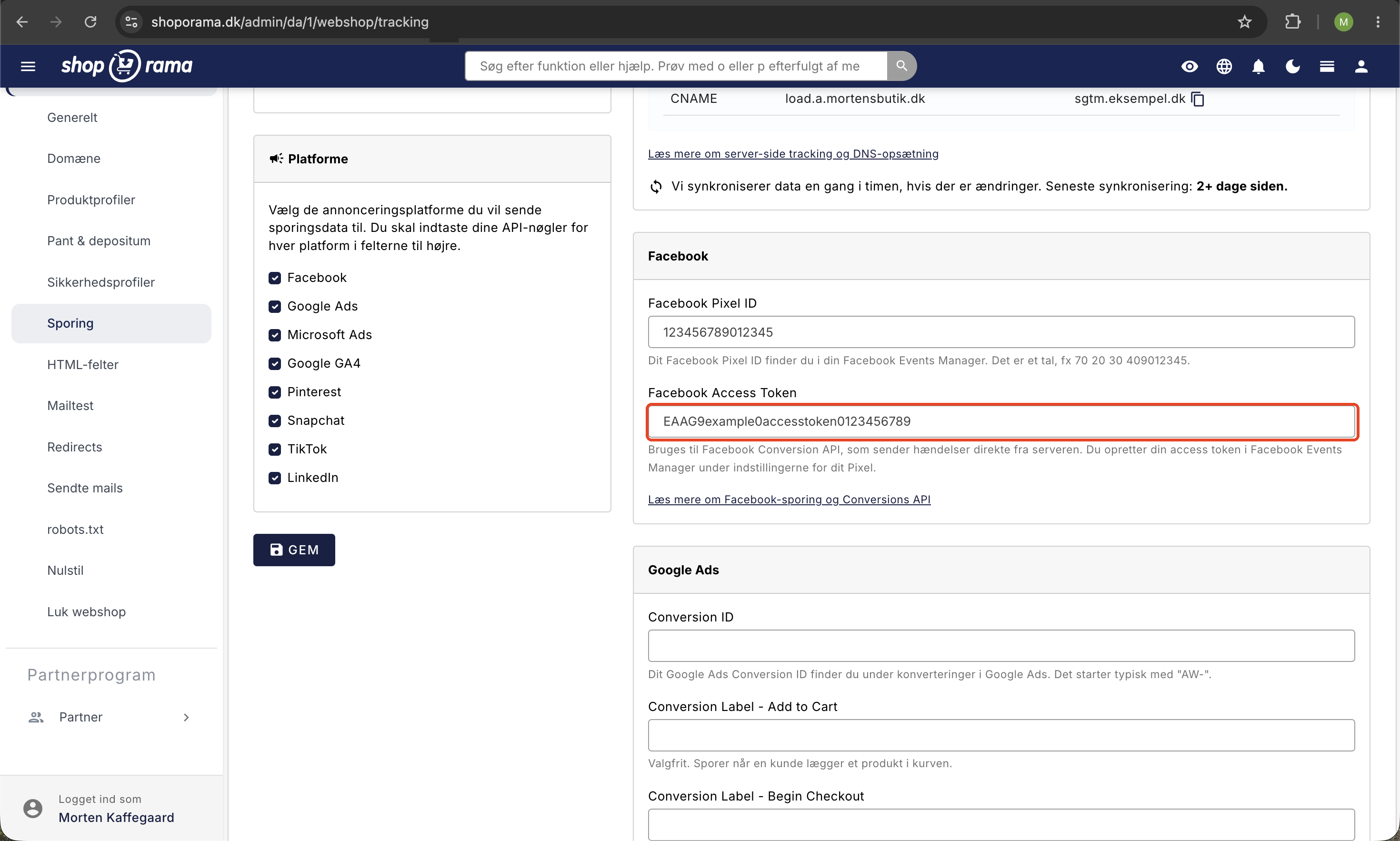
- Go to Webshop → Tracking in the left-hand menu
- Enable Tracking if it isn’t already turned on
- Check the box next to Facebook under Platforms
- Enter your Facebook Pixel ID. This is a number, e.g., 123456789012345, which you can find in Meta Events Manager
- Enter your Facebook Access Token
- Click Save
That’s it. Shoporama will then send events to Meta from both the customer’s browser and the server. If you want to make the tracking even more robust, you can also enable server-side tracking on your own subdomain. Read more in Server-side tracking. If you’ve enabled Consent Mode, data is only sent once the customer has given consent via your cookie banner.
What is tracked?
Shoporama automatically sends events throughout the entire purchase journey, including:
- PageView: when a page is viewed
- ViewContent: when a product is viewed
- AddToCart: when a product is added to the cart
- InitiateCheckout: when the customer starts checkout
- Purchase: when an order is completed
Upon purchase, the order value and the purchased products are sent. Customer information such as email and phone number is sent in hashed (encrypted) form to Meta’s Advanced Matching so that more of your conversions can be linked to the correct profiles.
Product IDs and catalog matches (content_ids)
For your dynamic product ads and retargeting to work, Meta must be able to recognize the products customers view and purchase. This is done via the content_ids field in each event, which Meta matches against the products in your product catalog.
Shoporama automatically includes the product ID in all events according to a fixed format:
- Standard: the product’s numeric ID. For variants, the product ID and variant ID are sent separated by a colon, e.g., 154585:45789
- Stores with language and country feeds: If you’ve enabled the SKU setting in your Google Shopping feed, the SKU is used instead. The variant’s SKU is used if available; otherwise, the product’s SKU is used
The important thing is that it’s exactly the same ID that your Google Shopping feed uses in the g:id field. If you populate your Meta product catalog with the feed from your Shoporama store, your events and your catalog will match 1:1, and your dynamic product ads (Advantage+ catalog ads) and your retargeting will work right away.
You can read much more about the ID schema in the article “Product IDs and Catalog Match.”
Deduplication: No Double-Counting of Purchases
Shoporama sends purchase events in two ways: from the customer’s browser and from the server. Both events share the same event ID—the order number. Meta can therefore recognize that it’s the same purchase and counts it only once. You get the benefits of both channels—the server’s reliability and the browser’s context—without having to do anything yourself.
Benefits of the Conversions API
- Better data foundation: server data isn’t affected by ad blockers or iOS restrictions
- More measured conversions: purchases that would never reach Meta via the browser alone are included
- Better ad optimization: the more precise the data, the better Meta’s algorithm can optimize your campaigns
Tip
Use both the pixel (browser) and the Conversions API (server) for maximum data quality. Shoporama automatically handles deduplication, so you don’t have to choose.
Troubleshooting: Low match rate or missing IDs
If you see a low match rate in your catalog, or if Meta reports missing IDs, go through this list:
- Test your events: Open Meta Events Manager and select the “Test events” tab. Here you can view your events in real time, including which content_ids are being sent. You can also check browser events using the Meta Pixel Helper browser extension
- The error message “No content IDs received” means that Meta is receiving events without product IDs. Shoporama’s built-in tracking always sends IDs, so if you see this error, the event typically originates from a custom or older tracking setup running alongside it
- Check your catalog: Your Meta product catalog must be populated with the Google Shopping feed from the same store. If you’re using a different feed or manually created catalog products, the IDs may not necessarily match
- Missing SKUs: If your store uses SKU-based feeds (language and country feeds), all products and variants must have an SKU. Products without an SKU are assigned an empty ID in the feed and therefore cannot be matched in the catalog
Frequently Asked Questions
Do I need to know how to code to use the Facebook Conversions API?
No. Everything is built into Shoporama. You just need to enter your Pixel ID and access token under Webshop → Tracking, and the system will handle the rest.
Where can I find my Pixel ID and access token?
Both are located in Meta Events Manager. The Pixel ID is a long number displayed next to your pixel. You create the access token under the pixel’s settings in the Conversions API section.
Will my sales be counted twice if both the browser and the server send purchase events?
No. Both purchase events are sent with the same event ID (the order number), so Meta automatically deduplicates them and counts the purchase only once.
Why aren’t my dynamic ads showing the right products?
This is almost always because the events and the catalog don’t match. Check that your Meta catalog is populated with the Google Shopping feed from your Shoporama store, and review the match rate for the catalog in Meta. With the Shoporama feed, the IDs match 1:1.
What does the error “No content IDs received” mean?
It means Meta is receiving events without product IDs. Shoporama’s built-in tracking always includes IDs, so the error typically stems from a custom or older tracking setup. Use “Test Events” in Meta Events Manager to see where the event is coming from.
I have multiple country-specific stores with the same products. Do the IDs match across them?
Yes. If you enable the SKU setting in your Google Shopping feed, the SKU is used as the ID in both the feed and tracking. The SKU is the same across all your country-specific stores, so the catalog matches across them. Be sure to include SKUs for all products and variants.
How do I test whether my events are reaching Meta?
Use the “Test Events” tab in Meta Events Manager, where you can monitor events in real time and view the included product IDs. You can also inspect browser events using the Meta Pixel Helper extension.
Does the Conversions API cost extra?
No, not on its own. The Conversions API is part of Shoporama’s tracking module, which requires a Pro or Flex plan and costs 89 DKK per month, excluding VAT. There is no additional charge for the Meta component.
See also
- Tracking in Your Shoporama Webstore
- Server-side tracking
- Set up a Google Shopping feed
- Product IDs and catalog matching
Need help? Contact us at support@shoporama.dk.
Related articles
Find or create an API key
Guide to finding your API key in Shoporama, which is used for integrations with e.g. Shipmondo.
REST API
Complete guide to Shoporama's REST API: authentication, all endpoints, examples and Swagger documentation.
Cookie consent and Consent Mode v2
How to set up Shoporama's free cookie consent app: categories, automatic blocking, consent revocation, and Google Consent Mode v2.
Product IDs and Catalog Match: How to Ensure Your Ads Match Your Product Feed
An explanation of which product ID Shoporama’s tracking sends, why it always matches the Google Shopping feed, what “catalog match” means for your...
Related features
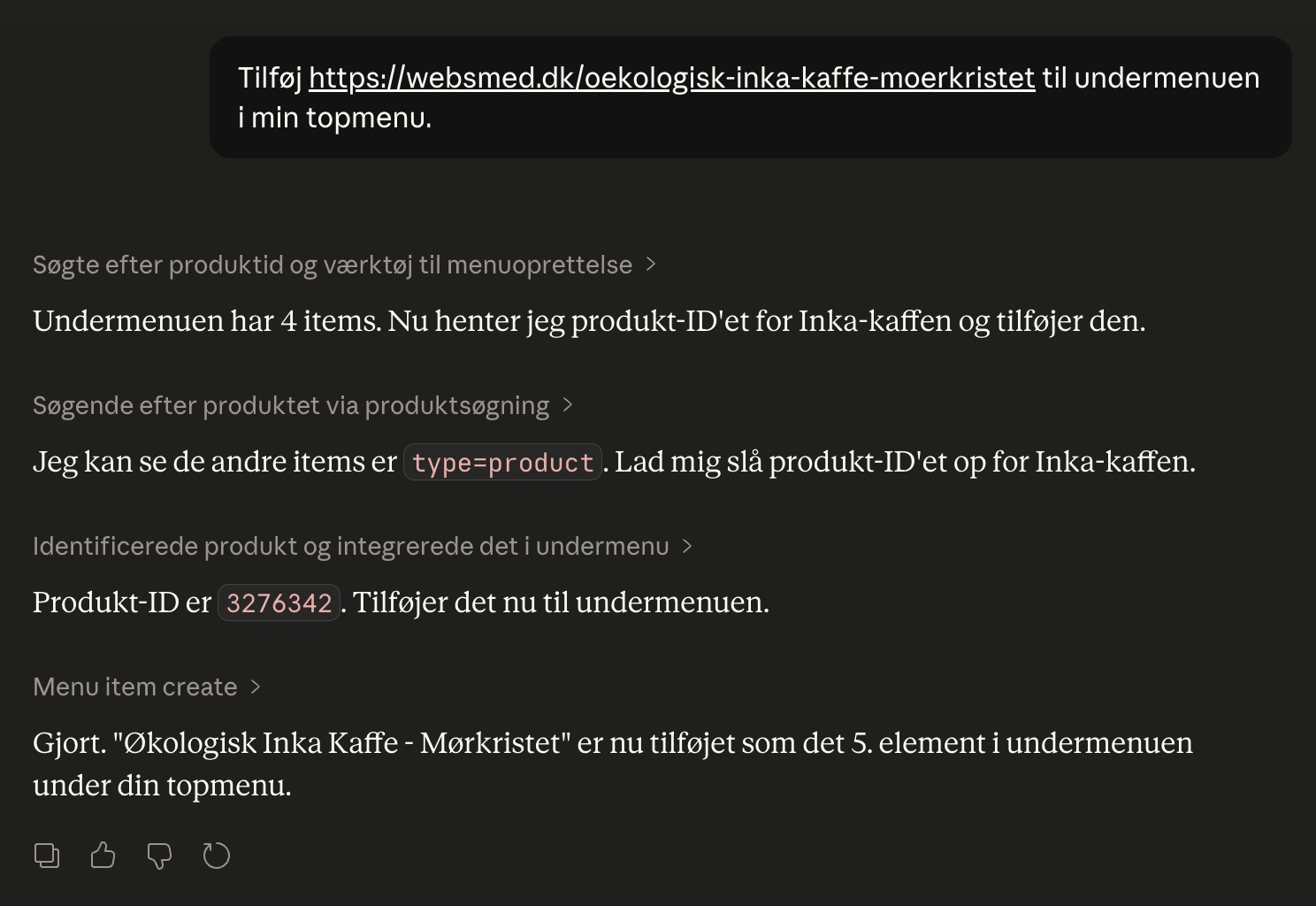
Webshop with Claude
Connect your Shoporama webshop with Claude and manage products, orders, campaigns and designs by typing in Danish. No code, full control, audit log.
Server-side tracking - accurate tracking without cookies
Server-side tracking for Google, Facebook, Pinterest, TikTok, LinkedIn and Microsoft Ads. Unaffected by adblockers. Included in Shoporama Pro.