Mollie payment gateway
Learn how to set up Mollie as a payment gateway in Shoporama. Mollie supports iDEAL, credit cards, Klarna, PayPal, Apple Pay, Bancontact and many more payment methods.
Mollie er en europæisk betalingsløsning, der giver dine kunder adgang til en lang række betalingsmetoder i en samlet integration. Mollie er særligt populær i Holland og Belgien, men understøtter betalinger i hele Europa og er et stærkt valg, hvis du sælger på flere markeder.
Betalingsmetoder via Mollie
Med én Mollie-konto kan du tilbyde mange betalingsmetoder. De faktiske metoder afhænger af din Mollie-konto, kundens land og om du har slået Orders API til.
- Kreditkort. Visa, Mastercard, American Express.
- iDEAL. Den mest brugte betalingsmetode i Holland.
- Klarna. Pay Later, Pay Now og Slice It. Kræver Orders API.
- PayPal. Betaling via PayPal-konto.
- Apple Pay. Betaling via Apple-enheder.
- Bancontact. Den mest brugte betalingsmetode i Belgien.
- SOFORT. Europæisk bankoverførsel i realtid.
- SEPA Direct Debit. Europæisk direkte debitering.
- Giropay. Tysk online-bankbetaling.
- EPS. Østrigsk online-bankbetaling.
- Przelewy24. Polsk betalingsmetode.
- BLIK. Polsk mobilbetaling.
- TWINT. Schweizisk betalingsapp.
- Billie. B2B faktura, kræver Orders API.
- in3. Hollandsk delbetaling, kræver Orders API.
- Riverty. Faktura og delbetaling, kræver Orders API.
- Mollie gavekort. Betaling med Mollies gavekort.
- Bankoverførsel. Klassisk bankoverførsel.
Hvilke metoder, der vises for kunden i checkout, styres i dit Mollie Dashboard. Du behøver ikke konfigurere hver enkelt metode i Shoporama.
Trin-for-trin opsætning
- Opret en konto på mollie.com og udfyld virksomhedsoplysninger og bankoplysninger.
- Hent din API-nøgle i Mollie Dashboard under Developers » API keys. Brug test-nøglen (starter med test_) til afprøvning og live-nøglen (starter med live_) i produktion.
- Gå til Integrationer » Betalingsgateways i Shoporama-admin.
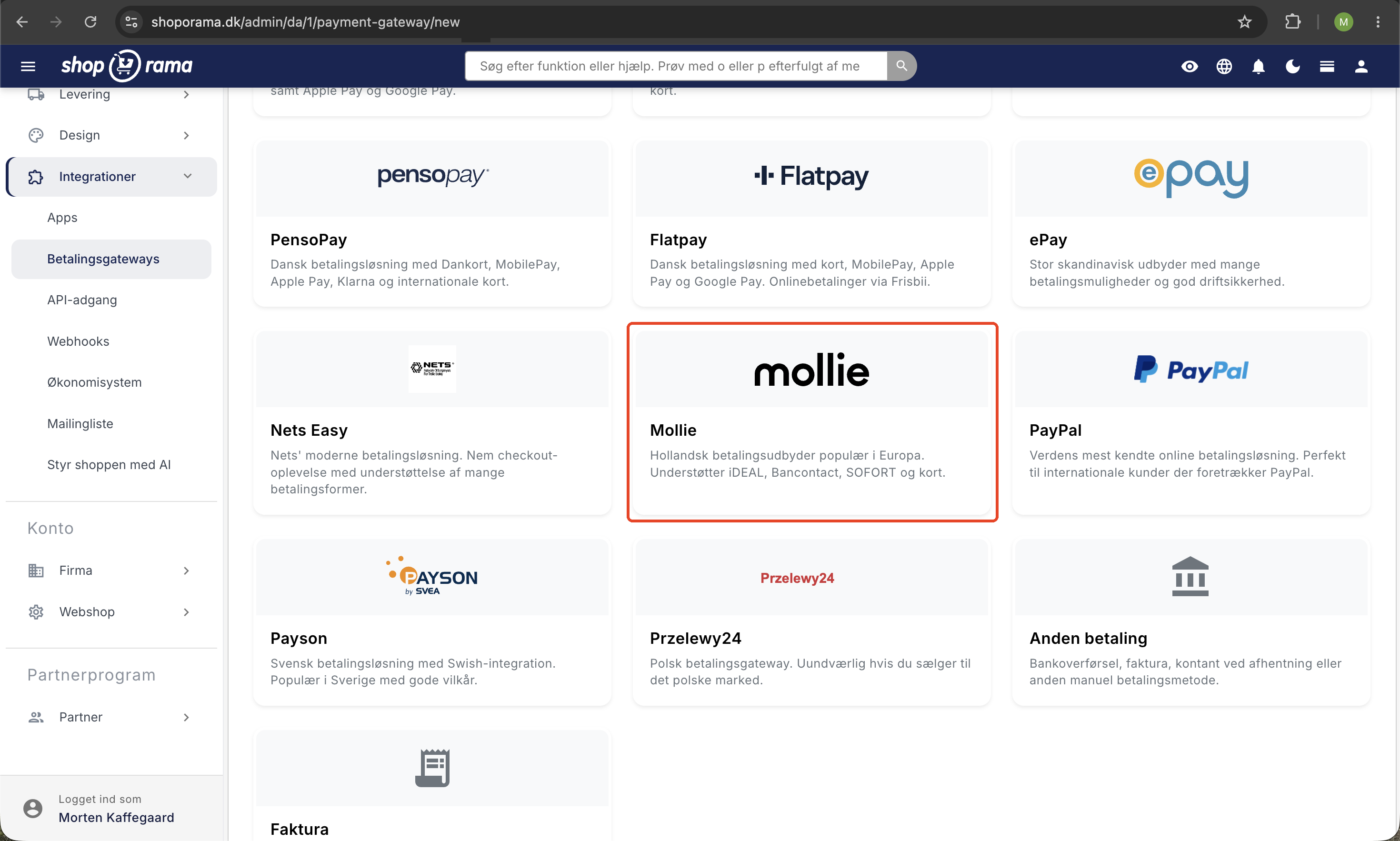
- Tilføj en ny betalingsgateway og vælg Mollie.
- Indsæt din API-nøgle i feltet API-nøgle.
- Vælg Sprog for Mollies betalingsvindue. Se hele listen i afsnittet nedenfor.
- Lad Betalingsmetode stå tom for at vise alle aktive metoder, eller indtast én bestemt metode (fx ideal).
- Slå Brug Orders API (kræves til Klarna) til, hvis du tilbyder Klarna, Billie, in3 eller Riverty.
- Gem og lav en testbetaling med en test-nøgle for at bekræfte at flowet virker.
Tip: Vil du tilbyde flere bestemte metoder hver for sig (fx både iDEAL og Bancontact som separate valg i checkout), så opret én Mollie-gateway pr. metode i Shoporama og udfyld Betalingsmetode i hver gateway.
Sprog i betalingsvinduet
Mollies betalingsvindue kan vises på 17 sprog. Du vælger ét sprog pr. Mollie-gateway. Skal du vise flere sprog, kan du oprette flere Mollie-gateways i Shoporama med hver sin sprogindstilling.
- Dansk (da_DK)
- Engelsk UK (en_GB) og Engelsk US (en_US)
- Hollandsk (nl_NL) og Hollandsk Belgien (nl_BE)
- Fransk (fr_FR) og Fransk Belgien (fr_BE)
- Tysk (de_DE), Tysk Østrig (de_AT) og Tysk Schweiz (de_CH)
- Svensk (sv_SE)
- Norsk (nb_NO)
- Finsk (fi_FI)
- Spansk (es_ES)
- Italiensk (it_IT)
- Polsk (pl_PL)
- Portugisisk (pt_PT)
Indstillinger på gatewayen
- API-nøgle. Din Mollie API-nøgle. Påkrævet.
- Sprog. Sproget i Mollies betalingsvindue. Vælg det sprog, dine kunder oftest taler.
- Betalingsmetode (valgfri). Lad feltet stå tomt for at vise alle dine aktive metoder fra Mollie Dashboard. Skriv én bestemt metodekode (fx ideal, bancontact eller creditcard) for kun at tilbyde den ene.
- Brug Orders API (kræves til Klarna). Sender ordrelinjer og kundeoplysninger til Mollie i stedet for kun et beløb. Påkrævet for Klarna, Billie, in3 og Riverty. Anbefales generelt til bedre ordrehåndtering i Mollie Dashboard.
Sådan tilbyder du Klarna via Mollie
- Aktivér Klarna i dit Mollie Dashboard under Settings » Payment methods. Mollie kan bede om CVR og bankoplysninger til godkendelse.
- Slå Brug Orders API (kræves til Klarna) til på Mollie-gatewayen i Shoporama. Uden denne indstilling vil Klarna fejle, fordi Klarna kræver detaljerede ordrelinjer.
- Gem og test betalingen med en testkonto. Klarna har egne test-instruktioner i Mollies dokumentation.
Samme fremgangsmåde gælder for Billie, in3 og Riverty.
Betalingsflow
Når kunden gennemfører et køb, sendes han eller hun til Mollies sikre betalingsside, vælger metode og gennemfører betalingen. Bagefter sendes kunden tilbage til ordrebekræftelsen i din webshop.
Mollie sender uafhængigt en notifikation (webhook) til Shoporama, når betalingen skifter status. Det betyder, at ordren markeres som betalt, også selv om kunden lukker browseren undervejs eller mister forbindelsen.
Refundering og kreditnotaer
Refunderinger kan håndteres direkte i Mollie Dashboard eller via Shoporamas ordrehåndtering, når du opretter en kreditnota. Mollie understøtter både fuld og delvis refundering af betalinger.
Gebyrer og udbetaling
Mollies gebyrer afhænger af betalingsmetode, transaktionsvolumen og land. Se Mollies prisside for aktuelle satser. Kort og iDEAL har typisk lavere gebyrer end Klarna, og betal-senere-metoder har normalt et procentvist gebyr af ordrebeløbet.
Shoporama tager intet ekstra gebyr for at bruge Mollie. Mollie udbetaler dine indtægter til din virksomhedskonto efter den frekvens, du vælger i Mollie Dashboard. Typisk dagligt eller ugentligt.
Ofte stillede spørgsmål
Hvilke sprog kan jeg vælge i Mollies betalingsvindue?
Du kan vælge mellem 17 sprog: dansk, engelsk (UK og US), hollandsk (NL og BE), fransk (FR og BE), tysk (DE, AT og CH), svensk, norsk, finsk, spansk, italiensk, polsk og portugisisk. Du sætter ét sprog pr. Mollie-gateway. Har du flere sproglige zoner, kan du oprette flere gateways med hver sin sprogindstilling.
Hvordan slår jeg Klarna til via Mollie?
Aktivér Klarna i Mollie Dashboard under Payment methods. Slå derefter indstillingen Brug Orders API (kræves til Klarna) til på Mollie-gatewayen i Shoporama. Uden Orders API kan Klarna ikke gennemføre betalingen, fordi Klarna kræver detaljerede ordrelinjer.
Hvad koster Mollie pr. transaktion?
Det afhænger af betalingsmetode og land. Kort og iDEAL er ofte billigst, mens Klarna og PayPal har højere procentgebyr. Se de aktuelle satser på Mollies prisside. Shoporama lægger ikke noget ekstra gebyr oveni.
Hvad er forskellen på test- og live-API-nøgle?
Test-nøglen starter med test_ og bruger Mollies sandkasse. Du kan teste hele købsflowet uden at trække rigtige penge. Live-nøglen starter med live_ og er den, du skal bruge i produktion. Skift først, når du har bekræftet at flowet virker i test.
Kan jeg kun tilbyde én bestemt metode (fx kun iDEAL)?
Ja. Skriv metodens kode i feltet Betalingsmetode (valgfri) på gatewayen, fx ideal, bancontact eller creditcard. Vil du have flere bestemte metoder hver for sig i checkout, så opret en Mollie-gateway pr. metode.
Hvad sker der, hvis kunden lukker browseren midt i betalingen?
Mollie sender en webhook til Shoporama uafhængigt af kundens browser, hver gang en betaling skifter status. Ordren bliver derfor markeret som betalt, selv om kunden lukker browseren, mister net eller ikke kommer tilbage til shoppen.
Hvor ser jeg Mollie-betalinger i mit regnskab?
Mollie samler dine indtægter og udbetaler dem til din bankkonto efter den frekvens, du vælger i Mollie Dashboard. Hver udbetaling kan afstemmes via Mollies rapporter. Bruger du E-conomic, Dinero eller Billy, kan ordrerne bogføres automatisk via integrationerne i Shoporama, mens selve Mollie-udbetalingen bogføres som indbetaling på bankkontoen.
Hvordan refunderer jeg en kunde?
Opret en kreditnota på ordren i Shoporama, eller refundér direkte i Mollie Dashboard. Begge dele kan bruges til både fuld og delvis refundering. Beløbet trækkes fra dine kommende Mollie-udbetalinger.
Skal jeg slå Orders API til, hvis jeg ikke bruger Klarna?
Det er ikke et krav, men vi anbefaler det. Med Orders API får Mollie ordrelinjer og kundeoplysninger, hvilket giver bedre overblik i Mollie Dashboard og er nødvendigt, hvis du senere vil tilføje Klarna, Billie, in3 eller Riverty.
Hvor finder jeg min API-nøgle?
Log ind i Mollie Dashboard og gå til Developers » API keys. Du kan kopiere både test- og live-nøglen direkte derfra.
Har du spørgsmål til Mollie-integrationen, er du velkommen til at skrive til support@shoporama.dk.
Related articles
Set up Klarna as payment method
Learn how to set up Klarna as a payment method in your Shoporama webshop.
Stripe payment gateway
Learn how to set up and use Stripe as a payment gateway in your Shoporama online shop. Stripe supports card payment, MobilePay, Klarna, Apple Pay,...
Set up ePay as a payment gateway
Step-by-step guide to setting up ePay as a payment gateway in your Shoporama webshop. Fill in Merchant ID, Secret (MD5) and Password for capture...
Setting up QuickPay
Guide to setting up QuickPay as a payment gateway on your Shoporama online shop. Supports Dankort, MobilePay, Visa, Mastercard and many more.
Setting up Nets Easy
Guide to setting up Nets Easy (Nexi) as a payment gateway on your Shoporama online shop.
How do I receive payment online?
What does it take to accept credit card or MobilePay payments online? Read about acquiring agreements, payment gateways and alternative payment...
Collect payments on orders (capture)
Guide to capture payments on orders in Shoporama. Understand the difference between authorization and capture and learn how to capture manually or...
Restrict payment methods to specific countries
Restrict which payment methods are shown in checkout based on the customer's country of delivery.
Related features
Webshop with Apple Pay
Offer Apple Pay in your online store and give iPhone customers a checkout in under 5 seconds. How to set up Apple Pay on Shoporama via Mollie or...
Webshop with Dankort
Create a webshop with Dankort as a payment method. How to get started on Shoporama via QuickPay, ePay, Mollie or Stripe - fees and setup explained.
Webshop with Klarna
Offer Klarna in your online shop and let customers choose between Pay Now, Pay Later and Slice It. How to set up Klarna on Shoporama via Mollie.