Set up E-conomic integration
Step-by-step guide to install Shoporama's e-conomic app from the App Store and set up automatic transfer of orders.
E-conomic is Denmark’s most widely used accounting software for small and medium-sized businesses. With Shoporama’s official e-conomic app, your orders are automatically transferred as invoices, and customers are created as accounts receivable in e-conomic. Here’s how to install the app and get started.
What does the integration do?
- Order Transfer — Orders are automatically transferred as invoices or draft invoices in e-conomic via webhook (in real time)
- Customer Creation — Customers are automatically created as accounts receivable in e-conomic with address, phone number, email, and CVR/EAN
- Correct VAT zone — Domestic sales, EU B2B with reverse charge, OSS sales to EU private individuals, and exports are handled automatically
- Auto-posting — Choose whether invoices should be posted automatically or saved as drafts
Note
The new e-conomic app is one-way: it sends data from Shoporama to e-conomic but does not retrieve inventory or product data back. Inventory is managed exclusively in Shoporama. Credit memos, however, are transferred automatically when an order is credited in Shoporama.
Step 1: Create an API key in e-conomic
- Log in to your e-conomic account at secure.e-conomic.com
- Go to Settings and select Extensions
- Find API Keys and create a new key for Shoporama
- Copy the key—you’ll need it in the next step
Step 2: Install the e-conomic app in Shoporama
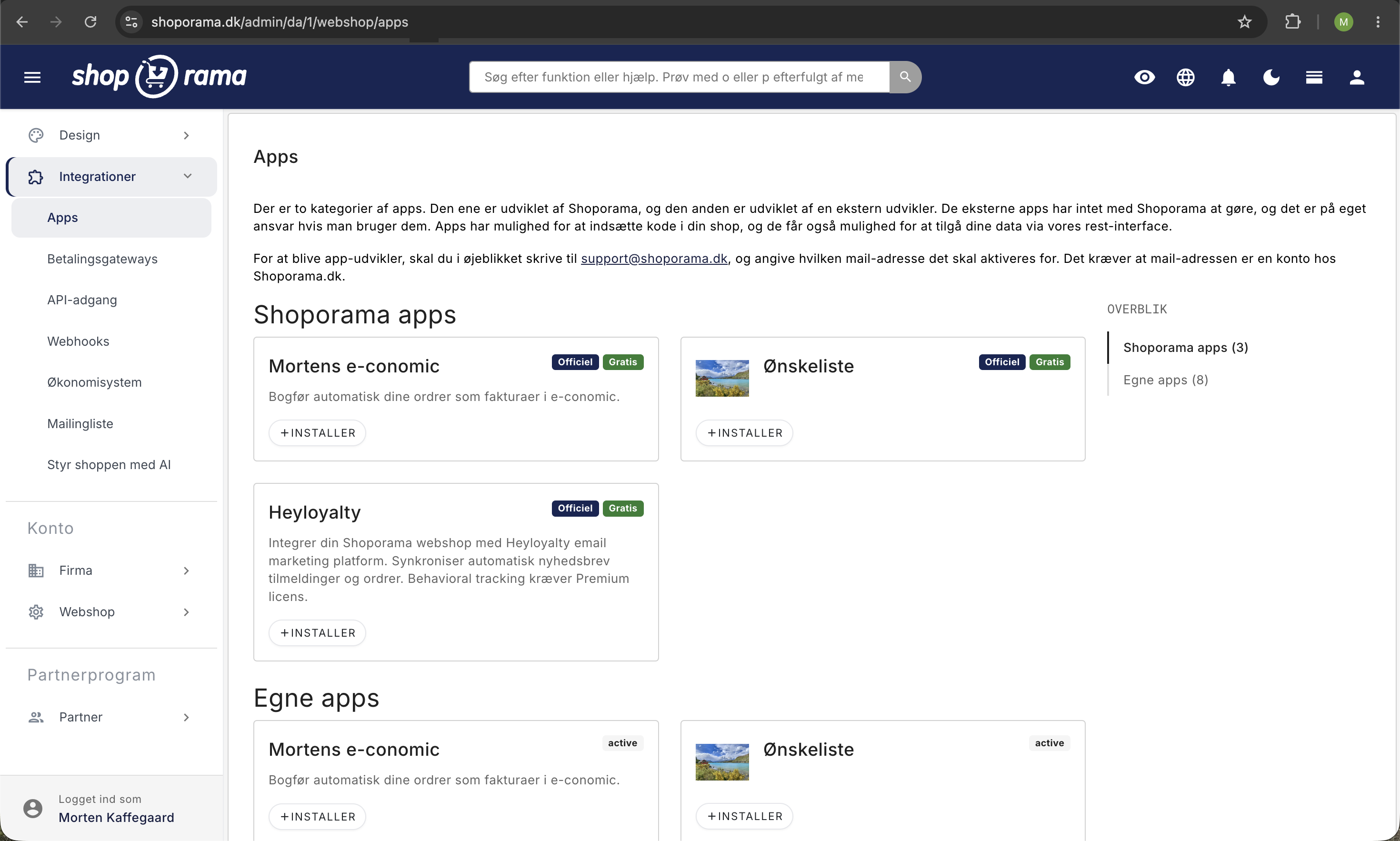
- Log in to your Shoporama admin
- Click Apps in the left-hand menu
- Find e-conomic in the app overview
- Click Install
- Enter your API key from step 1 in the API Key field
- Click Save
Step 3: Configure the settings
Once the app is installed, you can customize how orders are transferred. The most important settings are:
- Country of Origin — Determines the VAT zone calculation. Typically set to Denmark.
- When is the order transferred? — Choose between upon creation, upon payment, or upon shipment.
- Product group — The product group in e-conomic to which new product lines belong.
- Customer Groups (private/business) — You can select different customer groups for B2C and B2B customers.
- Payment Terms — Different terms for orders paid by card versus EAN-invoiced B2B orders.
- Layout — Different invoice layouts can be selected per order type.
- Customer Number Strategy — Choose whether the customer ID should be a phone number, customer number, or fixed number.
- Auto-posting — Should the invoice be posted automatically or saved as a draft?
Recommendation
Leave the invoices as drafts for the first few weeks so you can review them and correct any errors before they are posted. Once you are confident in the setup, you can enable auto-posting.
Step 4: Test with an order
- Create a test order in your online store (or use an existing one)
- Wait until the trigger event occurs (order creation, payment, or shipment)
- Check in e-conomic to make sure the invoice was created correctly
- Check that the customer has been created with the correct data
- Check that the VAT zone is set correctly
In Shoporama Admin, each order is automatically assigned a label indicating its status:
- e-conomic-ok — Order transferred without issues
- e-conomic-pending — Order is awaiting transfer
- e-conomic-failed — Transfer failed (click on the order to view the error message)
Resubmit a failed order
If a transfer fails, you can manually retry the order by removing the e-conomic-failed label and adding the e-conomic-pending label instead. The app will then attempt to transfer the order again.
Select accounting software: e-conomic, Dinero, or Billy
Shoporama has built-in integration with three Danish accounting programs: e-conomic, Dinero, and Billy’s Billing. All three are included in the subscription, and they serve the same basic purpose: to transfer your orders into your accounting system so you don’t have to enter them manually. But they’re built differently, and those differences are noticeable in day-to-day use. If you haven’t gotten started yet, or if you’re considering switching, use this section to make your choice before you spend time on setup.
They are enabled in two different places
e-conomic is enabled as an app. You’ll find it under Integrations, Apps, and can install it with a single click, as described earlier in this guide.
Dinero and Billy are enabled under Integrations, Accounting System. Here, select the program from the “Vendor” dropdown, click Save, and then fill in the fields that appear.
The dropdown menu can only hold one selection at a time, so Dinero and Billy are mutually exclusive. You should also avoid running the e-conomic app simultaneously with either of these two, unless you intentionally want the same orders posted in two places.
Be careful with EasyPos
The “Supplier” dropdown menu also includes EasyPos. This is not an accounting program, but an integration with a physical point-of-sale system that imports products and inventory levels into the online store from the other direction. Do not select it by mistake if your goal is to have your orders posted to the books.
e-conomic
The most flexible of the three, and the only one where you can review invoices before they’re posted.
- Three time points to choose from. The order can be transferred when it’s created, when it’s paid, or when it’s shipped. Dinero and Billy only offer the latter two options.
- You choose the customer number yourself. The customer number in e-conomic can be a unique number, the customer’s phone number, the customer’s ID from the online store, or a single fixed number under which all invoices are grouped.
- Draft or posted. You decide for yourself using the “Automatically post transferred invoices” setting. If you turn it off, the invoices will be saved as drafts that you can edit.
- Cross-border VAT. The VAT zone is automatically set based on the customer’s country, so Danish sales, EU sales to businesses under the reverse charge mechanism, EU sales to private individuals, and exports to countries outside the EU are handled separately. There’s also a field for the Norwegian VOEC.
- B2B and B2C are handled separately. You can set different customer groups, payment terms, and invoice layouts for orders paid by card and for orders with an EAN or invoice.
- Status displayed directly on the order. Each order is labeled so you can see in the order list whether it went through.
- Item numbers are handled automatically. The invoice lines use your own item numbers (SKU), and the app automatically ensures that the number exists in e-conomic.
Dinero
Easy to get started with, but with fewer customization options afterward. See the full guide in Set Up Dinero Integration.
- You log in instead of copying a key. The connection is established using the “Connect to Dinero” button, which redirects you to Visma for approval.
- The connection must be renewed. Visma requires that access be renewed approximately every 30 days. You do this using the “Renew Connection to Dinero” button. If you forget, the transfers will stop until you click the button.
- Posted immediately. The invoice is posted and marked as paid in a single step. There is no draft version you can edit.
- Fixed chart of accounts. You only select which account the payment should be posted to under “Post the payment to the following account.” The accounts for merchandise sales and shipping are fixed and cannot be changed in Shoporama.
- Two options. The order can be transferred once it’s paid or once it’s shipped.
- Multiple online stores can share a single connection. If you have multiple stores on the same Dinero account, you can reuse the connection from another store instead of creating a new one, which would otherwise shut down the first one.
- No product catalog. Your products are not created in Dinero. The product lines appear as text on the invoice.
Billy's Billing
The only one of the three that creates your products in the accounting software with both item number and price. See the full guide to the Billy's Billing integration.
- Simple API key. You copy a key from Billy and paste it in. It does not need to be renewed along the way.
- Three choices you need to make first. You must select an account where your products will be created, a shipping product, and a discount product. Create these in Billy before saving the setup in Shoporama.
- The products are imported automatically. Your items are created in Billy with an item number and price. However, this requires that all your products have an item number (SKU); otherwise, the invoice cannot be generated.
- Invoices are created as approved. Just like in Dinero, there are no draft invoices.
- The payment is posted in a separate step. If you enable “Automatically post order as paid” and select an account, the payment is posted up to 20 minutes after the invoice is generated—not in the same workflow.
- Two time points. The order can be transferred once it’s paid or once it’s shipped.
- Order prefix. You can add a prefix to the order numbers so you can distinguish online store orders from your other invoices in Billy.
- Automatic retry on error. If a transfer fails, Shoporama automatically retries several times before marking the order as failed.
What is transferred, and when?
Regardless of which of the three programs you choose, the same basic information is transferred with the order to the accounting system:
- Item lines with item number, quantity, and price excluding tax
- VAT, calculated based on the order
- Shipping as a separate line
- Discounts as separate, negative lines, including both promotional discounts and discount codes
- The customer as a contact or account receivable with name, address, phone number, and email. Business customers include their EAN number
- The order number from the online store, so you can trace the order back from the attachment
Times you can select
- When the order is created. e-conomic only. The document is available from the moment the customer clicks “Buy,” even if the payment later fails.
- When the order is paid. All three. The most common choice, and the one you should use if you sync inventory with other systems.
- When the order is shipped. All three. Best suited if you frequently make changes to the order before the package is shipped.
How fast is it?
All three are fast. Transfers are placed in a queue that is cleared every half minute, so the receipt usually appears in your accounting within a minute after your selected time is reached. If you use Billy, however, there’s one exception: the actual posting of the payment runs as a separate step up to 20 minutes later. If you don’t see anything at all after 15 minutes, something has likely gone wrong, and you should check the order.
Credit Notes
All three integrations automatically transfer credit memos, regardless of the transfer time you’ve selected. This applies both ways for a credit memo: when you approve a return in the returns center, and when you issue a credit memo yourself by clicking “Save and Create Return Items” at the bottom of an order. The credit memo is forwarded as a separate document with the online store’s order number. In Billy, it’s also linked directly to the original invoice, and in e-conomic, it appears as a document with negative line items.
Check the amount if the customer used a discount code
The credit memo contains the item lines you choose to credit, as well as any shipping costs. Promotional discounts and discount codes are not included, and the item lines appear with the full prices from the order. If you issue a credit memo for an order where the customer used a discount code, the credit memo amount may therefore be higher than what the customer actually paid. Adjust the prices of the line items in the returns center before you approve the return.
None of them do this
- Inventory is managed exclusively in Shoporama. None of the three systems retrieve inventory levels from the accounting software.
- Payment status is a one-way process. If you mark an invoice as paid in the accounting software, it does not affect the order in Shoporama.
- Old orders aren’t imported automatically. Orders from before you enabled the integration must be manually transferred if you want to include them.
How to Choose in Practice
The most important criterion is usually straightforward: choose the program that you or your bookkeeper already uses. If you have a free choice, these rules of thumb can help:
- Do you want to be able to approve invoices before they’re posted? Then it has to be e-conomic. It’s the only one of the three that lets you save the invoice as a draft.
- Do you sell a lot internationally or to businesses? e-conomic offers the most detailed handling of VAT zones, customer groups, and payment terms, and can distinguish between orders paid by card and orders based on EAN or invoice. Read more in “B2B Sales” on Shoporama.
- Do you want your products to be tracked in your accounting? Then Billy is the obvious choice. Billy creates your products with both product codes and prices. e-conomic only creates product codes and names, not prices, and Dinero doesn’t create any products at all.
- Would you rather not have to maintain anything? Avoid Dinero. The connection needs to be renewed about once a month, and you’ll typically only realize it’s expired when orders stop coming through.
- Do you only have a few orders per week? Then the differences matter less. Choose whichever option is cheapest with the provider, or the one your accountant feels most comfortable with.
- Do you run multiple online stores under the same accounting system? Dinero can share a single connection across your stores. With e-conomic and Billy, you set up the integration separately for each store. See the question about multiple online stores below.
Can I switch later?
Yes. You can switch to or from any of the three, and you can do so in the middle of a fiscal year. Two things are worth knowing:
- Orders that have already been transferred won’t be moved over. They’ll remain in the old accounting program, so choose a switch date that you can explain to your accountant—for example, the 1st of the month.
- Deactivate the old system before activating the new one. Otherwise, you risk having the same orders posted in two places during the overlap period.
If a single order needs to be transferred again afterward, you can do so manually. With Dinero and Billy, check the box labeled “Order must be sent to accounting or point-of-sale system” on the order and save. With e-conomic, use the labeling procedure described earlier in this guide.
Frequently Asked Questions
Can I review the invoices before they’re posted?
Only in e-conomic. If you turn off “Post automatically transferred invoices,” the documents will be saved as drafts that you can review and correct before posting them. Dinero and Billy always post immediately. This also means that an error in the initial entry in those two systems must be corrected with a credit memo afterward, whereas in e-conomic, it can simply be corrected in the draft.
Which program provides the best trail back to the online store if the accountant asks?
All three programs include the online store’s order number on the document, so you can always trace the invoice back to the order. In e-conomic, the order number is always included in the invoice header, and you can choose to include it in the “Other Reference” field or use the cart number there instead. In Billy, you can add a prefix to the order numbers so that online store invoices are easy to filter out from your other documents. With e-conomic and Billy, Shoporama also adds a note to the order with the document ID once it’s been transferred, so the trail goes the other way as well.
I don’t really understand the difference. Which one should I choose?
Choose the accounting software that you or your bookkeeper already uses. That’s almost always the right answer, and all three integrations are included in your Shoporama subscription, so there’s no extra charge for choosing one over the other. If you don’t have an accounting program yet, ask your accountant which one they prefer to work with.
Do all my products need to have a product code?
For Billy: yes. The integration creates your items in Billy based on the stock keeping unit (SKU), and if a product is missing its SKU, the invoice cannot be generated. In e-conomic, the SKU is used as the product number on the invoice line; if the product doesn’t have one, the product ID is used instead, so the transfer still goes through. For Dinero, this isn’t a requirement, since the item lines are entered as text; if the product has a SKU, it’s included in the text.
Can multiple online stores use the same accounting system?
Yes, but the setup is different. In Dinero, you can reuse the connection from one of your other stores, and you should do so—because if you create a new connection from store number two, it will close the connection for the first one. In e-conomic and Billy, you set up the integration separately for each store using the same login credentials. If you use Billy, give each store its own order prefix so that two orders with the same number don’t get mixed up in the accounting.
What should I do if an order hasn’t been transferred to the accounting system?
First, check the order in Shoporama. If you’re using e-conomic, the label on the order will indicate whether the transfer was successful, and you can resend the order as described earlier in this guide. If you use Dinero or Billy, you can check the box “Order must be sent to accounting or POS system ” and save; the system will then try again. If there are many orders at once, it’s usually the connection itself that has dropped, and with Dinero, it’s most often because access needs to be renewed. See Troubleshooting e-conomic Integration for the full checklist.
Are returns and credit memos also transferred automatically?
Yes. Both when you approve a return in the returns center and when you manually credit an order, Shoporama generates a credit memo that is automatically forwarded to the accounting software. You can see this on the label on the credit memo itself. Check the amount first if the customer used a discount code, as the discount lines are not included on the credit memo. Read more in Credit Memos and Refunds.
Read more
- How the e-conomic integration works
- Troubleshooting the e-conomic integration
- Common errors in the e-conomic integration
- B2B Sales in Shoporama
- Credit notes and refunds
Need help? Contact us at support@shoporama.dk.
Related articles
Troubleshooting E-conomic integration
Guide to troubleshooting the e-conomic app in Shoporama. Fix sync issues, failed transfers and incorrect posting.
Set up Dinero integration
Guide to setting up Dinero integration with Shoporama to automatically transfer sales to the accounts.
Billy's Billing integration
Guide to setting up Billy's Billing in Shoporama. Automatically transfer orders to your accounts, synchronize products and post payments.