Partner Ads setup step by step
Detailed guide to setting up Partner Ads in Shoporama: feed, tracking, program type, country, API key and auto cancel on return.
Denne guide tager dig gennem hele Partner Ads-opsætningen i Shoporama, felt for felt. Du får både produktfeed og tracking aktiveret korrekt, og bagefter automatisk annullering ved retur og differentierede provisionssatser pr. brand. Er du helt ny til Partner Ads, så start med Opsæt Partner Ads i Shoporama: kom i gang for overblikket.
Hvor finder jeg indstillingerne?
Alle Partner Ads-felter ligger samlet under Konto → Webshop → Generelt i venstre sidebar. På siden finder du kortet med overskriften "Feeds". Inde i kortet er der en række afsnit (Google Shopping, Pricerunner, Klaviyo m.fl.). Scroll ned til afsnittet "Partner-Ads". Det er her al opsætningen sker.
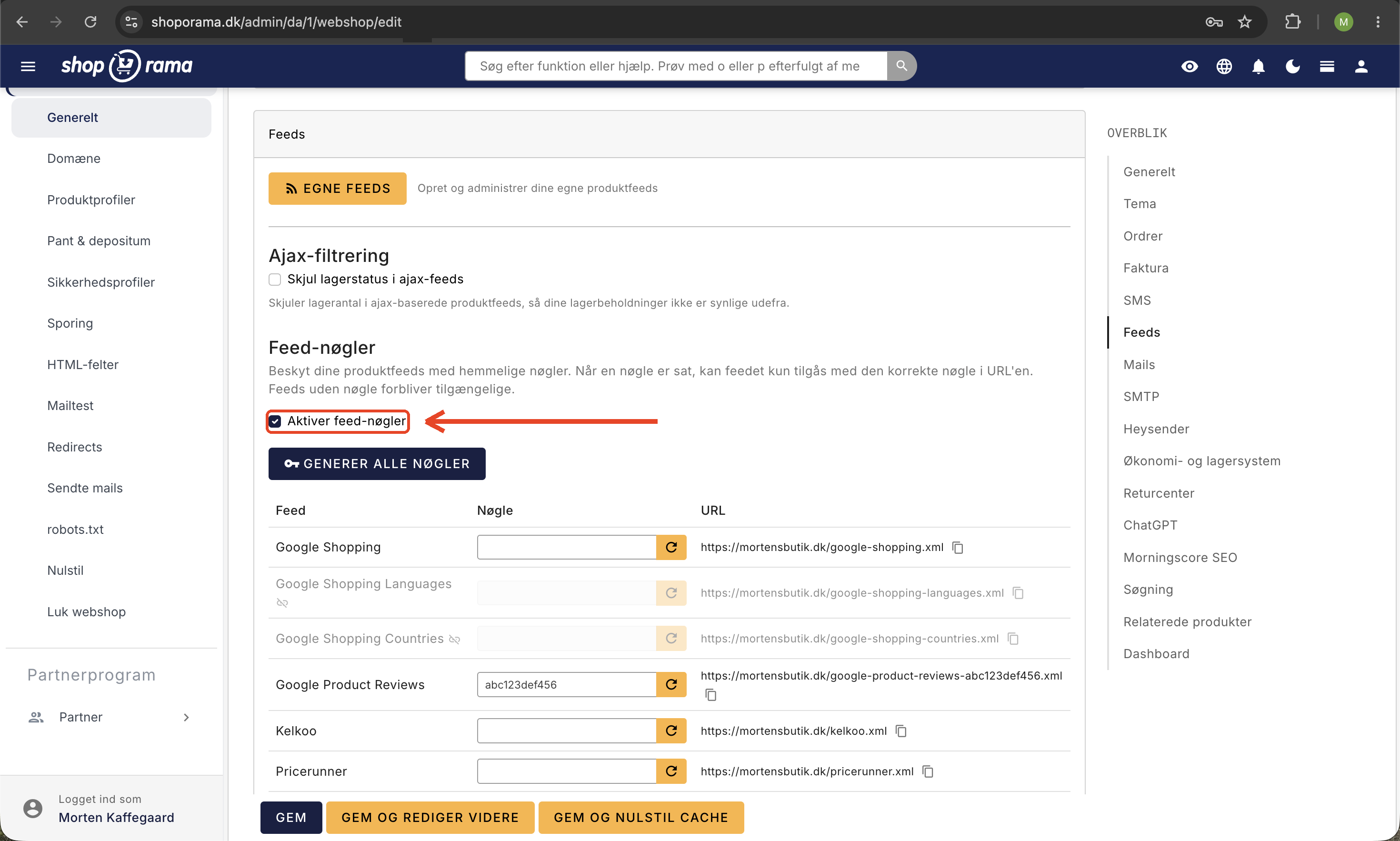
Bemærk: Tidligere lå Partner Ads-indstillingerne under et selvstændigt menupunkt "Feeds". Det er nu nedlagt, og alle felter er samlet på Webshop-siden. Egne, brugerdefinerede produktfeeds finder du under Produkter → Produktfeeds.
Forudsætninger
- En godkendt annoncørkonto hos Partner Ads
- Dit program-id fra Partner Ads (notér det)
- Beslut hvilken programtype din aftale dækker (Salg eller Lead)
- Adgang til din Shoporama-admin med rettigheder til at redigere webshop-indstillinger
Trin 1: Aktiver produktfeedet
Produktfeedet er den XML-fil, Partner Ads henter dine varer fra. Følg disse trin:
- Sæt flueben i "Aktiver Partner-Ads feed".
- Indtast dit program-id (eller affiliate-id) i feltet "Evt. partner Ads ID".
- Klik Gem nederst på siden.
Når feedet er gemt, vises feed-URL'en lige under feltet, fx https://dinshop.dk/partner-ads.xml. Den URL skal du give til Partner Ads, så de kan hente dine varer.
Vigtigt: Feedet aktiveres ikke automatisk, fordi du har skrevet et program-id. Du skal eksplicit sætte flueben i "Aktiver Partner-Ads feed" og gemme. Uden flueben er feedet inaktivt, og URL'en returnerer ingen produkter.
Trin 2: Aktiver trackingen
Trackingen registrerer at en kunde kom fra en partner og gennemførte et køb. Den aktiveres separat fra feedet:
- Sæt flueben i "Aktiver Partner-Ads tracking".
- Udfyld feltet "Partner-ads program-id" med dit program-id.
- Vælg Programtype: enten Salg (provision pr. ordre) eller Lead (provision pr. registreret kontakt). Skal matche din aftale med Partner Ads.
- Vælg Partner-ads land: Danmark, Sverige eller Norge. Vælg det land, der matcher din Partner Ads-konto.
- Klik Gem.
Trackingen sætter en cookie hos kunden, når de besøger din shop fra en affiliate-side. Cookien lever i 40 dage og indeholder partner-id og kundens IP-adresse. Når kunden gennemfører en ordre i den periode, sender Shoporama automatisk ordrenummer og pris til Partner Ads.
Trin 3: Tilføj API-nøgle og automatisk annullering (valgfrit)
Hvis kunder returnerer eller annullerer ordrer, vil du som regel også have provisionen tilbageført. Det sker automatisk, hvis du tilføjer din Partner Ads API-nøgle og slår de relevante checkboxe til:
- Log ind på din Partner Ads-konto.
- Gå til "Dataudtræk / API" i venstre side.
- Find teksten "Din unikke key er" og kopiér nøglen.
- Tilbage i Shoporama (samme afsnit), indsæt nøglen i feltet "Partner-ads nøgle".
- Sæt flueben i "Annuller automatisk annullerede ordrer i Partner-ads" for at tilbageføre ved manuel annullering.
- Sæt flueben i "Annuller automatisk returnerede ordrer i Partner-ads" for at tilbageføre ved retur.
- Klik Gem.
Trin 4: Differentierede satsgrupper (valgfrit)
Vil du give forskellige provisionssatser pr. brand (fx 8 % på et brand og 12 % på et andet), kan du slå satsgrupper til:
- Sæt flueben i "Brug differentierede satsgrupper".
- Angiv en standardsats i feltet "Default satsgruppe". Den bruges, når et brand ikke har sin egen sats.
- Klik Gem.
- Gå derefter til Produkter → Brands og angiv en specifik satsgruppe pr. brand, hvor det er relevant.
Oversigt over alle felter
- Aktiver Partner-Ads feed: tænder produktfeedet.
- Evt. partner Ads ID: dit Partner Ads ID/affiliate-id, der knyttes til feedet (typisk identisk med program-id).
- Aktiver Partner-Ads tracking: tænder salgs-/lead-tracking.
- Partner-ads program-id: dit program-id, der bruges af trackingen.
- Partner-ads nøgle: API-nøgle til at sende annulleringer tilbage.
- Programtype: salg eller lead.
- Partner-ads land: dk, se eller no.
- Annuller automatisk annullerede ordrer: tilbagefører provision automatisk, når en ordre annulleres.
- Annuller automatisk returnerede ordrer: tilbagefører provision automatisk ved retur.
- Brug differentierede satsgrupper: muliggør forskellige satser pr. brand.
- Default satsgruppe: standardsats for brands uden egen sats.
Verificér opsætningen
- Test feedet: åbn URL'en (fx https://dinshop.dk/partner-ads.xml) i en browser. Du skal se XML med dine produkter.
- Test trackingen: lav et test-link i Partner Ads-portalen, klik på det, gennemfør en testordre, og tjek om salget dukker op på din Partner Ads-konto inden for et par minutter.
- Tjek farve og størrelse: hvis dine varer kommer i varianter, så se Medtag farve og størrelse i Partner Ads feed.
Ofte stillede spørgsmål
Hvor finder jeg Partner Ads-indstillingerne i den nye admin?
Gå til Konto → Webshop → Generelt i venstre sidebar og scroll ned til kortet "Feeds". Afsnittet "Partner-Ads" indeholder alle felter du skal bruge. Tidligere fandtes et selvstændigt menupunkt "Feeds", men det er nu samlet på Webshop-siden.
Bliver feedet aktiveret automatisk, når jeg indtaster mit program-id?
Nej. Du skal eksplicit sætte flueben i "Aktiver Partner-Ads feed", før feedet er aktivt. Det samme gælder trackingen, som har sin egen separate checkbox. Det er den hyppigste fejl ved opsætningen.
Hvad er forskellen på "Evt. partner Ads ID" og "Partner-ads program-id"?
For de fleste webshops er det samme nummer. "Evt. partner Ads ID" knytter sig til feedet, mens "Partner-ads program-id" bruges af trackingen. I særlige opsætninger med flere programmer kan de være forskellige, men ellers udfylder du begge med dit program-id.
Skal jeg vælge Salg eller Lead?
Næsten alle webshops vælger Salg, fordi partneren får provision pr. gennemført ordre. Lead bruges kun, hvis din aftale med Partner Ads er baseret på fx en udfyldt kontaktformular eller en oprettelse, ikke et faktisk salg. Tjek hvad der står i din aftale.
Hvilke lande kan jeg vælge?
Shoporama understøtter Danmark, Sverige og Norge. Vælg det land, der matcher din Partner Ads-konto. Hvis du sælger til flere lande, kører Partner Ads typisk pr. land, og du kan kun knytte én konto pr. webshop.
Hvad sker der ved en returnering, hvis jeg ikke har lagt API-nøglen ind?
Så bliver provisionen ikke automatisk trukket tilbage hos Partner Ads. Du skal selv logge ind og annullere ordren manuelt. Med API-nøglen og fluebenene "Annuller automatisk" sætter Shoporama det i gang automatisk, når en ordre bliver annulleret eller returneret i admin.
Hvor lang tid efter et klik registreres et salg?
Tracking-cookien sættes for 40 dage. Hvis kunden vender tilbage og køber inden for de 40 dage, krediteres partneren. Efter 40 dage udløber sporet, og salget tilskrives ikke partneren.
Hvordan bruges Default satsgruppe-feltet?
Når du har slået differentierede satsgrupper til, bruges Default satsgruppe som standardsats for alle brands, der ikke selv har en specifik sats sat under Produkter → Brands. Det betyder du kan få et fungerende set-up uden at sætte sats på hvert eneste brand fra start.
Hvad med GDPR og cookies?
Partner Ads-cookien indeholder personhenførbare data (IP-adresse) og kræver samtykke. Sørg for at din cookieløsning er sat op til at omfatte den. Se Cookie-samtykke og Consent Mode v2.
Har du brug for hjælp? Kontakt os på support@shoporama.dk.
Related articles
Set up Partner Ads in Shoporama: getting started
Introduction to Partner Ads in Shoporama. Understand what it is, what you get out of it, and get started quickly with product feed and tracking.
Include color and size in Partner Ads feed
Guide to adding color, size and gender to your Partner Ads feed in Shoporama via product profiles and extra fields.
Set Up a Google Shopping Feed
Guide til at opsætte Google Shopping Feed i Shoporama: kategorier, custom labels, produkt-id og katalogmatch samt lands- og sprogfeeds.
Google Shopping category ID on products
Guide to adding Google Shopping category IDs to products in Shoporama via extra fields.
Cookie consent and Consent Mode v2
How to set up Shoporama's free cookie consent app: categories, automatic blocking, consent revocation, and Google Consent Mode v2.