Product reviews
Learn how to use product reviews in Shoporama. Collect customer reviews automatically, moderate them and display star ratings on your product pages.
Product reviews allow your customers to rate and review the products they’ve purchased. Reviews build trust, help other customers make purchasing decisions, and improve your visibility in search engines.
Here’s how it works
- A customer completes a purchase in your online store
- Once the order is marked as shipped, the number of hours you’ve selected elapses, and the customer automatically receives an email inviting them to review the products they purchased
- The customer clicks the link and provides a star rating (1–5 stars) as well as an optional text review for each product
- The review is created as unpublished and awaits your approval
- You approve the review in the admin panel, and it appears on the product page
Automatic Review Emails
You can set up automatic review emails under Account → Webstore → General in the Emails tab. Specify how many hours should elapse from when the order is marked as shipped until the email is sent.
Tip: A good timeframe is 48–72 hours after shipment, so the customer has had time to receive and try the product.
Customers who have unsubscribed from review emails will not receive them. Additionally, customers with an account in your online store will only receive the review email once. If they received it for a previous order, they will not receive it again on their next purchase.
When is the review email sent?
The hours are counted from the moment the order receives the “Shipped” status. They are not counted from the order date or the payment date. If you enter 48 in the field, 48 hours will pass from the status change until the customer receives the email.
- The order must be paid and have the “Shipped” status. Unpaid orders and orders that have not yet been shipped will not receive a notification email
- The system checks once per hour. The email is sent during the hour in which the specified time period expires, not at the exact minute
- A blank field disables the feature. If you do not enter a number of hours, no notification emails will be sent at all
- Only orders from the last 30 days. Orders marked as shipped more than 30 days ago will never be retrieved again. If you change the number of hours, your old orders will not suddenly trigger an email
- Stay under 720 hours. 720 hours is 30 days. If you enter a higher number, the order will have already fallen outside the 30-day window by the time the email was supposed to be sent, and it will never be sent
Tip: If you want to check that the emails are actually being sent, you can find them under Account → Webshop → Sent Emails. Here, you can both open individual emails and resend them.
The email itself is based on the product_review_mail.html template in your theme. All of Shoporama’s built-in themes include this template. If you have a custom-built theme that doesn’t include this template, nothing will be sent, regardless of what’s entered in the field.
How the customer writes the review
The link in the email leads to a page in your own online store showing exactly the products the customer purchased in that specific order. The customer does not need to log in or create an account. The link contains a verification code linked to the email address on the order, so it only works for that specific order.
- The customer rates each product on a scale of 1 to 5 and can write a comment. Most themes display the rating as stars; some use smileys
- The number of reviews created depends on your theme. Some themes only create reviews for the products the customer has actually rated, while others generate a review for every item in the order. Check the list after the first review to see how your theme works
- When the customer saves the review, the page displays a thank-you message, and the reviews appear in your list as unapproved
The page comes from the product_review.html template in your theme, so it automatically matches your store’s design. If your theme lacks that template, the page won’t display, and the link in the email won’t lead anywhere.
That’s why the email isn’t always sent
If you notice that fewer reviews are coming in than expected, there are a few perfectly normal explanations. The review email is skipped if:
- The order hasn’t been paid for or doesn’t have the “Shipped” status
- The order was marked as shipped more than 30 days ago
- The customer has already reviewed one of the products in the order from the same email address
- The customer has an account in your online store and has received a review email before. Customers with accounts only receive the email once in total, while guest purchases without an account may trigger one email per order
- The email address is on the unsubscribe list for review emails because the customer clicked “Unsubscribe” in a previous email
- Your theme is missing the template for the review email
- The field under Account → Web Store → General in the Emails tab is empty
Learn more about how unsubscriptions work in “Unsubscribe Links in Automatic Emails.”
Preview and send a test email
Before you enable automatic sign-up emails, it’s a good idea to see what the email will look like to the customer. You can do this directly in the admin panel under Account → Webstore → Email Test.
- Go to Account → Webstore → Email Test
- Select product_review_mail.html in the left column
- The email is displayed as a preview with both the subject line and content, based on random test data from your online store
- Enter your own email address and click Send Test Email to receive the email in your inbox
Tip: Refresh the page to view the email with a new random order. This way, you can check that the layout looks correct regardless of what the customer has purchased. You can send up to 3 test emails per minute and 20 per hour, so you don’t end up flooding your own inbox.
If you want to change the language in the email—such as the subject lines or the introductory text—you can translate the texts under Store → Design → Texts. Select the "Email" section from the dropdown menu to find the texts used in the review email.
Managing Reviews
All reviews are managed under Products → Reviews in the admin panel. Here you can:
- View an overview of all reviews, including approval status, rating, product, and date
- Approve or reject reviews individually
- Use bulk actions to approve, reject, or delete multiple reviews at once
- View the number of pending reviews on the dashboard
Note: Reviews from your customers are unpublished and must be manually approved before they are displayed to other customers. This gives you full control over what appears on your online store. However, reviews you import from a CSV file are approved by default.
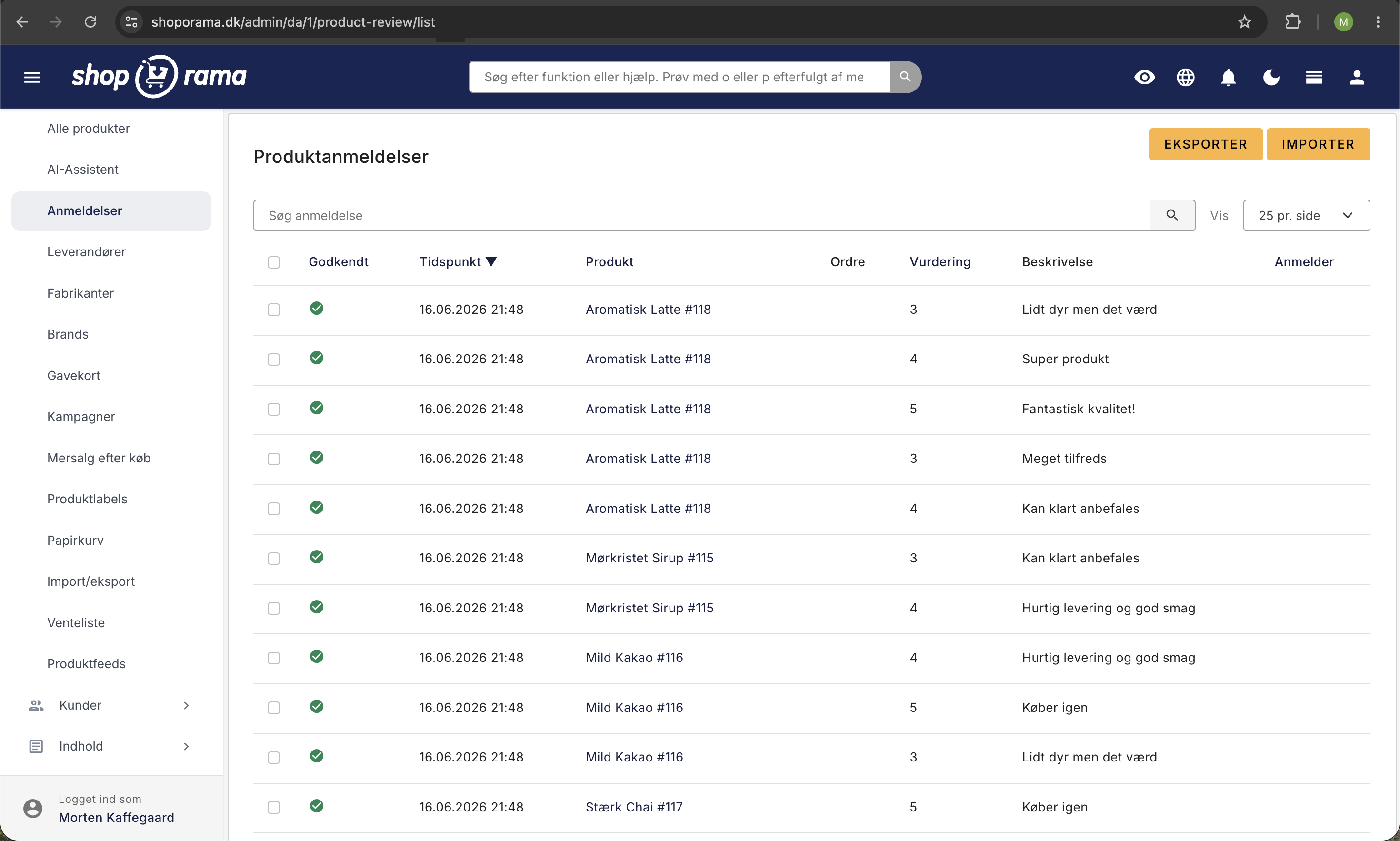
Approve, Reject, or Delete Reviews
You’ll find the reviews under Products → Reviews. If there are reviews waiting for you, the number will appear in parentheses next to the menu item, and on the dashboard, you’ll see the “New Reviews” field, which links to the same page.
- One at a time: Click the icon in the “Approved” column. A gray X means not approved, and a green checkmark means approved. Your selection is saved immediately without reloading the page, so you can quickly scroll through the list
- Multiple at a time: Check the box in the leftmost column. The checkmark in the column header selects all reviews on the page at once
- Select an action: Approve Selected, Reject Selected, or Delete Selected at the bottom of the list
It’s important to understand the difference between rejecting and deleting. Rejecting only removes the approval. The review remains in the list and can be approved again later if you change your mind. Delete permanently removes the review, which is why Shoporama asks you to confirm before the deletion is completed.
Note: Only approved reviews are included in the product’s average rating and in the total number of reviews. If you reject a review again, it will disappear from both the product page and the average rating.
Search and Sort Reviews
If you have many reviews, there are three tools that make the list easier to work with:
- The search field searches simultaneously for the product name, the reviewer’s name, and the review text itself. This is the fastest way to find a specific review if a customer contacts you about it
- The column headers Approved, Date, Product, Rating, and Reviewer sort the list. Click the same header again to reverse the order
- The "Number per page" can be set to 10, 25, 50, or 100. This setting is saved for the next time you open the list
Two sorting options are particularly useful in your daily work. Sort by Approved to gather all the reviews that haven’t been processed yet. Sort by Rating, then click the header again to display the lowest ratings at the top, allowing you to identify dissatisfied customers immediately. Search and sort functions work independently: when you search, results are always displayed with the most recent ones at the top.
The columns also serve as shortcuts: the product name opens the product page, the order number opens the order, and the reviewer’s name shows the customer’s other orders.
How to Follow Up on a Review
Shoporama does not have a field where you can write a public reply below the customer’s review. Instead, you can go directly from the review to the customer: click the order number in the “Order” column, and the order will open with the customer’s contact information, allowing you to reach out to the customer personally.
Reviews that have been imported from another system, or where the order has since been deleted, do not have an order associated with them. Instead, the list displays the name that appeared in the import file, and you will not have an email address to use for follow-up.
Note: Be cautious about deleting negative reviews. A product page where every single review is five stars appears untrustworthy to new customers, and systematically publishing only positive reviews may violate marketing laws. If you’re unsure about the rules, ask your own advisor.
An objective three-star rating is rarely a problem. Instead, it provides valuable insight: Is the product description inaccurate, is the size guide incorrect, or was something missing from the package? If you address the issue, both returns and future negative reviews will decrease.
Display on Product Pages
Approved reviews are automatically displayed on product pages with:
- Star rating — 1–5 stars for each product
- Average rating — Overall average of all approved reviews
- Number of reviews — How many reviews the product has received
- Review text — The customer’s own words about the product
- Customer name and date — Who wrote the review and when
Reviews automatically include structured data (schema.org), which allows star ratings to appear directly in Google search results.
Display reviews as stars in Google Shopping
Your approved product reviews can also appear as stars on your Google Shopping ads and in Google’s free product listings. This requires a separate feed that you submit to Google Merchant Center, and it’s built right into Shoporama. See how in “Get Stars in Google Shopping with Product Reviews.”
Import and Export
If you’re switching from another e-commerce platform, you can import existing reviews via a CSV file. You can also export all your reviews to CSV for backup or analysis.
When importing, the CSV file must contain the product ID, rating, and review text. Imported reviews are automatically approved.
Upload Reviews from a CSV File
If you’re switching to Shoporama from another system, your reviews are one of the things you’ll be reluctant to leave behind. They’ve been collected over the years, and they help drive sales. That’s why you can add them to your new store with just a few clicks.
- Go to Products → Reviews and click Import in the top right corner
- Select your file under “Upload CSV File”
- Click Import
- The confirmation message at the top of the page shows how many reviews were imported
The file must be in CSV format with a semicolon as the field separator, and the first row must contain the column names. Column names are not case-sensitive. The file may be saved in a character encoding other than UTF-8, as the content is converted during import to prevent characters like æ, ø, and å from becoming garbled.
Columns in the file
- product_id: Shoporama’s internal product ID. Required
- rating: an integer between 0 and 5
- description: the review text itself
- created: date and time in the format 2021-04-24 12:30:00. If you omit this column, the review will be assigned the import time as its date
- name: The name of the reviewer. This column may also be named order_name
- order_id and webshop_order_id: optional. If you include them, the review will be linked to the correct order in your store. Shoporama’s internal order ID is used first; otherwise, the import will fall back on your own order number
Tip: Click “Export” on the review list before you create your import file. This will give you a file containing all the columns the import tool recognizes, and you can use it as a template. The file includes a few extra columns, which the import tool will simply ignore.
Note: All imported reviews are marked as approved and are therefore immediately visible on the product pages. Review the file before uploading it.
Rows that refer to a product that does not exist in this particular online store are skipped without an error message. Therefore, the number on the receipt serves as your check: if it doesn’t match the number of lines in the file, there are lines with a product ID that the import process couldn’t find. The import process also doesn’t check for duplicates, so if you upload the same file twice, the reviews will be imported twice.
Reviews without an associated order have neither an order number nor an email address. If you’ve made customizations to your theme that display order information alongside the review, those customizations must be able to handle the absence of an order.
Frequently Asked Questions
How do I view the review email before it’s sent to customers?
Go to Account → Webstore → Email Test, select product_review_mail.html, and view the email with random test data. You can send a test email to your own inbox and see exactly what the customer will receive.
Can I change the text in the email itself?
Yes. The fixed text in the email is managed under Store → Design → Texts in the Email section. Here, you can translate and customize the wording without modifying the theme’s code.
Why do I need to manually approve reviews?
Manual approval gives you control over what appears on your product pages. You avoid spam, misspelled reviews, and misunderstandings. This is especially important because reviews are used in structured data and can appear in Google search results.
What happens if a customer has unsubscribed from review emails?
If a customer has clicked “unsubscribe” in a previous review email, their email address is added to your unsubscribe list, and no further review emails will be sent to that address. Additionally, customers with an account in your online store will only receive the review email once in total, regardless of how many orders they place.
How many hours after shipment should I send the email?
48–72 hours after the order is marked as shipped is a good starting point. By then, the customer will have received the package and had a chance to try the product. If you test different time frames, you can determine which interval yields the most reviews in your industry.
Do reviews affect my visibility on Google?
Yes. Approved reviews are automatically displayed using structured data (schema.org), and Google may choose to show the star ratings directly in search results. This typically results in a higher click-through rate for your ad or organic listing.
Can I import reviews from another system?
Yes. You can import existing reviews via CSV. The file must contain the product ID, rating, and review text. Imported reviews are automatically approved.
What’s the difference between rejecting and deleting a review?
Rejecting simply removes the approval. The review remains in the list, disappears from the product page and from the average rating, and can be approved again at any time. Deleting permanently removes the review, and this action cannot be undone. If in doubt, reject it.
Can I respond to a customer who left a negative review?
There is no field for a public reply below the review. However, you can click on the order number in the “Order” column to go directly to the customer’s order, where you’ll find their contact information and can write to them personally. This is often the better solution: the customer feels heard, and you’ll find out what actually went wrong.
Can I send review emails for my past orders?
No. The system only considers orders marked as shipped within the last 30 days. If you enable the feature today, it will apply going forward, and you won’t send out a flood of emails to your old orders. If you have reviews from a previous system, you’ll need to use the CSV import feature instead.
Where can I find the product ID that the import file needs?
The easiest way is to click “Export” on the review list. The export file contains both the product ID and the product name, and it includes all the columns required for the import. You can also open the product in the admin panel and find the number at the end of the address bar.
If you have any questions about product reviews, feel free to contact us at support@shoporama.dk.
Related articles
Unsubscribe links in automatic emails
Give your customers the option to unsubscribe from automatic follow-up emails after purchases and product reviews - with a simple link in the email.
AI assistant in the text editor
Learn how to use Shoporama's built-in AI assistant to generate product texts, image descriptions and text suggestions.
Order list and inventory management
Learn how to use the Shoporama order list to keep track of inventory, generate shopping lists and receive goods efficiently.