Enhedspris: vis kr/stk, kr/L og kr/kg i din webshop
Vis pris pr. enhed under prisen på produktkort og produktside. Sådan sætter du enhedspris (kr/stk, kr/L, kr/kg) på dine produkter i Shoporama.
If you sell items in packages, rolls, or specific quantities, it helps customers see the price per unit. A case of soda for 79 kr doesn’t mean much on its own, but “3.29 kr/each” makes it easy to compare. This is exactly the display you’re familiar with from sites like Nemlig.com, and the one retail chains use on their shelves.
In Shoporama, you can display a unit price below the price on both the product card and the product page. You fill in two small fields on the product, and the theme displays the rest automatically. The feature is optional and takes up no space if you don’t use it.
Good to know: For food and beverages in retail, unit price is a legal requirement under the Price Labeling Regulation. With this feature, you can display the unit price without having to modify the theme’s code. The rules use whole base units: price per liter for beverages and price per kilogram for items sold by weight. You choose the correct unit for your product.
How to Set the Unit Price for a Product
Open the product in the admin panel and go to the General tab. In the “Contents of the package (if any)” field, enter two things:
- Number in package. This is the number of base units the price is to be divided by. For a case of 24 cans, enter 24. For a 500-gram bag, enter 0.5 (i.e., half a kilo).
- Unit. Select the unit from the dropdown menu: pcs, kg, L (liters), m, or m². Use price per liter for beverages and price per kilo for items sold by weight, so the unit price follows the rules.
Save, and the unit price will appear in the store. If you leave the fields blank, no unit price will be displayed. So you decide for yourself which products should have one.
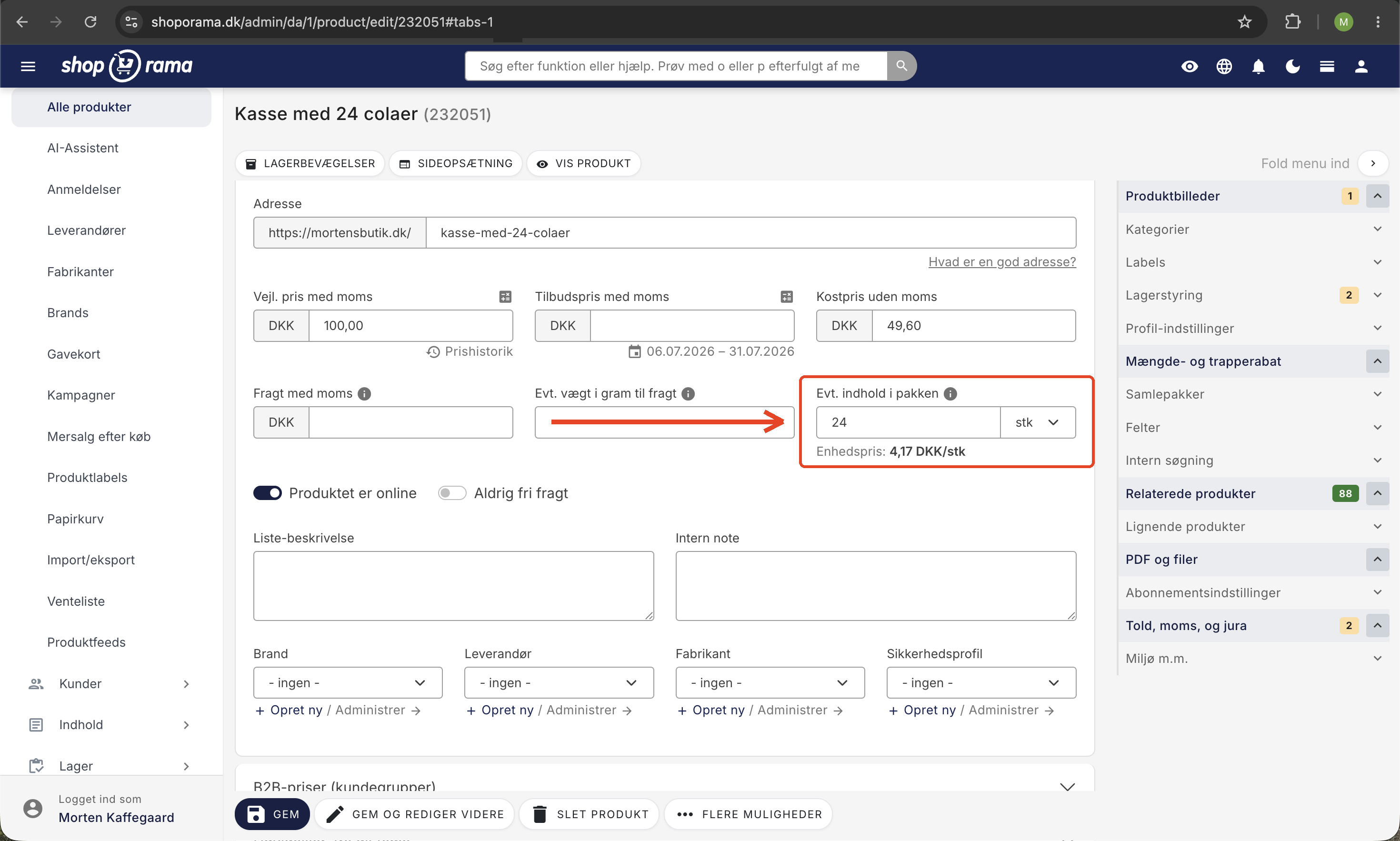
Three examples
- Price per unit: A case of 24 cans for 79 kr. Set the quantity to 24 and the unit to “each.” The store displays 3.29 kr/each (79 divided by 24).
- Price per kilogram: A 500-gram bag of candy for 20 kr. Set the quantity to 0.5 and the unit to kg. The store displays 40 kr/kg (20 divided by 0.5).
- Price per liter: A case of 24 cans, each containing 0.33 liters, totals 7.92 liters. Set the quantity to 7.92 and the unit to L, and the store will display the price per liter.
Where is the unit price displayed?
The unit price is displayed in smaller, gray text just below the regular price:
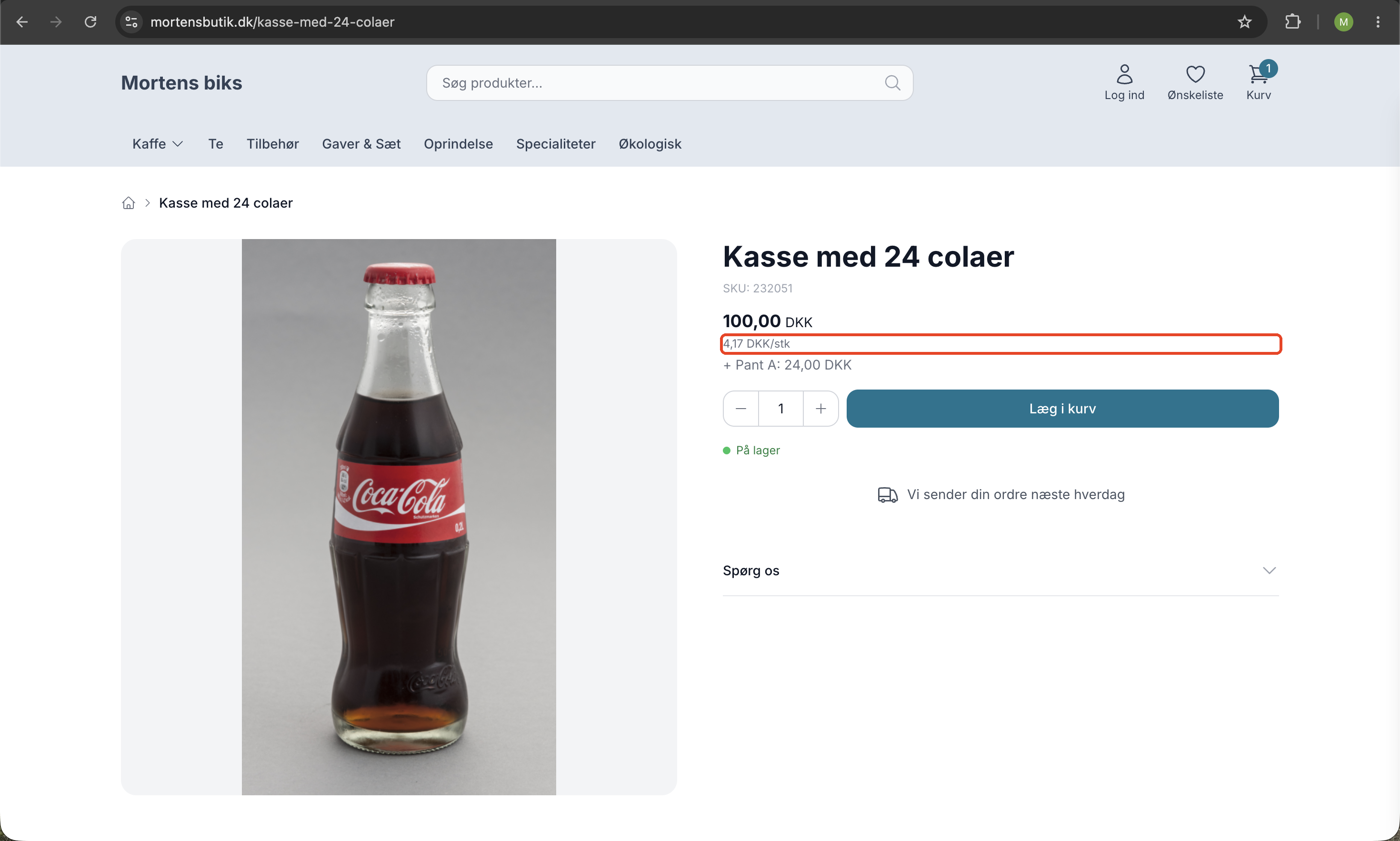
- On product cards in categories, on the homepage, and in recommendations.
- On the product page below the total price.
The unit price is intentionally not displayed in the cart or at checkout to keep the shopping experience simple there. If a product has multiple prices (e.g., different prices per variant), the unit price is not displayed because it would then be ambiguous.
The unit price always follows the displayed price
You don’t need to worry about sales tax or promotions when setting the unit price. It’s calculated based on the price the customer actually sees. If the item is on sale, the unit price is calculated based on the sale price. If your store displays prices including sales tax, the unit price also includes sales tax. If you run a B2B store with prices excluding VAT, the unit price is displayed without VAT. If the customer has a special customer group price, the unit price reflects that. In short: the unit price always matches the main price.
Which themes support unit price?
This feature works automatically in Shoporama’s built-in themes: Delaware, DelawareDK, Montana, and MontanaB2B. If you’re using a custom theme, you’ll need to add the display code to your theme’s source code. Email us at support@shoporama.dk if you have any questions about your theme.
Unit price or deposit?
The two are similar but different. Unit price is simply a display of the item’s own price divided per unit. It doesn’t add anything extra, and the customer pays exactly the price shown. A deposit, on the other hand, is a separate amount added at checkout and refunded upon return. If you sell beverages, you can easily use both on the same product: the deposit as an extra charge, and the unit price to help the customer compare prices.
Frequently Asked Questions
What exactly is a unit price, and do I need to use it for all my products?
The unit price shows how much the item costs per piece, liter, kilogram, or similar—for example, 3.29 DKK/piece for a case of 24 cans. It makes it easy for customers to compare prices. The field is optional, so you don’t need to fill it in for all products. It makes the most sense for food and beverages, where it’s often relevant to the customer.
Where can I find this field when I create a product?
You’ll find it in the product editor under the General tab. There is a field for quantity and a field for unit. For example, enter 24 in the quantity field and “pcs” in the unit field, or 0.5 and “kg” for a 500-gram bag. You select the unit from a fixed dropdown menu with options such as “pcs,” “kg,” “L,” “m,” and “m².”
Is the unit price displayed with or without tax?
The unit price always matches the price the customer actually sees. If your store displays prices including VAT to retail customers, the unit price is calculated including VAT. If the customer is a B2B buyer and sees prices excluding VAT, the unit price is calculated excluding VAT. You don’t need to do anything; it adjusts automatically.
Does it also calculate correctly when the item is on sale or the customer has a special price?
Yes. The unit price is calculated based on the price that’s actually displayed and divided by the quantity you’ve specified. If the item is on sale or the customer has a customer group price, the unit price adjusts accordingly. So it always matches the current price on the screen.
I have a lot of products. Where can I see the unit price in the store?
It appears as a small gray line below the price, both on the product cards (category, homepage, and recommendations) and on the product page itself. It does not appear in the cart or at checkout. You fill in the field once per item, and the display is then handled automatically in both places.
Why isn’t the unit price showing up for my variant product?
If the product has different prices per variant, the unit price is not displayed. This is intentional, as it would be ambiguous since the price changes depending on which variant the customer selects. For products with a single fixed price, the unit price is displayed as usual.