How do I receive payment online?
What does it take to accept credit card or MobilePay payments online? Read about acquiring agreements, payment gateways and alternative payment methods.
There are several ways to accept payments online. The vast majority of online stores accept credit cards, and to do so, you’ll need two things:
- A merchant agreement
- A payment gateway
In this article, we’ll go over both of these—and also look at a couple of alternatives like MobilePay and PayPal.
What is a merchant agreement?
To accept credit cards online, you need a merchant agreement.
A merchant agreement is a contract between your business and a payment provider. The agreement grants your business the right to accept payments via credit and debit cards and sets out the terms for how transactions are handled—including fees, security requirements, and payout schedules.
For you as an online store owner, the most important aspects of such an agreement are the fees and payout schedules. If you need quick access to cash, it’s important that you receive the funds promptly. If that’s less of a priority, you can leave the funds with the card issuer for, say, 30 days.
The fees are, of course, important. There’s a big difference between paying 1.4% or 1.95% of your revenue, so it’s worth checking periodically to see if you can negotiate better rates.
If you need to accept Dankort, you must have an acquiring agreement with Nets. For international cards such as Mastercard and Visa, you can obtain acquiring agreements from providers like Clearhaus or Nets.
What is a payment gateway?
A payment gateway acts as an intermediary between your online store and the financial institution that processes the payment. It ensures that payment information (the customer’s card number, etc.) is sent securely from the customer to the payment processor and returns a payment confirmation to both the seller and the buyer.
In practice, it works like this: Your online store is hosted, for example, by Shoporama. When a customer needs to pay 350 kr., we forward the request to your payment gateway. The customer sees a window where they can enter their credit card number, expiration date, and other details.
The payment gateway then verifies that your online store has an acquiring agreement that accepts the specific credit card and that there are sufficient funds on the card. If everything checks out, the amount is reserved on the customer’s credit card, and Shoporama records that the order has been paid.
You then have a certain number of days to withdraw all or part of the amount. You cannot withdraw more than the amount the customer has authorized.
Shoporama supports the following payment gateways: Stripe, Quickpay, OnPay, PensoPay, Flatpay, ePay, Nets Easy, Mollie, PayPal, Payson, and Przelewy24. In addition, you can set up “Invoice” and “Other Payment” options for payments settled outside the system. Contact us at support@shoporama.dk if you need help getting started.
Comparison: What Can the Different Payment Gateways Do?
All gateways on the list can accept payments. The difference becomes apparent in day-to-day operations when you need to withdraw funds, issue a refund to a customer, or process a subscription payment. Some gateways can be managed directly from the order in Shoporama. With others, you’ll need to log in to the gateway and do it manually. This is the difference you’ll notice every single week, which is why it matters more than the last few fractions of a percent in fees.
What you can do directly from the order in Shoporama
When a customer pays, the amount is reserved on the card. The money isn’t yours until it’s debited. These gateways can debit the amount directly from Shoporama, either automatically or when you click the button:
- Capture the amount: Quickpay, OnPay, PensoPay, Flatpay, Stripe, Nets Easy, ePay, and Payson.
- Full or partial refund: Quickpay, OnPay, Stripe, PensoPay, and Flatpay. You specify the amount yourself, so you can refund a single item without canceling the entire order, and you can issue multiple partial refunds for the same order.
- Subscriptions and recurring payments: Quickpay, PensoPay, Flatpay, and ePay. The customer authorizes their card once, and subsequent payments are then deducted automatically.
Mollie, PayPal, and Przelewy24 can accept payments, but you must handle chargebacks and refunds through the gateway’s own control panel. Payson can process chargebacks from Shoporama but cannot issue refunds. This means more manual work, and the figures in Shoporama may not necessarily match up.
How complicated is the setup?
There’s a big difference in how much you have to copy back and forth yourself:
- Stripe and OnPay connect with a single click. You click the button, log in to the payment gateway, and approve the connection. There are no keys to copy. With Stripe, the connection that notifies Shoporama of payments is even set up automatically. However, Shoporama adds a 0.5% fee (with a minimum of 1 DKK) to each transaction when you use Stripe through us.
- Flatpay requires you to enter your private key (it starts with "priv_"). Shoporama handles the rest, and you’ll receive a green confirmation once the connection is active.
- Quickpay, PensoPay, Nets Easy, Mollie, ePay, Payson, and Przelewy24 require you to retrieve keys from the gateway’s own system and enter them into Shoporama. This typically takes about 15 minutes, and each field in Shoporama tells you where to find the value.
Payment Methods and Markets
The payment methods you can offer depend on both the gateway and what you’ve activated with it. Overall, the picture looks like this:
- MobilePay: Quickpay, OnPay, PensoPay, Flatpay, Stripe, Nets Easy, and ePay.
- Apple Pay and Google Pay: Stripe, PensoPay, and Flatpay. Nets Easy supports Apple Pay.
- Klarna: Quickpay, PensoPay, Nets Easy, Mollie, and ePay. Note that Klarna requires that order lines be included. In Quickpay and ePay, enable “Add Invoice Data,” and in Mollie, enable “Use Orders API.”
- Nordic countries: Nets Easy covers MobilePay, Vipps, and Swish in a single solution. Flatpay also supports Vipps.
- Netherlands, Belgium, and Germany: Mollie is the obvious choice because, in addition to cards, it supports iDEAL, Bancontact, SOFORT, and SEPA.
- Sweden: Payson is a Swedish solution with a built-in checkout. It has its own list of supported countries, including Denmark, Sweden, Norway, Germany, the UK, and the Netherlands.
- Poland: Przelewy24 supports Polish bank transfers and local payment methods. Please note that Shoporama marks it as an integration under testing, and that it does not work with an open cart.
- Danish cards: If you need to use Dankort, Quickpay, OnPay, PensoPay, Nets Easy, and ePay are the obvious choices.
When payment occurs outside the system
Two of the options are not actual payment gateways, but rather convenient shortcuts. Use “Other Payment ” for bank transfers, cash on pickup, or other manual methods. Use “Invoice ” for business customers paying by account. Both have a setting called “Automatically mark new orders as paid.” If you turn this on, the order is considered paid immediately, which makes sense if you’re following up on the payment yourself afterward. If you leave it turned off, you’ll need to mark the order as paid yourself once the payment has been received.
How to Choose: A Guide Based on Your Situation
You don’t have to limit yourself to just one payment gateway. You can have multiple active gateways at the same time, and the customer can choose which one to use at checkout. But one of them should be your primary solution. Find the scenario that best matches your situation:
- You sell physical goods to Danish customers. Choose Quickpay, OnPay, PensoPay, or Flatpay. They can all process payments and issue refunds directly from the order, and they support MobilePay. Quickpay, PensoPay, and Flatpay also have an “Automatically Charge the Amount When the Item Is Shipped or Picked Up” setting , which is suitable for items that aren’t packed until the next day.
- You sell digital goods or services that are delivered immediately. PensoPay and Flatpay have an “Autocapture” setting that charges the amount the moment the customer pays. This way, you don’t have to manually process payments for items that have already been delivered.
- You sell subscriptions or prepaid cards. Choose Quickpay, PensoPay, Flatpay, or ePay. Read more in the article about subscriptions.
- You sell throughout Europe. Stripe or Mollie offer the broadest coverage. Stripe is the easiest to set up and allows refunds directly from the order. Mollie supports the most local payment methods, but debits and refunds are processed through Mollie’s own control panel.
- You have one major foreign market. Set up a payment gateway that’s strong specifically in that market, and limit it to that country. Payson for Sweden and Przelewy24 for Poland are the two obvious examples.
- You sell to the public sector or to businesses on account. Set up an invoicing gateway alongside your card payment processing. The public sector typically needs to be able to pay via EAN.
- You’d rather not deal with API keys. Stripe and OnPay connect with a single click and a login.
If you’re unsure, start with one gateway that can process payments and issue refunds for the order. You can always add more later, and you can switch your primary solution without losing your previous orders.
How to Accept MobilePay Online
Online MobilePay payments often catch people off guard, because even if you have a merchant agreement for your physical store, you can’t use it online.
Fortunately, you can use your payment gateway and your acquiring agreement. That’s because a credit card is always linked to a MobilePay user, so when your customers pay with MobilePay, they’re actually paying with their credit card.
Alternative payment methods
There are also alternatives to credit cards and MobilePay. The two most common are PayPal and EAN payment.
EAN payment isn’t really an online payment in the traditional sense—it’s more comparable to paying by invoice. In Denmark, the government requires that payments be accepted via EAN, which is why it has become a common payment method in online stores. Note, however, that—unlike with credit card payments—you have no real guarantee that the funds are secured for you.
Order and Country Restrictions: Control What the Customer Sees
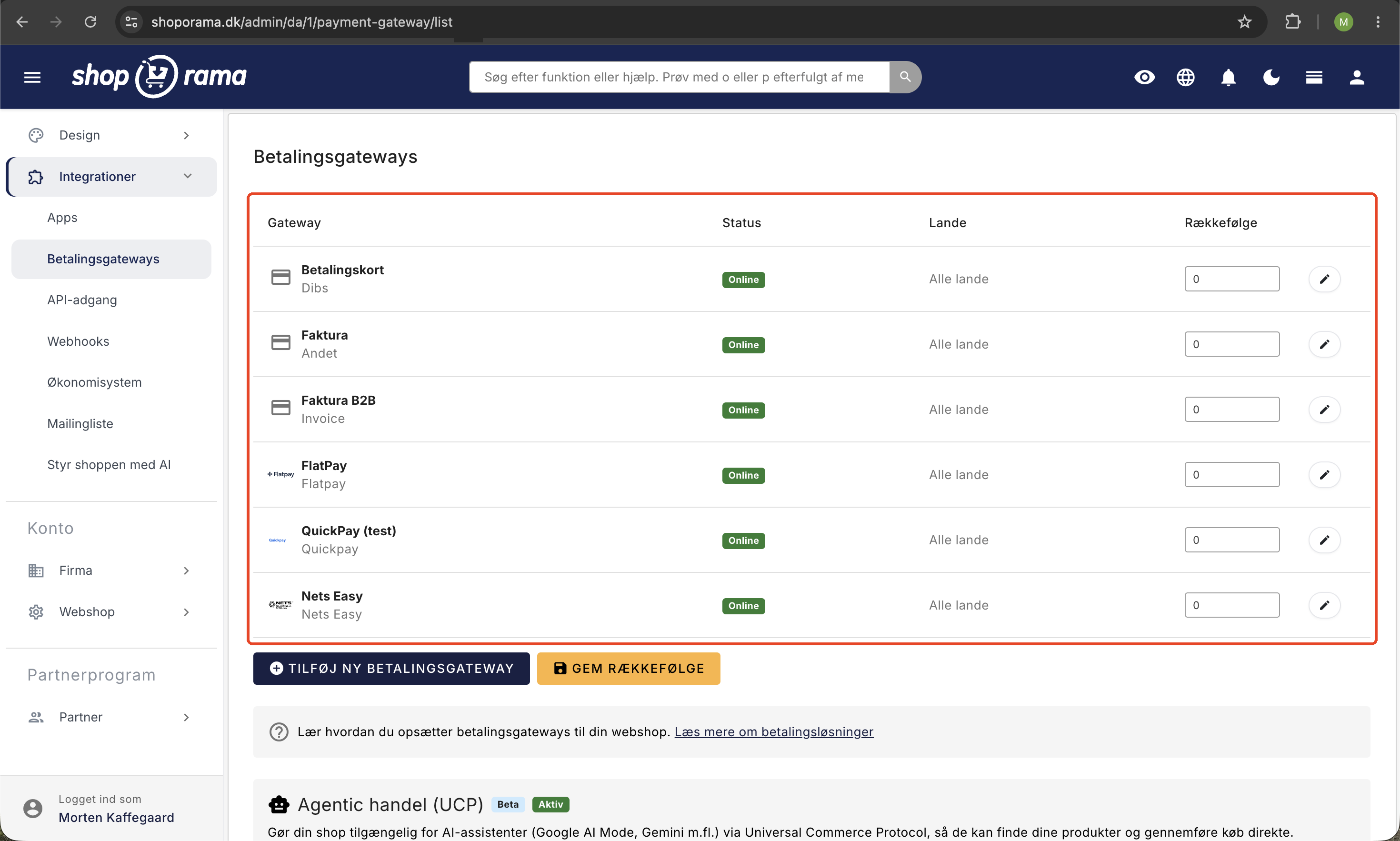
When you offer more than one payment option, you decide both the order in which they appear and who sees what. Both settings are managed on the Integrations > Payment Gateways page in Shoporama.
Online or Offline
The Status column shows whether a gateway is Online or Offline. Only gateways marked as Online are displayed to the customer in the store. This is a convenient way to prepare a new gateway without allowing customers to select it just yet. It’s also the way to take a gateway out of service without deleting it or its history. You’ll find the toggle under “Status” when you edit the gateway.
Order
The Order column contains a number for each gateway. The lowest number appears first. Enter the numbers you want and click Save Order at the bottom of the page. Use increments of ten—that is, 10, 20, and 30—so you can later add a new gateway at number 15 without having to renumber the entire list.
The order matters. The method listed at the top is the one most customers choose, and a long list of payment options creates uncertainty rather than confidence. Put the method your customers actually use the most at the top, and consider removing from the list entirely those methods that are almost never selected. It’s one of the cheapest ways to boost your conversion rate.
Country Restriction
The Countries column shows which countries each gateway is available in. If it says “All countries,” it’s available to all customers. To restrict it, open the gateway and use the “Country Restriction” box on the right-hand side. Select one or more countries from the list and hold down Ctrl or Cmd to select more than one. If you don’t select any countries, the gateway is available everywhere.
In the store, payment options are filtered based on the country the customer has selected at checkout. A Danish customer will therefore only see the gateways that are either set to Denmark or have no country restriction. This is useful if you want to display Przelewy24 to Polish customers and Payson to Swedish customers, without everyone else having to scroll past them.
Be careful with one thing: if you set country restrictions on all payment gateways and a customer selects a country that isn’t listed anywhere, the customer will be left with no payment options at all. Therefore, always keep at least one gateway without country restrictions as a safety net. The countries you can choose from are the ones you’ve enabled in your online store.
Note that Payson has its own country list in the gateway’s settings. This controls which countries are displayed within Payson’s checkout window and is distinct from Shoporama’s country restriction, which determines whether Payson is displayed as a payment option at all.
Test your payment gateway before going live
You should never put a payment solution into operation without having completed at least one purchase yourself. Several gateways therefore have a test mode where the entire flow works, but without any real money changing hands. You’ll find this setting on the gateway’s own page in Shoporama:
- Nets Easy: the “Test mode” toggle. Remember to enter your test keys—both the private key and the checkout key—so they match the selected mode.
- PensoPay: the “Test Mode” toggle.
- Flatpay: the “Test Mode” toggle. Turn it on when using a test key from Flatpay.
- Przelewy24: the “Sandbox (test mode)” toggle.
- PayPal PLUS: a choice between Live and Sandbox. There’s also a “Test Your Login” button so you can verify that your information works before attempting a real purchase.
- Mollie: no toggle. You switch between test and production by using the test key (starting with `test_`) and the live key (starting with `live_`), respectively.
- Quickpay, OnPay, Stripe, and ePay: no test interface in Shoporama. Here, you test through the gateway’s own test or sandbox environment.
When testing, go through the entire process—not just the payment itself. Go through the cart and checkout, complete the payment, find the order in Shoporama, withdraw the amount, and issue a refund. That way, you’ll know what to expect the day a customer calls asking for a refund.
The most important thing to remember: turn off test mode and switch to your live keys before opening the store. A gateway in test mode looks completely normal to the customer, but no money will ever be received. Also note that Shoporama marks both Przelewy24 and PayPal PLUS as integrations that are still in test mode, so you should check the payments yourself before shipping the orders.
Keep an eye on payments you haven’t withdrawn
A reserved payment is not the same as money in your account. The reservation expires after a certain number of days, and if the amount isn’t withdrawn by then, the reservation is released and the money never reaches your account. This is one of the most costly and commonly overlooked mistakes in an online store.
If you use OnPay, Shoporama can help. On the payment gateway overview, an amount will be listed next to your OnPay gateway if there are transactions you haven’t withdrawn, and there’s a button that takes you to the “Unwithdrawn Transactions” page. Here you’ll see each individual transaction with the order, date, amount, what has been refunded and captured, card type, status, and transaction number, and you can capture or cancel directly from the list.
We’ve summarized everything—including the difference between an authorized and a captured payment, why transactions remain pending, and what to do about them—in the article on capturing payments.
Frequently Asked Questions
I’m not very tech-savvy. Which payment gateway should I choose?
Choose one you can connect to with a single click—such as Stripe or OnPay. You click the button, log in, and approve the connection. There are no keys to copy back and forth, so there’s nothing to type incorrectly. If you’d like to use Dankort and MobilePay as your primary payment methods, OnPay is a good place to start. If you’re unsure, email support@shoporama.dk, and we’ll help you get started.
Can I test payments without actual money being deducted?
Yes. Nets Easy, PensoPay, Flatpay, and Przelewy24 have a test mode that you can enable on the gateway’s page in Shoporama, and PayPal PLUS offers a choice between Live and Sandbox. For Mollie, you switch by using the test key instead of the live key. You can test Quickpay, OnPay, Stripe, and ePay through the gateway’s own test environment. Remember to turn off test mode and switch to live keys before opening your store.
Can I issue a partial refund if the customer returns only one item?
Yes, if you use Quickpay, OnPay, Stripe, PensoPay, or Flatpay. You specify the amount to be refunded, and you can issue multiple partial refunds for the same order. If you use Mollie, PayPal, or Przelewy24, the refund must be processed through the gateway’s own control panel, and you’re responsible for ensuring the accounting records match.
When is the money actually debited?
When the customer pays, the amount is reserved. It is not debited until later. Quickpay, PensoPay, Flatpay, Stripe, Nets Easy, and ePay have a setting called “Automatically debit funds when the item is shipped or picked up,” which is suitable for physical goods where you don’t know until the next day whether you can deliver. PensoPay and Flatpay also offer “Autocapture,” which debits the amount immediately and is well-suited for digital products. If you don’t enable either of these options, you’ll need to debit the amount from the order yourself.
A customer abroad says there are no payment options at all. What should I do?
This is almost always due to country restrictions. Go to Integrations, Payment Gateways, and check the Countries column. If all your gateways have country restrictions and the customer’s country isn’t listed under any of them, the customer will have no payment options. The solution is either to add the customer’s country to one of the gateways or to leave at least one gateway without a country restriction. Also, make sure the gateway is set to Online, as offline gateways won’t appear in the store at all.
Does the order in which the payment methods are listed matter?
Yes. Most customers choose the first option on the list, and the checkout is where hesitation costs the most orders. Therefore, place the method your customers actually use at the top and keep the list short. You can manage this in the “Order” column, where the lowest number appears first, and save your changes by clicking the “Save Order” button.
Can I have multiple payment gateways active at the same time?
Yes, and it’s quite common. Many stores have a card payment solution as their primary option, an invoice gateway for business customers, and perhaps a local solution for a specific market. You can also run two gateways side by side during a transition period while you switch providers. Just make sure you always have at least one gateway remaining, as Shoporama does not allow you to delete the last one.
We want to sell subscriptions. Which gateways support this?
Quickpay, PensoPay, Flatpay, and ePay support recurring payments. The customer authorizes their card once, and subsequent payments are then automatically charged without the customer having to do anything. The customer can also switch cards along the way without having to set up the subscription from scratch. Read more in the article about subscriptions.
Related articles
3D Secure error in QuickPay
Solution to the '3D secure enrollment failed' error in QuickPay and what you can do.
3D Secure on QuickPay
Guide to enabling 3D Secure (SCA) on your QuickPay integration in Shoporama.
Subscriptions
Learn how to set up subscriptions in Shoporama so your customers can create recurring orders with automatic payment and delivery at set intervals.
Related features
13+ payment gateways for your webshop
Choose from OnPay, Quickpay, Stripe, Mollie, Nets Easy, ePay and many more. Automatic capture, country restrictions and partial payment.
Danish support from people who understand e-commerce
Danish developed, Danish support, Danish integrations. Get help via email, chat, phone and in-person events.
Klarna payment - partial payment, invoice and instant in your webshop
Offer Klarna partial payment, invoice and immediate payment in your online store. Higher conversion and larger orders with Shoporama.
ViaBill - part payment and buy now, pay later
Offer ViaBill partial payment in your webshop. The customer pays in installments, you get the money right away. Easy integration via QuickPay.
Webshop with Klarna
Offer Klarna in your online shop and let customers choose between Pay Now, Pay Later and Slice It. How to set up Klarna on Shoporama via Mollie.
Webshop with MobilePay
Create a webshop with MobilePay and give customers a faster checkout. How to set up MobilePay and MobilePay Checkout on Shoporama via QuickPay.
Webshop with Dankort
Create a webshop with Dankort as a payment method. How to get started on Shoporama via QuickPay, ePay, Mollie or Stripe - fees and setup explained.