Set up Klaviyo integration
Guide to setting up Klaviyo integration with your Shoporama online store for automated email flows.
Shoporama har en Klaviyo-integration der automatisk synkroniserer kundedata, ordrer og produkter til Klaviyo for avancerede email-flows.
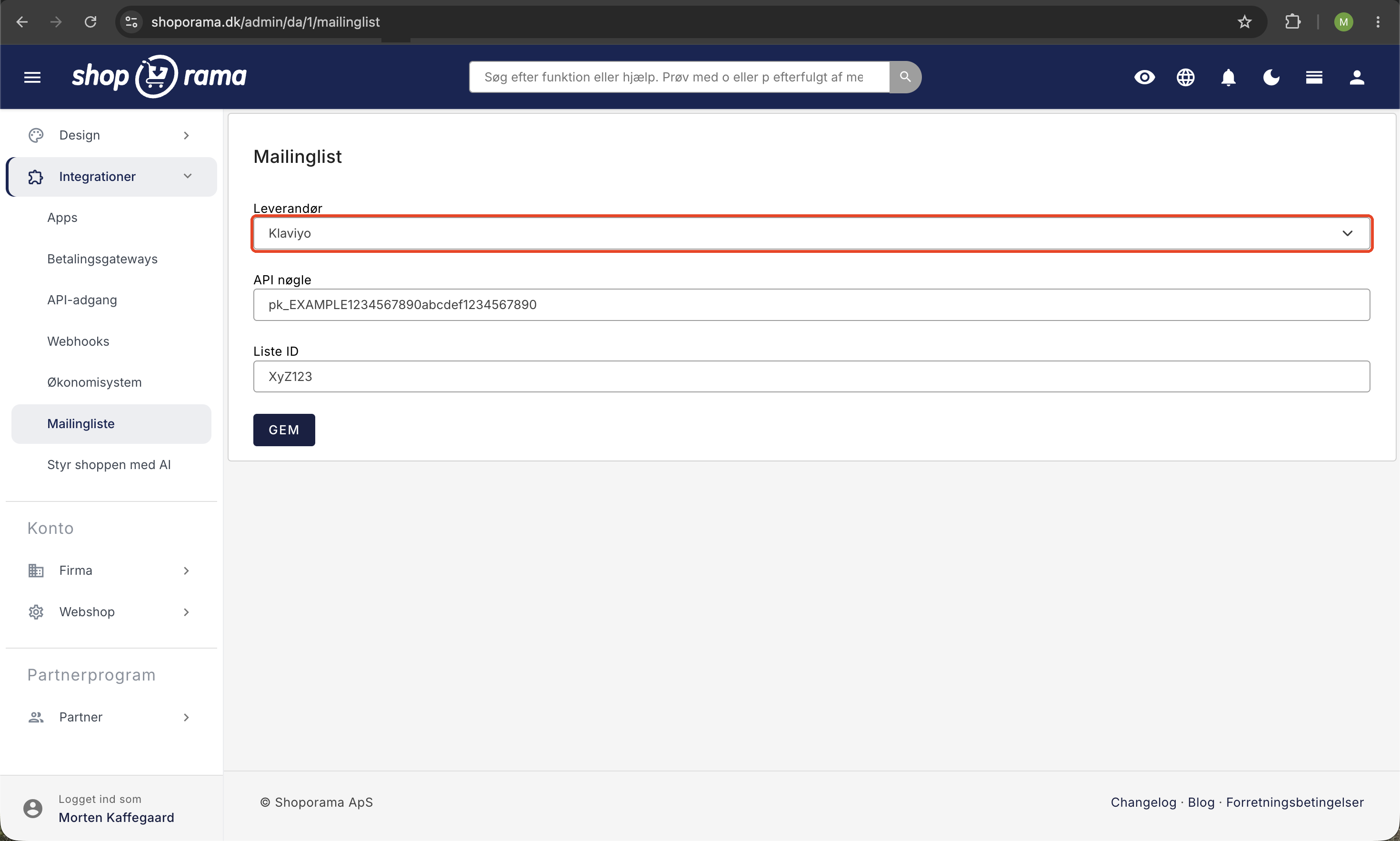
Opsætning
- Opret en konto hos Klaviyo
- Find din Private API Key i Klaviyo under Account → Settings → API Keys
- I Shoporama: gå til Mailingliste i venstremenuen
- Vælg Klaviyo som type i mailinglistens opsætning
- Indsæt din Klaviyo API-nøgle
- Klik Gem
Klaviyo aktiveres altså via Shoporamas mailingliste-modul, ikke som et selvstændigt integrationsmenupunkt.
Hvad synkroniseres?
- Kunder – nye kunder synkroniseres automatisk til Klaviyo
- Ordrer – ordredata sendes til Klaviyo til segmentering og flows
- Produkter – produktdata til brug i anbefalinger og emails
Flows du kan opsætte
Med Klaviyo-integrationen kan du opsætte automatiske email-flows som:
- Velkomstflow – hilsen til nye kunder
- Forladt kurv – påminding til kunder der ikke gennemførte købet
- Post-purchase – opfølgning efter køb
- Win-back – reaktivering af inaktive kunder
Tip
Se også Heysender som alternativ email-marketing platform med Shoporama-integration.
Har du brug for hjælp? Kontakt os på support@shoporama.dk.
Related articles
Set up Heysender integration
Guide to setting up Heysender integration so your transactional emails support DMARC, SPF and have better deliverability.
Brevo integration newsletter signup integration from your webshop
How to connect your Shoporama webshop to Brevo (formerly Sendinblue) so that new newsletter subscriptions automatically land in Brevo. Read what...
HeyLoyalty integration
Guide to setting up HeyLoyalty in Shoporama for email marketing with automatic synchronization of subscribers and order data.
Related features
Email marketing
Integrate with Klaviyo, Brevo, Mailchimp, Ubivox or Campaign Monitor, or use Shoporama's own newsletter system. Automatic synchronization and event...
Newsletter system - send professional newsletters directly from Shoporama
Built-in newsletter system with A/B testing, segmentation, product blocks and statistics. Integrates with Brevo, Klaviyo and HeyLoyalty. Included...