Delaware Theme
A modern and flexible theme for Shoporama that allows you to create a professional online store with advanced features
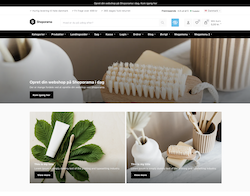
Page designer
Build beautiful pages with our powerful drag-and-drop page designer
Content Sections
-
Hero video with category/landing page
Hero with a background video and links to up to three categories or landing pages
-
Text with image—two columns
Text and image side by side, with the image on the left or right
-
Value Proposition
Display up to four value propositions with icons, such as free shipping and fast delivery
-
Category List
Highlight all or selected categories with images
E-commerce Sections
-
Product Block
Highlight one product with images, variants, and a "Buy" button
-
Product Slider
Product carousel featuring the latest, most popular, best-selling, or featured products
-
Category Slider
Category carousel with images
-
Trustpilot
Display your Trustpilot reviews in a carousel
Advanced Components
Delaware includes many powerful components to create a great user experience
Product Features
- Variant selector with images, prices, and stock status
- Add-ons on the product page
- Product video from YouTube
- Size Guide and Care Instructions
- Up to 3 custom badges per product
- Product Safety Information
User experience
- Customer login & profiles
- Wish lists and favorites
- "Get notified when the item is back in stock"
- Pop-up when an item is added to the cart
- Product Video in a Pop-up
- Slide Basket
- Confetti on the "Thank You for Your Order" page
Freight & Logistics
- Countdown to the next shipment
- Notification of how far the customer is from qualifying for free shipping
- Shipping methods limited to specific ZIP codes
- Products available for pickup only
- Total weight of the cart at checkout
- Delivery times for in-stock items, items in remote warehouses, and out-of-stock items
Price and Payment
- ViaBill price tag on the product page
- AnyDay "Buy Now, Pay Later" price tag
- Discount codes and gift cards in the cart and at checkout
- Volume Discount with Price Table
- Original price under the Omnibus Directive
- Pricerunner badge on the product page
More features
- Share the cart with a link
- Comment section for selected products
- Hide the contents of a bundle
- Language Selector for Your Online Stores
- Online Store Message at the Top of the Page
- Expandable tabs on the product page
Admin Tools
- Admin bar on the online store when you're logged in
- Shortcuts to SEO and Speed Tests
- Product Analysis: 7-Point Checklist
- Create a redirect directly from the 404 page
- Schema.org validator
- Shortcuts to Page Designer, Theme Settings, and Text
Integrations
Delaware supports a number of popular integrations

Trustpilot
Show reviews and ratings directly on your webshop
- TrustScore at the top and at checkout
- Review carousel in the footer and in the Page Builder
- Product reviews on the product page
Clerk.io
AI-driven personalization and recommendations
- Search via Clerk instead of the theme's own search
- Similar products on the product page
- Popular Products on Category Pages
- Recommendations in the cart
ViaBill
Show your customers that they can pay in installments
- Price tag on the product page
- Shows the current price of the item
- Sign in with your ViaBill Shop ID
AnyDay
Buy now, pay later solution
- Price tag on the product page
- As shown
- Get started with your AnyDay Price Token
E-marked
Show your e-commerce certification
- The E-Mark logo at the top and next to the "Buy" button
- The E-mark widget at the top, on the product page, and in the footer
- Each location is enabled individually
Pricerunner
Display the Pricerunner price badge on your products
- Badge in the product gallery
- Matches based on the item's item number
- Log in with your Pricerunner Account ID
Customer login & Profiler
Full customer profile functionality for better customer relationships
Customer Profile Features
-
Order history
View open and completed orders by date, status, and amount
-
Saved Addresses
Billing address and an alternate shipping address
-
Favorites/Wish list
Save your favorite products for later
-
Returns and Cancellations
Start a return or cancel your purchase directly from the order list
-
Subscriptions
Manage subscriptions, change delivery settings, and update your payment card
Benefits for the store
-
Faster checkout
Saved information means faster purchases
-
Customer Registry
Customers with profiles can be identified across orders
-
Email marketing opportunities
Targeted marketing to registered customers
-
Easy to shop again
Customers can find their orders, wish lists, and subscriptions all in one place in their profile
Tip: Enable customer login under Design > Theme Settings: Check the box next to "Enable Login (Beta) " in the " Checkout: General " group and next to "Enable Create Profile (Beta) " in the " Checkout: Address" group. In the English version for Delaware, the fields are labeled "Enable Login (Beta)" and "Enable Create Profile (Beta)."
Checkout
A modern and conversion-optimized checkout process
Mobile Payments
Apple Pay
Fast payment for Apple users, such as via Stripe
Google Pay
Easy payment for Android users, such as via Stripe
MobilePay
Denmark's most popular mobile payment methods, such as Quickpay or OnPay
Checkout Features
-
Order Sales
Recommendations at checkout and in the shopping cart based on what others have bought along with the items in the cart
-
Discount Codes and Gift Cards
Field for discount code or gift card in the shopping cart and at checkout
-
Shopping Cart Sharing
Share your shopping cart with others via a link
-
Customer login & Create profile
Let customers create profiles and log in
-
Newsletter Sign-Up
Optional checkbox at checkout with a link to the privacy policy
-
B2B/B2C/B2G support
The customer selects "Private," "Business," or "Public (EAN)" at checkout
Admin Tools
Powerful tools to manage and optimize your online store
Admin Bar
SEO & Performance Testing
- Link to PageSpeed Insights
- Schema.org Validator
- Rich Snippet Validator
- Links to the page in Search Console
- Accessibility Checker
- W3C i18n Checker
- Facebook Debugger
- Security Headers Check
Product Analysis
7 checkmarks on the product page that indicate whether the product has:
- Images
- Item number
- Description
- Categories
- Main category
- Relatere products
- Simular products
Tip: The admin bar appears when you're logged into Shoporama and visit your own online store. If you're on a 404 page, you can set up a redirect with a single click, and on product pages, the product analysis uses colors to show what's missing.
Theme settings
Customize Delaware down to the last detail
General settings
- Thousands and decimal separators
- Language Code and Regional Settings (5 languages)
- Language Selector for Your Online Stores
- Currency: Show or Hide and Select Display Format
- Debug mode, which reloads CSS and JavaScript on every page view
Visual settings
- Primary color and action color
- Badge Colors
- Image aspect ratio (1:1, 2:3, 3:2, or 16:9)
- Image Adjustment (Crop or Show Entire Image)
- Distance and Background in Photos
Filters
- Checkbox filters on attributes
- Filter by brand
- Sort by popularity and price
- Select the filters based on the attributes' tags
- Enable this setting for categories and landing pages separately
Email Templates
- About 30 email templates
- Subscription Emails
- Emails for in-store pickup
- Dynamic tags such as [customer_name]
- Follow-ups, Reviews, and Abandoned Carts
SEO & Schema
- Global schema settings for the store
- Product List with Prices and Inventory
- Reviews and Overall Rating
- Breadcrumbs and Product Lists
- The Basics of Rich Snippets in Google
Custom code
- Custom CSS in the theme settings
- Custom stylesheet under Design > Stylesheet
- Page Designer section: Custom code for HTML, schema, and scripts
Shortcodes
Insert dynamic content into your text using shortcodes
Product codes
[products category="123"]
Display products from a category. For example, add columns="4" max="8" to control the number of columns and products
[products ids="12,34,56"]
Display selected products based on their ID
[products landingpage="123"]
Display products from a landing page
Content Shortcuts
[link type="product" id="123"]
Link to a product. Also works with categories and landing pages.
[youtube_embed id="abc123"]
Embed a YouTube video using the video's ID
[terms_trade]
Insert your terms and conditions. Also available as [terms_return], [terms_delivery], [terms_payment], [terms_eprivacy], and [terms_gdpr]
Advanced Features
Extra functionality for professional webshops
Variant Dropdown
Advanced dropdown menu for product variants with images, prices, and stock status
Admin Bar
Quick access to admin functions directly from the webshop
Product Analysis
Built-in tool to analyze product quality and optimization opportunities
Advanced search
Search with suggestions as the customer types, including categories and product images
Stock status
In-stock status with badges, "In Stock" indicator, and backorder notification
Bundles
Display the contents of a bundle with images and let the customer choose a variant for each item
Performance & SEO
Optimized for speed and search engines
Performance Features
-
Lazy loading
Images are loaded only when they come into view
-
Optimized files
Minified CSS and JavaScript
-
Deferred JavaScript
Scripts are loaded using `defer` so the page loads faster
-
WebP images
The images are provided in the lightweight WebP format
SEO Features
-
Structured data
Schema.org for products, categories, and the homepage
-
Breadcrumbs
Displayed on the page and as structured data
-
Shared Image
Custom image when the page is shared on social media
-
Custom Error Pages
Text and heading on the 404 and 410 pages
Ready to get started with Delaware?
Start your free trial and experience all the powerful features