Sell downloadable products
Guide to selling digital downloadable products (PDF, audio, video, ZIP, etc.) in Shoporama. How the download link works, what the customer sees after purchase and what you need to be aware of regarding security.
You can sell digital products on Shoporama, such as e-books, audio files, videos, software, recipes, or graphic design packages. The customer receives a download link in the order confirmation and can also find it in their order history. It’s one of the fastest ways to get started with passive sales because there’s no physical shipping, inventory, or shipping costs.
How to Create a Downloadable Product
- Create a new product as usual under Products.
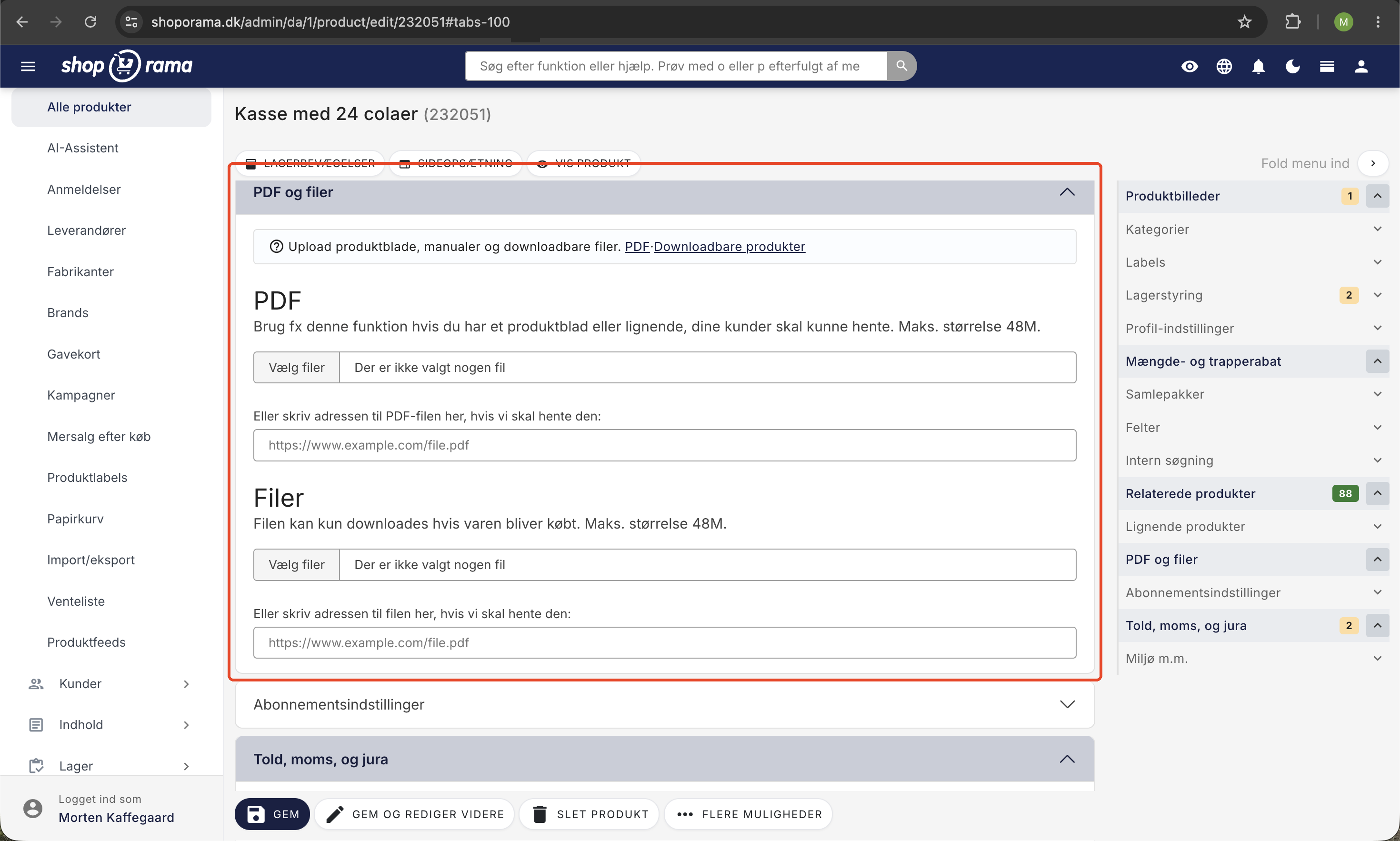
- Find the Files section on the product edit page.
- Click Upload and select the file you want customers to be able to download.
- You don’t need to mark the file separately. Anything you add to the Files section can only be downloaded after purchase.
- Click Save.
You can attach multiple files per product. Each file becomes available to the customer via a link after purchase.
What does the customer see after purchase?
Once the order is completed and paid for:
- The customer receives an order confirmation via email with a download link for each file associated with the purchased products.
- The link can also be found in the customer’s order history under “My Account.”
- Clicking the link downloads the file directly in the browser. The file opens or saves depending on the customer’s device.
The link is formatted as /download-file?f=<order-id>|<product-id>|<security-code> and consists of three parts: the order ID, the product ID, and a security code calculated based on the customer’s email address. The link is thus tied to that specific order.
Important security information: The download link does not require a password, login, or expiration date, but it is signed: The URL contains a security code (a hash of the customer’s email address) and is tied to the specific order, so the link cannot be guessed. Specifically, this means:
- The customer can download the file as many times as she needs. This is an advantage.
- If the customer forwards the link or it ends up in a public place (e.g., on a forum), others can also download the file.
- The link does not expire on its own. If you want to stop access to a file, you must delete the file from the product in the admin panel.
If you sell highly sensitive or expensive digital products, consider watermarking PDFs with the buyer’s information or using an external delivery service with access control.
Shipping for Digital Products
For purely digital products, you can create a free shipping option (e.g., “Digital Delivery for 0 kr.”) so the customer doesn’t pay shipping for something they simply download online. You can also choose to display this shipping option only when the cart contains exclusively digital products.
Supported file formats
- PDF, such as e-books, manuals, recipes, or documents.
- ZIP, e.g., software, graphic packages, or collections of files.
- MP3 and MP4, e.g., music, podcast episodes, or videos.
- Other formats, such as EPUB, PSD, AI, or image files. Virtually all file types can be uploaded.
Note that the file is delivered with its own file type and as an attachment (Content-Disposition: attachment), so the browser downloads the file rather than opening it inline. For other formats, such as ZIP and MP3, the browser will typically save the file, or you can right-click and select “Save As.”
Tip: If the file needs to be available before a purchase (e.g., a product sheet, a data sheet, or a size guide), then you don’t need a downloadable product. Instead, read Attach a PDF to Products.
Frequently Asked Questions
Is the download link time-limited or signed with a token?
The link does not expire and does not require a login, but it is signed: The URL contains a security code (a hash of the customer’s email) and is tied to the specific order. It consists of the order ID, the product ID, and the security code. This means that the customer can safely download the file again later, but it also means that the link is effectively public if it’s shared with others. Keep this in mind if you’re selling something you don’t want to be freely distributed.
Can I limit the number of times the file can be downloaded?
No. There is no download counter, no IP blocking, and no user binding on the link. If you need strict access control per purchase, you must either deliver the file via an external service or watermark the file per order so that a shared link can be traced back to the sender.
How large can the file be?
The admin panel displays a maximum file size during upload (set by the server’s upload limit), and large files (e.g., videos over 1 GB) can take a long time to download, especially on mobile devices. Feel free to compress PDFs and bundle related files into a ZIP so the customer only has to download one file.
Can I replace the file without creating a new product?
Yes. Delete the old file under “Files” for the product and upload the new one. The next time a customer downloads it, she’ll get the latest version, even if she goes back in her order history to a previous purchase.
What happens if a customer loses their order confirmation?
Ask the customer to log in under “My Account” and open the order in their order history. The link is in the same place. You can also find the order yourself in the admin panel under Orders and resend the order confirmation.
How is this reflected in the accounting?
A downloadable product is recorded in the books as a regular item. Remember to set the correct VAT rate, and consider whether you’re selling to EU private customers (OSS rules), businesses (B2B), or for export, as this affects how VAT is handled in your accounting software.
Can I sell both a physical and a digital version of the same product?
Yes. Create two products (e.g. , My Book , Paperback and My Book, PDF), or use variants where the digital variant has a file attached and the physical one does not. Remember to give the two variants different SKUs.
Where exactly on the page is the download link located?
The link appears in the HTML of the order confirmation, and the same link is on the order page under “My Account.” The URL points to the /download-file-path on your online store with the parameter “f,” which contains the order ID, product ID, and a security code.
Does the customer need to be logged in to download the file?
No. The link does not require a login, so the customer can click directly from their email without logging in. This is convenient for the customer, but it also means that anyone with the link can download the file.
How do I revoke access to a file if I change my mind?
Delete the file from the product in the admin panel under “Files.” The link will then no longer point to the file, for either new or existing customers. Keep in mind that this also removes access for customers who purchased it legally, so you may want to send them an updated version instead.
Need help? Contact us at support@shoporama.dk.
Related articles
Attach PDF to products
How to attach PDF files such as product sheets, manuals, datasheets or certificates to your products in Shoporama. Including example of correct...
Attach file to the order confirmation
Guide to attaching a file (e.g. terms and conditions) to the order confirmation in Shoporama.
Subscriptions
Learn how to set up subscriptions in Shoporama so your customers can create recurring orders with automatic payment and delivery at set intervals.