Abandoned baskets statistics - understand and reduce lost sales
See how many shopping carts are abandoned, what your recovery rate is and how reminder emails help you save lost sales in Shoporama.
What is an abandoned cart?
An abandoned cart occurs when a customer adds items to their shopping cart but leaves your online store without completing the purchase. It’s one of the most common phenomena in e-commerce—globally, between 60% and 80% of all shopping carts end up being abandoned. So while it’s completely normal, it also represents a huge sales opportunity that you can capitalize on.
The Statistics Page
Under Statistics → Abandoned Carts, you’ll get a comprehensive overview of your abandoned carts and your ability to recover them.
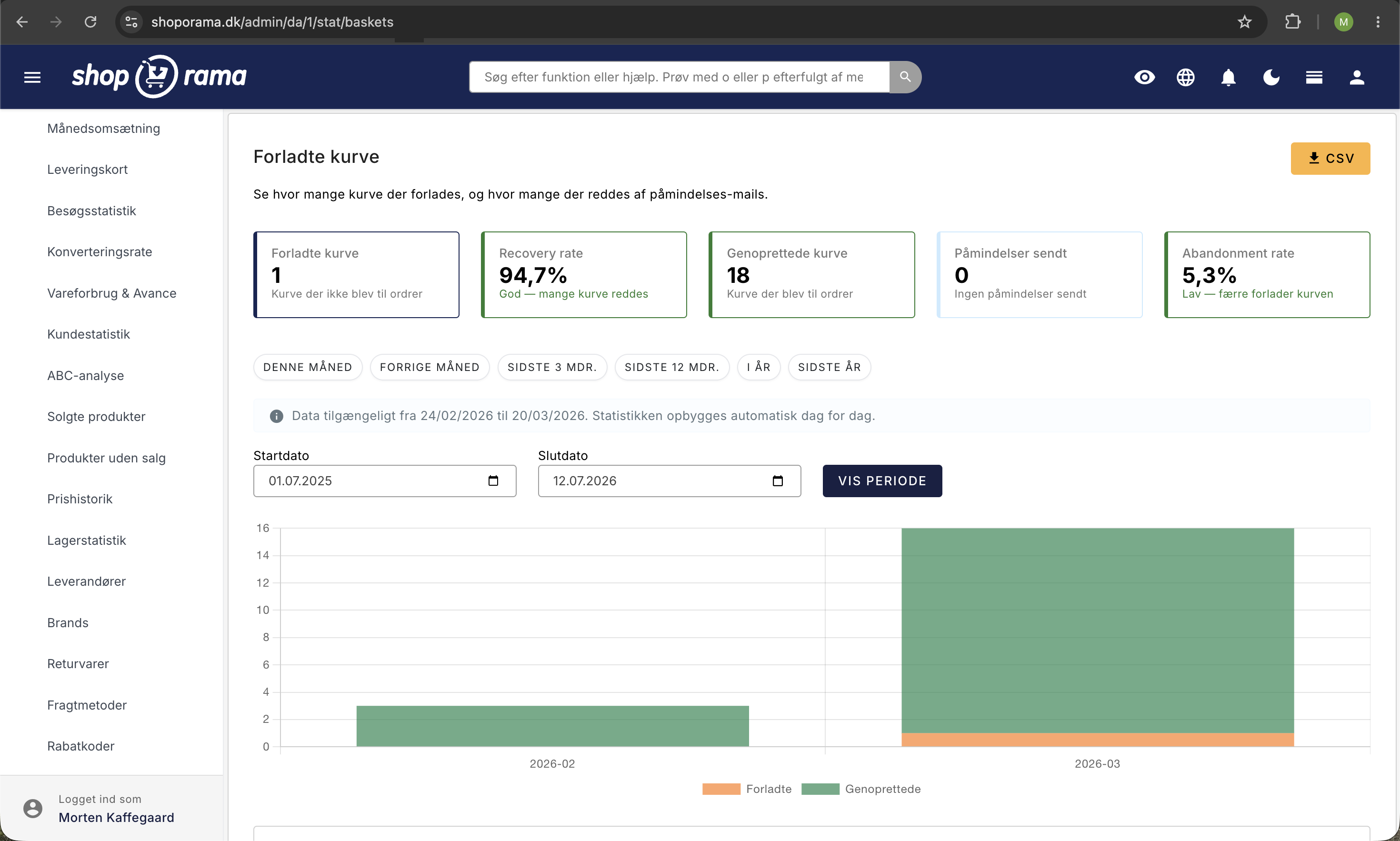
The four key metrics at the top
- Abandoned carts — the total number of carts abandoned during the period.
- Recovery rate — the percentage of abandoned carts that were ultimately converted into completed orders. A recovery rate of 5–15% is typical for online stores that use reminder emails.
- Recovered carts —the number of abandoned carts that resulted in completed orders. You would have lost these sales without the recovery efforts.
- Reminders sent — the number of reminder emails sent to customers with abandoned carts.
Stacked bar chart
The chart shows abandoned vs. recovered carts over time, broken down by day or month. The two colors make it easy to see the ratio of lost to recovered sales. Look for spikes—they may indicate technical issues in the checkout flow or campaigns that attracted traffic without converting.
Daily and monthly table
The table provides detailed figures by day or month: number of abandoned carts, recovered carts, recovery rate, and number of reminders sent. Use the table to spot trends and evaluate the impact of changes you’ve made to your checkout.
What is the recovery rate?
The recovery rate is the percentage of abandoned carts that ultimately result in completed orders. The most important factor for a good recovery rate is reminder emails —automatic emails sent to customers who have abandoned their carts. In Shoporama, you can enable reminder emails that automatically send a friendly reminder to the customer with a link directly to their cart.
Tips for reducing abandoned carts
- Enable reminder emails —they’re your most effective tool. A well-crafted reminder email can recover 5–15% of abandoned carts. See “Open Carts” for setup instructions.
- Reduce shipping surprises —one of the most common causes of abandoned carts is unexpected shipping costs. Display shipping costs as early as possible in the checkout flow.
- Simplify your checkout process —the fewer steps and fields, the fewer customers will abandon their carts. Read about checkout processes and shipping calculations to optimize the process.
- Offer multiple payment methods —if customers can’t find their preferred payment method, they’ll abandon their cart. Be sure to offer credit cards, MobilePay, and any payment plans you offer.
- Monitor the recovery rate over time —use the statistics to measure the impact of the changes you make. A rising recovery rate is a clear sign that your efforts are working.
Combine insights from abandoned cart statistics with conversion rate statistics to get a complete picture of where in the purchase journey you’re losing customers—and where you can take action.
Related articles
Open baskets - View and restore abandoned shopping carts
Statistics and analytics in Shoporama
Get an overview of Shoporama's built-in statistics tools: dashboard, revenue, profit margin, ABC analysis and much more. Learn how to use data to...
Conversion rate - understand and improve your stats
Understand what your conversion rate means and how to use the statistics page in Shoporama to track your progress over time.
What is the difference between open basket and closed basket?
Understand the difference between open and closed baskets in Shoporama - stock reservation, customer experience and which type is right for your...
Customize your checkout
Guide to customizing the checkout flow in your Shoporama online store, including payment methods, shipping, customer fields and gift cards.
Related features
Cart abandonment rate
Cart abandonment rate is the percentage of customers who leave the cart without buying. Learn about common causes, solutions and abandoned cart...
Funnel - funnel
A funnel visualizes the customer journey from first visit to purchase in your webshop. Learn about the stages, measurement and optimization of your...
Statistics and analytics
Dashboard, revenue, profit margin, ABC analysis and more. Shoporama's built-in statistics tools give you insights to run your online store profitably.