Handle returns
Guide to Shoporama's returns center - handle returns, create credit notes, and manage customer return requests.
The Returns Center in Shoporama gives you a comprehensive overview of returned items and makes it easy to handle returns from your customers. You can filter, search, and browse through all your return cases and export data to CSV.
Cancellation and return are not the same thing. When a customer cancels a purchase, it is a legal declaration that is handled through the new digital cancellation feature. The Returns Center handles the subsequent return of the item. Learn more in Digital Cancellation: Let Customers Cancel Their Purchase Online.
Open the Returns Center
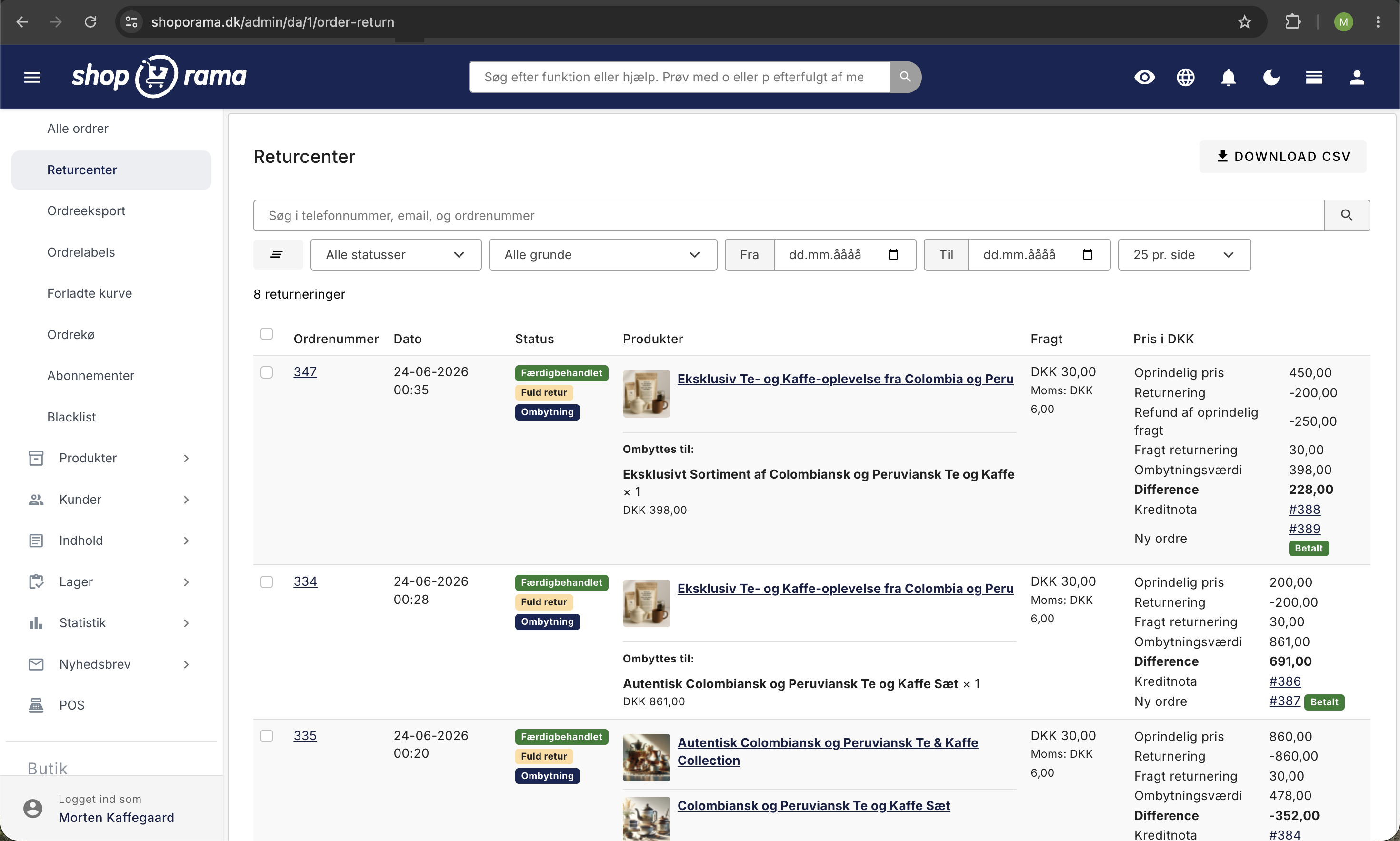
Go to Orders > Returns Center in the menu. Here you’ll see an overview of all returned items with status, order number, product, reason, and date.
Process a return
- Open the return case from the overview
- View the customer’s reason for return and any comments
- Select whether the item should be refunded, exchanged, or rejected
- Update the status and save
Search and filter returns
The overview has a filter bar so you can quickly find exactly the returns you’re looking for.
- Search by the customer’s phone number, email, order number, or return ID
- Status: All, New, or Processed
- Reason: The dropdown shows all the return reasons your customers have used, with the number in parentheses, so you can immediately see which ones are most common
- Date Range: From and to dates so you can view a specific month, quarter, or campaign period
- Number per page: Switch between 10, 25, 50, and 100 rows per page
All filters can be combined and work simultaneously. Click the Reset icon on the far left to clear all filters. The number of returns that match your filters is displayed immediately below the filter bar.
Export to CSV
You can export return data to a CSV file that can be opened in Excel, Google Sheets, or Numbers. This is useful if you want to analyze return reasons, create monthly reports for your accounting, or share data with a colleague.
Click the Download CSV button at the top of the page (or at the bottom below the table). While the file is being generated, the button displays a loading icon, and it resets automatically once the download is complete.
The CSV contains the following columns:
- Order Return ID: The return’s unique ID
- Order ID: The original order’s ID
- Status: New or Processed
- Product: The product’s name
- Product SKU: Product ID/item number
- Reason: Customer's reason for return
- Created: Creation date
The download respects the active filters. If you’ve set a date range and a reason before clicking “Download CSV,” you’ll only get the returns that match those criteria. If you want all returns, simply reset the filters first.
If you’ve set a date range, it’s automatically reflected in the file name (e.g., order_returns_2026-01-01_2026-04-30_20260422150000.csv), so you can recognize the export in the folder afterward.
The Customer’s Return Process
The customer can request a return from their order history in the online store. They select the product they want to return, specify a reason, and submit the request. You receive the return request in your returns center.
Manage Returns Using AI
You can ask an AI assistant to find returns for you, update the status, and add notes to an order. The AI can quickly give you an overview of how many returns are open, what they’re about, and which ones are awaiting your processing.
Note that the AI cannot automatically issue a refund through your payment gateway. The actual refund must still be processed via “Credit Order” in the admin panel or directly through your payment provider. However, the AI can mark the order as returned and update your own notes.
Examples of prompts you can copy:
Show me all open returns from the last month.Find the return for order 10245 and add the note “Item received in good condition.”How many returns have I received this week, and which products are involved?Read more about how you can manage your store with an AI assistant in the blog post “Now You Can Manage Your Entire Online Store via Chat.”
Credit Memo for Returns
When you approve a return, you can create a credit memo directly from the order. Read more in the article “Credit Memos and Refunds.”
Store Credit Instead of a Refund
You can let the customer choose a store credit instead of a refund. This keeps revenue in the store. The feature is enabled at the bottom of the Returns Center page with two settings:
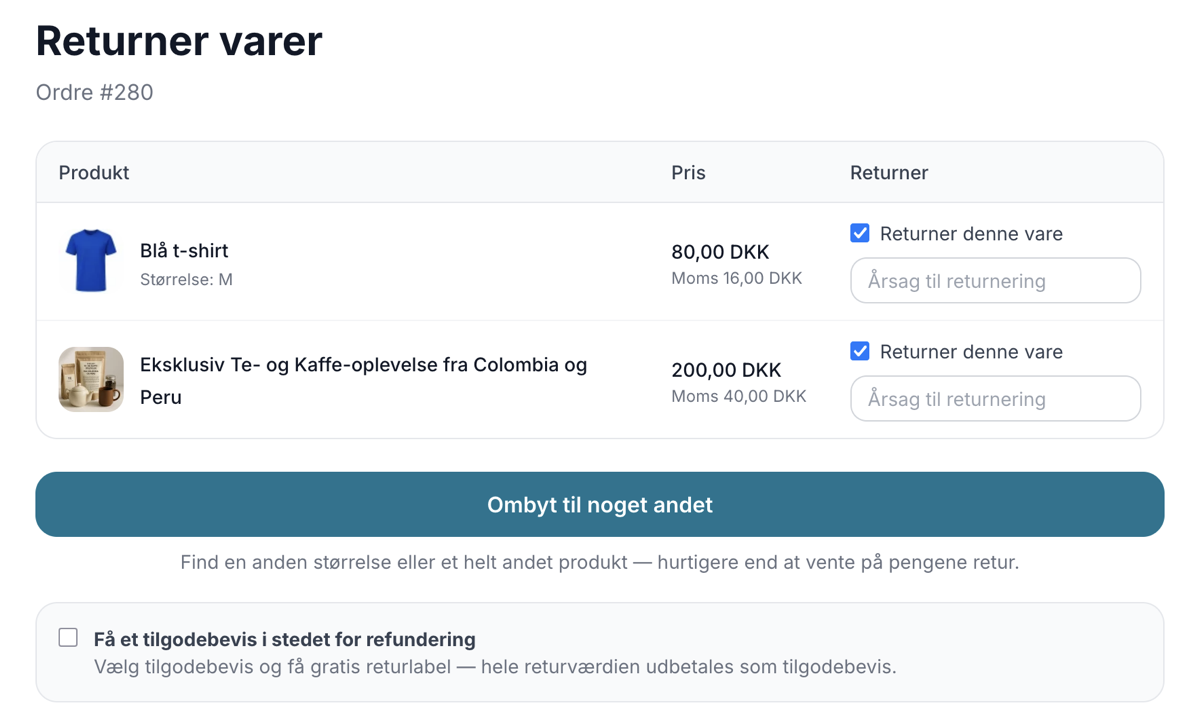
- Offer the customer a store credit instead of a refund – Displays a checkbox in the customer’s return flow where the customer can choose store credit for the entire return
- Free return label when the customer chooses a store credit – Does not deduct the return shipping cost, so the full return value is issued as a store credit. A good incentive to choose a store credit
Once a customer has chosen a store credit, the return appears in the overview with a “Store Credit” label. When you approve the return, Shoporama automatically creates a gift card for the return amount, sends the code to the customer via email, and displays the code on the return case with a link to the gift card. The credit memo is created as usual to ensure your accounting is accurate; the store credit is a separate transaction on top of that.
The customer will therefore receive either a refund or a credit note. Read more in Gift Cards and Credit Notes.
Exchange Instead of a Refund
If you’ve enabled exchanges on the Returns Center page, the customer can choose to exchange the item for a different size or a different product instead of getting a refund. This is often the best solution for both parties: the customer gets the right item, and you retain the sale.
An exchange appears in the returns overview with an “Exchange” label. When you open the return case, you can see the items the customer is returning, the items the customer wants instead, and the difference between them (whether the exchange is more or less expensive).
You approve an exchange using the same “Approve” button as for all other returns. Upon approval, Shoporama automatically creates two documents:
- A credit memo for the items the customer is returning
- A new order for the items the customer is exchanging for
The return case links directly to both the credit memo and the new order, giving you a complete overview. You don’t need to contact the customer yourself regarding payment or any excess amount—the system handles that:
- If the exchange is more expensive, the customer will automatically receive a payment link for the difference, and the return value will be refunded to their card
- If the exchange is less expensive, the new order is covered by the return, and the excess amount is sent to the customer as store credit or a refund to their card, depending on what the customer selected in the return process
If you cover the return shipping costs for exchanges yourself, you can set a limit so that the customer can only exchange once per order and must therefore include everything in the same exchange. This limit is enabled by selecting “Only one exchange per order” at the bottom of the Returns Center page, and it applies throughout the entire exchange process, meaning that the new order resulting from an exchange cannot be exchanged again either. The customer can still return items and receive a refund.
Exchanges are enabled at the bottom of the Returns Center page along with the store credit option. Read more about the entire process in the article “Returns Center.”
Return Labels
If you have an integration with a shipping provider (e.g., GLS, PostNord, or DAO), you can create return labels for the customer directly from the order.
Troubleshooting
- The customer cannot create a return – Check that the return feature is enabled and that the order has a status that allows returns (typically “shipped”)
- The Return Center isn’t showing all cases – Use the search and filter functions to find specific return cases, or click Reset to remove active filters
- Inventory isn’t updating – Enable “Automatically restock returned items” under Webstore → Returns Center; approved returned items will then be automatically restocked. If you want the item to be restocked only after you’ve physically received it, also enable “Restock the item only when the return is marked as received” and click “Mark as Received” in the Returns Center once the package has been returned
Frequently Asked Questions
How do I handle an exchange in the admin panel?
Exchanges are marked with an “Exchange” label in the overview. Open the return case to view the new items and the difference, then click “Approve.” Shoporama automatically creates a credit memo for the returned items and a new order for the replacement items, and sends a payment link or credit note to the customer.
How many returns can I export at once?
There is no upper limit. Large exports may take a moment, but the button displays a loading icon so you can see that it’s processing.
Can I export all returns since January?
Yes. Set the From date to January 1, leave the To field blank (or set it to today), and click Download CSV.
Can I see the reasons my customers most often provide?
Yes. The Reason dropdown shows each unique return reason with the number in parentheses. The reasons are sorted so that the most common one appears at the top.
How do I use the CSV file in Excel to count returns by reason?
Open the file, select the “Reason” column, and go to Insert > PivotTable. Drag “Reason” into both the Row and Value fields (with Count). You’ll get an overview in just a few seconds.
Does the CSV file contain deleted products?
Yes, but if a product has been deleted, the product name will appear as blank. The return ID, SKU, and reason are still included, so you don’t lose the history.
Can I export data from multiple online stores at once?
No. Each online store has its own returns center and its own CSV file. If you have multiple stores (e.g., a Danish and a German version), you’ll need to log in to each store and download the files separately.
Can I filter by multiple reasons at the same time?
Not all at once. You can select one reason at a time. If you want multiple reasons, you can download the entire file without a reason filter and sort/filter in Excel.
Can I save my filter settings?
Not as a bookmark within the system, but the URL updates every time you change a filter, so you can save the URL as a bookmark in your browser and go directly to the same view next time.
What do “Partial Return” and “Full Return” mean?
A full return means that the entire order is returned. A partial return is when the customer returns only some of the products. Both are clearly shown in the overview.
How do I offer the customer a store credit instead of a refund?
Enable “Offer the customer a store credit instead of a refund” at the bottom of the Returns Center page. This allows the customer to choose a store credit during the return process, and when you approve the return, a gift card for the return amount is automatically created and emailed.
Related articles
Billy's Billing integration
Guide to setting up Billy's Billing in Shoporama. Automatically transfer orders to your accounts, synchronize products and post payments.
Blacklist - Block unwanted orders
Learn how to use Shoporama's blacklist feature to block spam orders and unwanted customers by blacklisting email, phone number or IP address.
Troubleshooting E-conomic integration
Guide to troubleshooting the e-conomic app in Shoporama. Fix sync issues, failed transfers and incorrect posting.
GLS QR Returns: Set up return labels and send them automatically
Guide to GLS QR Returns in Shoporama: Choose the format for return labels (PDF, QR, or both), automatically send the label to the customer, test...
Related features
Now your customers can exchange instead of return
Let customers exchange for a different size or a completely different product directly in the return center. Keep revenue, save time and let the...
Return center - handle returns professionally
Manage returns, issue credit notes and refunds to the customer's card. With return statistics and automatic inventory management.
Markér varer der er undtaget fortrydelsesretten
New feature: Mark custom-made, perishable, and sealed hygiene products as exempt from the 14-day right of withdrawal. The customer is notified, and...