Test your front page against itself - split testing is live in Shoporama
Split testing is now part of Shoporama. You can create multiple versions of your front page, category page or stylesheet, split traffic between them and see which one sells best. The same system can also be used to schedule time-limited pages, such as a Black Friday homepage that turns itself on and off.
Update May 10, 2026
Split testing can now also test entire themes against each other, not just page layouts and stylesheets. If you've built two versions of a custom theme with structural differences (HTML, JavaScript, sections) - not just CSS - you can now compare them directly in Shoporama. The winning theme will automatically become the new shop default.
Theme testing requires a pro subscription and that the shop is running Smarty 4. Read more on the feature page or check out the step-by-step guide.
When you tweak your front page, change a button color or create a new hero area, it can be hard to know if the change actually improves sales. Split testing provides a clear answer: you run two or more versions simultaneously, split the traffic between them and let the numbers decide which one works best.
The feature is now located under Design in your Shoporama admin. It covers both page layouts (front page, category pages, product pages, etc.) and stylesheets, so you can test everything from a completely new front page design to a single button color.
Example: two front pages against each other
This is what it looks like in the Page Designer when two variants of the same front page are running in parallel:

Both front pages are online at the same time and are part of a split test. Each visitor is assigned one of the versions and the same user sees the same version on repeat visits to avoid contaminating the test.
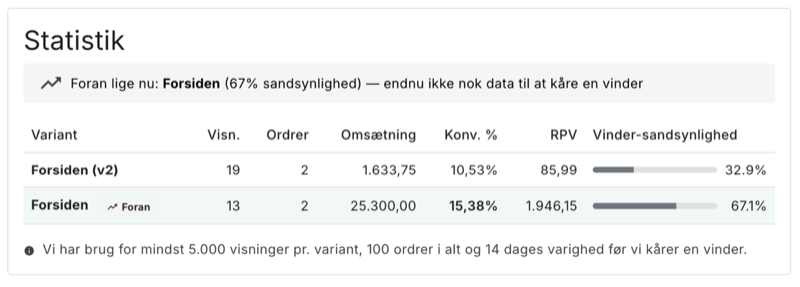
After a few days of running, the statistics look like this:
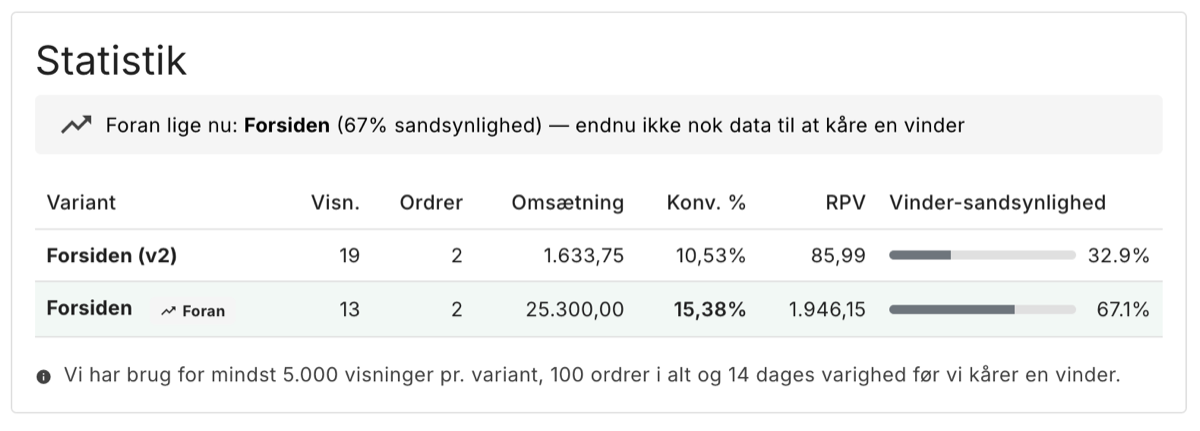
Frontpage converts 15.38% against Frontpage v2's 10.53%. More interesting is the revenue per visitor (RPV): 1,946.15 DKK on the winning variant against 85.99 DKK on the other. The difference is due to both higher conversion and larger orders. RPV combines the two into one number and is therefore the primary measure in the statistics.
Note that the statistic says "not yet enough data to pick a winner". This is intentional. To avoid drawing conclusions based on chance, a minimum of 5,000 impressions per variant, 100 total orders and 14 days duration is required before a variant can be declared a winner.
Also test CSS, e.g. the color of your "Add to cart" button
In addition to page layouts, you can test stylesheet variants. This allows you to compare CSS changes such as button colors, typography, or spacing. You create alternative variants and let them compete:
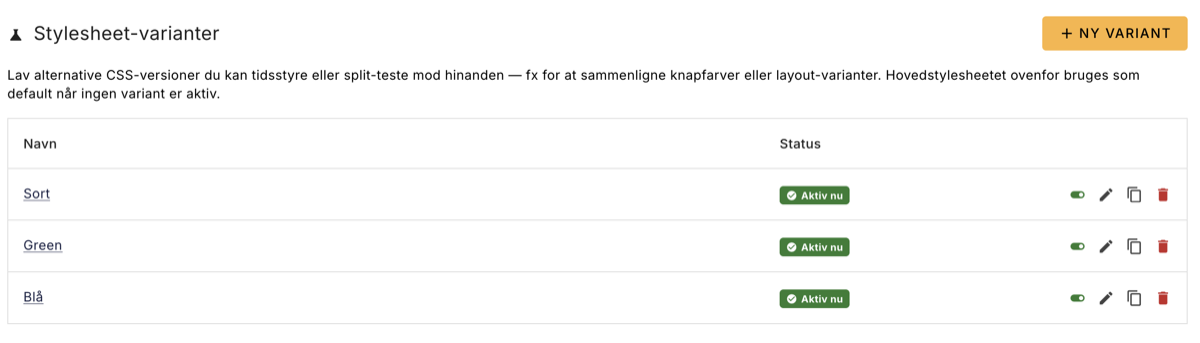
Three variants (Black, Green, Blue) are active at the same time and are included in a split test. The statistics might look like this:
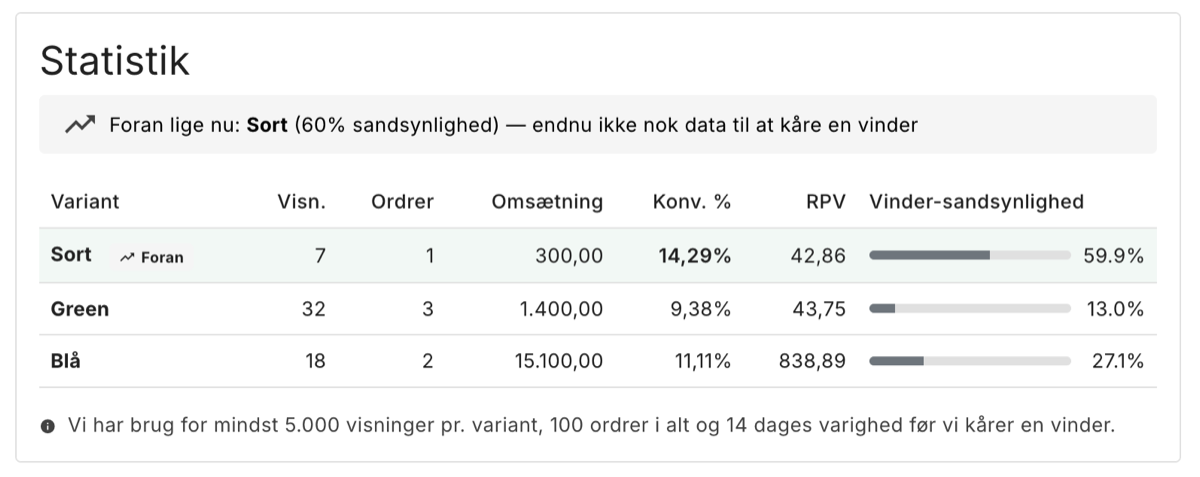
Black has a 60% probability of being the best, but Blue has the highest RPV ($838.89) on the fewest impressions. This illustrates why it's worth waiting for data: a variant with a lower conversion rate can still be the most profitable if it gets more orders. More data will tell the tale.
Time management without split testing
The Variant system can also be used to schedule pages in advance without comparing them. A typical example is Black Friday: instead of logging in on November 28 and switching the front page manually, you create a Black Friday front page and set it to be visible from November 28 to December 1. It will then turn on and off automatically.
It works for all seasons: summer sales, Christmas, Father's Day, Valentine's Day. It can also be combined with split testing, for example by creating two variants of the Black Friday homepage and finding out which one works best on Black Friday traffic.
Automatic completion
Two settings allow a test to run without manual follow-up:
- Stop automatically when there is a clear winner. When the criteria are met and a variant has a 95%+ probability of being the best, the test stops automatically. You will be notified in admin.
- Use the winner as the new default. When the test stops, the winner is put online with high priority and the other variants are put offline. They are not deleted, so you can always roll back manually.
With both enabled, you can create a test, click Start and let it run. When it ends, the winning variant is already activated.
How to get started
The feature is located under Design → Split test. If you're not sure where to start, the front page and the primary button color are typically the places where a small improvement will pay off the most because they are seen by all visitors.
Further reading:
- Feature description: overview of what split testing can do, the statistics behind it, GDPR handling, and bots/SEO
- Step-by-step guide: how to create, run and complete a split test
The feature is included in your Shoporama solution at no extra cost.
More from the blog
Sælg mere med Mersalg efter køb
Det bedste tidspunkt at sælge lidt mere er lige efter, kunden har sagt ja til det første køb. Med vores nye funktion Mersalg efter køb viser...
20. juni 2026
Markér varer der er undtaget fortrydelsesretten
Ikke alle varer er omfattet af 14 dages fortrydelsesret. Nu kan du markere specialfremstillede, letfordærvelige, og forseglede hygiejnevarer...
20. juni 2026
Dine kunder kan snart shoppe via AI: Shoporama er klar til Googles nye protokol (UCP)
Forestil dig, at en kunde beder sin AI-assistent om at finde og købe dine varer, uden nogensinde at besøge din webshop. Google har lanceret...
16. juni 2026