Online Store with Make Influence
Influencer marketing for your online store: Shoporama’s free Make Influence app tracks clicks and discount codes and reports sales excluding tax and shipping. No developer required.
30 days free with no credit card required.
- Danish e-commerce platform since 2013
- Danish support
- No binding
Here's what you get with Shoporama
- 30 days free. No credit card required and no commitment.
- Fixed price on Pro. We don't take a percentage of your sales.
- Everything is built in. Payment, shipping, accounting, and feeds are ready to go.
- Danish support. Responses from people familiar with Danish e-commerce.
Page Content
- An online store powered by Make Influence tracks sales generated by your influencers
- How the Make Influence app works
- What do you get as a store owner?
- How to Get Started
- What to Keep in Mind
- Frequently Asked Questions About Online Stores with Make Influence
- Ready to get a handle on sales from your influencers?
Make Influence is a Danish influencer marketing platform where influencers share links and discount codes to your online store and earn a commission on the sales they generate. With Shoporama’s free Make Influence app, sales are tracked automatically. Here, you can read about how the app works, what benefits it offers, and what you need to be aware of.
An online store powered by Make Influence tracks sales generated by your influencers
When an influencer shares your products, the sale must be traceable back to the influencer. Otherwise, the influencer won’t receive their commission, and you won’t be able to see which collaborations are driving sales. This requires that the Make Influence script be embedded on every page of the online store and that the order be sent to Make Influence once the customer has made a purchase. Previously, a developer had to insert code into the theme. With Shoporama’s free Make Influence app, you can do it yourself in Shoporama without touching the theme.
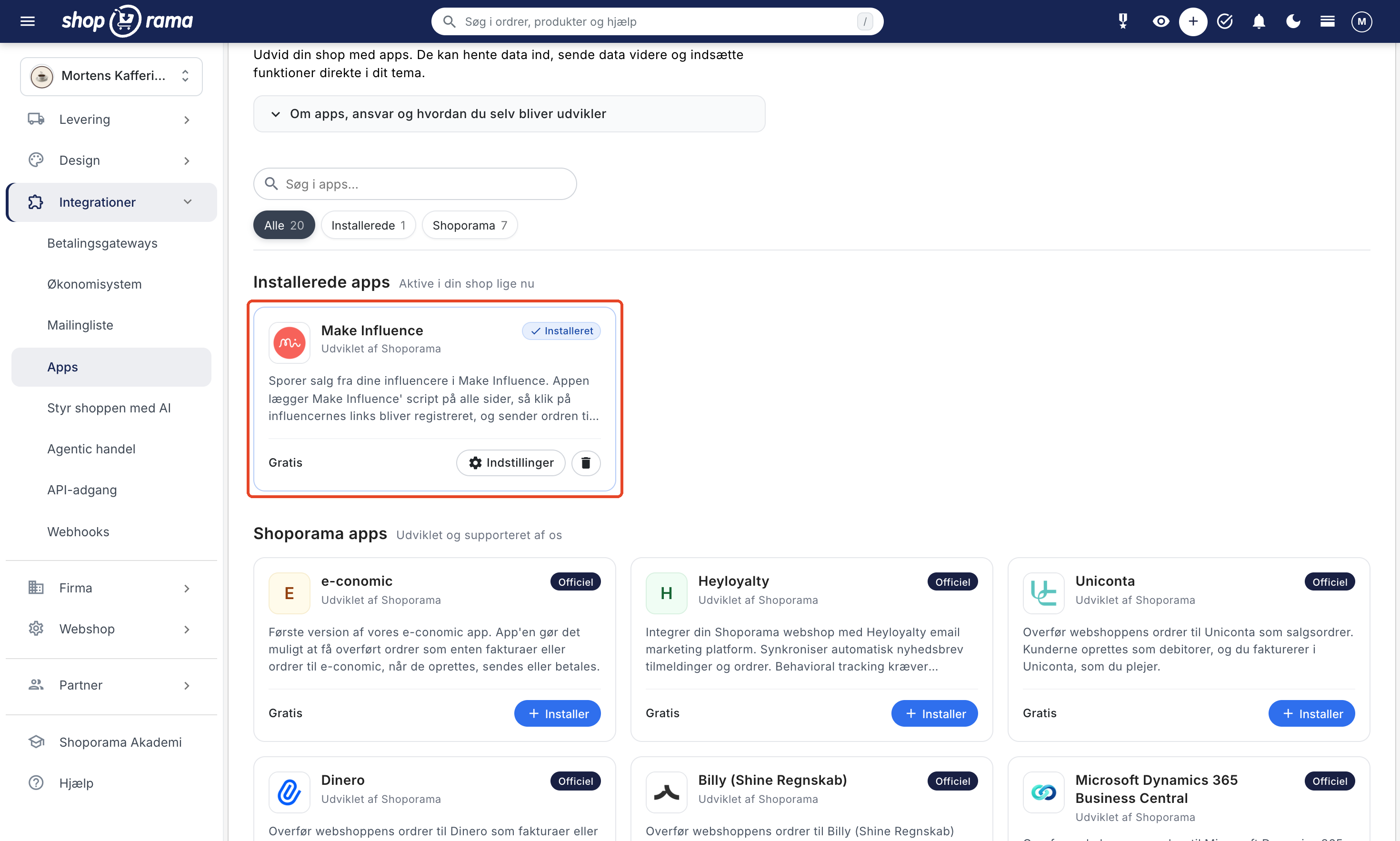
Make Influence is a Danish platform for influencer marketing and affiliate marketing. The app was developed by Shoporama, and you’ll find it under Integrations → Apps. All you need is your Business ID from Make Influence.
How the Make Influence app works
- The influencer shares your products. This is done via a link to your online store, a personalized discount code, or both.
- The customer clicks the link. Make Influence’s script, which the app has placed on all pages, stores a cookie in the customer’s browser for 30 days. This ensures the sale is attributed to the influencer, even if the customer makes the purchase later.
- The customer makes a purchase. If the customer used the influencer’s discount code, it will appear on the order.
- The sale is tracked via the receipt. When the customer views the receipt, the app sends the order number, the amount excluding tax and shipping, and the discount code to Make Influence.
- Make Influence attributes the sale to the influencer based on the click or the discount code.
Each order is sent only once. If the customer reloads the receipt or opens it again, the sale is not sent again, and Make Influence automatically rejects the same order number twice.
What do you get as a store owner?
- No developer required. You install the app and enter your Business ID. The code is inserted outside the theme, so the app works with Shoporama’s themes as well as your own themes.
- Both clicks and discount codes count. The click is remembered for 30 days, and the discount code is included so the sale can be attributed to the influencer, even if the customer didn’t click on a link.
- The correct amount. Make Influence receives the amount excluding tax and shipping, with the discount code, promotional discount, and points deducted.
- No duplicates. Each order is sent only once, and the order number is the same as in Shoporama and on the customer’s receipt.
- Consent is respected. With Shoporama’s free Cookie Consent app, Make Influence’s cookie is set only after the customer has agreed to marketing cookies.
- Free. The app is free in Shoporama.
Try it out on your own online store
30 days free. No credit card required, and no commitment.
How to Get Started
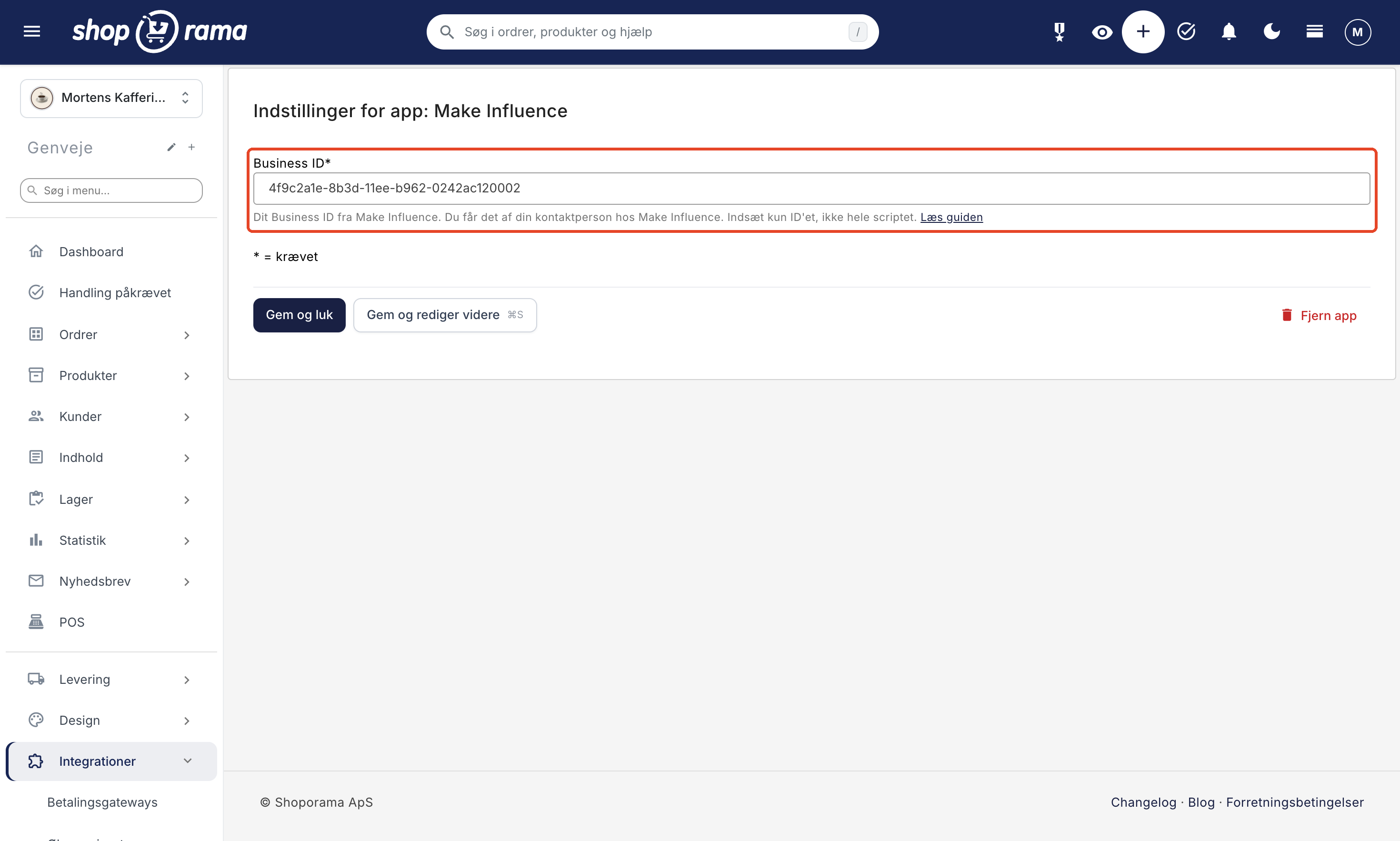
- Get your Business ID. You’ll receive this from your contact at Make Influence. It consists of letters, numbers, and hyphens.
- Install the app. Go to Integrations → Apps in Shoporama, and click Install next to Make Influence. The app’s settings page will open automatically.
- Enter your Business ID. Enter only the ID in the Business ID field—not the entire script—and click Save and Close.
- Remove old code. If a developer previously added Make Influence’s code to your theme, have it removed now to prevent sales from being sent twice.
The full instructions are in the Make Influence guide. You’ll find a brief overview of the app under Make Influence integration.
What to Keep in Mind
- Sales are reported based on the receipt. If the customer closes the browser after payment before the receipt is displayed, the sale will not be reported to Make Influence.
- Returns are not included. The app does not send returns or cancellations to Make Influence. You handle those in Make Influence.
- You’ll find reports and commissions in Make Influence. The app sends the sales data but does not display any influencers or figures in Shoporama.
- Danish kroner and euros. Make Influence only accepts these two currencies. If you sell in multiple countries using a different currency, the amount is converted to the online store’s own currency using the exchange rate at the time of purchase.
- VAT-exempt orders. For an order without VAT—such as an export outside the EU—the order amount is reported excluding shipping.
- Other cookie solutions. If you use a cookie solution other than Shoporama’s Cookie Consent app, that solution must handle Make Influence’s cookie.
- Very old themes. In rare cases, a very old, custom-developed theme may not be able to run the app’s code. In that case, please email support@shoporama.dk.
Frequently Asked Questions About Online Stores with Make Influence
How much does the Make Influence app cost?
The app is free in Shoporama. Your agreement with Make Influence—and what you pay for sales generated by their influencers—is between you and Make Influence.
Where can I find my Business ID?
You’ll receive your Business ID from your contact at Make Influence. It consists of letters, numbers, and hyphens. Enter only the ID in the Business ID field in the app’s settings—not the entire script. The field does not accept other characters, so if you enter the entire script, you won’t be able to save it.
How do I test to make sure the sale is recorded?
Open the online store via a Make Influence link and complete an order all the way through to the receipt in the same browser. If you’re using Cookie Consent, accept marketing cookies on the first page. The test order counts as a real sale in Make Influence, so check with your contact at Make Influence to see what should happen with it.
How much does Make Influence receive?
The order amount excluding tax and shipping. For example, if a customer purchases goods for 500 DKK, including 25% tax, and pays 49 DKK in shipping, Make Influence receives 400 DKK. Discount codes, promotional discounts, points, and gift cards are deducted. The gift card code is not included because it can be used as payment.
What about cookies and consent?
Make Influence’s cookie is called _miid and is a marketing cookie. If you use Shoporama’s free Cookie Consent app, it is set only after the customer has consented to marketing cookies. If the customer declines, it is never set; however, if the customer uses the influencer’s discount code, the sale can still be attributed to the influencer. If you’ve checked the “Enable Content Security Policy (CSP)” box in the Cookie Consent app, enter scripts.makeinfluence.com and system.makeinfluence.com in the “CSP Whitelist Domains” field. Otherwise, Make Influence’s script will be blocked until the customer has given consent. If you’re using a different cookie solution, that solution must handle Make Influence’s cookie.
I already have Make Influence’s code in my theme. What should I do?
Remove the code from your theme when you install the app. Otherwise, sales will be reported twice with two different amounts, because the old code reports the amount including tax. Make Influence only accepts the first one, so it depends on which code is received first.
Ready to get a handle on sales from your influencers?
If you’re already collaborating with influencers through Make Influence, the app is the quickest way to ensure your sales are recorded correctly. If you have a Shoporama online store, install it under Integrations → Apps. If you’re not a customer yet, you can create an online store and try it out for yourself. Need help with setup? Email support@shoporama.dk.
You'll get that with Shoporama, too
Fixed Price on Pro
No transaction fees, no app subscriptions, and no setup fee.
12 payment solutions
For example, Quickpay, OnPay, Stripe, and Flatpay—ready to take action.
Shipping and Accounting
PostNord, GLS, DAO, e-conomic, and Dinero are integrated.
Feeds for Google and Meta
Product feeds for advertising and Google Shopping are included.
Danish support
Responses from people familiar with Danish e-commerce.
No binding
30-day free trial and full data export at any time.