Ajax filtering
Technical documentation for Shoporama's /ajax endpoint for filtering products. For developers and theme designers.
All Shoporama stores have a built-in /ajax endpoint that returns products in JSON format. This makes it possible to implement dynamic filtering, lazy loading, and infinite scrolling without reloading the page, providing customers with a fast and modern experience.
This article is primarily written for developers and those who are building or customizing their own theme. If you’re using the Delaware theme, you already have AJAX filtering out of the box and don’t need to call the endpoint yourself.
How to call the endpoint
A simple call that fetches products from one or more categories:
fetch('/ajax?categories=123&limit=24')
  .then(response => response.json())
  .then(products => {
    products.forEach(p => console.log(p.name, p.price));
  });
By default, the endpoint returns a JSON array of products. If you also want to include metadata and pagination, add `include_meta=1 ` and `include_pagination=1`. You’ll then receive an object containing ` products`, `meta`, and `pagination`.
Available Parameters
Several of the parameters accept pipe-separated values, allowing you to filter by multiple criteria at once. For example, ` categories=12|34|56`.
| Parameter | Description |
|---|---|
| categories | Category IDs, pipe-separated. If multiple IDs are specified, products in at least one of the categories are returned (OR). Add match=all to return only products in all specified categories (AND) |
| force_categories | Same as ` categories`, but enforces the categories without allowing other filters to further narrow them down |
| price_range | Price range as min|max, e.g., 100|500 |
| attribute_values | IDs of attribute values (e.g., color, size), separated by pipes. Multiple values are matched as OR. Add match=all to require that the product have all the specified values (AND), e.g., both a color and a size |
| attribute_tags | Filter attribute values by their tag instead of their ID, e.g., red|blue |
| attribute_tags_in_stock | Same as attribute_tags, but only variants in stock |
| attribute_tag | Filters by an entire attribute (not a specific value) based on its tag, e.g., only products that have the "color" attribute |
| extension[id] | Filter by custom fields. id is the custom field ID, and the value can be pipe-separated |
| brands | Brand IDs, pipe-separated |
| suppliers | Supplier IDs, pipe-separated |
| landing_pages | Landing page IDs, pipe-separated |
| product_ids | Specific product IDs, pipe-separated |
| tags | Filter by product tags |
| sort + sort_order | Sort the results. sort_order is asc or desc (default) |
| limit / offset | Pagination. limit can be at most 1000; higher values are automatically truncated |
| meta | Specific meta field to include for each product. Use _all for all meta fields, or pipe-separate multiple names |
| only_in_stock_variants | Return only variants that are in stock, as indicated in the variant_stock field for each product |
| include_meta | Set to 1 to include attributes, categories, and brands in the results (useful for building a filter UI) |
| include_pagination | Set to 1 to include offset, limit, count, and total |
| pretty | Set to 1 for nicely formatted JSON (good for debugging) |
| rebuild | Set to 1 to force a regenerate of the cache for that specific URL |
Filtering with AND (match=all)
When you send multiple categories or attribute_values, the endpoint matches using OR by default: a product is included if it matches at least one of the values. This is fine for broad overviews, but for faceted filtering, you’ll often want the opposite—namely, only those products that match all the selected values at once.
Add `match=all` to switch to AND logic. Then, the product must have every single one of the specified values to be included. This is exactly what you need when a customer selects both a color and a size in your filter:
// Only products that have BOTH value 401815 AND 401822
fetch('/ajax?attribute_values=401815|401822&match=all&limit=50')
  .then(response => response.json())
  .then(products => { /* ... */ });
`match=all` works on both `categories ` and ` attribute_values`. Without this parameter, `OR` is used as before.
Note: The older parameter `exclude=1` does exactly the same thing as `match=all ` and still works for backward compatibility. The name is misleading, as it does not exclude anything, so use `match=all` in new code.
Note: The parameters `category_id`, `tag`, ` extra_field[..]`, `price_from `, and `price_to ` no longer exist. Use `categories`, `tags`, `extension[id] `, and `price_range` instead. Incorrect names will simply return 0 results or be ignored; they do not trigger an error message.
Example: Category, price range, and color
Retrieve red products priced between 100 and 500 kr. from two categories, sorted by price in ascending order:
const params = new URLSearchParams({
  categories: '12|34',
  price_range: '100|500',
  attribute_tags: 'red',
  sort: 'price',
  sort_order: 'asc',
  limit: 24
});

fetch('/ajax?' + params)
  .then(r => r.json())
  .then(products => renderProducts(products));
Example: Filter using extension fields and retrieve metadata
Extension fields are specified by the extension field’s ID in parentheses. You can find the ID under Settings → Extended Fields in the admin panel. Example where extension field 5 (e.g., "material") must be either "cotton" or "linen":
// extension[5]=cotton|linen
fetch('/ajax?categories=12&extension[5]=' + encodeURIComponent('cotton|linen') + '&include_meta=1&include_pagination=1&limit=24')
  .then(r => r.json())
  .then(data => {
    console.log(data.products);
    console.log(data.meta.attributes);
    console.log(data.pagination);
  });
Fields for each product in the response
Each product in the `products` array has the following fields, among others:
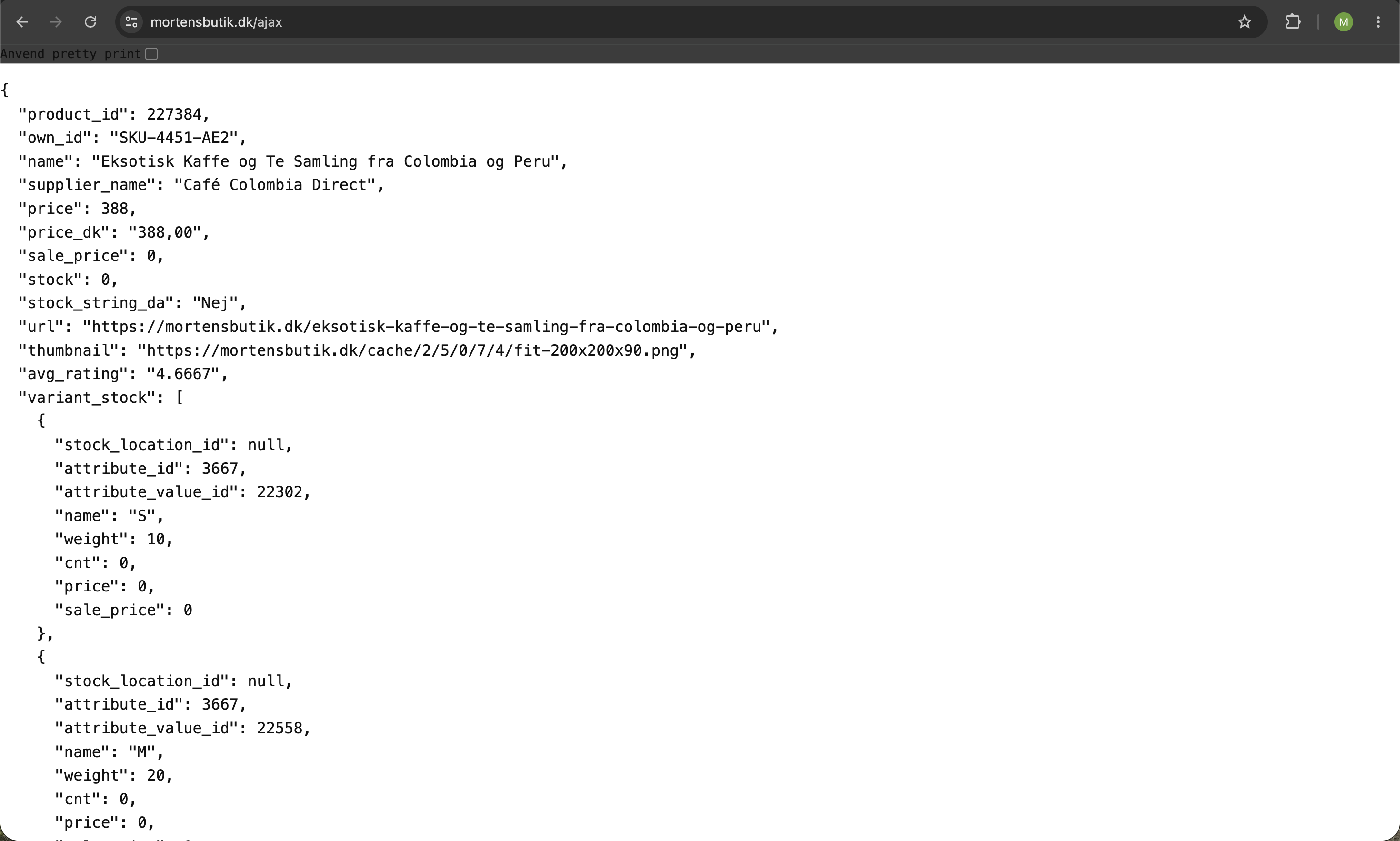
- product_id, own_id, name, description, list_description
- price, real_price, sale_price, price_dk (formatted for Danish)
- stock, attr_stock, variant_stock, stock_string_da
- brand_name, supplier_id, supplier_name, profile_name
- category_ids, category_names
- thumbnail (200x200), thumbnails (array of all images at 200x200), url
- avg_rating, online_since, delivery_time, delivery_time_not_in_stock, approx_shipping
- has_campaigns, campaign_info
- meta_values (only filled in if you send meta=...)
If the online store has enabled "hide stock via AJAX," stock, attr_stock, and stock quantities in variant_stock will be null, so that stock numbers are not publicly disclosed.
Caching
The endpoint is cached on the server for 12 hours per unique URL. The response is also sent with correct Last-Modified and Expires headers, so that browsers and intermediate caches can return a quick 304 Not Modified if the content is unchanged. This ensures fast response times, but it also means that changes to a product won’t take effect until the cache expires. You can force a cache rebuild for a specific URL by adding `rebuild=1`.
Read more in the article “Caching in Shoporama,” which provides an overview of the cache layers in general.
Implementation in Your Theme
To build a complete AJAX-filtered product list, the developer typically needs to:
- Build a filter UI with checkboxes or dropdowns based on ` meta.attributes`, ` meta.brands `, and `meta.categories`
- Listen for changes to the filters and combine them into a query string
- Call /ajax with the selected parameters
- Dynamically update the product list and display pagination based on `pagination.total`
Tip: Read more about filtering in general in Filtering on Your Webshop. If you’re using the Delaware theme, you already have AJAX filtering out of the box.
Frequently Asked Questions
Where can I find the ID of a custom field or an attribute value?
In the admin panel under Settings → Extended Fields for custom fields, and under Settings → Profiles for attribute values. The IDs are displayed in the list or in the URL when you edit a field.
Why am I not getting any results when I use category_id=123?
Because the parameter doesn’t exist. Change it to categories=123 (plural). This is one of the most common mistakes when building AJAX filtering for the first time. Also, make sure you’re not usingprice_from/price_to or extra_field[...], as those don’t exist either.
My changes to a product aren’t showing up on /ajax. What should I do?
The endpoint is cached for 12 hours. Wait, or retrieve the URL with &rebuild=1 to force a regeneration of that specific URL.
Do lots of AJAX calls affect my website’s speed? (Mikkel, developer)
The cache ensures that repeated calls are fast. However, be careful not to make a new call for every single keystroke in a search field. Use "debounce" so that you only make the call after the user pauses for 200–300 ms. The browser also uses If-Modified-Since, so unchanged responses return as 304 and use almost no bandwidth.
Will I get the same result as on the category page?
Pretty much. /ajax follows the same rules that ProductFactory uses on category pages, so filtering, sorting, and visibility (e.g., hidden products) behave the same way.
Can I perform a search on /ajax? (Sofie, new hire)
/ajax does not accept a free-text search parameter. For searching, you must use Shoporama’s dedicated search endpoint in the theme (typically /search) or filter by product_ids if you’re handling the search yourself and simply want to retrieve data for a known list of products.
How many products can I retrieve in a single call? (Jonas, Scale)
You can retrieve up to 1,000 products in a single call. If you request more, the response is automatically capped at 1,000, and the shop will simultaneously receive a notification in the admin panel under Messages so you can see it. In practice, you should aim for a somewhat lower number. A few hundred per request keeps the JSON payload small and the response fast, which is especially important for mobile users. Use `limit` and `offset` for pagination, or only fetch the next batch when the user scrolls.
Will my customers’ inventory levels be publicly exposed? (Malene, Marketing)
By default, the response includes stock levels. If you want to hide them (so competitors or bots can’t see how much you have in stock), your developer can enable “hide stock via AJAX” on the online store, after which the stock fields will be sent as null.
Can I use /ajax as a “real” REST API? (Mikkel, developer)
No, it’s a public, cache-friendly product endpoint for frontend use. If you need to create, update, or integrate at a deeper level, use the actual REST API instead, which requires an API key.
Should I be concerned that filtering works differently for customers in different languages?
The endpoint runs in the same webshop context as the front page, so prices, currency, and visibility follow the webshop’s settings. If you have multiple webshops or languages, remember that each webshop has its own URL and, therefore, its own /ajax-cache.
Would you like us to help you integrate AJAX filtering into your theme, or do you have technical questions? Email us at support@shoporama.dk.
Related articles
Filtering on your online store
Guide to setting up filtering on your Shoporama online store so customers can filter products.
Delaware-themed configuration and customization
Complete guide to setting up the Delaware theme on your Shoporama online store. Footer, mega menu, colors, payment icons, Trustpilot, Instagram...
REST API
Complete guide to Shoporama's REST API: authentication, all endpoints, examples and Swagger documentation.
Import extra fields on products
Guide to importing extra fields via CSV import of products in Shoporama.
Cache in Shoporama
How caching works in Shoporama. How often caches are built, when your changes take effect, and how to force a reset.
Related features
Filtering
Filtering lets customers narrow down the product selection by price, color, size and more. Learn about filter types, best practices and SEO...
Fast search with Elastic Search
Lightning-fast search with Elastic Search. Spelling tolerance, synonyms, 0 searches and search analytics for your online store.
Speed is a feature - that's why we've made Shoporama shops lightning fast
We love fast online shops. Everyone does. That's why we've made Shoporama webshops lightning fast. It's good for you, your user and your SEO