Shared inventory between webshops
Guide to setting up shared inventory so that two Shoporama webshops draw from the same inventory.
Har du flere webshops, fx en dansk og en svensk, kan du dele lagerstatus mellem dem. Når en vare sælges i den ene shop, opdateres lageret automatisk i den anden.
Forudsætning: Fælles SKU-numre
For at Shoporama kan identificere det samme produkt på tværs af shops, skal produkterne have identiske SKU-numre.
Vigtigt
Hvis du har produkter med varianter, skal SKU'et matche på variant-niveau. Fx: 112233-S (small), 112233-M (medium), 112233-L (large) i begge shops. Sørg også for at ingen to produkter i samme shop har samme SKU.
Trin 1: Synkronisér lageret
Før du aktiverer delt lager, skal du synkronisere lageret, så det er ens i begge shops:
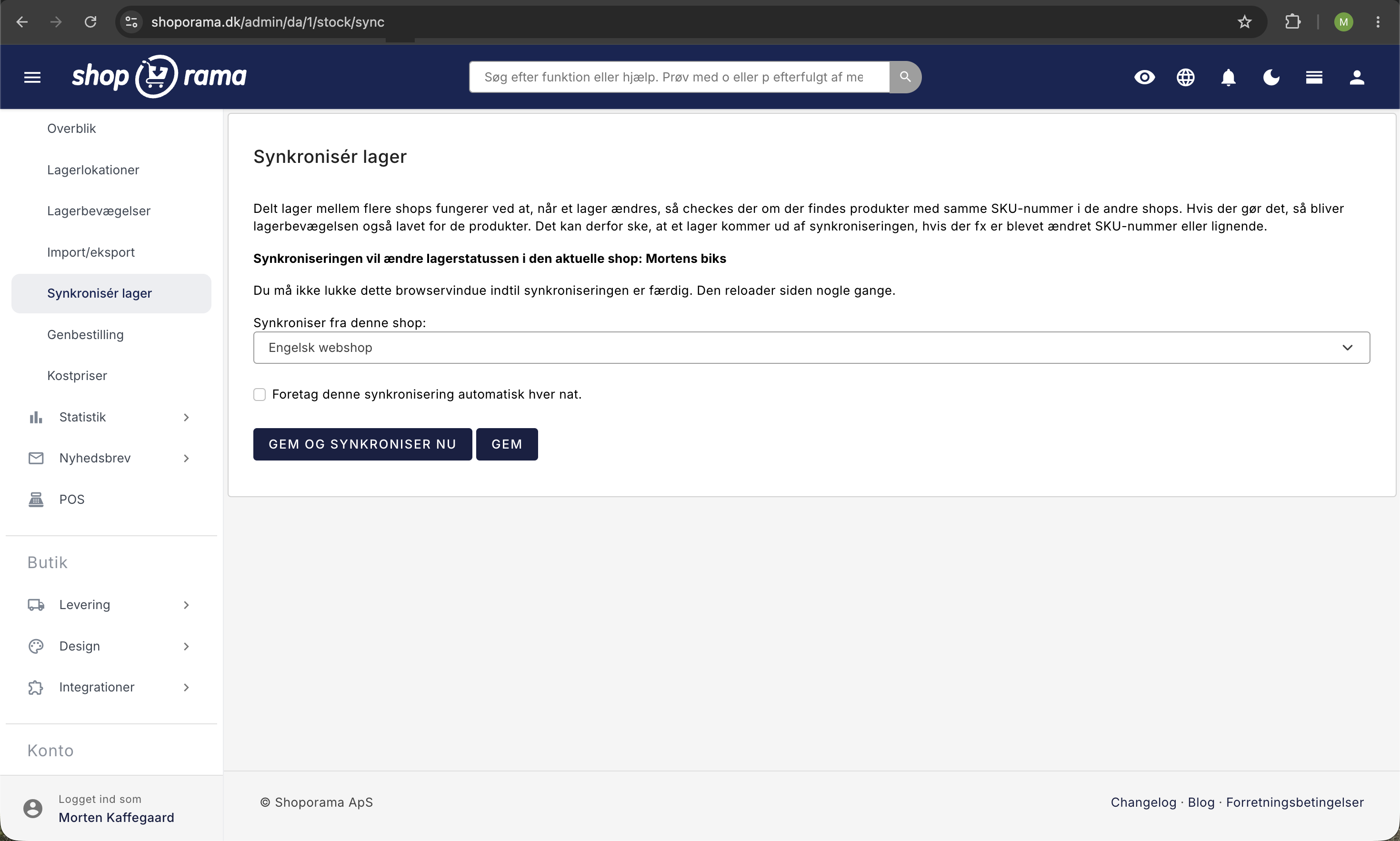
- Gå ind i den shop, der skal modtage lagerdata
- Klik på Lager i den grå menu
- Klik på "Synkroniser lager"
- Vælg den shop, du vil synkronisere fra
- Klik Synkroniser
Trin 2: Aktivér delt lager
Indstillingen ligger på dine firmaoplysninger, ikke på den enkelte webshop. Den gælder altså for alle shops under samme firma.
- Gå til Konto → Firma → Firmaoplysninger i admin-menuen
- Sæt flueben i "Aktiver delt lager mellem dine shops"
- Klik Gem
Nu deler dine shops lagerstatus automatisk. Når der sælges en vare i den ene shop, trækkes lageret i den anden.
Fejlfinding
- Lageret synkroniserer ikke?, tjek at produkterne har identiske SKU-numre i begge shops
- Duplikerede SKU'er?, sørg for at hvert SKU er unikt inden for hver shop. To produkter med samme SKU vil forårsage fejl
- Varianter matcher ikke?, SKU'et skal matche på variant-niveau, ikke kun på produktniveau
Har du brug for hjælp? Kontakt os på support@shoporama.dk.
Related articles
Stock notification: Notify your customers when items are back in stock
Learn how to set up email notifications so your customers can be notified when out-of-stock products are restocked in your Shoporama online store.
Update stock with CSV file
Guide to updating inventory on many products via CSV import in Shoporama.
Synchronizing stock with variants
Guide to stock syncing products with variants in Shoporama.
Related features
Shared stock
Automatically share inventory between multiple online stores in real-time. Avoid overselling, reduce inventory work and easily expand into new...
More shops
Run multiple webshops from the same administration. Own domain, design and prices per shop. Shared inventory and product copying across shops.