OAuth - give apps access to your webshop
Learn how OAuth works in Shoporama. Give third-party apps secure access to your online store without sharing your password.
Shoporama supports OAuth, allowing third-party apps to securely access your online store without you having to share your password. When an app requests access, you log in with your Shoporama account, select which online store the app should have access to, and determine the access level.
Here’s how it works
- The app sends you to Shoporama — You’ll be redirected to a login page on shoporama.dk
- Log in — Enter your Shoporama email and password
- Select an online store — If you have multiple online stores, choose which one the app should have access to
- Select access level — You decide whether the app gets read access, write access, or full access
- Authorize — Shoporama generates an API key and redirects you back to the app
Access Levels
You can choose between three access levels:
- Read-only — The app can only retrieve data (products, orders, etc.) but cannot make any changes
- Read and write — The app can both retrieve and update data
- Full access — The app has full administrative access to the selected online store
Security
- Your password is never shared with the app—it only receives an API key
- You choose exactly which online store the app has access to
- You determine the access level
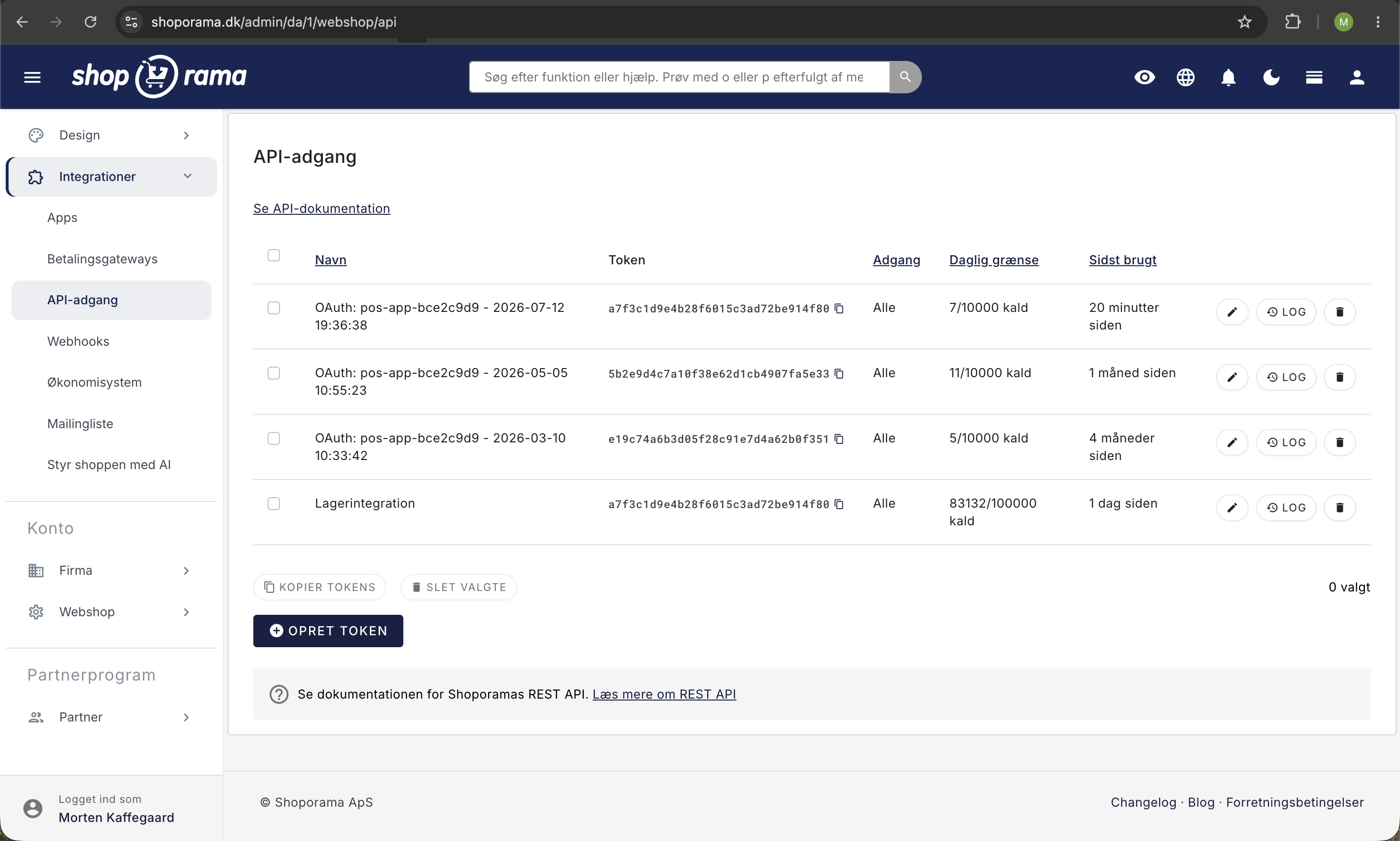
- API keys can be revoked at any time under Integrations → API Access
- All access grants are logged with the time and user
Manage Access
API keys generated via OAuth appear under Integrations → API Access in your admin panel with the prefix "OAuth:". Here you can see when the key was last used, and you can revoke access if you no longer want the app to have access.
For Developers
If you’re building an app to integrate with Shoporama, you’ll find a complete OAuth guide with code examples in PHP, Laravel, JavaScript, Node.js, and Python in the API documentation.
Tip
If you have any questions about OAuth or API access, feel free to contact us at support@shoporama.dk.
Related articles
Facebook Conversions API
Guide to the Facebook Conversions API on Shoporama: setup with Pixel ID and access token, automatic deduplication of purchases, content_ids that...
Find or create an API key
Guide to finding your API key in Shoporama, which is used for integrations with e.g. Shipmondo.
Log in with SFTP
Guide to logging in to your Shoporama online store with SFTP so you can edit your theme.
Related features
Headless Commerce and OAuth
Use Shoporama as a headless backend with OAuth login and a comprehensive REST API. Build custom frontends, apps and integrations.
REST API - build exactly the integration you want
Full REST API with access to products, orders, customers and more. Build your own integrations, apps or a headless frontend.