Update prices via CSV import
Step-by-step guide to update prices on many products at once via CSV import in Shoporama. Incl. explanation of the VAT checkbox.
If you need to update prices for many products at once, you can easily do so via CSV import in Shoporama. This saves a lot of time if, for example, you receive new prices from your supplier, need to make seasonal adjustments, or need to update cost prices. Here, we’ll show you exactly how to do it step by step and how to avoid the classic VAT mistake.
1. Create your CSV file
The file must contain two columns: the product’s SKU number (item number) and the new price, separated by a semicolon. We recommend including a header row so that Shoporama can automatically recognize the fields:
own_id;price
1-5443-ST5;199.90
2-2289-GV4;351.00
3-7466-UT6;123.89
Important: Use a period as the decimal separator, not a comma. Do not use a thousands separator. Save the file as a .csv. If your numbers are formatted with commas (e.g., 199,90), you can check the box for "Amounts are in Danish format" during upload.
2. Upload the file in Shoporama
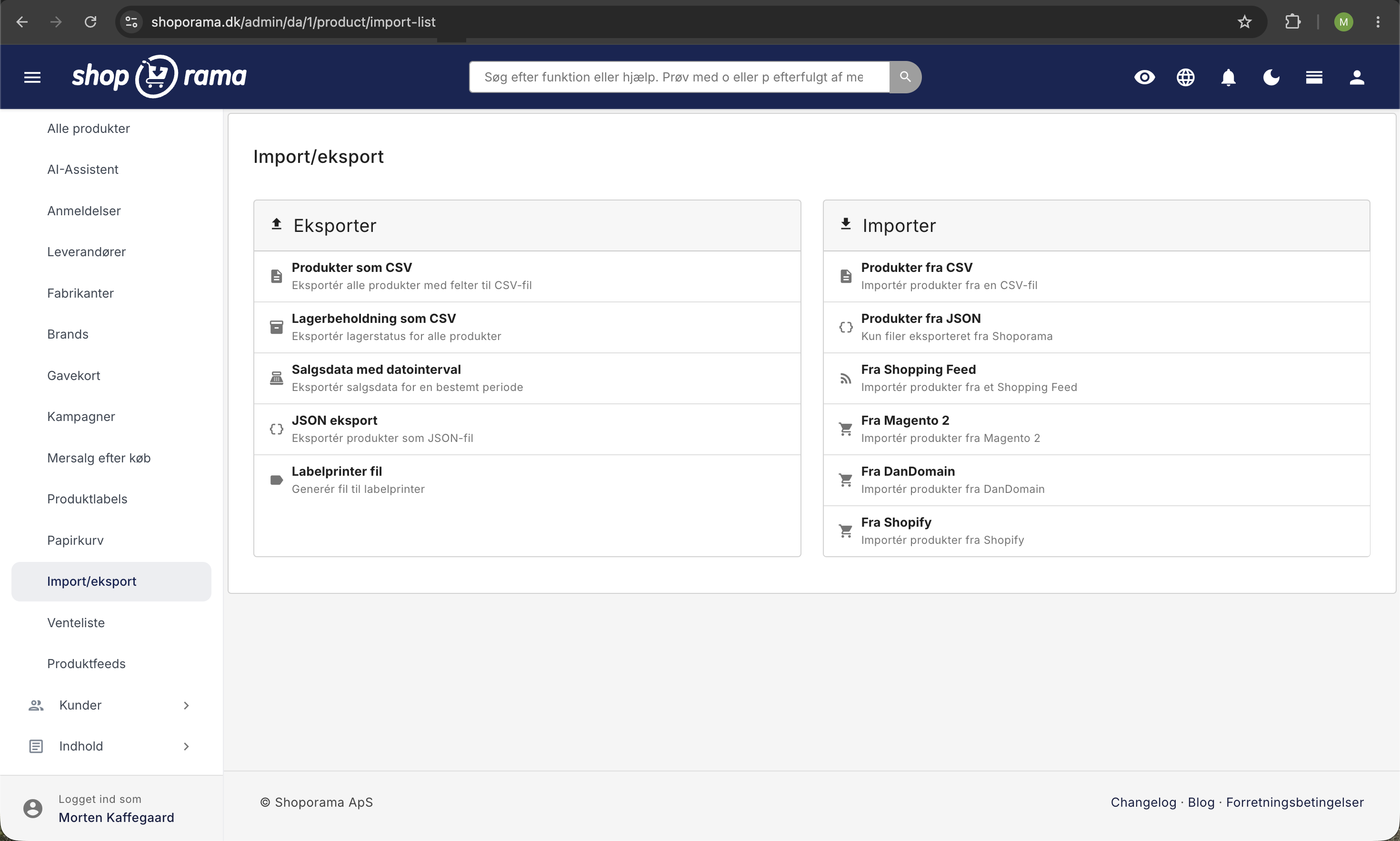
- Go to Products and click “Import.”
- Check the "Enclosed by" field. If your file does not have quotation marks around the values, remove the " from the field.
- Click “Browse” and select your CSV file.
- Click “Upload.”
3. Verify and import
You will now see a preview of your file. Here, you should:
- Verify that the columns show SKU number and Price in the dropdown fields.
- Check the "Unique" box next to SKU. This ensures that prices are updated for existing products instead of creating new duplicates.
- Do not select a profile. The products already have one assigned.
- Decide whether to check the box “Deduct 20% Danish VAT from prices.” It is checked by default. Read the explanation below before importing.
- Click “Import.”
Your prices will be updated within a few minutes, depending on the number of products.
What does the "Deduct 20% Danish VAT from prices" checkbox do?
Prices in Shoporama are saved excluding VAT, while most supplier files and price lists include VAT. This checkbox controls whether Shoporama should deduct VAT from your prices during import.
- Check the box if your prices in the CSV file include VAT. Shoporama will then multiply each price by 0.8 and save the VAT-excluded price.
- Uncheck the box if your prices are already exclusive of VAT (e.g., if you work directly with cost prices or B2B prices). Otherwise, your prices will end up 20% lower than intended.
Calculation example: An item costs 1,000 DKK, including 25% VAT, from the supplier.
- The price excluding VAT is 1,000 / 1.25 = 800 kr.
- The VAT thus amounts to 200 kr. of the 1,000 kr.
- 1,000 DKK multiplied by 0.8 equals exactly 800 DKK. That’s what the checkbox does.
Why 20% and not 25%? Although the Danish VAT rate is 25%, the VAT amount is only 20% of the sales price including VAT (25/125 = 0.20). Subtracting 20% from a price including VAT therefore gives you exactly the price excluding VAT.
Other fields you can update
The same method can be used to update many other fields, such as:
- sale_price, offer price.
- purchase_price, cost price (important for accurate profit margin statistics).
- stock, stock quantity.
- name, description, meta_title, meta_description.
Remember to include SKU as a unique field so that Shoporama knows which product to update. Read more in the guide to CSV product import.
Please note: The VAT checkbox affects all price fields in the same import (price, sale price, AND cost price). If you want to import cost prices that are already exclusive of VAT along with sales prices that include VAT, create two separate imports.
Frequently Asked Questions
What happens if an SKU doesn’t exist in the store?
By default, Shoporama creates a new product for each row where the SKU does not match. If you only need to update existing products (e.g., for a new price list from a supplier), also check “Skip unique items if they do not exist.” This will completely ignore unknown SKUs.
My file uses a comma as the decimal separator, e.g., 199,90. Will that work?
Not directly. Check the box for “Amounts are in Danish format, ” and Shoporama will automatically convert the Danish number format (199,90) to the international format (199.90) during import. This applies to all price fields in the file.
Can I undo a CSV import if I make a mistake?
There is no “undo” button. Always export your products before importing so you have a backup. If something goes wrong, you can re-import the old export to revert to the previous state. It’s a good idea to test with 5–10 products before running the entire file.
How long does the import take?
It depends on the number of products. 100–500 rows typically take less than a minute. Up to 10,000 rows can take several minutes. The import runs in the background, so you don’t need to keep your browser open.
How do I check that the prices have been updated correctly?
Open a few random samples in the admin panel under Products, or re-export the products and compare them with your import file. If you didn’t clear the cache at the same time, the online store may display old prices for a short time afterward. Read more in Cache in Shoporama.
What about variants, such as different sizes of the same product?
Each variant has its own SKU, so if you want to adjust prices for variants individually, you must list them as separate rows in your CSV. If all variants should have the same price, you can simply update the main product’s price and let the variant prices follow suit.
Can I adjust prices by a percentage instead of specifying a new price?
The CSV import accepts fixed price values. For example, if you want to increase all prices by 5%, first export the product list, calculate the new prices in Excel (multiply by 1.05), and then import the adjusted file back.
Does this affect active campaigns and discount codes?
No. The CSV import only changes the product’s regular retail price and any sale price. Active promotions, volume discounts, and discount codes are still calculated based on the new price.
I forgot to uncheck the box, and now all the prices are 20% too low. What should I do?
That’s a classic mistake. You have two options: 1) Import the original export—which you hopefully created beforehand—so the prices revert to their original values. 2) Create a new CSV file with the same prices multiplied by 1.25 (e.g., in Excel) and import it again without checking the box. This will restore the original prices.
My online store is VAT-exempt or sells internationally. Should I uncheck the box in that case?
Yes. Shoporama always saves prices excluding VAT, and VAT is added at checkout based on the customer’s country. If your supplier prices are already net prices excluding VAT, then uncheck the box when importing. This is determined by your supplier invoice and your accounting records, not the online store’s VAT settings.
Where can I find the existing price list so I can start an export?
Go to Products and click “Export.” Select the CSV format. You’ll receive a file containing all your products, which you can open in Excel or Google Sheets, edit the prices in, and import back. This is the safest way to avoid errors with column names.
Need help? Contact us at support@shoporama.dk.
Related articles
Import products via CSV
Complete guide to importing products with a CSV file in Shoporama - including format, fields and tips.
Import categories via CSV
Guide to importing categories as a CSV file in Shoporama.
Update the cost price of multiple products at once
Guide to mass edit the cost price (purchase price) of multiple products in the Shoporama admin.
Import extra fields on products
Guide to importing extra fields via CSV import of products in Shoporama.
Show prices incl. VAT in the backend
Learn how to switch to showing product prices including VAT in the Shoporama admin panel.
Related features
Mass editing
Edit many products at once. Loop Edit, stock update, bulk actions and queued bulk edits in the background.
Import features - move your shop or update thousands of products
Import via CSV or migrate from Shopify, DanDomain and Magento 2. Products, categories, prices, stock and extra fields.