Setting up Nets Easy
Guide to setting up Nets Easy (Nexi) as a payment gateway on your Shoporama online shop.
Nets Easy (nu en del af Nexi Group) er en moderne betalingsløsning, der giver dine kunder en hurtig og nem checkout-oplevelse. Nets Easy understøtter kortbetalinger, MobilePay, Klarna og meget mere.
Opret en Nets Easy-konto
- Gå til Nets Easy Portal og opret en konto
- Gennemfør verifikationsprocessen
- Nets Easy fungerer som både gateway og indløser, så du behøver ikke en separat indløsningsaftale
Find dine nøgler
Du skal bruge to nøgler fra Nets Easy:
- Log ind i Nets Easy Portal
- Gå til Integration
- Find din Checkout key (bruges til at åbne betalingsvinduet)
- Find din Secret key (bruges til at verificere betalinger)
Opsætning i Shoporama
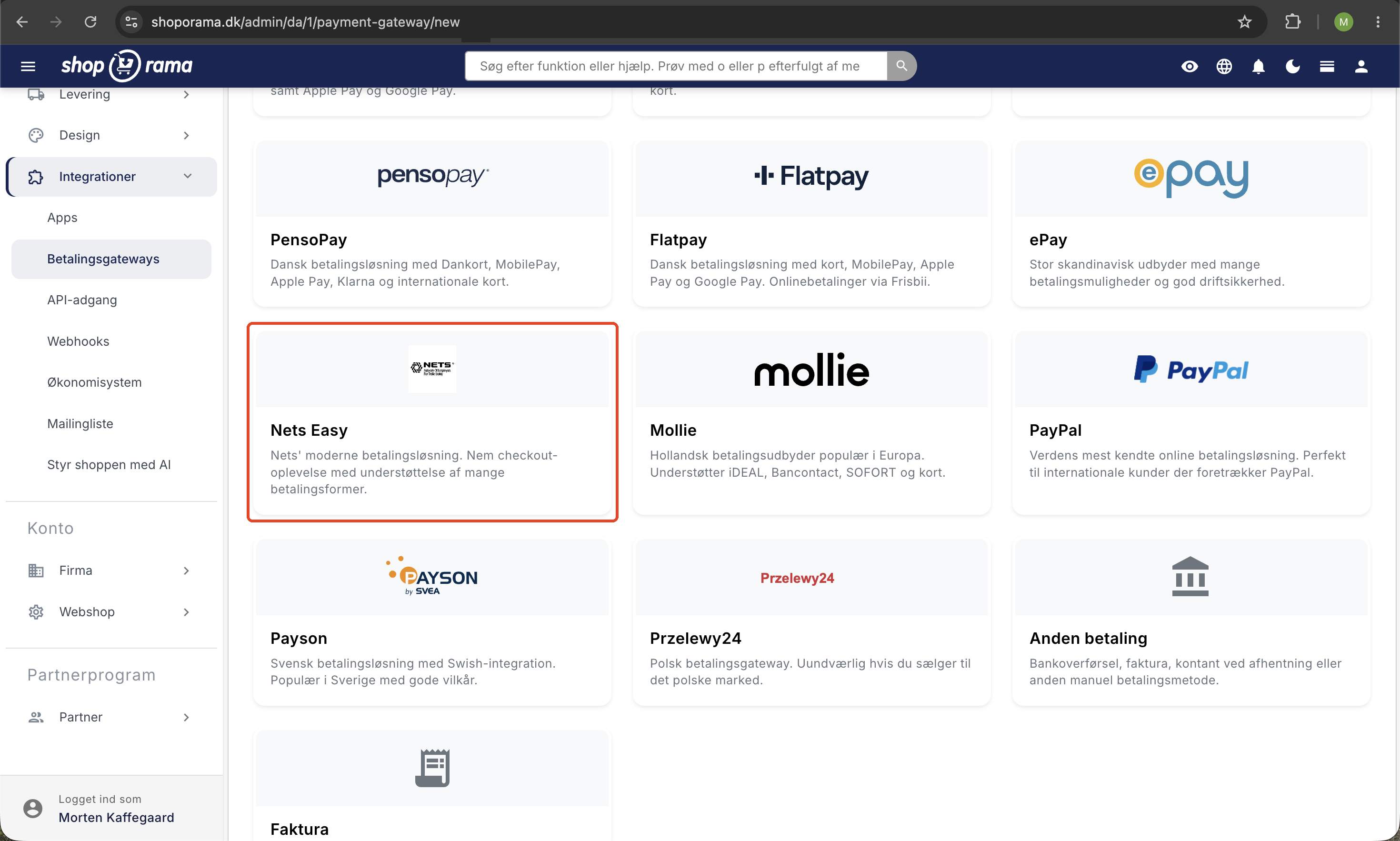
- Log ind i Shoporama og gå til Integrationer → Betalingsgateways
- Klik Opret ny betalingsgateway og vælg Nets Easy
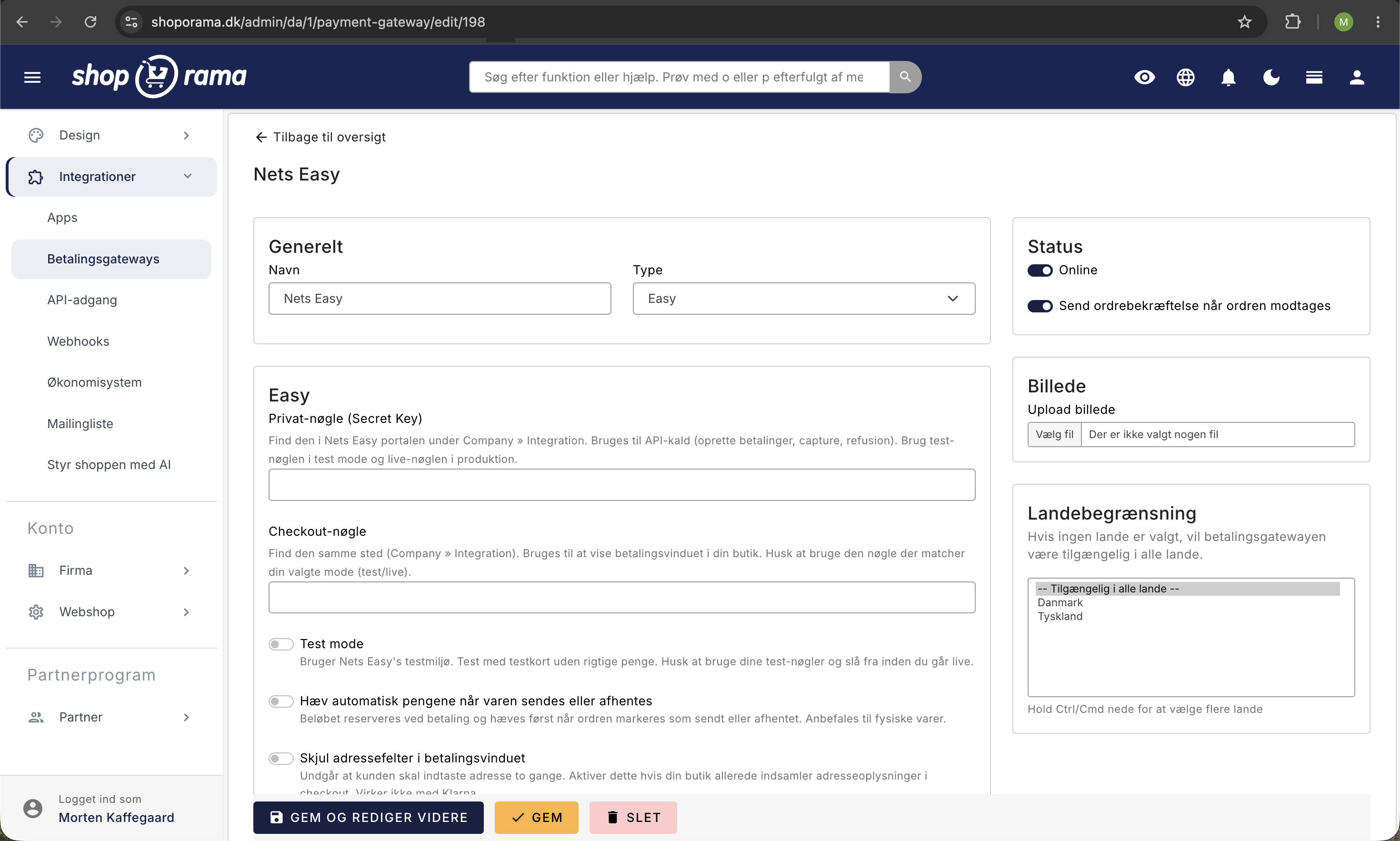
- Giv din gateway et navn, fx "Kortbetaling"
- Klik Gem
Konfiguration
Udfyld følgende felter:
- Privat-nøgle — din Secret key fra Nets Easy Portal
- Checkout-nøgle — din Checkout key fra Nets Easy Portal
Indstillinger
- Test mode — aktiver dette for at teste betalinger med testkort uden at trække rigtige penge. Husk at bruge test-nøglerne fra Nets Easy Portal (ikke live-nøglerne)
- Hæv automatisk ved forsendelse — beløbet hæves automatisk, når ordren markeres som sendt eller afhentet
- Skjul adressefelter i betalingsvinduet — undgår at kunden skal indtaste sin adresse to gange (virker ikke med Klarna)
Understøttede funktioner
- Kortbetaling — Visa, Mastercard, Dankort og flere
- MobilePay — tilgængelig som betalingsmetode i Nets Easy-vinduet
- Klarna — betal senere eller delbetaling
- Swish — svensk betalingsmetode
- Capture — hæv betalingen manuelt eller automatisk ved forsendelse
- Refund — refundér helt eller delvist direkte fra Shoporama
- Cancel — annullér en betaling, der endnu ikke er hævet
Betalingsmetoder
Nets Easy håndterer selv visningen af betalingsmetoder i betalingsvinduet. Du behøver ikke konfigurere individuelle metoder i Shoporama — du aktiverer i stedet de ønskede metoder direkte i Nets Easy Portal.
Sikkerhed
Alle betalinger verificeres server-side via Nets Easy API. Shoporama kontrollerer betalingsstatus direkte hos Nets Easy, før en ordre markeres som betalt.
Fejlsøgning
Det mest almindelige problem er, at kunden bliver sendt videre fra kurven, men betalingsvinduet fra Nets Easy aldrig åbner. Nets afviser oprettelsen af betalingen, og din shop kan ikke sende kunden videre. Nedenfor gennemgår vi de typiske årsager.
Betalingsvinduet åbner ikke (status 401)
Hvis dine kunder ikke bliver viderestillet til betalingsvinduet, skyldes det som regel, at Nets afviser oprettelsen af betalingen med status 401. I Shoporama-administrationen vil du kunne se en notice under Indstillinger (blandt dine notifikationer) med teksten:
Fik status 401 retur. Check at din konto er live hos Easy
Beskeden betyder, at Nets har afvist forespørgslen, selv om dine nøgler kan være indtastet korrekt. Der er to typiske årsager.
Årsag 1: Kontoen er ikke aktiveret (live) endnu
Selv om din aftale med Nets er godkendt, er din konto ikke nødvendigvis aktiveret med det samme. Der kan gå tid, i nogle tilfælde op til cirka 48 timer, fra aftalen er godkendt, til kontoen er sat live hos Nets. Så længe kontoen ikke er live, afviser Nets betalingerne med status 401. Dette er en meget almindelig årsag, og den løser sig selv, så snart Nets aktiverer din konto.
- Log ind hos Nets/Nexi og kontrollér, om kontoen er markeret som live eller aktiv.
- Er kontoen endnu ikke live, skal du afvente aktiveringen.
- Kontakt Nets/Nexi, hvis der er gået mere end cirka 48 timer, siden aftalen blev godkendt.
- Når kontoen er live, virker betalingerne automatisk, uden at du behøver ændre noget i Shoporama.
Tip: Har du lige oprettet din aftale, så vent til kontoen er bekræftet live hos Nets, før du fejlsøger yderligere. I de fleste tilfælde forsvinder status 401 af sig selv, når kontoen er aktiveret.
Årsag 2: Nøglerne passer ikke til Test mode
En anden hyppig årsag til status 401 er, at dine nøgler ikke passer til det valgte miljø. Nets har to sæt nøgler: et til test og et til produktion (live). Bruger du test-nøgler, mens Test mode er slået fra, eller live-nøgler mens Test mode er slået til, afviser Nets forespørgslen. Både din Checkout key og din Secret key skal komme fra det samme miljø som det, du har valgt i Shoporama.
- Er Test mode slået til, skal du bruge test-nøglerne fra Nets.
- Er Test mode slået fra (produktion), skal du bruge live-nøglerne fra Nets.
- Bland aldrig test- og live-nøgler. Begge nøgler skal stamme fra samme miljø.
- Kopiér eventuelt nøglerne på ny fra Nets-portalen, så du er sikker på, at de er indtastet uden mellemrum eller manglende tegn.
Ofte stillede spørgsmål
Skal jeg have en separat indløsningsaftale ved siden af?
Nej. Nets Easy fungerer både som gateway og indløser, så du behøver ikke en separat indløsningsaftale. Du opretter aftalen ét sted hos Nets Easy (Nexi), og så er både betalingsvindue og indløsning dækket. Det gør opsætningen enklere end de fleste andre løsninger.
Betalingsvinduet åbner ikke, når kunden skal betale. Hvad er galt?
Det skyldes næsten altid en status 401, som betyder én af to ting: enten er din Nets Easy-konto ikke aktiveret som live endnu, eller også er nøglerne fra det forkerte miljø. En nyoprettet konto kan være op til cirka 48 timer om at blive live efter godkendelsen. Tjek desuden at Test mode og nøglerne matcher. Admin viser en notice, hvis noget er galt. Se afsnittet Fejlsøgning ovenfor.
Hvor bestemmer jeg, om kunderne kan betale med MobilePay eller Klarna?
Det styrer Nets Easy selv. Hvilke betalingsmetoder der vises i vinduet (kort, MobilePay, Klarna, Swish) aktiveres i din Nets Easy Portal, ikke i Shoporama. Mangler du en metode, skal du slå den til hos Nets Easy. Bagefter dukker den automatisk op i betalingsvinduet uden ændringer i Shoporama.
Hvornår trækkes pengene fra kundens kort?
Det afhænger af din indstilling. Slår du Hæv automatisk ved forsendelse til, hæves beløbet automatisk, når ordren markeres som sendt eller afhentet. Er den slået fra, skal du selv hæve beløbet manuelt på ordren. Mange vælger den automatiske, så bogføring og pengestrøm følger forsendelserne.
Kan jeg refundere eller annullere en betaling direkte i Shoporama?
Ja. Både refundering og annullering kan laves direkte fra ordren i Shoporama, så du ikke behøver logge ind i Nets Easy Portal for det. Annullér før beløbet er hævet, og refundér når det allerede er trukket. Det gør det nemt at håndtere returneringer og fejlordrer fra ét sted.
Hvordan tester jeg betalinger uden at bruge rigtige penge?
Slå Test mode til og indsæt dine test-nøgler. Så kan du gennemføre hele købsflowet, uden at der trækkes rigtige penge. Når du er klar til at gå live, skal du slå Test mode fra og skifte til dine live-nøgler. Husk at test- og live-nøgler ikke må blandes, ellers åbner betalingsvinduet ikke.
Hjælp
Har du brug for hjælp til opsætningen, er du velkommen til at kontakte os på support@shoporama.dk.
Related articles
Setting up OnPay
Step-by-step guide to setting up OnPay as a payment gateway on your Shoporama online store. Supports payment links, capture, refund and cancel.
Setting up PensoPay
Step-by-step guide to setting up PensoPay as a payment gateway on your Shoporama online shop.
Setting up QuickPay
Guide to setting up QuickPay as a payment gateway on your Shoporama online shop. Supports Dankort, MobilePay, Visa, Mastercard and many more.