Reverse charge og VIES-validering: sælg uden moms til erhverv i EU
If you sell to businesses in other EU countries, in many cases you must sell without VAT. This is called “reverse charge.” The rules are simple once you know them, but there’s a pitfall: if you exclude VAT based on a VAT number that turns out to be invalid, you may end up being liable for the VAT yourself. This article explains how Shoporama helps you do this correctly and securely by automatically validating VAT numbers against the EU’s official register.
What is reverse charge?
When you sell a good or service to a VAT-registered business in another EU country, the general rule is that you do not charge Danish VAT. Instead, the buyer is responsible for paying the VAT in their own country according to local rates. This is what is meant by the reverse charge mechanism: the obligation to pay VAT is reversed, so that it falls on the buyer rather than the seller.
For you as a store owner, this means that you issue an invoice without VAT and clearly state that the transaction is subject to the reverse charge mechanism. The prerequisite is that the buyer is actually a VAT-registered business in another EU country. If the buyer is a private individual or the business is not validly VAT-registered, you must charge VAT as usual.
Domestic sales and sales to countries outside the EU are not affected by the reverse charge mechanism. If you sell to a Danish business or a customer outside the EU, this feature does not change your normal VAT handling.
Why It’s Important to Validate the VAT Number
A VAT number serves as your proof that the buyer is a VAT-registered business and, therefore, your right to sell without VAT. Problems arise if the number is entered incorrectly, has expired, or does not exist at all. If you’ve sold goods or services without charging VAT to an invalid number, you’ll be held liable, and you may be required to pay the VAT retroactively.
That’s why the EU recommends that you verify VAT numbers against VIES, which stands for the VAT Information Exchange System. This is the EU’s official registry where you can check whether a VAT number is valid and active. Shoporama can perform this check automatically for you, so you don’t have to manually verify numbers one by one.
How VIES validation works in Shoporama
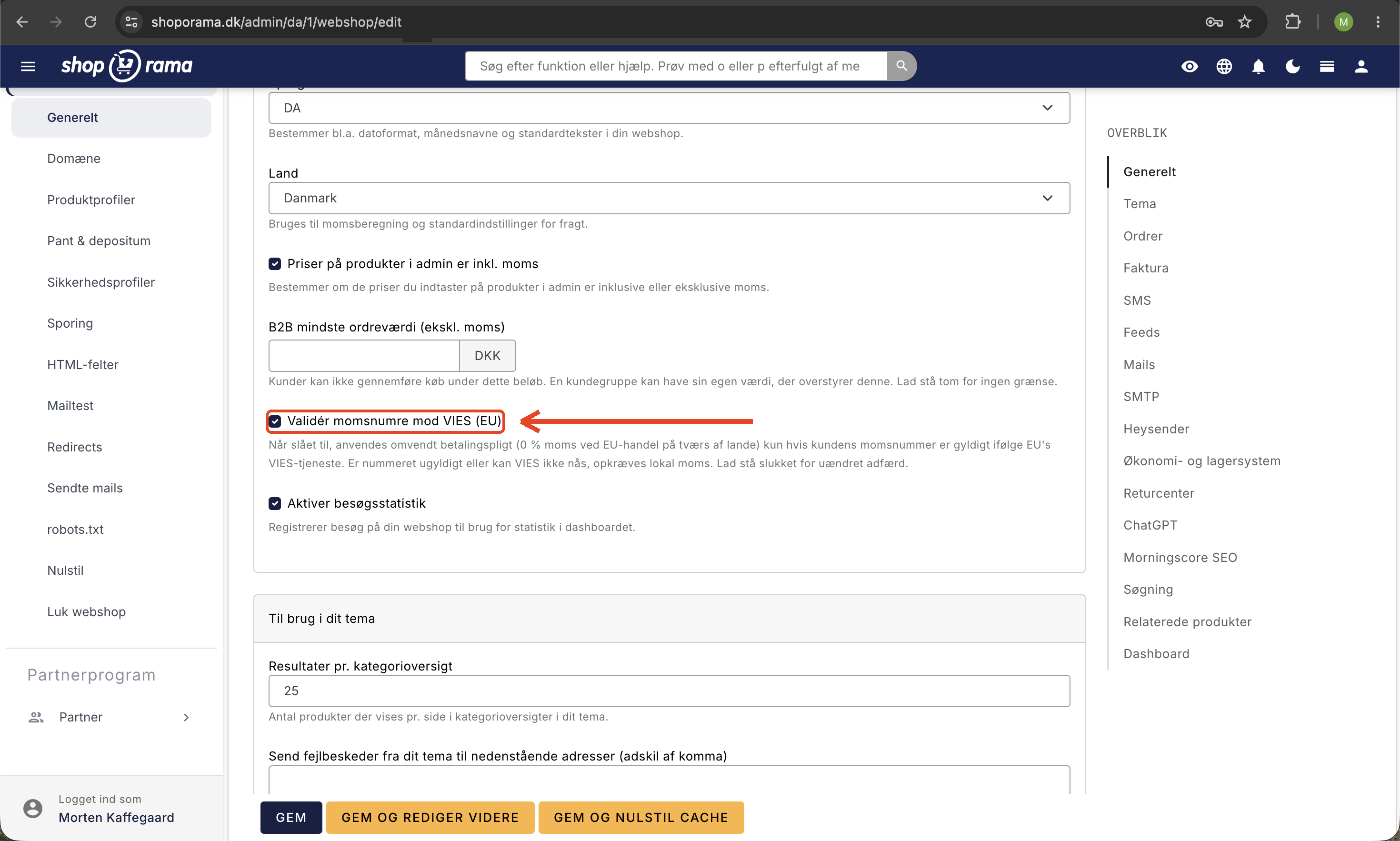
This feature is a setting you enable on a per-store basis. It’s called “Validate VAT Numbers Against VIES” and can be found in the store’s settings. When enabled, the following happens:
- The customer provides their VAT number, for example, at checkout, when creating an account, or in their profile.
- Shoporama automatically checks the number against the EU’s VIES registry and saves the result for the customer.
- If the number is valid and verified, the sales tax is removed, and the transaction is processed as a reverse charge.
- If the number is invalid or unverified, the sale is processed with standard VAT.
The key principle is that VAT is only removed for a valid, verified number. This protects you: you’ll never omit VAT on an invalid VAT number, in which case you yourself would be liable for the VAT. It’s better to have a correct invoice with VAT than an incorrect one without it.
The lookup itself occurs when the customer enters the number, or when you, as the store owner, edit the customer’s information in the admin panel. A live lookup against VIES is never performed in the middle of a price calculation, because that would slow down the checkout and make it dependent on the EU service responding instantly. Instead, the validated result is cached so that price calculations are always fast.
Here’s what you’ll see in the admin panel
On the customer’s page in the admin panel, you’ll see a clear badge next to the VAT number. A green badge means the number is valid according to VIES, and you’ll also see the company name that VIES returns for that number. A red badge means the number is invalid. This way, you can see at a glance whether a business customer is properly registered for VAT without having to log in to an external registry yourself.
On the order itself, the reverse charge mechanism is noted along with the buyer’s VAT number. This means that the documentation explaining why the transaction was sold without VAT is included with the order, so everything is in order if you later need to present it during an audit or inspection.
If VIES is temporarily down
The EU’s VIES service is generally stable, but in rare cases it may be temporarily unavailable. If this happens, the number cannot be verified at that moment, and Shoporama opts for the safe solution: the sale is processed with VAT until the number is verified. A background process will automatically retry later, so a number that could not be validated due to downtime will be checked again as soon as the service is back online. You don’t need to do anything yourself.
What happens if I don’t enable this feature?
If the setting is turned off, the behavior remains exactly the same as how your store operated before. A provided VAT number is trusted as before, and VAT is removed based on that number without a VIES lookup. So you can choose for yourself whether you want to take advantage of this extra layer of security. We recommend that you enable validation if you sell to businesses in other EU countries, precisely because it eliminates the risk of selling without VAT to an invalid number.
Get started with B2B sales
VIES validation is part of Shoporama’s comprehensive suite of tools for business-to-business sales. If you’d like to learn more about selling to businesses, you can explore the options on the B2B online store page, and if you’re just getting started, follow the “Get Started with B2B” guide.
Please note that this article describes the general principle behind the reverse charge mechanism and how Shoporama supports it. It does not constitute tax or VAT advice. If you’re unsure about the rules applicable to your specific situation, consult your accountant or bookkeeper.
Frequently Asked Questions
How do I know in my accounting records that an order was sold without VAT?
The order will indicate “reverse charge” along with the buyer’s VAT number, and the VAT amount will be zero. This means you have documentation explaining why VAT wasn’t charged right on the order, which makes bookkeeping and any audits easy.
What happens if I have an audit and a customer had an incorrect number?
With VIES validation enabled, VAT is only waived for a valid, confirmed number. If a number was invalid, the sale was processed with standard VAT, so you won’t end up with a transaction where VAT was mistakenly omitted. That’s precisely where the security lies.
I sell to customers in several EU countries. Does Shoporama validate numbers from all countries?
Yes. VIES covers all EU member states, and Shoporama recognizes the country code in the VAT number or uses the customer’s country. Domestic transactions and sales to countries outside the EU aren’t affected, since the reverse charge mechanism only applies to business-to-business sales across EU borders.
I’m not very tech-savvy. Do I have to do anything myself every time a customer makes a purchase?
No. Once you’ve enabled the setting, it runs automatically. The customer enters their VAT number, Shoporama verifies it, and the VAT is handled correctly on its own. You can see the result as a green or red mark on the customer’s page in the admin panel.
How do I see which company is associated with a VAT number?
On the customer’s page in the admin panel, the green badge displays the company name that VIES returns for that number. It’s a quick way to confirm that the number belongs to the company you think you’re doing business with.
What if the EU service is down just when a customer wants to make a purchase?
In that case, the number cannot be verified at the moment, and the sale will be processed with VAT for now. A background process will automatically retry later, so the number will be validated as soon as VIES is back online. This means the customer can still complete the purchase—albeit with VAT included—until the number is verified.
Will this change anything for my existing customers or my past sales?
If you leave the setting turned off, everything remains unchanged. If you turn it on, the validation will apply going forward whenever numbers are entered or edited. Domestic sales and sales outside the EU are not affected in any case.
Does the lookup slow down checkout when the store is busy?
No. The VIES lookup itself occurs when the number is entered, not in the middle of the price calculation. The result is stored for the customer, so the checkout and price display remain fast, even during busy periods with many orders.
Related articles
B2B sales in Shoporama
How to sell to businesses (B2B) and public institutions (B2G) in Shoporama with CVR, EAN and differentiated VAT.
Kundegrupper og B2B-priser: giv forskellige kunder forskellige priser
Firma-konti med flere brugere og roller
Countries and currencies
Guide to setting up countries, VAT rates, VAT zones, shipping options and currency in your Shoporama online store.
Related features
B2B webshop
A B2B webshop sells to business customers with customer pricing, CVR validation and invoicing. Read about B2B e-commerce and features.
B2B webshop
Shoporama now offers a full-featured B2B solution: a login-based store, customer group pricing, volume discounts, company accounts with roles,...
B2B online store
Nu kan du drive en rigtig B2B-webshop med Shoporama
Shoporama now offers a full-featured B2B solution: a login-based store, customer group pricing, volume discounts, corporate accounts, VIES reverse...
Theme Settings in MontanaB2B: Fields and B2B Features
An explanation of all fields in MontanaB2B's theme settings, plus the login screen, prices excluding VAT, customer groups, company accounts, and...