The supplier has failed to deliver, an item is backordered, and the customer has been waiting for four days. Should the entire order wait for that one item, or should you ship what you have and keep track of the rest yourself? With partial shipping, you don’t have to choose. You ship what you can, and Shoporama keeps track of what’s missing.
One order, one invoice, one payment transaction
We could have split the order into two. Then the customer would have had two order numbers for a single purchase, you would have had two invoices to explain to your accountant, and the shipping costs would have had to be split between them. Instead, the packages are listed on the order as a record of what has actually been shipped.
The order doesn’t change to “Shipped” until the last item has been shipped. That’s when the invoice number is assigned, the payment is processed, and the order is transferred to the accounting software—exactly once, just like any regular order.
The customer knows what’s on the way
Each package triggers its own email listing the specific items in that package and its tracking number. The first email states that it’s part of the order, and the last one indicates that it’s the final part. The customer won’t be looking for items that aren’t in the box and won’t contact your support team to ask about them.
Each package also has its own packing slip that shows only what’s actually inside the box.
Overview in the Order List
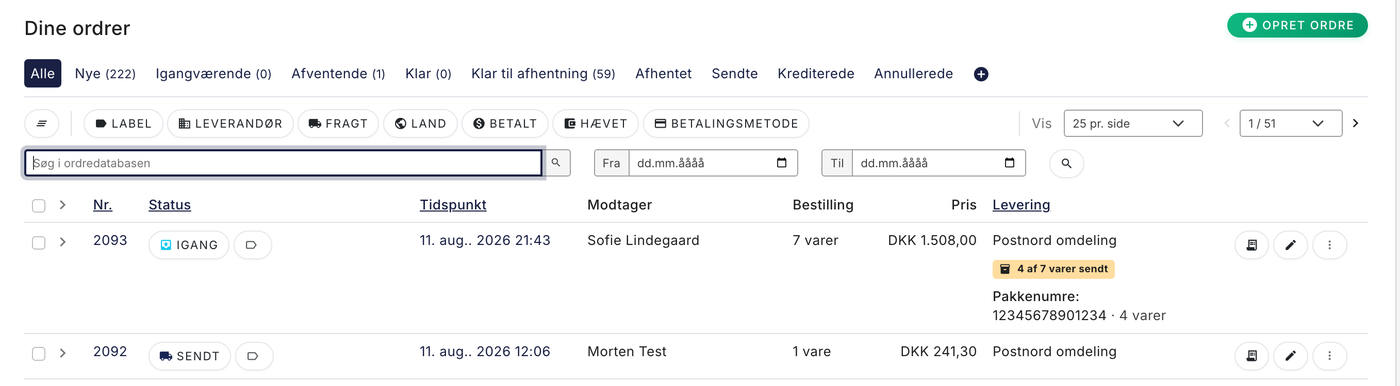
Partially shipped orders are marked directly in the list, so you can see how far along each order is without opening it. You can filter the list to see only the orders that are pending something.
No setup, no risk
There are no settings to enable. The feature is right where you need it—in the picking list at the packing table, where you’ll notice if something is missing. If you use it on five orders, the rest will run exactly as before.
- Shipping labels are ordered based on the package’s weight and contents—not the entire order’s—through GLS and PostNord.
- A package can be edited or deleted until it’s shipped, and canceled afterward.
- There is no limit to the number of packages an order can be shipped in.
- Partial shipments are also available in the REST API, with webhooks triggered when a package is created or shipped.
See the full guide in the article “Partial Shipments: Send Part of the Order Now and the Rest Later.”