Feed-nøgler: Beskyt dine produktfeeds med en hemmelig nøgle
Sådan slår du feed-nøgler til i Shoporama og beskytter dine produktfeeds, så kun Google, Pricerunner, og andre godkendte tjenester kan hente dine data.
Your product feeds contain everything your competitors want: your products, your descriptions, and, not least, your prices. By default, the feed URL is public, so anyone who knows it can retrieve the data. With feed keys, you can lock your feeds so they can only be accessed with a secret key in the URL. In this article, we’ll show you how to enable this feature and use it correctly.
What are feed keys?
A feed key is a secret code that you add to your feed’s URL. Once a key is set, the feed can only be retrieved if the correct key is included in the URL. This means that a random person who guesses or finds your regular feed address can no longer view your product and price data.
The purpose is simple: to prevent competitors, price bots, or others from freely retrieving your product and price data via your public feed address. You decide which services get access by only providing the key to those you trust, such as Google, Pricerunner, or Partner-Ads.
Note: Feeds without a key remain publicly accessible. The protection only takes effect once you’ve assigned a key to each individual feed.
How to enable feed keys
You’ll find the setting in your admin panel. Follow these steps:
- Go to Settings and select Webshop.
- Click the Feeds tab.
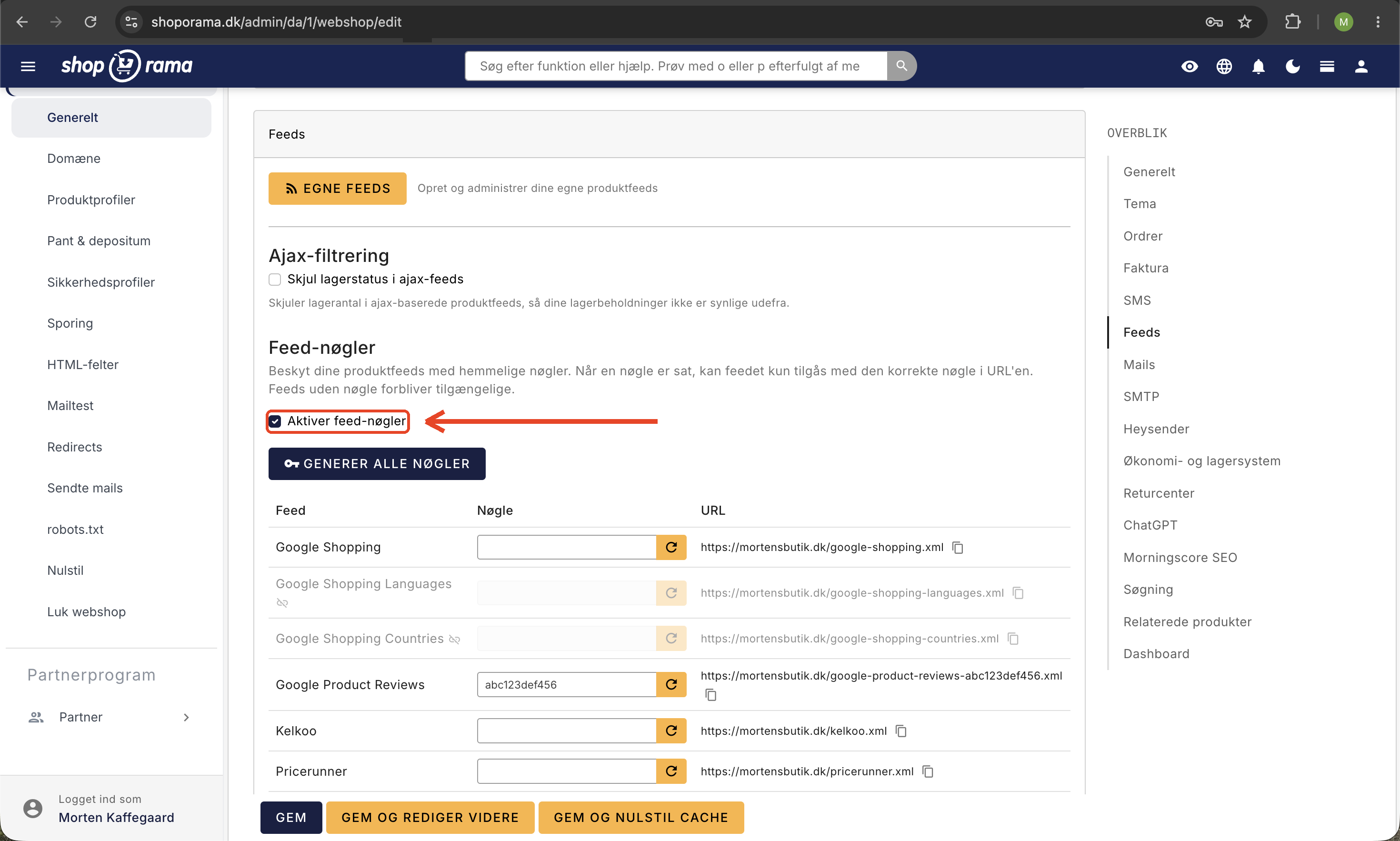
- Find the Feed Keys section.
- Check the box next to Enable feed keys.
- Generate a key for each feed you want to protect, or click Generate All Keys to create keys for all feeds at once.
- Save your settings.
You can choose to protect all your feeds at once using the Generate All Keys button, or just assign a key to the specific feeds where you need it. It’s entirely up to you.
How to use the key in your feed address
Once you’ve set a key, it becomes part of the feed’s address. This means that the regular, public address no longer works, and you must use the address with the key instead.
Here’s an example using the Google Shopping feed. Without a key, the address looks like this:
- your-domain.dk/google-shopping.xml
With a key, the address becomes something like this:
- your-domain.dk/google-shopping-YOUR-SECRET-KEY.xml
You need to copy and paste the full address—including the key—into the service that will use the feed, such as Google, Pricerunner, or Kelkoo. If you’ve previously provided the old address (without the key) to a service, be sure to update it to the new address with the key so the feed can still be retrieved.
Note: Treat the key like a password. Share the full feed address only with the services that actually need it, and do not post it publicly on your website or in other public places.
Which feeds can be protected?
Feed keys work with the online store’s built-in feeds:
- Google Shopping (see our guide to Google Shopping feeds)
- Google Product Reviews (see the guide to product reviews in Google Shopping)
- Kelkoo (see the guide to the Kelkoo feed)
- Pricerunner (see the guide to Pricerunner feeds)
- Klaviyo
- Partner Ads
- Tradetracker (see the Tradetracker feed guide)
- Your regular product feed
You don’t need to protect them all. You can easily leave some feeds public and only apply a key to those where you want extra protection.
Your custom product feeds are protected elsewhere
If you create your own feeds under Products> Product Feeds, the feed keys on this page do not apply to them. Custom feeds are protected on the individual feed page, where you have one additional option:
- Secret URL — same principle as the feed keys on this page.
- Username and password — the feed requires a login. This is the most secure solution and is worth using if the feed contains cost prices or other confidential information.
You’ll find this setting in the Feed URL field when you edit the feed. Read more in Build Your Own Feeds.
Note: Feeds that you build yourself from a landing page using your own XML template cannot currently be protected. Therefore, do not include confidential information in them.
Frequently Asked Questions
Does the feed key also apply to my own product feeds?
No. The feed keys here apply to built-in feeds such as Google Shopping and Pricerunner. Your own product feeds under Products> Product Feeds have their own settings for each individual feed, where you can also choose a username and password.
Do I need technical knowledge to use feed keys?
No. You simply check a box and click a button to generate the keys. Afterward, copy the new feed address and paste it into the service that will use the feed. There’s no code or technical configuration you need to set up yourself.
I have 4 online stores and use many price comparison services. Can I protect everything at once?
Yes. On each store, you can click “Generate All Keys,” and all feeds will receive a key immediately. Remember to update the feed addresses you’ve already submitted to Google, Pricerunner, and other services so they point to the new addresses with the key.
Do feed keys affect my accounting or orders?
No. Feed keys solely control who can retrieve your product feeds. They have no impact on orders, invoices, sales tax, or bookkeeping. It’s simply an extra layer of protection for the public product data you send to comparison and advertising services.
What happens if I forget to update the address with Google?
Once a key is set, the old address without the key will no longer work. If a service is still using the old address, it won’t be able to retrieve the feed. That’s why it’s important to update the address to the new one—which includes the key—for all the services you use the feed with.
How does this affect customers who visit my store?
It doesn’t affect them at all. Feed keys only pertain to the underlying data files that services like Google and Pricerunner retrieve. Your customers don’t see feeds or keys, so their experience of your online store is exactly the same as before.
Can I leave some feeds open and protect only others?
Yes. You can generate one key per feed, so you decide which feeds to protect. A feed without a key remains publicly accessible, while a feed with a key can only be retrieved using the correct address. This way, you can tailor the protection to your specific needs.
Related articles
Related features
Feed
A product feed exports your product data to Google Shopping, PriceRunner, Facebook and other channels. Learn about feed types, important fields and...
Feeds
Ready-made feeds for Google Shopping, Pricerunner, Partner Ads, Kelkoo and TradeTracker. Or build your own custom feeds in XML or CSV.
Custom Feeds
Build customized product feeds in XML, JSON or CSV. Select fields, filter products, expand variants and split feeds into pages.
Theme Settings in MontanaB2B: Fields and B2B Features
An explanation of all fields in MontanaB2B's theme settings, plus the login screen, prices excluding VAT, customer groups, company accounts, and...