Create an additional webshop
Guide to creating an additional online store under the same login in Shoporama.
You can create multiple online stores under the same Shoporama account. Each store has its own theme, products, orders, and settings, but you log in using the same credentials. A new store always starts as a free demo, so you can build and test it at your leisure before deciding whether to launch it.
Your new store is free
A new online store is created as a demo, and a demo store is free. You won’t be billed until you choose to go live with the store. The pricing model shown in the form is simply a default selection for that day.
How to create an additional store
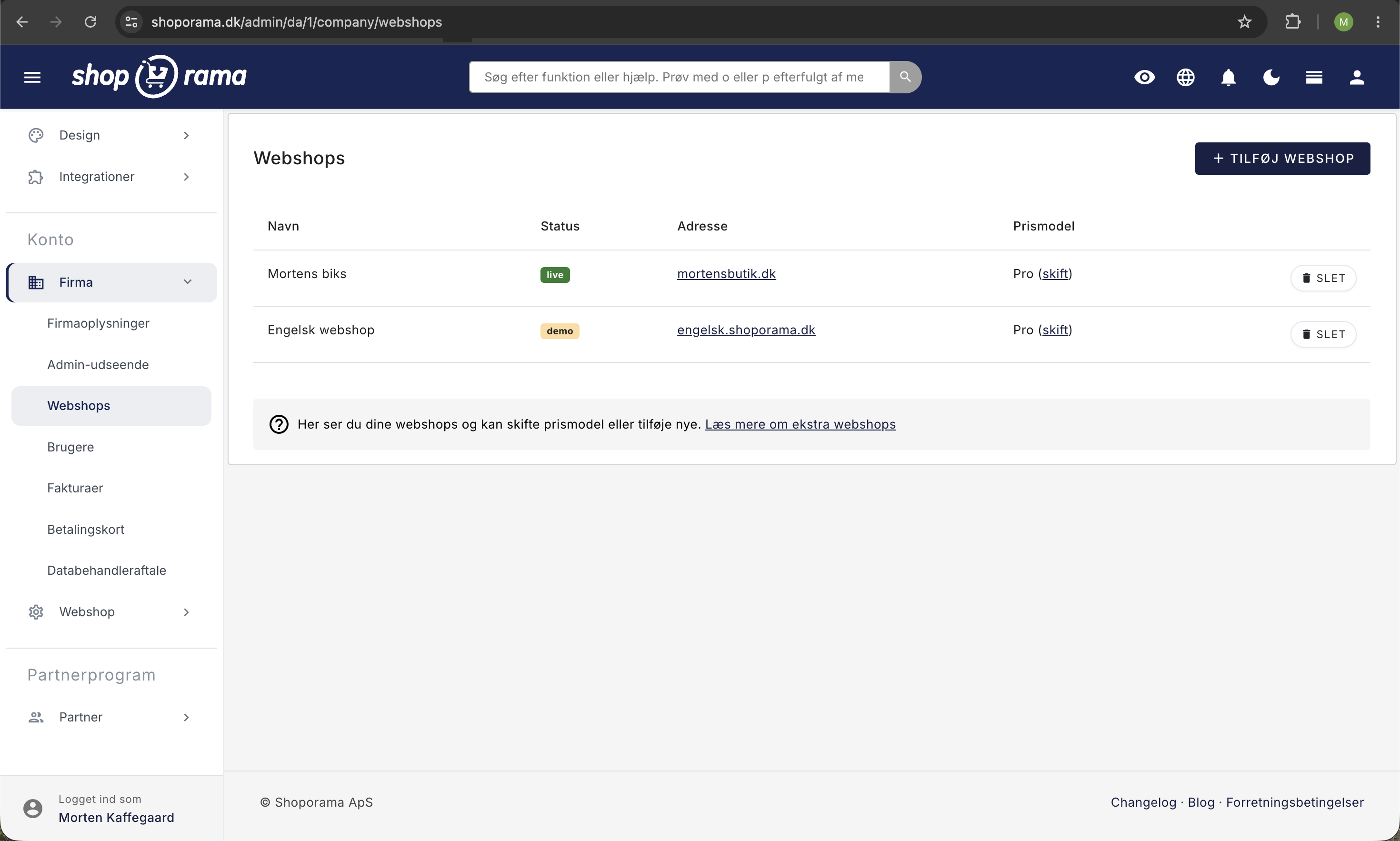
- Go to Account → Company → Webshops in the menu
- Click “Add Webshop”
- Enter the shop name and select a pricing plan (just a default option—see below)
- The new store is created as a demo, and you can start configuring it right away
Does it cost anything to create an additional store?
No. A new online store is always created with “demo” status, and a demo store is free. You can add products, choose a theme, set up shipping and payment, and fully build the store at no cost, regardless of how long it remains active.
In the “Add Web Store” form, you must select a pricing plan and accept the terms of service. This selection is only a preliminary choice until the day you decide to go live with the store. The creation itself does not trigger an invoice or a payment.
You will not be billed until you actively launch the store and confirm the terms. Until then, you pay nothing. You can read more about using a free test store in the article “Create a Demo Store: Test New Ideas Risk-Free.”
Switch Between Shops
To switch between your shops, click your company name at the top of the admin panel and select the shop you want to work with.
What’s separate?
- Products and categories: each shop has its own
- Orders and customers: separate for each shop
- Theme and design: can be different
- Domain: Each shop can have its own domain
- Settings: shipping, payment, sales tax, etc., are configured separately
Shared inventory
If you have the same products in multiple shops, you can enable shared inventory so that stock levels are automatically synchronized across shops.
Subscription
A demo store has no subscription and is free. Only when you launch a store does it get its own subscription based on the selected pricing plan (Flex or Pro). You can choose your pricing plan again the moment you go live, so you’re not locked into the one you selected during setup.
If you run multiple live shops on the same account, feel free to contact support@shoporama.dk to learn about your options.
Tip
Additional stores are ideal for selling in different countries, with different themes, or under different brands—all with a single login. They’re also perfect as a free development or testing environment, for example, for a partner who needs to build on the store.
Frequently Asked Questions
Is there a cost to set up an additional online store?
No. The store is set up as a free demo. You can add products, choose a theme, and complete the store without paying anything, and no invoice will be generated upon creation.
Will I be charged when I select a pricing plan and click “Continue”?
No. The pricing plan in the form is only a preselection. Even if you choose a plan and accept the terms of service, the store is created as a demo, and no payment is initiated.
So what triggers the fixed monthly fee?
It’s when you go live with the store yourself and confirm the terms. It’s neither the creation of the store nor the first sales, but the active switch from demo to live that starts billing.
Can I have an extra store set up for free while I or a partner is building it?
Yes. As long as the store has “demo” status, it’s free, no matter how long it remains active, and it’s ideal for development and testing. If it’s going to remain unused for a long time, you can extend the demo period by emailing support@shoporama.dk.
Is the pricing plan selection binding, or can I change it later?
It’s not binding. You’ll choose the pricing plan again when you launch the store, and you can always contact support to switch plans later.
What if I change my mind and want to close the store without paying?
Yes. As long as the store is just a demo, there’s no subscription and no bill. You can safely leave it as is or close it again.
It’s just a test project that might not go anywhere. Which pricing plan should I choose?
Just choose the one that’s closest to your needs to get started. The choice doesn’t matter as long as the store is in demo mode, and you can change it if and when you decide to go live.
Do I get a discount if I run multiple stores on the same account?
Each live store is billed according to its own pricing model. If you have multiple stores, contact support@shoporama.dk to learn about your options.
Need help? Contact us at support@shoporama.dk.
Related articles
Related features
More shops
Run multiple webshops from the same administration. Own domain, design and prices per shop. Shared inventory and product copying across shops.
Shared stock
Automatically share inventory between multiple online stores in real-time. Avoid overselling, reduce inventory work and easily expand into new...