Can I change the product profile of a product?
Explanation of why you can't switch product profiles and what you can do instead.
Yes, you can change the product profile for an existing product in Shoporama. However, since the profile determines the product’s variants and fields, the change usually results in data loss: if either the old or the new profile has variants, the product’s inventory entries with variants will be removed, and the product’s profile settings will be reset. However, if both profiles use the same shared values, those values are transferred, so inventory, SKUs, and prices are preserved for those specific items.
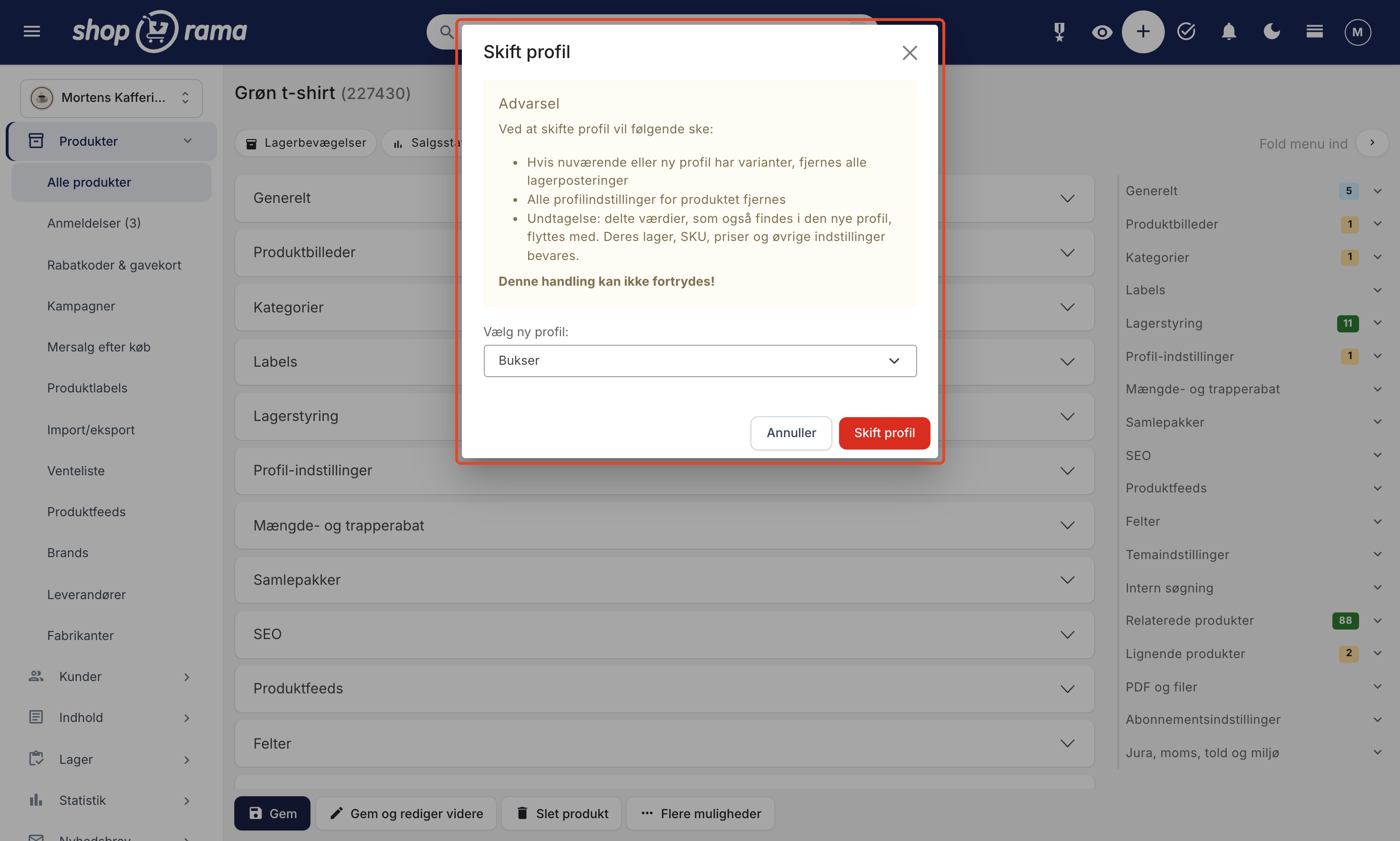
How to Switch Profiles
- Open the product under “Products”
- Click the “Change Profile ” link next to the profile name under “General.” You can also click “Change Profile ” at the bottom of “Profile Settings”
- Read the warning in the “Change Profile” window
- Select the new profile in the “Select New Profile” field :
- Click “Change Profile.” The product will be saved with the new profile immediately
If you’ve made other changes to the product, such as the description, they’ll be saved at the same time. However, anything you’ve entered in the fields for the old profile’s variants and profile settings won’t be saved, because they belong to the old profile.
What happens when you switch?
The window warns that the following will happen:
- Inventory entries with variants will be removed if either the current or the new profile has variants. Along with them, the variants’ prices and sale prices, as well as fields such as SKU, GTIN, and cost price, will also be removed. Inventory without variants will remain
- All profile settings for the product will be removed—that is, the values you entered in the fields of the old profile, such as material or fit
- This action cannot be undone. If you switch back to the old profile, the removed data will not be restored
The rest of the product remains unchanged: name, descriptions, price, images, categories, and SEO. Your orders will not be affected either.
Exception: shared values are carried over
If you use shared values—for example, the same “Small,” “Medium,” and “Large” in both your T-shirt profile and your pants profile—“Medium” is the same value in both profiles. In that case, Shoporama will move the product data for “Medium” to the new profile instead of deleting it. This applies to, among other things:
- Variant inventory and inventory entries
- SKU, secondary SKU, GTIN, MPN, cost price, and location
- Variant prices, promotional prices, subscription prices, and customer group prices
- Minimum stock, deposit, and quantity discount for the variant
- Waiting lists, wish lists, active variants, and variant images
- The selected value in general fields that are not variants, e.g., a shared color
Values without a corresponding counterpart in the new profile will be removed as described above. For example, if the T-shirt has Small, Medium, and Large, and the pants have Medium, Large, and W32, Medium and Large are moved along with their inventory, SKU, and prices, while Small disappears and W32 starts at 0.
For a value to be carried over, three conditions must be met:
- The value in the old and new profiles is linked to the same shared value
- It is a variant in both profiles, or a regular field in both. A variant does not transfer to a regular field, and vice versa
- It must be unambiguous where it should go. The shared value may only exist in one field of that type in the new profile, and all values from a field in the old profile must end up in the same field in the new one. If this is not the case, nothing is moved from that field, so a variant is never split up
If neither profile uses split values, exactly what the window warns about will happen, and nothing will be moved.
Tips before you switch
- Check your inventory. Note the inventory counts, SKUs, and variant prices for the variants that won’t be transferred, so you can set them up again in the new profile
- Make the variants shared values first. For example, if both profiles have sizes with the same names, link them to the same shared values in both profiles before switching. This way, inventory and prices will be transferred. See Shared Values
- Or copy the product. If you want to keep the old product unchanged while setting up the new one, copy the product and switch the profile on the copy. If the old product has already been taken offline or deleted, create a redirect from its URL to the new one
- Switch early. The sooner you realize the profile is incorrect, the less data you’ll have to set up again. It’s best to switch before the item comes into stock
Frequently Asked Questions
I selected the wrong profile for a new item that isn’t in stock. Is there anything to worry about?
No. If the product has neither inventory nor variants set up, there’s almost nothing to lose. Change the profile and fill in the new fields and variants afterward.
Can I undo a profile change?
No. You can switch back to the old profile, but the data that was removed won’t be restored. Only shared values found in both profiles will be transferred back and forth.
What happens to my old orders and inventory values?
The orders remain unchanged. However, the inventory entries for the variants that are removed will disappear from the product and, consequently, from the inventory. Therefore, make sure to record the inventory first if you need to document it, and then re-enter it for the new variants.
I need to move 200 products to a new profile. Can they retain their inventory?
Yes, if the variants are linked to the same shared values in both the old and new profiles. Link them first, and then the inventory, SKUs, and prices will transfer with each change. The profile can also be changed via the REST API, following the same rules as in the admin panel.
Why didn’t my “Medium” variant move over, even though it’s shared?
Check that “Medium” is linked to the shared value in both profiles (it has a link icon in the profile), that it is a variant in both, and that the new profile only has “Medium” in one variant field. If any of these conditions aren’t met, the value will be removed as a regular variant.
Will the product lose its ranking in Google when I switch profiles?
No. The product retains its URL, name, and SEO fields. Only if you create a new product instead do you need to set up a redirect from the old URL.
Need help? Contact us at support@shoporama.dk.
Related articles
Unsubscribe links in automatic emails
Give your customers the option to unsubscribe from automatic follow-up emails after purchases and product reviews - with a simple link in the email.
AI assistant in the text editor
Learn how to use Shoporama's built-in AI assistant to generate product texts, image descriptions and text suggestions.
Order list and inventory management
Learn how to use the Shoporama order list to keep track of inventory, generate shopping lists and receive goods efficiently.