Nyt: Se med det samme hvilke pakkeshop-pakker der snart udløber
En ikke-afhentet pakkeshop-pakke koster dig returfragt, ekstra håndtering og en ærgerlig kunde. Nu viser Shoporama direkte i ordrelisten om en pakke ligger klar, snart udløber, er afhentet, eller returneret. Helt automatisk for GLS, PostNord, og DAO.
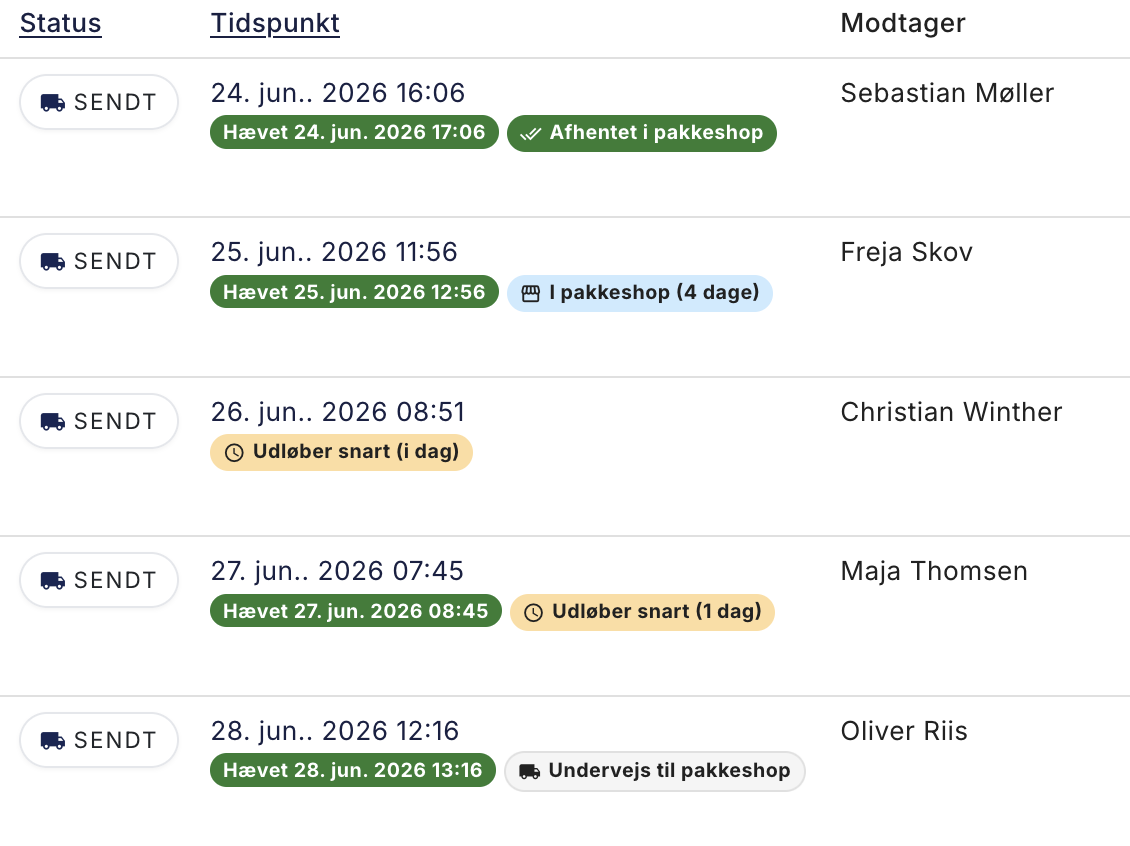
You’ve probably been there. A customer chooses pickup at a package store, the package is shipped, and then it just sits there. After about a week, the carrier sends it back, and you’re left with return shipping costs, extra handling, and a customer wondering where the package went. It’s both expensive and frustrating, and until now, the only way to detect this has been to click through to each carrier’s tracking page, order by order.
We’ve changed that. Shoporama now automatically retrieves the pickup status from the carrier and displays it as a small colored label directly on the order in your order list (image above). Please note that the orders and names in the screenshots are fictional.
Five statuses you can act on
The label changes color depending on how much attention it requires, so you can quickly scan the list:
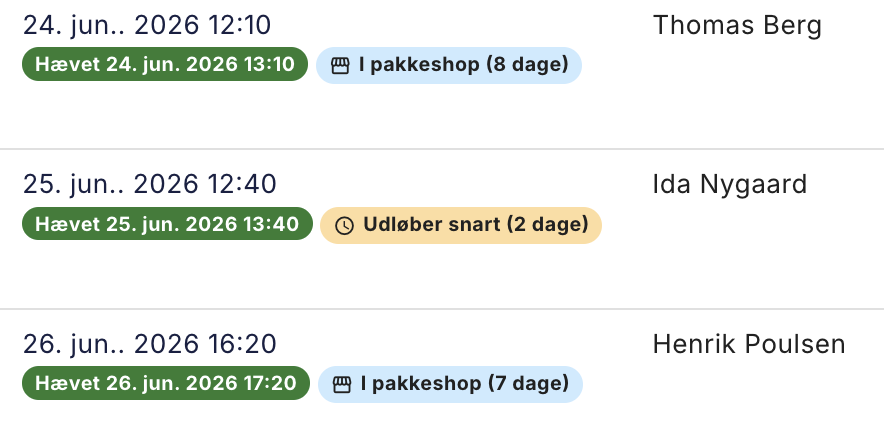
- At the package shop (blue): The package is ready, and there’s still plenty of time. The number of days until the deadline is shown in parentheses.
- Expiring soon (yellow): There are only a few days left. Now is a good time to remind the customer to pick up the package.
- Expired at the pickup location (red): The deadline has passed, and the package is on its way back to you.
- Picked up at the pickup location (green): The customer has picked up the package. The case is closed.
- Returned from the pickup location (red): The package has been sent back to you.
Works automatically with GLS, PostNord, and DAO
You don’t need to do anything. For all orders where Shoporama has generated the shipping label itself using GLS, PostNord, or DAO, the system automatically checks the status a few times a day and updates the label. If you use GLS Parcel Shop, PostNord Parcel Shop, or daoSHOP, you’re set up from day one.
Filter the list to see only the urgent ones
If you only want to see the packages waiting at the pickup location, you can filter by pickup status. Open the shipping filter above the order list, scroll down to “Parcel Shop Pickup,” check the box next to, for example, “In Parcel Shop,” and the list will show only the relevant orders. Then it’s easy to go through the list and message customers whose packages are about to expire.
Why it’s worth it
A returned package shop parcel typically costs 40 to 60 kroner in return shipping, on top of your time. If you can just catch a few per month by reminding customers in time, the feature pays for itself right away. And the customer gets their package instead of a frustrating experience.
Frequently Asked Questions
Do I need to set anything up?
No. If you use GLS, PostNord, or DAO through Shoporama, the labels are automatically applied to your package shop orders.
How often is the status updated?
A few times a day. A package that has just been picked up may therefore show as “At the package shop” for a few hours until the next update.
Does this work with other carriers?
Currently, it works with GLS, PostNord, and DAO, because Shoporama generates the shipping label for these carriers and therefore knows the tracking number. If you use a carrier through a different system, we can’t track the status automatically.
Is “Picked up at a package shop” the same as click-and-collect?
No. “Picked up at a package shop” comes from the carrier and means that the customer has picked up the package at the package shop. Click-and-collect at your own store is a separate order status that you set yourself.
If you have any questions about this feature, feel free to email us at support@shoporama.dk.
Related articles
Set up PostNord with parcel shop
Guide to setting up PostNord with parcel shop as a shipping option in your Shoporama online shop.
GLS settings on shipping options
Explanation of the GLS-specific settings per shipping option in Shoporama: shipping module, DepositService, PrivateDelivery, FlexDelivery and...
What emails does Shoporama send to my customers?
Overview of automatic emails Shoporama sends to your customers - order confirmation, abandoned baskets, track-and-trace, product reviews, and more.
More from the blog
Add-ons on the product page can now have variants
If you sell coffee, the obvious add-on item is a French press, and the French press is available in black, stainless steel, and copper. Those were...
13. august 2026
Send part of the order now and the rest later
Two of the three items are on the shelf. The last one is on backorder, and the customer has been waiting for four days. Now you can ship what you...
12. august 2026
New: Let customers personalize their purchases
Do you sell products that customers personalize? Now you can add fields directly to the product page for customers to fill out themselves: a name,...
08. august 2026