Hvad er en split-test?
En split-test (også kaldet A/B-test) er en simpel måde at finde ud af hvad der virker bedst på din shop. Du laver to eller flere varianter af samme side, fx din forside, og lader Shoporama vise hver besøgende én af varianterne tilfældigt. Efter et stykke tid kan du se hvilken variant der gav flest salg, største kurv eller højeste konvertering. I stedet for at gætte hvad dine kunder bedst kan lide, lader du dem stemme med deres adfærd.
Det smarte ved en split-test er at den er retfærdig. Begge varianter ses af besøgende på samme tid og under samme betingelser, så hverken vejret, sæsonen, eller en kampagne påvirker resultatet skævt. Når en variant vinder, er det fordi den reelt klarer sig bedre.
Et konkret eksempel: en grøn "Læg i kurv"-knap der konverterer 8% bedre end den røde lyder lille, men over tusindvis af besøg er det rigtige penge.
Tre slags split-tests i Shoporama
Du kan teste tre forskellige typer af ændringer mod hinanden:
- Sidelayouts. To eller flere varianter af samme side i Sidedesigneren. Test fx to forskellige forside-layouts, to versioner af din kategoriside, eller to produkt-side-opbygninger. Du kan ændre billeder, sektioner, tekst, rækkefølge — alt der ligger i Sidedesigneren.
- Stylesheets. To eller flere CSS-varianter mod hinanden. Test knapfarver, fontstørrelser, layout-justeringer, eller hele design-stemninger. Hvis du ved hvordan man skriver lidt CSS (eller har en hjælper der gør), er det her du finder de overraskende vindere. Små visuelle ændringer kan have stor effekt på konverteringen.
- Hele temaer. Splittest to af dine egne temaer mod hinanden — fra HTML-struktur til JavaScript og CSS samlet. Det er den dybeste form for test, hvor du sammenligner to fundamentalt forskellige forretningsindgange (fx en konventionel webshop vs. et single-page-flow). Kræver pro-abonnement og Smarty 4. Hvis 80% af dine optimeringer alligevel sker direkte i temafilerne, er det her du måler om de virker.
Alle tre slags fungerer på samme måde teknisk og bruger samme statistik. Du beslutter selv hvilken type test der giver mening for det du vil afprøve.
Bonus: tidsstyring uden at teste
Variant-systemet bag split-testen kan også bruges til at planlægge sider på bestemte datoer, fx en Black Friday-forside der tænder og slukker selv. Læs videre.
Tidsstyring — også uden split-test
Klassisk eksempel: Black Friday. I stedet for at huske at logge ind 28. november kl. 00:00 og skifte din forside, opretter du på forhånd en Black Friday-forside og siger til systemet: "Vis denne fra 28. november til 1. december". Resten klarer Shoporama selv.
Det fungerer for alle de store sæsoner: sommerudsalg, jul, fars dag, Singles Day, valentinsdag. Du kan have flere tidsstyrede varianter samtidig, fx en almindelig forside året rundt, en sommer-version juni-august, og en Black Friday-version i den uge. Systemet skifter automatisk mellem dem på de rigtige datoer.
Vil du kun have varianten vist på en bestemt dato, så lad "Online"-checkboxen være slået fra og udfyld kun datoerne. Så aktiveres den automatisk i intervallet og forsvinder igen når slutdatoen er passeret.
Sådan kommer du i gang
Først skal du have to varianter at teste mod hinanden:
- Gå til Sidedesigner (eller Stylesheet hvis du vil teste CSS), find den side du vil teste, og klik på kopi-ikonet (de to ark papir) ud for sidens navn. Du får en kopi der starter offline, så du trygt kan ændre i den.
- Tilpas kopien. Skift billede, ret tekst, omarranger sektioner. Det er det her dine kunder skal se som alternativ til originalen.
- Sæt kopien online. Så har du nu to online varianter af samme side. Hvis du blot havde sat begge online uden test, ville den med højeste prioritet vinde og blive vist til alle. Det er her split-testen kommer ind.
- Gå til Split-test, opret en ny test. Vælg hvad du vil teste (siden eller stylesheets), giv testen et navn ("Forside Hero A vs B"), tilføj de to varianter, vælg trafikfordeling (start med 50/50), og klik Start. Nu fordeles dine besøgende automatisk, og hver bruger får tildelt én variant der følger dem ved gentagne besøg.
Hvordan finder vi vinderen?
Bag kulisserne bruger Shoporama en moderne statistik-metode (Bayesian) til at beregne hvor sandsynligt det er at hver variant er den bedste. Du behøver ikke forstå matematikken, men i modsætning til klassiske p-værdier giver Bayesian dig svar du faktisk kan bruge: "variant B har 87% sandsynlighed for at være bedst". Når den sandsynlighed når 95% og der er nok data, kårer vi varianten som vinder.
Vi kårer IKKE en vinder for hurtigt. Selv hvis variant B ser bedre ud efter to dage, kan det være tilfældigheder eller en kort kampagne der pumper salget op. For at undgå falske positive vindere kræver vi:
- Mindst 1.000 besøgende pr. variant
- Mindst 100 ordrer i alt på tværs af varianterne
- Mindst 14 dages varighed (så vi dækker en hel uge-cyklus to gange)
- 95% Bayesian-sandsynlighed for at vinderen er bedst
Hvis kriterierne ikke er mødt, viser vi dig hvilken variant der er foran lige nu, men markerer tydeligt at testen ikke er afgjort. Så ved du om du skal vente eller om resultatet allerede er pålideligt.
Automation — sæt det og glem det
Du behøver ikke sidde og holde øje med din test hver dag. To uafhængige indstillinger gør at systemet kan håndtere det selv:
- Stop automatisk når der er en tydelig vinder. Så snart kriterierne er mødt og en variant har 95%+ sandsynlighed, stopper testen automatisk. Du får besked i admin.
- Brug vinderen som ny standard når testen stopper. Vinderen sættes online med høj prioritet, og de øvrige varianter sættes offline. Du har stadig dem alle i systemet, så du altid kan rulle tilbage manuelt fra variant-listen. Det virker både ved auto-stop OG når du selv stopper testen manuelt.
Med begge indstillinger slået til kan du oprette en test, klikke Start, og glemme den. Når den engang ender, er din shop allerede opgraderet til den vindende version, og du har en notice i admin der fortæller hvad der skete.
Statistikken du får
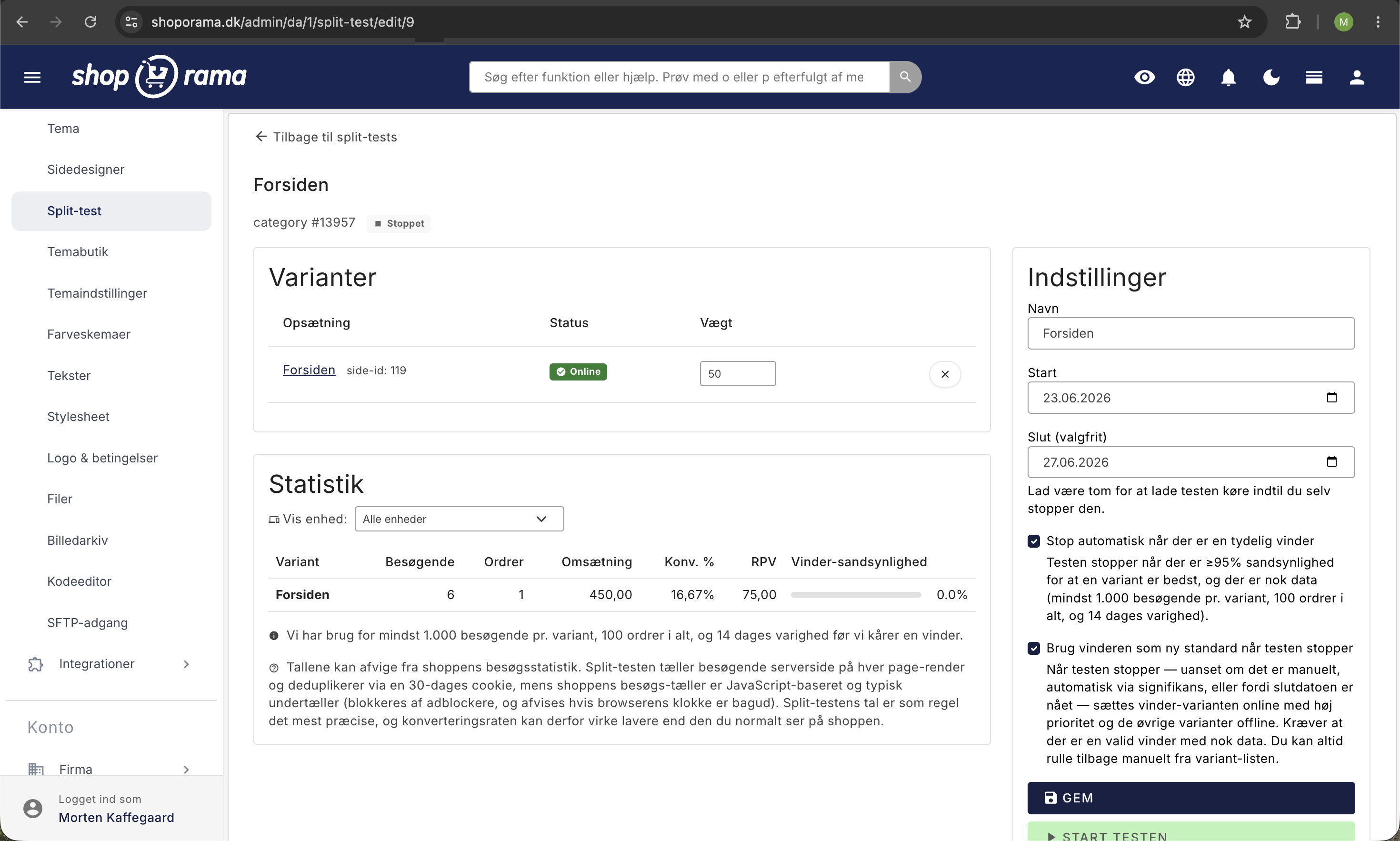
For hver variant viser Shoporama:
- Besøgende — antal unikke besøgende der så varianten (bots ekskluderet)
- Ordrer — antal gennemførte ordrer fra besøgende der så varianten
- Omsætning — total omsætning pr. variant inkl. moms og fragt
- Konverteringsrate — ordrer divideret med besøgende, vist som procent
- Omsætning pr. besøgende (RPV) — den vigtigste KPI i e-handel fordi den både fanger konvertering og kurv-størrelse i ét tal
- Vinder-sandsynlighed — Bayesian-procent for at varianten er den bedste, vist som farvet bar
Den ledende variant er fremhævet med grøn baggrund, og når en vinder er kåret med 95%+ sandsynlighed får den et trofæ-badge. Tallene står stille mellem opdateringer indtil der kommer nye data ind, så du kan trygt genindlæse uden at se procenterne hoppe.
Hvad sker der bag kulisserne?
Når en besøgende rammer din shop første gang under en kørende test, tildeler vi dem en variant baseret på trafikfordelingen. Tildelingen gemmes i en lille cookie der hedder pb_v så de ser samme variant ved gentagne besøg. Det er afgørende. Hvis kunden så variant A på telefonen i går og variant B på laptoppen i dag, var det ikke længere en valid test.
Når kunden lægger en vare i kurven, gemmer vi variant-tildelingen på selve kurven. Når ordren gennemføres, tagges den med hvilken variant kunden så. Det betyder at vi kan måle reel omsætning per variant, ikke bare estimerede klik. Hver nat kører et script der opdaterer statistikken og auto-stopper tests der har nået signifikans.
Cookie og GDPR
Du behøver ikke gøre noget for at split-test overholder GDPR. Det er en funktionel cookie der ikke deler data med tredjeparter og ikke bruges til marketing.
Cookien indeholder kun et tilfældigt visitor-id og en mapping til hvilken variant brugeren ser. Den kan ikke læses af JavaScript på siden, sendes kun ved første-parts-navigation, og udløber efter 30 dage. Hvis besøgende afviser cookies via din cookie-banner, sættes cookien ikke. I stedet bruger vi en session-baseret fallback der følger brugeren resten af sessionen uden at skrive til disk.
Du bør tilføje cookien til din cookiepolitik som funktionel/præference-cookie. Vi viser også selv en diskret note i Split-test-administrationen der minder dig om det. Datatilsynet anser sticky A/B-test-cookies som funktionelle cookies der ikke kræver eksplicit marketing-samtykke.
Bots og søgemaskiner
Googlebot, Bingbot, og andre crawlere får altid den samme variant (den med højeste trafik-vægt i testen). De får ikke en cookie og indgår ikke i statistikken. Det er hverken cloaking eller SEO-problem fordi vi ikke leverer forskelligt indhold baseret på user-agent — alle nye besøgende får samme valg som bot'en. Den canoniske URL er stabil, så Google kan rangere siden uden forstyrrelser.
Når testen er færdig
Hvis du har slået "Brug vinderen som ny standard" til, sker det automatisk: vinderen aktiveres, taberne sættes offline, du får en notice. Hvis ikke, kan du selv klikke ind på testen og se hvilken variant der vandt, og manuelt opdatere din shop til den version.
Statistikken bevares uanset hvad. Du kan altid gå tilbage og se historiske tests og deres resultater. Det giver dig over tid et bibliotek af viden om hvad der virker for netop din butik. Du planlægger den næste test klogere fordi du har forstået dine kunder bedre.
Tips til en god test
- Test ÉN ting ad gangen. Skift kun knapfarven, eller kun overskriften, eller kun billedet. Hvis du ændrer fem ting på én gang og B vinder, ved du ikke hvad der gjorde forskellen.
- Vælg ændringer der kan gøre en reel forskel. En ændring fra grå til mørkegrå knap flytter sjældent noget. Test større visuelle eller tekstuelle ændringer først, og nørd med detaljerne senere når de store ting er optimeret.
- Lad testen køre i mindst 14 dage. Der er typisk forskel på hverdage og weekender, og en hel uges cyklus to gange giver et mere balanceret billede.
- Stop ikke en test tidligt fordi det "ser godt ud". Det er den klassiske fælde der giver falske positiver. Hvis du har slået signifikans-stop til, lader systemet automatisk vente til der er nok data.
- Hav en hypotese. Skriv ned hvad du forventer FØR testen starter ("jeg tror grøn knap konverterer 5% bedre fordi den skiller sig mere ud"). Selvom du tager fejl, lærer du noget om dine kunder.
- 50/50 er hurtigst. Hvis du er forsigtig og kun vil eksponere en ny variant til 10% af trafikken, så kør 90/10 — men accepter at det tager længere tid før der er nok data til en konklusion.
Konkrete testidéer at starte med
- For modetøj/livsstil: Test "Forårsnyheder" overskrift mod "Nye varer i butikken" på din forside, eller test et model-billede mod et flat-lay-billede.
- For boligartikler: Test "Bedst sælgende" sektion mod "Nyeste produkter" som første blok.
- For specialvarer: Test om en kort produktbeskrivelse eller en lang teknisk spec konverterer bedst.
- Universelt: Test din primær-knaps farve. Den klassiske CRO-test viser at små farveændringer ofte flytter konvertering 3-10%.
Kombiner med tidsstyring og AI
Tidsstyring og split-test kan kombineres. Du kan fx oprette en Black Friday-forside, slå den online i den uge, og samtidig split-teste to varianter af den (rød hero vs grøn hero) for at finde ud af hvad der virker bedst netop til Black Friday-trafik. Sæsondata bliver guld værd til næste år.
Hvis du har AI-styringen aktiveret, kan du også oprette tidsstyrede sider direkte ved at chatte med din AI-klient: "Lav en Black Friday-forside der automatisk går online 28. november og slukkes 1. december" eller "Tag min sommerforside offline nu". Selve split-test-orchestrationen (oprette test, vælge varianter, starte/stoppe) er bevidst ikke automatiseret via AI. Det er valg du skal tage selv så ingen kommer til at starte en utilsigtet test.
Ofte stillede spørgsmål
Skal jeg være teknisk for at bruge split-test?
Nej. For sidelayouts (forsider, kategorisider osv.) klikker du dig gennem Sidedesigneren ligesom altid og kopierer med ét klik. For stylesheets skal du eller en hjælper kunne skrive lidt CSS, men resten af split-test-flowet er det samme: vælg varianter, start, vent på resultatet.
Hvor lang tid tager det før jeg har en vinder?
Det afhænger af din trafik. En shop med 5.000 besøg om dagen kan være færdig på de minimum 14 dage. En mindre shop kan have brug for 4-8 uger for at samle nok data. Hvis du ikke har 1.000 besøgende pr. variant + 100 ordrer i alt indenfor en rimelig tidsramme, vil signifikans-stop aldrig udløse, og du må manuelt vurdere ud fra de tal du har. Til meget små shops kan split-test alligevel være et godt redskab til at fange tydelige forskelle (fx en variant der konverterer dobbelt så godt).
Hvad sker der hvis jeg sletter en variant midt i en test?
Hvis testen falder under to varianter pga. sletning, stopper den automatisk. Indsamlede data bevares som historik på taggede ordrer, men testen kan ikke fortsættes. Vi kårer ikke en "vinder" i den situation, fordi en test med kun én variant ikke giver mening.
Påvirker det min webshops hastighed?
Næsten ikke. Variant-valget sker i serveren før HTML rendres, så der er ingen flicker eller forsinkelse i browseren. Den eneste ekstra omkostning er et hurtigt fil-tjek og et databaseopslag pr. besøg under en aktiv test. Når der ikke kører tests er overheaden minimal. Cachen deaktiveres dog mens en test kører, og også for brugere der har deltaget i en test (op til 30 dage efter de har fået tildelt en variant), så de altid får serveret deres tildelte version uden risiko for cache-forurening.
Hvordan ved jeg om jeg skal stole på resultatet?
Vinder-sandsynligheden er din rettesnor. Under 70% — testen er for tæt, vent på mere data. 70-94% — der er en tydelig leder, men endnu ikke statistisk sikker. 95%+ med minimumskravene mødt — du kan trygt vælge vinderen som standard. Vi viser farvede bars og badges der gør det visuelt let at se hvor langt du er.
Kan jeg køre flere split-tests samtidig?
Ja, så længe de ikke konkurrerer om samme target. Du kan godt have en split-test på forsiden OG en split-test af stylesheets samtidig — de tester forskellige ting. Men du kan ikke have to forskellige split-tests af forsiden kørende parallelt, fordi det forurener hinandens data. Systemet håndhæver reglen automatisk og giver besked hvis du forsøger.
Hvad bliver der af de varianter der taber?
De forsvinder ikke. Hvis du har slået auto-apply-vinder til, sættes de offline. Men de ligger der stadig i systemet med deres indhold intakt. Du kan altid manuelt sætte dem online igen, eller bruge dem som udgangspunkt for en ny variant. Statistikken fra den afsluttede test bevares også.
Hvad hvis flere besøgende ender på den ene variant end den anden?
Vi tjekker dagligt for skæv trafikfordeling. Hvis trafikken er klart anderledes fordelt end dine vægte (fx 70/30 i stedet for 50/50), får du en advarsel i admin. Det skyldes typisk en cache-konfiguration eller usædvanligt bot-mønster, og resultatet bør tages med forbehold indtil problemet er løst.
Hvornår vises Omsætning pr. besøgende (RPV)?
RPV beregnes så snart der er ordrer på en variant, men vi kræver minimum 30 ordrer pr. variant før vi kan give et statistisk pålideligt RPV-baseret svar. Indtil da kan du stadig se de rå tal og bruge konverteringsraten som primær KPI.
Hvad er forskellen på at splitteste stylesheet og tema?
Stylesheet-test er for ren CSS — knapfarver, fontstørrelser, spacing. Det er hurtigt at sætte op, og du behøver ikke et eget tema. Tema-test går videre: du sammenligner to af dine egne temaer i deres helhed, inkl. HTML-struktur, JavaScript-adfærd, sektion-opbygning, custom features. Hvis du allerede skræddersyr dit tema og vil måle om en større ombygning betaler sig, er tema-test svaret. Hvis du bare vil teste en knapfarve, er stylesheet-test nemmere.
Hvorfor kræver tema-test pro-abonnement?
Tema-test forudsætter at du har egne private temaer i shoppen — det er en pro-funktion i sig selv. Sidelayouts og stylesheet-test er gratis tilgængelige for alle, fordi de virker på alle Shoporama-temaer ud af boksen. Tema-test er for shops der har investeret i custom design og vil måle effekten datadrevet.
Hvorfor kræver tema-test Smarty 4?
Det er en teknisk forudsætning for at to forskellige temaer kan render side-om-side på samme shop uden at deres template-cache går i koks. Smarty 4 isolerer kompilerede templates pr. tema automatisk; Smarty 2 gør ikke. Hvis din shop kører Smarty 2, kan du skifte til Smarty 4 under temaindstillinger og dermed låse tema-test op.
Sender split-test data til Google Analytics?
Nej. Al statistik holdes internt i Shoporama. Du behøver ikke konfigurere noget eksternt for at få tallene.
Koster split-test ekstra?
Nej. Det er inkluderet i din Shoporama-løsning uden ekstra betaling, ingen begrænsning på antal tests, ingen per-besøgende afgift. Du kan køre lige så mange tests du vil, så længe du vil.
Kom i gang
Find Design → Split-test i din Shoporama-admin og opret din første test. Hvis du er i tvivl om hvad du skal teste, så start med din forside. Det er den side flest af dine kunder ser, og selv små forbedringer her giver stort udbytte. Test fx to forskellige hero-billeder eller to forskellige overskrifter mod hinanden.
Har du spørgsmål, er du velkommen til at kontakte os på support@shoporama.dk.