A marketplace for your online store
Shoporama’s App Store is the central hub where you’ll find apps that expand your online store’s functionality. Here, you can browse, install, and configure apps with just a few clicks—without having to write a single line of code.
Apps are organized into categories, and you can quickly distinguish between official Shoporama apps and apps developed by third-party developers in the partner program.
What can apps do?
Apps in Shoporama’s App Store can enhance your online store in many ways:
- Integrations — Connect your online store to accounting systems, inventory management, shipping solutions, marketing platforms, and other external services
- Widgets — Add functionality to your online store, such as live chat, customer reviews, or social media feeds
- Tracking and analytics — Install tracking codes from Google Analytics, Facebook Pixel, Google Ads, and similar services with just a few clicks
- Automation — Receive notifications and respond automatically to orders, inventory changes, and other events in your online store
- Visual customization — Customize your online store’s appearance with additional design elements and features
Install and configure in just a few minutes
Getting started with an app is easy:
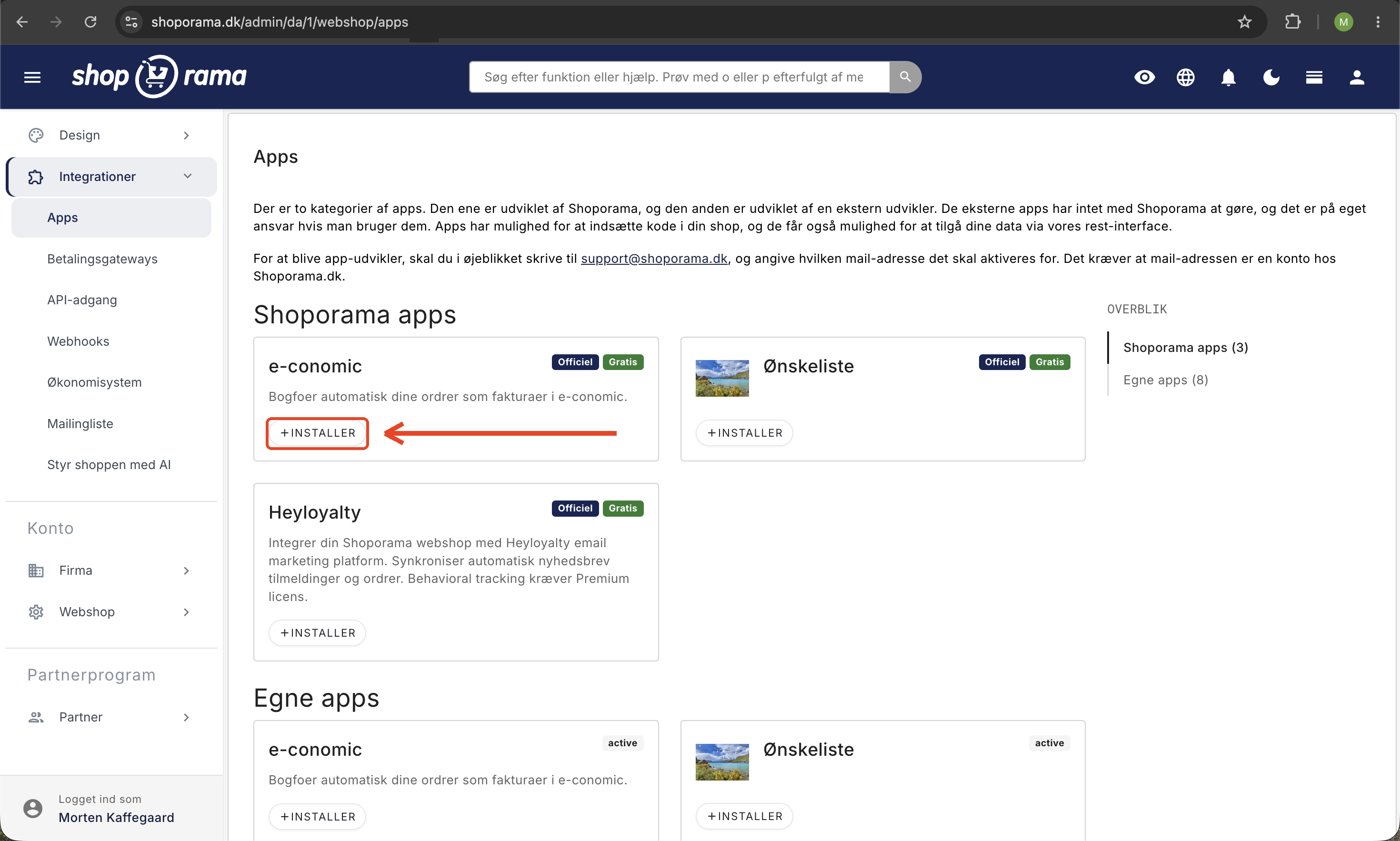
- Go to Integrations → Apps in your admin panel
- Find the app you want to use — browse by category or search directly
- Click Install
- Fill in the app’s settings (API keys, preferences, colors, etc.)
- Save — and the app is active immediately
Only users with the Full Access role can install and remove apps. This is because the app has its own access to the online store, which is independent of the individual user’s role. A user with the Developer role can view the Apps page but cannot install or remove apps. App installations and removals are recorded in the activity log, which the company administrator can access using the Activity Log button at the top of Company → Users. Read more in Roles and Permissions.
Each app has its own settings fields, which may include text fields, checkboxes, dropdown menus, color selections, and even text editors. You can always go back and adjust the settings.
Pricing and Billing
Many apps are completely free to use. Others have a monthly subscription fee, which is clearly displayed on the app card before you install it. Payment is automatically billed along with your Shoporama invoice, so you don’t have to make a separate payment.
Partner Program — Earn Money as a Developer
Shoporama’s partner program gives developers, agencies, and freelancers the opportunity to build and sell digital products to all Shoporama online stores. As a partner, you can earn money in three different ways:
1. Build and sell apps
Create your own apps with customizable settings, webhooks, and API integration. You set the price yourself—either for free or with a monthly subscription—and Shoporama handles the billing. Every time a store owner installs your paid app, you earn money.
As an app developer, you’ll have access to:
- Input fields — Create fields (text, number, boolean, dropdown, color picker, editor) that the store owner fills out during installation
- Webhooks — Receive automatic notifications when orders are created, inventory changes, or products are updated
- Events — Monitor customer behavior such as add-to-cart, view-cart, view-address, order-confirmed, paid, etc.
- Code injection — Insert JavaScript or HTML on specific pages in the online store
- Callback URL — Receive data about the online store’s configuration via a central endpoint
- Import/Export — Transfer app configurations between environments using JSON
- REST API — Access Shoporama’s REST API with the access level you choose for the app, so it can read and write data in the connected online store
2. Design and sell themes
Create professional online store themes and sell them through the partner program. You upload the theme as a ZIP file, and Shoporama handles versioning, distribution, and payment. Themes can be sold as one-time purchases or through recurring subscriptions.
The theme system supports:
- Versioning — Release new versions with a changelog, and shop owners can choose to update
- Auto-update — Store owners can enable automatic updates so they always have the latest version
- Notifications — Store owners who haven’t enabled auto-updates are notified when a new version is available
- Customer Overview — See which online stores are using your theme and which version they’re running
3. Create and resell online stores
Build online stores for your customers on the Shoporama platform and earn ongoing commission on their subscriptions. This is ideal for web agencies that want to offer a complete online store solution without having to manage servers themselves.
OAuth integration for apps
Shoporama supports OAuth-based authorization, allowing third-party services to securely access an online store’s data. The process works as follows:
- The external service redirects the user to Shoporama’s OAuth login page with a client_id and a redirect URL
- The user logs in and selects which online store to connect to
- The user selects an access level (Read, Write, or Full)
- Shoporama generates an API token and redirects the user back with the token, store URL, currency, API endpoint, and other relevant information
OAuth tokens are logged and can be revoked at any time under Integrations → API Access. If the user who authorized the app is removed from the store, the token is automatically revoked. If the user has been assigned a restricted role, such as Employee or Marketing, the token is limited to the actions permitted by that role. This ensures a secure and controlled integration.
Payments and Finances
Shoporama pays partners quarterly. Your earnings from apps, themes, and online stores are aggregated, and you’ll receive a payment statement with a breakdown. You enter your company information, CVR number, and account number in the partner dashboard, and the funds are paid directly into your account.
In the partner dashboard, you’ll have a complete overview of your earnings broken down by apps, themes, and online stores—as well as a history of previous payments with the option to download statements as PDFs.
Get Started
Are you a shop owner? Go to Integrations → Apps in your admin panel and explore the available apps right away.
Are you a developer? Apply to become a partner directly from your Shoporama account. Once your partner profile is activated, you can start building apps and themes right away. If you have any questions, feel free to contact us at support@shoporama.dk.