Cookie consent and Consent Mode v2
How to set up Shoporama's free cookie consent app: categories, automatic blocking, consent revocation, and Google Consent Mode v2.
Shoporama har en indbygget, gratis cookie-samtykke-app. Den viser et cookie-banner for dine kunder, blokerer automatisk statistik- og marketing-cookies indtil der er givet samtykke, og understøtter Google Consent Mode v2. Du behøver altså ikke købe en ekstern løsning som Cookiebot for at overholde reglerne.
Denne artikel gennemgår opsætningen og alle funktionerne. Vil du vide mere om selve lovgivningen, så læs GDPR og cookie-regler for din webshop. En komplet liste over de cookies din shop sætter, finder du i Hvilke cookies sætter Shoporama?.
Sådan aktiverer du cookie-samtykke
- Gå til Integrationer > Apps i din administration
- Find appen Cookie Consent, og installér den
- Vælg visningstype, og tilpas eventuelt tekster, knapfarver og indholdet af din cookiepolitik
- Gem
Appen er gratis, virker med alle temaer og indsættes automatisk på alle sider. Du skal ikke ændre noget i dit tema eller markere dine scripts manuelt.
Det ser kunden
Ved første besøg vises cookie-banneret, hvor kunden kan vælge mellem tre muligheder:
- Acceptér alle: Statistik- og marketing-cookies tillades
- Afvis alle: Kun nødvendige cookies tillades
- Indstillinger: Kunden vælger selv kategorier til og fra
Du kan vælge mellem to visningstyper: et klassisk overlay midt på skærmen eller en diskret bar i bunden af siden. Når kunden har truffet sit valg, genindlæses siden automatisk, så de tilladte scripts starter korrekt.
Kunden kan altid ændre sit valg via det lille cookie-ikon, der er synligt nederst på siden.
Cookie-kategorier
Appen arbejder med tre kategorier:
- Nødvendige: Kurv, login, betaling og selve samtykke-cookien. Altid aktive og kan ikke fravælges.
- Statistik: Analyseværktøjer som Google Analytics og Hotjar
- Marketing: Annonceplatforme som Meta (Facebook), Google Ads, TikTok, LinkedIn, Pinterest, Snapchat og Microsoft Ads samt e-mail-værktøjer som Klaviyo
Cookies kategoriseres automatisk ud fra deres navn. Appen genkender cookies fra de mest udbredte tjenester, og cookies den ikke kender, behandles som tracking-cookies og blokeres, indtil der er givet samtykke.
Automatisk blokering
Fra det øjeblik siden indlæses, opfanger appen alle forsøg på at sætte cookies i browseren. Indtil kunden har taget stilling, blokeres alle statistik- og marketing-cookies automatisk. Giver kunden samtykke, sættes de tilbageholdte cookies med det samme. Afviser kunden, forbliver de blokeret.
Det betyder, at du ikke skal ombygge eller tagge dine tracking-scripts. De kan blive stående som de er, og appen sørger for, at deres cookies først sættes efter samtykke.
Tilbagekald af samtykke
Kunden kan til enhver tid klikke på cookie-ikonet nederst på siden og ændre sit valg. Trækkes et samtykke tilbage, sletter appen automatisk de relevante statistik- og marketing-cookies fra browseren og rydder også tilhørende data i browserens lokale lager.
Samtykket gemmes med tidsstempel i kundens browser og gælder i op til 12 måneder. Herefter bliver kunden bedt om at tage stilling igen.
Google Consent Mode v2
Consent Mode v2 er Googles standard for samtykke-signaler og har siden marts 2024 været et krav for at bruge Google Analytics og Google Ads med personaliseret annoncering i EU. Appen sender automatisk de fire signaler til Google:
- analytics_storage: Styrer Google Analytics-cookies
- ad_storage: Styrer Google Ads-cookies
- ad_user_data: Styrer deling af brugerdata med Google
- ad_personalization: Styrer personaliserede annoncer
Alle signaler står som "denied" fra start og opdateres automatisk ud fra kundens valg. Fordi Google stadig modtager anonyme signaler, når kunden afviser, kan Google modellere konverteringer. Du bevarer dermed et retvisende billede i Google Analytics og Google Ads, selv når en del af kunderne siger nej til cookies.
Kobling til Shoporamas sporing
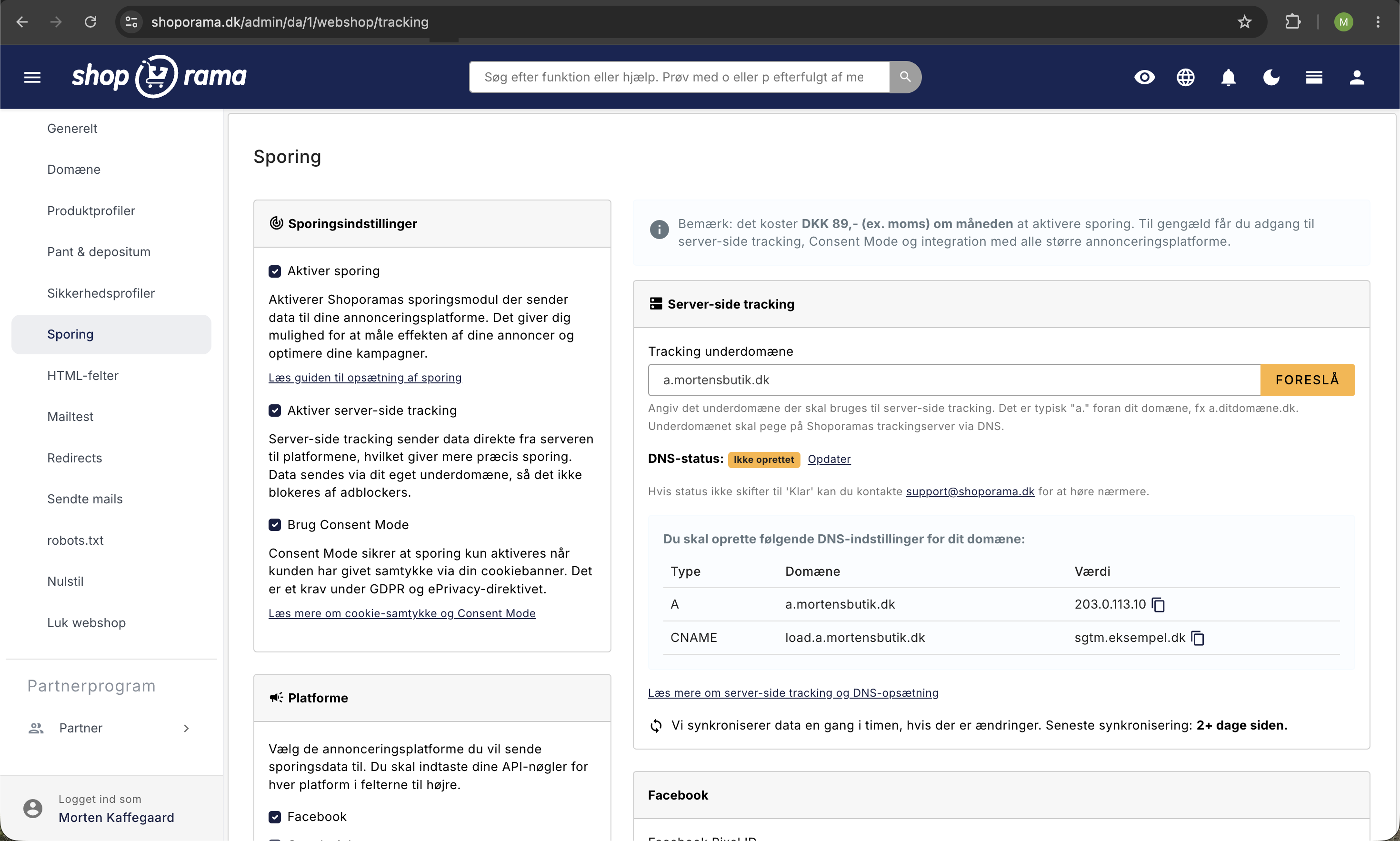
Bruger du Shoporamas indbyggede sporing, kan du koble den direkte til cookie-samtykket:
- Gå til Webshop > Sporing
- Markér Brug Consent Mode
- Gem
Så aktiveres sporingen først, når kunden har givet samtykke via cookie-banneret, og annonceplatformene modtager de korrekte samtykke-signaler. Det er sådan, kravene under GDPR og ePrivacy-direktivet opfyldes i praksis.
Tilpasning
Alt i banneret kan tilpasses i appens indstillinger:
- Alle tekster: overskrift, beskrivelse, knaptekster og kategoribeskrivelser
- Indholdet af cookiepolitikken, som kunden ser under "Læs mere"
- Knapfarver, så banneret matcher shoppens design
- Egen CSS for fuld kontrol over udseendet
- Visningstype: overlay eller diskret bar i bunden
Ofte stillede spørgsmål
Koster cookie-appen noget?
Nej. Appen er gratis og inkluderet i alle Shoporama-webshops. Du installerer den under Integrationer > Apps, og der er ingen løbende abonnement som ved eksterne løsninger.
Skal jeg ændre noget i mit tema?
Nej. Appen indsættes automatisk på alle sider og virker med alle temaer. Dine eksisterende tracking-scripts kan blive stående, da appen selv blokerer deres cookies indtil samtykke.
Hvordan dokumenterer jeg kundens samtykke?
Hvert samtykke gemmes med tidsstempel i kundens browser og gælder i op til 12 måneder. Sammen med en opdateret cookiepolitik kan du påvise, at din shop indhenter samtykke, før tracking-cookies sættes. Læs mere i GDPR og cookie-regler for din webshop.
Mister jeg konverteringsdata, når kunder afviser cookies?
Ikke nødvendigvis. Med Consent Mode v2 modtager Google stadig anonyme signaler og modellerer konverteringer, så dine tal i Google Analytics og Google Ads forbliver retvisende. Annonceplatformenes egne cookies sættes dog først ved samtykke.
Hvordan ændrer kunden sit valg senere?
Via det lille cookie-ikon, der altid er synligt nederst på siden. Trækker kunden et samtykke tilbage, sletter appen automatisk de relevante cookies fra browseren.
Kan jeg tilpasse banneret til min shops design?
Ja. Du kan ændre alle tekster, vælge knapfarver, tilføje egen CSS og vælge mellem overlay eller en diskret bar i bunden af skærmen.
Related articles
GDPR and Cookie Policies for Your Online Store
Overview of the GDPR and cookie regulations for online stores: consent before tracking, documentation, and cookie policies, and how Shoporama meets...
What cookies does Shoporama set?
A complete overview of the cookies set by a Shoporama online store: name, purpose, and duration. Use this list as the basis for your cookie policy.
HTML fields: Insert Cookiebot, GTM and other scripts in your online store
How to use Shoporama HTML fields to insert Cookiebot, Google Tag Manager, Facebook Pixel, chat widgets and other custom HTML/JavaScript on your...
Data Processor Agreement
Guide to approving the data processing agreement with Shoporama under the GDPR.
Related features
Cookie Consent - free and GDPR friendly
Free cookie consent included in Shoporama. Google Consent Mode, categorized cookies, automatic blocking and consent logging. GDPR ready.
Shoporama vs WooCommerce
Compare Shoporama and WooCommerce: price, security, speed, GDPR and maintenance. Find the best online shopping platform for your business.
Shoporama vs DanDomain
Compare Shoporama and DanDomain on price, speed, AI features and integrations. See which Danish webshop platform is best for your business.