Set currency in your shop
Set your store's currency and sell in other currencies by country using the current exchange rate or a fixed rate, price adjustments, rounding, and fixed prices for products.
Your store has one main currency, which you set in the store's general settings. If you sell in other countries using Web Store → Countries, each country can have its own currency—for example, euros in Finland and Swedish kronor in Sweden.
How to change your store’s currency
- Go to Web Store → General in the left-hand menu
- Find the Currency field
- Enter the currency code, such as DKK, SEK, EUR, or NOK
- Click Save
The store’s currency is the currency of your primary country. You should always enter your prices, shipping rates, free shipping thresholds, and discount codes in this currency.
Sell in multiple currencies using Countries
If you want to sell in a different currency, add the country under Web Store → Countries and select the currency in the “Currency” tab on the country’s page. You can choose from 14 currencies, such as the euro, Swedish and Norwegian kroner, Icelandic kronur, British pounds, Swiss francs, and U.S. dollars. Read the full guide in “Sell in Multiple Countries and Languages.”
- Exchange Rate: Select “Today’s Rate” from the National Bank, which is automatically updated daily, or “Fixed Rate,” where you enter the value of 100 units of the country’s currency in your currency, e.g., 100 SEK = 64.50 DKK
- Price adjustment: Add or subtract a percentage from the converted prices, e.g., 8 to add 8% or -5 for a 5% discount
- Rounding: Round prices, e.g., to whole numbers, to .95 or .99, to an amount ending in 9, or to the nearest 5 or 10
- Example: See immediately what 100, 249, and 999 in your currency will be in that country
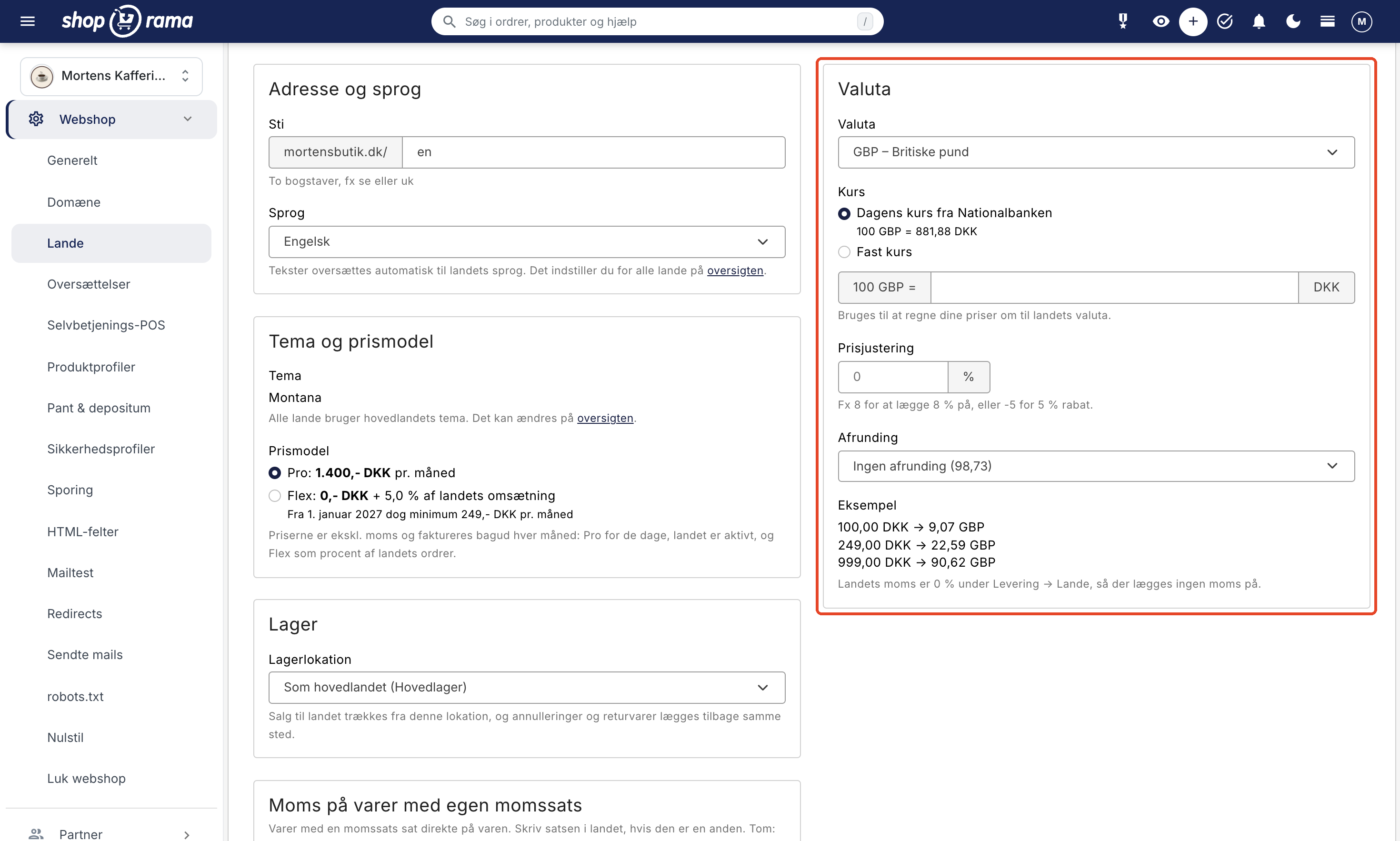
How prices are converted
The price is converted using the exchange rate, the price adjustment is applied, and finally, the price is rounded. If you enter your prices including tax, the calculation uses the price excluding your own tax, and the country’s tax is added before rounding. The country’s VAT is the B2C VAT you’ve set for the delivery country under Delivery → Countries. This also applies to promotional prices, variants, customer group prices, and campaign prices.
Fixed amounts such as shipping fees, the threshold for free shipping, discount codes, and gift cards are converted only using the exchange rate, without price adjustments or rounding.
Using today’s exchange rate, the customer sees the same rate from the cart through checkout. The order is saved in the country’s currency along with today’s exchange rate from the National Bank on the date of purchase, so it can be converted to your currency for statistics and accounting purposes.
Fixed Prices in the Local Currency
If you want to reach a specific amount, such as 199 SEK, you can set a fixed price for an item in the local currency:
- Open the product and click “Translations” at the top of the page. If your countries only have a different currency and not a different language, the link is labeled “Prices”
- Find the "Prices" tab. Here you’ll see the " Calculated Price " for each currency
- Enter a Fixed price and, if desired, a Fixed promotional price for the currency
- Click Save and Close
The fixed price is the price the customer sees, and it applies in all countries using that currency. If you leave the fields blank, the calculated price will be used. A fixed sale price also applies even if the product isn’t on sale in the main country.
Important to know
- Prices are entered in your main currency. Prices in the countries’ currencies are calculated automatically, unless you have assigned a fixed price to an item
- Orders are saved in the currency of the country where the customer made the purchase. Orders from the home country are in the store’s currency
- Payment gateway: Check with your payment provider to ensure it supports the currencies used in your target countries
Note
If you change the store’s currency under Web Store → General, your prices will not be recalculated. The amounts will remain as you entered them, just in the new currency, and this also applies to the display of orders from the main country. If you want to sell in a currency other than your own, use Countries instead.
Frequently Asked Questions
Should I choose the current exchange rate or a fixed rate?
With the current exchange rate, prices follow the currency’s fluctuations, so they may vary slightly from day to day. With a fixed exchange rate, prices remain unchanged until you update the rate yourself. If you want neat, round numbers, combine the exchange rate with rounding.
Can customers choose the currency themselves?
The currency is determined by the country. Customers can change the currency by selecting a different country in the language selector, in Shoporama themes that support country-specific settings. If you only have delivery countries listed and no countries under Webshop → Countries, all transactions will be in the store’s currency.
Why isn’t the shipping cost a nice, rounded price?
Shipping, free shipping thresholds, discount codes, and gift cards are only converted using the exchange rate so that the amount matches what you’ve entered in your own currency. Rounding applies only to product prices.
Need help? Contact us at support@shoporama.dk.
Related articles
Blog linked to your shop
Complete guide to the blog feature in Shoporama - create posts, schedule publishing, link products, optimize for search engines and use dynamic...
Get a copy of your shop
Information about options for getting a copy of your Shoporama online shop to another country, for example.
Remove a user from your shop
Guide to removing a user from your business in Shoporama admin.
Countries and Currency: Delivery Countries, Sales Tax, and Shipping
Set up delivery countries under Delivery → Countries with VAT rates, VAT zones, shipping options, and free shipping, and see how they relate to...
Sell in multiple countries and in multiple languages
Here's how to sell in other countries in your customers' languages and currencies using "Countries": Add a country, set up the address, language,...