MobilePay Checkout
Guide to setting up MobilePay Checkout as a payment option in your Shoporama online shop.
MobilePay Checkout giver dine kunder mulighed for at betale hurtigt med MobilePay — uden at udfylde adresseoplysninger manuelt. Integrationen fungerer via QuickPay.
Forudsætninger
- En QuickPay-konto med MobilePay Checkout aktiveret
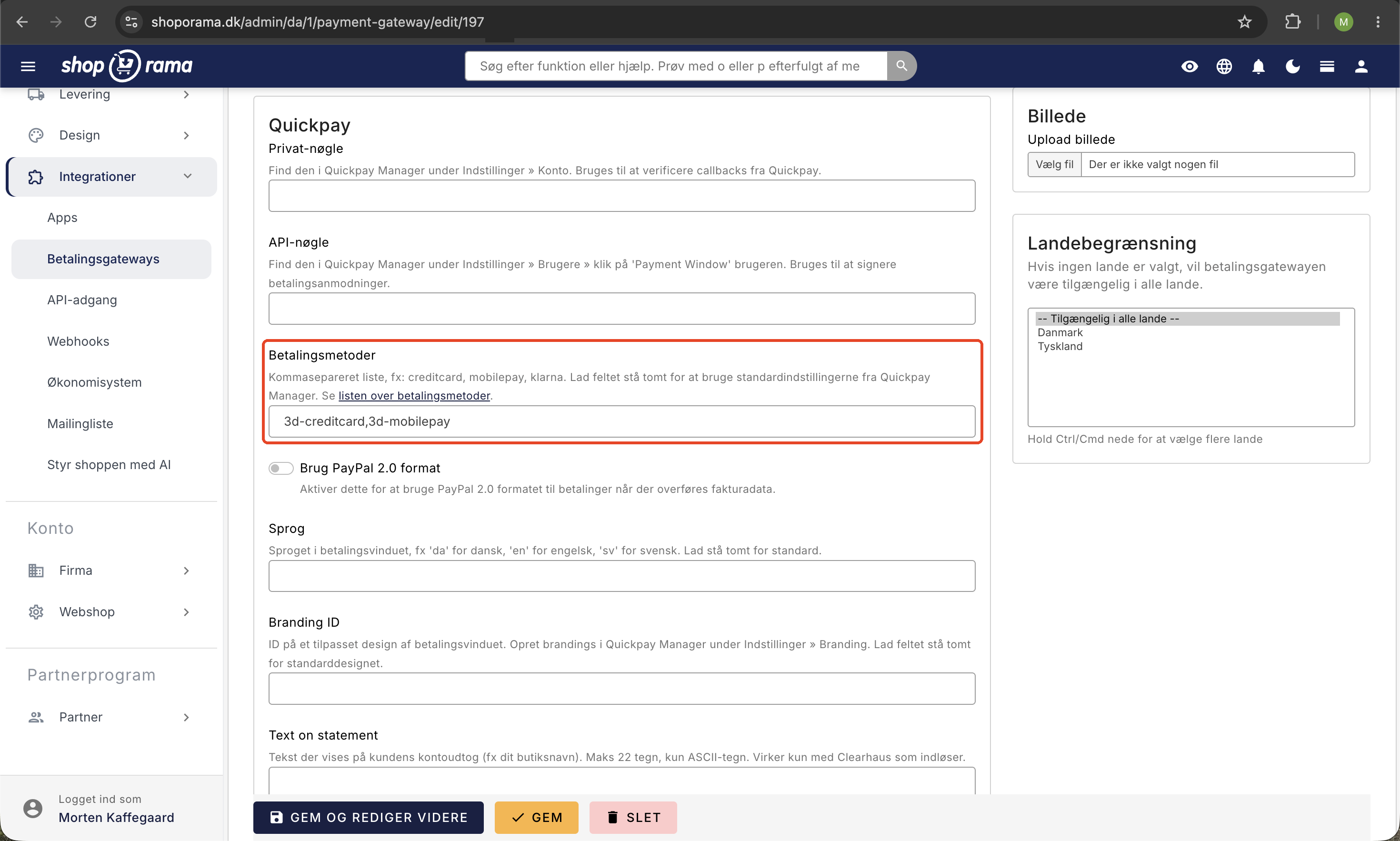
- En betalingsgateway oprettet i Shoporama med "mobilepay" som betalingsmetode
1. Aktivér MobilePay Checkout i Shoporama
- Gå til Betalingsgateways i admin
- Opret en ny gateway eller rediger en eksisterende
- Sørg for at "mobilepay" er angivet under betalingsmetoder
- Markér feltet "Hent kundeadresse fra MobilePay/PayPal"
- Klik Gem
2. Tilføj MobilePay-knap i dit tema
Du skal tilføje en knap i din kurv-template (basket.html) der sender kunden til MobilePay Checkout. Knappen skal submitte variablen invoice_address_selection via POST til /basket:
<input type="submit" name="invoice_address_selection"
       value="Betal med MobilePay Checkout"
       class="btn btn-primary" />
Tip
Du kan tjekke om din shop understøtter MobilePay Checkout med en if-sætning: <{if $webshop->hasInvoiceAddressSelection()}>. Knappen vises så kun, når det er aktiveret.
3. MobilePay fra andre sider (valgfrit)
Du kan også tillade kunder at gå direkte til MobilePay Checkout fra andre sider end kurven, fx produktsiden. Opret en formular der POST'er til /basket:
<form action="/basket" method="post">
  <input type="submit" name="invoice_address_selection"
         value="Hurtig betaling med MobilePay" />
</form>
Vigtigt at vide
Bemærk
MobilePay Checkout ændrer fundamentalt, hvordan ordreoplysninger indhentes. Shoporama modtager først kundens adresseoplysninger efter betalingen er gennemført — og oplysningerne kan ikke verificeres på forhånd. Hold derfor ekstra øje med, at kundernes oplysninger er valide.
Ofte stillede spørgsmål
Hvorfor bliver telefonnummeret ikke udfyldt automatisk i MobilePay?
MobilePay understøtter ikke længere forudfyldning af telefonnummer fra webshoppen. Kunden skal selv taste sit nummer første gang de betaler med MobilePay fra en PC. Nummeret huskes dog i browserens cache til næste gang. Fra mobil sendes kunden direkte til MobilePay-appen, hvor det ikke er relevant.
Læs mere: Telefonnummer i MobilePay.
Har du brug for hjælp med opsætningen? Kontakt os på support@shoporama.dk.
Related articles
Customize your checkout
Guide to customizing the checkout flow in your Shoporama online store, including payment methods, shipping, customer fields and gift cards.
Settings for transactional emails
How to set when Shoporama automatically sends transactional emails like abandoned baskets, payment reminders and product reviews.
Order flow and automated emails
Understand the entire flow from checkout to order confirmation. Learn when automatic emails are sent, what happens with different payment methods...