Order queue
Guide to the order queue in Shoporama. See the status of automatic order actions such as capture, invoicing and stock pull, and learn how to manage the queue.
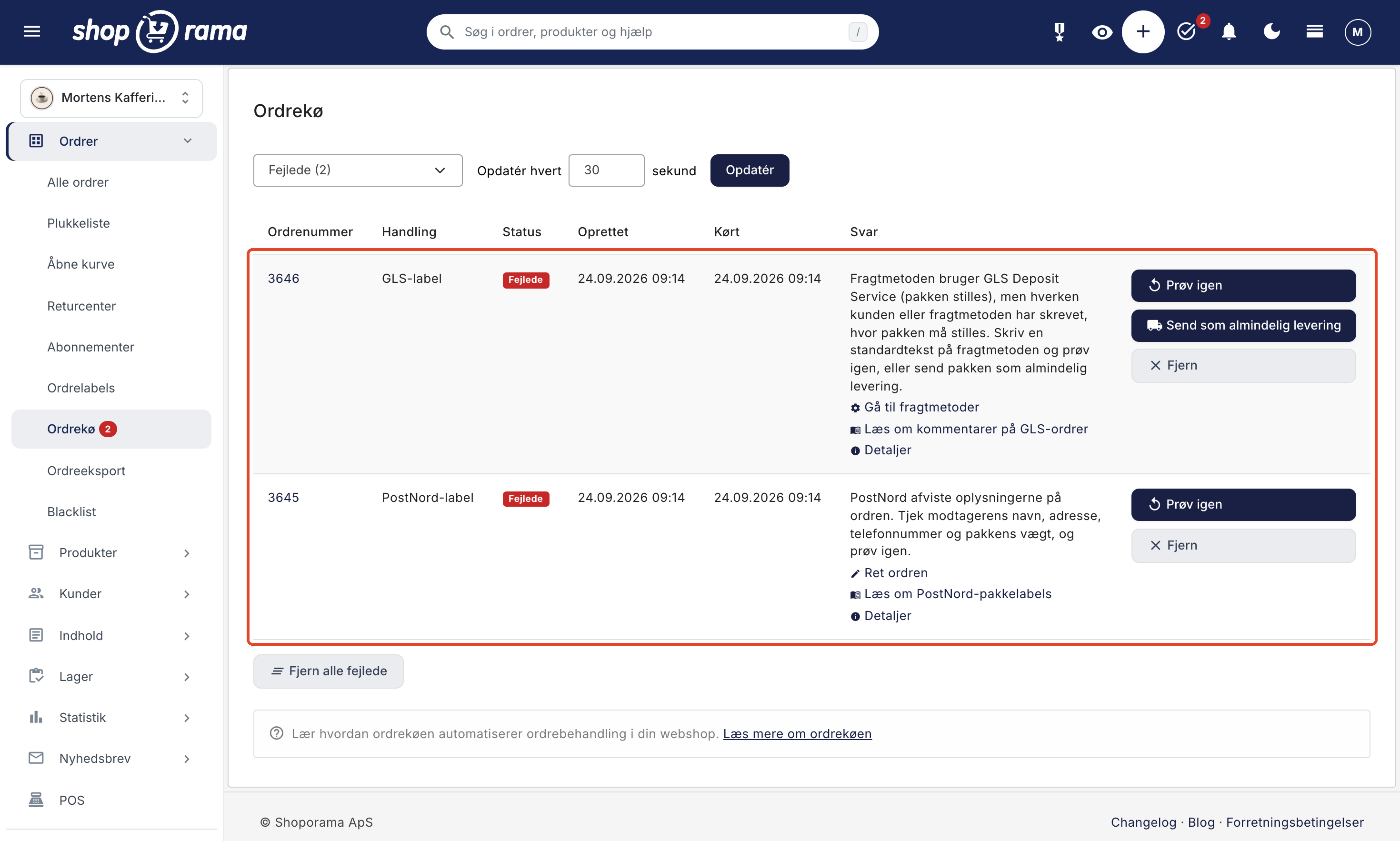
The order queue shows all automatic actions performed on your orders. For example, when you process a payment, create a shipping label, or post an order, it happens through the order queue. Here, you can track the status, see exactly what went wrong if an action fails, and choose what to do about it.
What is the order queue?
The order queue is an overview of all asynchronous actions performed on orders in your online store. Instead of waiting for each action to be completed immediately, the tasks are placed in a queue and processed automatically in the background. This ensures that your administration remains fast and responsive, even when many orders are being processed at the same time.
You’ll find it under Orders → Order Queue in the menu. Click on an order number in the queue to open the order itself.
Statuses
Each action in the queue has one of the following statuses, which are displayed as a colored icon in the Status column:
- Pending (yellow): The action is waiting to be executed. If it also says “Deferred,” it is set to wait a short while before being processed.
- Running (cyan): The action is currently being executed.
- Completed (blue): The action has been completed. You can view the response from the external service in the Response column.
- Failed (red): The shipping company, payment provider, or accounting system rejected the action, or an error occurred during the process. For example, a label was not generated, or the funds were not withdrawn.
- Canceled: The action has been canceled and will not be executed. The time of cancellation is shown in the Running column.
Transactions that have been in the “Pending” or “In Progress” status for more than 7 days are automatically canceled. The same applies to transactions on an order that has been canceled or deleted.
Filtering
Use the dropdown menu at the top to filter by status. You can select All, Failed, Pending, Running, Completed, or Canceled. For Failed, Pending, and Running, the number appears in parentheses.
If there are failed actions and the filter is set to something other than Failed, a box at the top of the page will display, for example, “2 entries in the order queue have failed,” with a “View Failed” link so you don’t overlook them.
Automatic Update
The order queue updates automatically at a set interval. The default interval is 30 seconds, but you can change it by entering a different number of seconds in the “Update every ” field and clicking “Update.”
When an action fails
In the “Response” column, the error is explained in Danish, for example, that the recipient is missing a last name or that the card issuer declined the transaction. Below the explanation is a discreet line with links to where you can fix the problem, such as “Correct the order,” Go to Shipping Methods, or Go to Payment Gateways, as well as to the support article describing the error. If we don’t recognize the error, the shipping company’s or payment provider’s own text will appear there instead.
Click Details to view the entire transaction: order number, action, status, creation and processing times, the error message with links, and the raw response from the service. The raw response is useful if you need to contact the shipping carrier or us.
If an action has been retried and is now pending, or if it has been canceled but the previous attempt failed, it will say “Last attempt failed:” followed by the error message in the “Response” column. This way, you can still see what went wrong the first time.
Shoporama does not retry on its own
A failed action is not automatically retried. This is a deliberate choice: an action that appears to have failed may still have been partially processed by the shipping company or payment provider, and an automatic retry could therefore result in duplicate labels, duplicate invoices, or a payment being charged twice. That’s why the transaction remains marked as “Failed” until you decide what should happen.
Actions
The buttons on the right side of the row depend on the action’s status:
- "Cancel" appears for actions in the "Pending" status. The action is canceled and will not be carried out.
- "Retry" appears for failed actions. You’ll be asked if you’ve checked the order to ensure a label hasn’t already been generated or an amount charged. The action is then queued again and processed within one minute. You can track it under "Pending."
- "Send as Standard Delivery " appears only for GLS labels that failed because the shipping method uses Deposit Service without a note specifying where the package should be left. The label is then generated as a standard GLS delivery, and the package will not be left. Read more in Comments on GLS Orders.
- "Remove" appears next to failed actions. Use this when you’ve resolved the problem yourself, such as by creating the label another way. The action is moved to "Canceled" and will not be processed again.
- "Back in Queue" is a button you cannot click. It appears next to a failed action if the same action is already queued in another entry, e.g., because a colleague has reordered the label. The new entry will be processed within a minute, and you can remove the old error using "Remove."
- "Restart" appears next to actions in the "Running" queue that have stalled. The action is returned to the queue. If the action is currently running, there is no button.
Below the table, two buttons appear when needed:
- "Remove All Failed " appears when the filter is set to "Failed." All failed actions are moved to "Canceled" and will not be run again.
- "Restart Stalled Entries " appears when there are actions in "Running." Actions currently running are not affected.
If there are multiple GLS packages waiting because the shipping method uses “Deposit Service” without text, a box at the top of the page displays the number and the “Send All as Standard Delivery” button, so you can send them all at once.
All buttons lock after the first click, so a double-click won’t add the same action to the queue twice. If it says, “The label is already in the queue and will be generated shortly. No extra one has been added to the queue,” the action had already been reordered, and nothing extra has happened.
Typical actions in the queue
The actions are listed with their Danish names in the “Action” column. The most common are:
- GLS label, PostNord label, DAO label, and Burd delivery, which create the shipment with the shipping company.
- Return labels, e.g., GLS return label, GLS return label (QR), PostNord return label, DAO return label, DHL return label, and DPD return label.
- Payment withdrawal, which debits the funds from the customer’s card.
- Track & Trace update, which retrieves the shipment’s status from the shipping carrier.
- Transfer to e-conomic, Transfer to Billy, and Transfer to Dinero, which post the order to the books.
- Transfer to EasyPOS and Transfer to DDD, if you use those integrations.
How to Spot an Error
You don’t need to keep an eye on the order queue all the time. An error is displayed in several places in the admin panel:
- The number next to “Order Queue” in the menu. A red number indicates how many actions have failed in the last 24 hours. If an action was retried or removed afterward, it isn’t counted. Errors in updating track & trace and errors on canceled orders aren’t counted either.
- Action Required. The task “Orders have errors in the order queue” compiles the errors from the last 14 days; the “View Errors” button opens the order queue filtered by “Failed.” Read more in Action Required.
- The error icon in the order list. A red icon immediately after the order number indicates that the order has an error in the order queue. Hover over the icon to view the error, and click to open the order queue filtered by that order. While an action is pending or in progress, a small spinner will appear in its place.
- On the order itself. The order queue for the order displays the same statuses and the Danish error message with links.
Troubleshooting
First, read the error message in the “Response” column, and use the link below it to fix the problem, such as a missing address on the order or an incorrect login in the settings. Then click “Try Again.” If the error message says that the shipping carrier’s system did not respond, nothing has been created, and you can safely try again in a little while.
If a task is listed as “Running for a long time,” this may be due to a temporary issue with the external service (e.g., the payment gateway or shipping provider). If it has stalled, you can use “Restart.”
If GLS labels are failing, you’ll find the most common errors and solutions in “Errors When Transferring to GLS.”
Tip
You can keep the order queue open in a separate tab with automatic updates so you can quickly monitor the status while working on orders in another tab.
Frequently Asked Questions
There’s a red number next to “Order Queue” in the menu. Did I do something wrong?
Not necessarily. The number means that one or more actions have failed in the last 24 hours—for example, a label that couldn’t be generated because the customer only entered their first name. Click on "Order Queue," select " Failed " in the filter, and read the explanation in the "Response" column. It tells you what needs to be corrected.
Why doesn’t Shoporama just try again on its own when a label fails?
Because a new attempt could result in two labels or a double charge if the first attempt was partially successful. Check the order and click “Try Again” yourself.
Can I click “Try Again” on all the failed orders at once?
No, “Try Again” applies to each individual action because most errors require you to correct something first; otherwise, they’ll just fail again. The only exception is GLS packages that failed due to a Deposit Service entry with no text. You can send those all at once by selecting “Send All as Standard Delivery” in the box at the top of the page.
A transfer to Dinero failed. Will the order be posted twice if I click “Try Again”?
First, check in Dinero to see if the invoice has gone through after all. If it hasn’t, you can safely click “Try Again.” If it’s already there, you should instead click “Remove” so the transaction is moved to “Canceled” and isn’t run again.
I created the label myself on the GLS website. How do I remove the error?
Click “Remove” next to the failed transaction. It will be moved to “Canceled,” will no longer be counted in the “Order Queue” in the menu or under “Action Required,” and the error icon in the order list will disappear. If you have a lot to clean up, you can filter by “Failed” and click “Remove All Failed.”
Where can I see the exact response from the shipping company so I can forward it?
Click “Details” below the error message. At the bottom of the page, you’ll find the raw response under “Response,” and under “Action,” the technical term is also listed in parentheses. Copy this into your email to the shipping company or to support@shoporama.dk.
My GLS packages are supposed to be left at the door, but the label is invalid. What should I do?
You’re using the “Deposit Service” shipping method, but neither the customer nor the shipping method specifies where the package should be left, and without that information, GLS will reject the shipment. Enter a standard text in the “Default Comment ” field for the shipping method and click “Try Again,” or click “Send as Standard Delivery” if the package should simply be delivered as usual. See “Comments on GLS Orders.”
An action has been stuck in “Running” for an hour. Has it stalled?
If there’s a “Restart” button next to it, it has frozen, and you can put it back in the queue. If there’s no button, it’s actually running right now, typically because the external service is responding slowly. In that case, just wait a little while.
Why has the error icon in the order list disappeared, even though I haven’t done anything?
The icon only appears for current errors from the last 14 days. It also disappears if the same action has been retried, run, or canceled afterward—for example, because a colleague clicked “Retry” or reordered the label from the order list. If the label has been reordered, the old error will still appear in the order queue under “Failed” until someone clicks “Remove.”
Need help? Contact us at support@shoporama.dk.
Related articles
Pick list
How to use the picking list in Shoporama: the queue, shelf location for each item, scanning with a barcode scanner, printing picking slips, and the...
Order labels
Guide to order labels in Shoporama. Create color-coded labels to organize and categorize your orders and set up automatic allocation based on...
Action Required
"Action Required" lists the items in your store that require your attention, such as errors in the order queue, payments that weren't processed,...
Related features
Shipping options
Set up shipping with PostNord, GLS, DAO, DHL and Shipmondo. Parcel shops in checkout, tracking, free shipping and weight-based shipping calculation.
13+ payment gateways for your webshop
Choose from OnPay, Quickpay, Stripe, Mollie, Nets Easy, ePay and many more. Automatic capture, country restrictions and partial payment.