Get stars on Google Shopping with product reviews
Here's how to display your product reviews as stars in Google Shopping using Shoporama's built-in review feed: activation, Google requirements, and registration in Merchant Center.
Stjerner ved siden af dine produkter i Google Shopping bygger på de anmeldelser, dine kunder allerede har givet dig. Med Shoporamas indbyggede review-feed kan du sende dine godkendte produktanmeldelser til Google, så stjernebedømmelserne kan vises på dine Shopping-annoncer og i de gratis produktlister. Det er ekstra værdi af et arbejde, du i forvejen lægger i butikken.
Når en potentiel kunde scroller gennem Shopping-annoncer og produktlister, falder øjet helt naturligt på de produkter, der viser stjerner. Det er et hurtigt tillidssignal om, at andre har købt varen og er glade for den, før kunden overhovedet har klikket. En højere klikrate kan være med til at gøre dine annoncekroner mere effektive, fordi flere af dem, der ser annoncen, vælger netop din butik.
Bemærk: Feedet er indbygget i Shoporama og virker uanset hvilket tema du bruger. Du skal ikke installere noget eller redigere i dit tema.
Hvad er stjerner i Google Shopping?
Google kalder det Product Ratings. Det er de gule stjerner og det samlede antal anmeldelser, der vises sammen med dine produkter i Google Shopping og i Shopping-annoncer. Stjernerne kommer fra et særskilt feed, du indsender i Google Merchant Center, hvor Google matcher dine anmeldelser til de rigtige produkter.
Det er vigtigt at holde tre ting adskilt, fordi de er forskellige kanaler:
- Anmeldelser på dine egne produktsider: stjernerne, dine besøgende ser inde i din webshop. Det styrer du i Produktanmeldelser.
- Stjerner i Googles organiske søgeresultater: de kommer fra strukturerede data på dine sider. Læs mere i Implementér strukturerede data.
- Stjerner i Google Shopping og Shopping-annoncer: dem får du via dette review-feed. Det er denne artikel handler om.
Du kan sagtens have det ene uden det andet, og de tre ting supplerer hinanden fint.
Sådan aktiverer du review-feedet
Du skal allerede indsamle produktanmeldelser i din shop. Er du ikke i gang endnu, så start med Produktanmeldelser. Derefter:
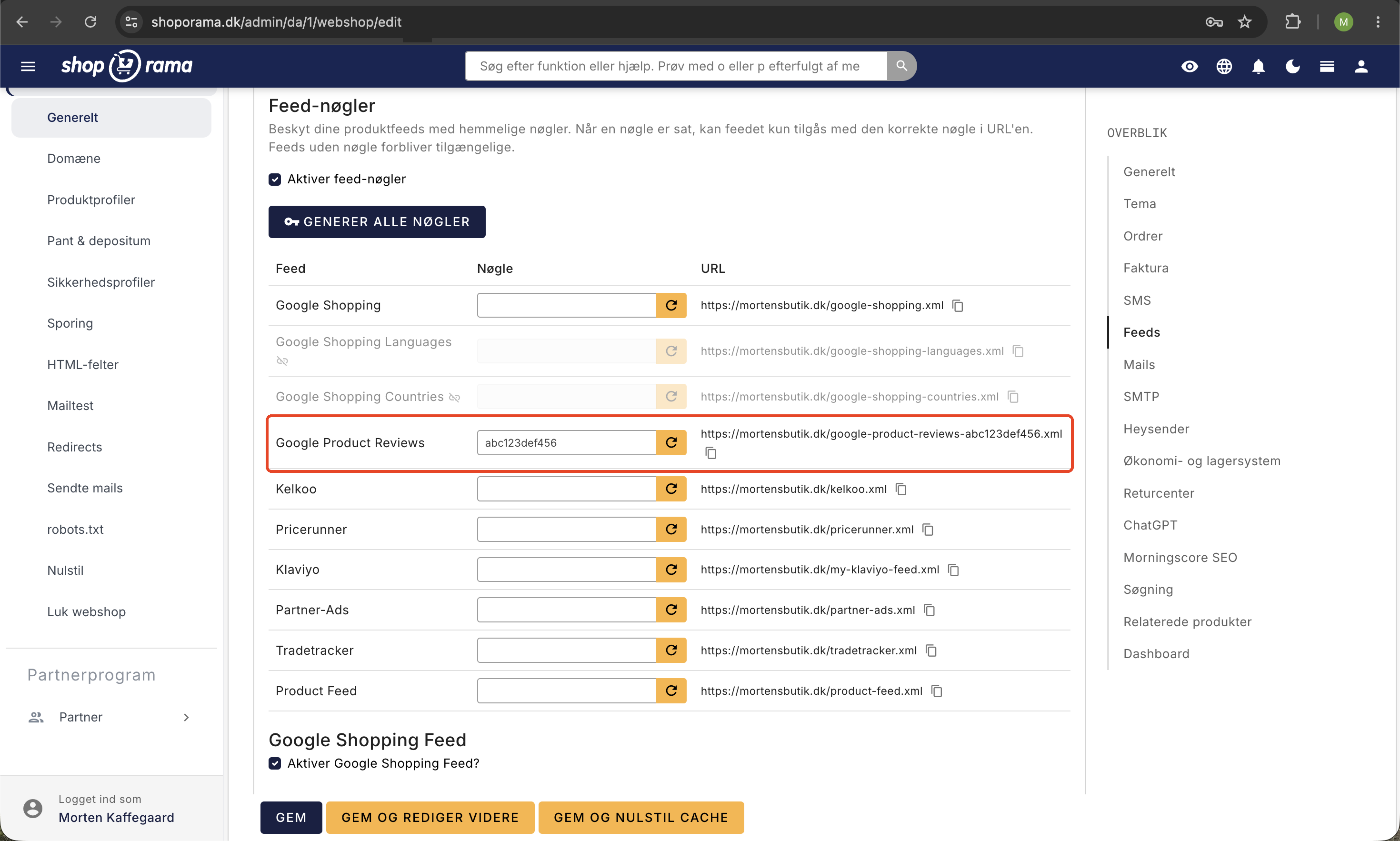
- Gå til Indstillinger → Webshop og åbn fanen Feeds.
- Find afsnittet Google produktanmeldelser, og sæt flueben i Aktiver Google Product Reviews feed.
- Gem. Din feed-adresse vises nu på siden og ser sådan ud: dit-domæne.dk/google-product-reviews.xml
Vil du ikke have, at adressen er offentligt tilgængelig, kan du tilføje en valgfri feed-nøgle på samme fane. Så får feedet en hemmelig adresse, hvor nøglen indgår i selve linket, og det er den fulde adresse du bruger i næste trin.
Tilmeld feedet i Google Merchant Center
Feedet sendes ikke automatisk til Google. Du skal selv tilmelde adressen én gang:
- Log ind i Google Merchant Center.
- Find Product reviews (Produktanmeldelser). Har du ikke programmet endnu, skal du først ansøge om at deltage hos Google.
- Opret en ny datakilde, og indsæt din feed-adresse fra Shoporama.
- Gem. Google henter herefter feedet med jævne mellemrum, typisk en gang i døgnet.
Har du flere webshops, har hver shop sin egen feed-adresse, som du tilmelder separat i den pågældende shops Merchant Center. Kører du allerede det almindelige produktfeed, kan du med fordel læse Opsæt Google Shopping Feed.
Krav fra Google for at få vist stjerner
- Mindst 50 anmeldelser: Google viser først stjerner, når du har mindst 50 anmeldelser på tværs af alle dine produkter.
- Produktidentifikatorer: Google matcher helst anmeldelser til produkter via GTIN (stregkode), men kan også bruge MPN sammen med brand, eller SKU. Jo flere af dem du udfylder på produkterne, jo sikrere bliver matchet.
- Alle anmeldelser med: Google vil have både gode og dårlige anmeldelser. Du kan altså ikke kun sende de positive.
- Kun om produktet: En produktanmeldelse skal handle om selve varen, ikke om levering, kundeservice, eller pris. Anmeldelser der kun handler om fragt eller service, lever ikke op til Googles politik.
Hvilke anmeldelser kommer med i feedet?
Shoporama sørger automatisk for, at feedet følger Googles officielle format, og at det kun indeholder anmeldelser, du må og bør sende:
- Kun godkendte anmeldelser med en skreven tekst kommer med. Vurderinger uden kommentar og anmeldelser, du endnu ikke har godkendt, holdes ude.
- Er en anmeldelse knyttet til en ordre, markeres den automatisk som verificeret køb. Det fortæller Google, at anmelderen rent faktisk har købt varen.
- Vi viser anmelderens navn. Mangler det, bruger vi af hensyn til privatliv kun fornavnet fra ordren, og ellers vises anmeldelsen som Anonym.
- Har kunden vedhæftet billeder til anmeldelsen, eller har du selv lagt billeder på, kommer de med i feedet, så Google kan vise dem sammen med anmeldelsen. Har du slået Vis billederne i shoppen fra på anmeldelsen, bliver billederne heller ikke sendt til Google. Om og hvornår Google viser billederne, afgør Google selv. Læs mere om billederne i Produktanmeldelser.
For aktive shops genopbygges feedet automatisk med jævne mellemrum, så det altid er opdateret med dine nyeste godkendte anmeldelser. Du skal ikke gøre noget løbende.
Stjernerne kommer ikke frem, hvad gør jeg?
Det er helt normalt, at der går noget tid, før stjernerne dukker op. Tjek disse ting:
- Har du mindst 50 godkendte anmeldelser på tværs af produkterne?
- Er feedet tilmeldt under Product reviews i Merchant Center, og henter Google det uden fejl?
- Har dine produkter GTIN, MPN med brand, eller SKU, så Google kan matche anmeldelserne?
- Google bruger typisk nogle dage på at behandle og godkende et nyt review-feed, før stjernerne begynder at blive vist.
Ofte stillede spørgsmål
Jeg er ikke så teknisk. Hvad skal jeg egentlig gøre?
Du tænder funktionen under Indstillinger → Webshop → fanen Feeds → Google produktanmeldelser. Så får du en feed-adresse, som du indsender i Google Merchant Center under Product reviews. Google kræver mindst 50 godkendte anmeldelser, før stjernerne vises. Resten kører af sig selv.
Virker det uanset hvilket tema jeg bruger?
Ja. Feedet er indbygget i Shoporama og fungerer uanset tema. Har du flere webshops, har hver shop sin egen feed-adresse, som du tilmelder separat i den pågældende shops Merchant Center.
Hvorfor kan jeg ikke se stjerner, selvom feedet er indsendt?
Google viser først stjerner, når du har mindst 50 anmeldelser på tværs af alle produkter. Derudover skal Google kunne matche anmeldelsen til produktet via GTIN, MPN med brand, eller SKU. Mangler du GTIN, bliver matchet mere usikkert, og færre stjerner vises.
Vi får af og til kritik af leveringstiden. Bliver de anmeldelser også sendt til Google?
Google vil have alle anmeldelser med, også de kritiske, så du kan ikke kun sende de positive. Men en produktanmeldelse skal handle om selve produktet, ikke om levering, service, eller pris. Anmeldelser der kun handler om fragt eller kundeservice, lever ikke op til Googles politik.
Er det her ikke bare de samme stjerner, jeg allerede ser i Googles søgeresultater?
Nej, det er tre forskellige ting. Anmeldelser på dine egne produktsider er i din webshop. Stjerner i Googles organiske søgeresultater kommer fra strukturerede data på siden. Dette feed giver stjerner på Google Shopping og dine Shopping-annoncer. Du kan have det ene uden det andet.
Vores produkter har ikke alle sammen stregkoder. Får vi så slet ikke stjerner?
Google matcher helst via GTIN, men kan også bruge MPN sammen med brand, eller SKU. Uden GTIN bliver matchet mindre sikkert, så jo flere produktidentifikatorer du udfylder, jo bedre. Sørg især for at have GTIN på de produkter, hvor stregkoden findes.
Kan jeg beskytte feed-adressen?
Ja. Du kan tilføje en valgfri feed-nøgle, så feedet får en hemmelig adresse. Det er den fulde adresse inklusive nøgle, du indsender i Merchant Center. Uden en nøgle er feedet offentligt tilgængeligt.
Hvordan ved Google, at en anmeldelse er fra en rigtig kunde?
Når en anmeldelse er knyttet til en ordre, markeres den automatisk som verificeret køb i feedet. Kun godkendte anmeldelser med tekst sendes med, så tomme vurderinger uden kommentar kommer ikke med.
Har du spørgsmål til opsætningen, er du altid velkommen til at skrive til support@shoporama.dk.
Related articles
Product reviews
Lær hvordan du bruger produktanmeldelser i Shoporama. Indsaml kundeanmeldelser og kundernes billeder automatisk, moderer dem, og vis...
Set Up a Google Shopping Feed
Guide to Setting Up a Google Shopping Feed in Shoporama: categories, custom labels, product IDs, and catalog matching; feeds by country with the...
Product IDs and Catalog Match: How to Ensure Your Ads Match Your Product Feed
An explanation of which product ID Shoporama’s tracking sends, why it always matches the Google Shopping feed, what “catalog match” means for your...
Build your own feeds
Guide to building your own product feeds in CSV, XML or JSON format with Shoporama's custom feed feature.
Related features
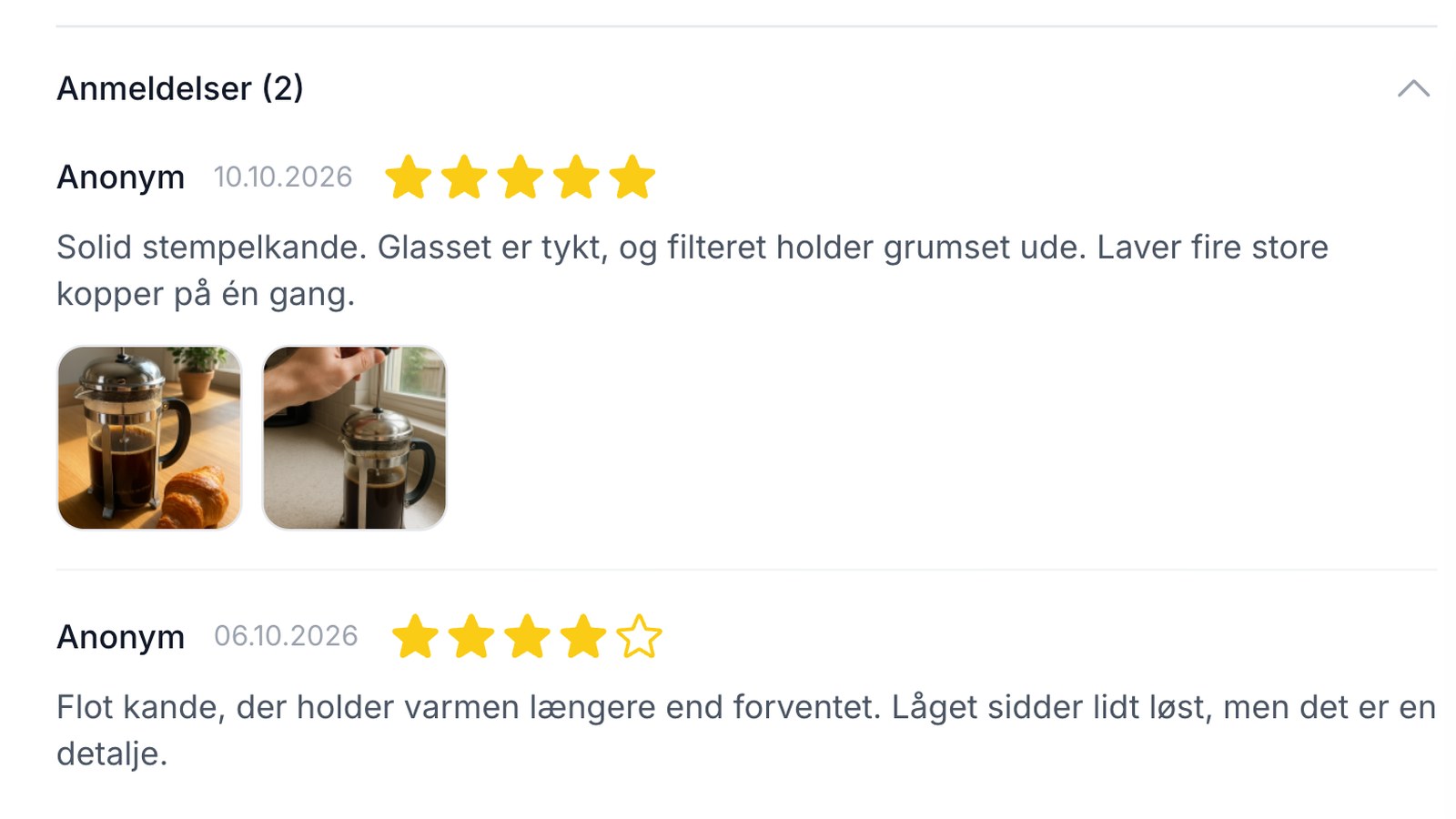
Anmeldelser med billeder: lad kunderne vise varen, som den er
Nyt i Shoporama: kunderne kan vedhæfte op til 5 billeder til anmeldelsen. Du ser billederne, før de vises, og kan selv tilføje, slette, eller...
Social proof
Social proof is the principle that customers follow the actions of others. Learn about reviews, ratings, trustmarks and other forms of social proof...
Online Store with Trustmade
Connect your Shoporama online store to Trustmade. CVR verification, verified reviews from actual orders, and automatic invitations. Install with...