Verified Shoporama Store
The "Verified Shoporama Store" badge shows your customers that Shoporama has verified the identity of the store's owner. See the requirements, the different versions, and how to display it in your store.
When a customer visits your online store for the first time, they ask themselves one question before even looking at the prices: Who am I actually buying from? The “Verified Shoporama Store” label answers that question. It shows that Shoporama has verified who is behind the store and that the information is accurate.
This article explains what the badge covers, what requirements your shop must meet, and how to display it in your store.
What the badge means
The badge verifies who owns the store. It is not a recommendation of the store. This distinction is important, and it’s also clearly stated on the page your customers land on when they click.
Here’s what we verify:
- That the shop is operated by a company with a CVR number, which the customer can look up themselves in the Central Business Register
- That the business is listed as active in the CVR—meaning it has not ceased operations or gone bankrupt
- That the company is an active customer of Shoporama
- That the store is open and operated on Shoporama’s platform
- That the domain actually points to Shoporama
- That the connection to the store is encrypted with HTTPS
We do not verify the following: product quality, delivery times, customer service, response times, prices, or whether an offer is genuine. The badge is issued by Shoporama, which is your platform provider, and it reflects your identity and operations, not how you run your business.
The requirements, point by point
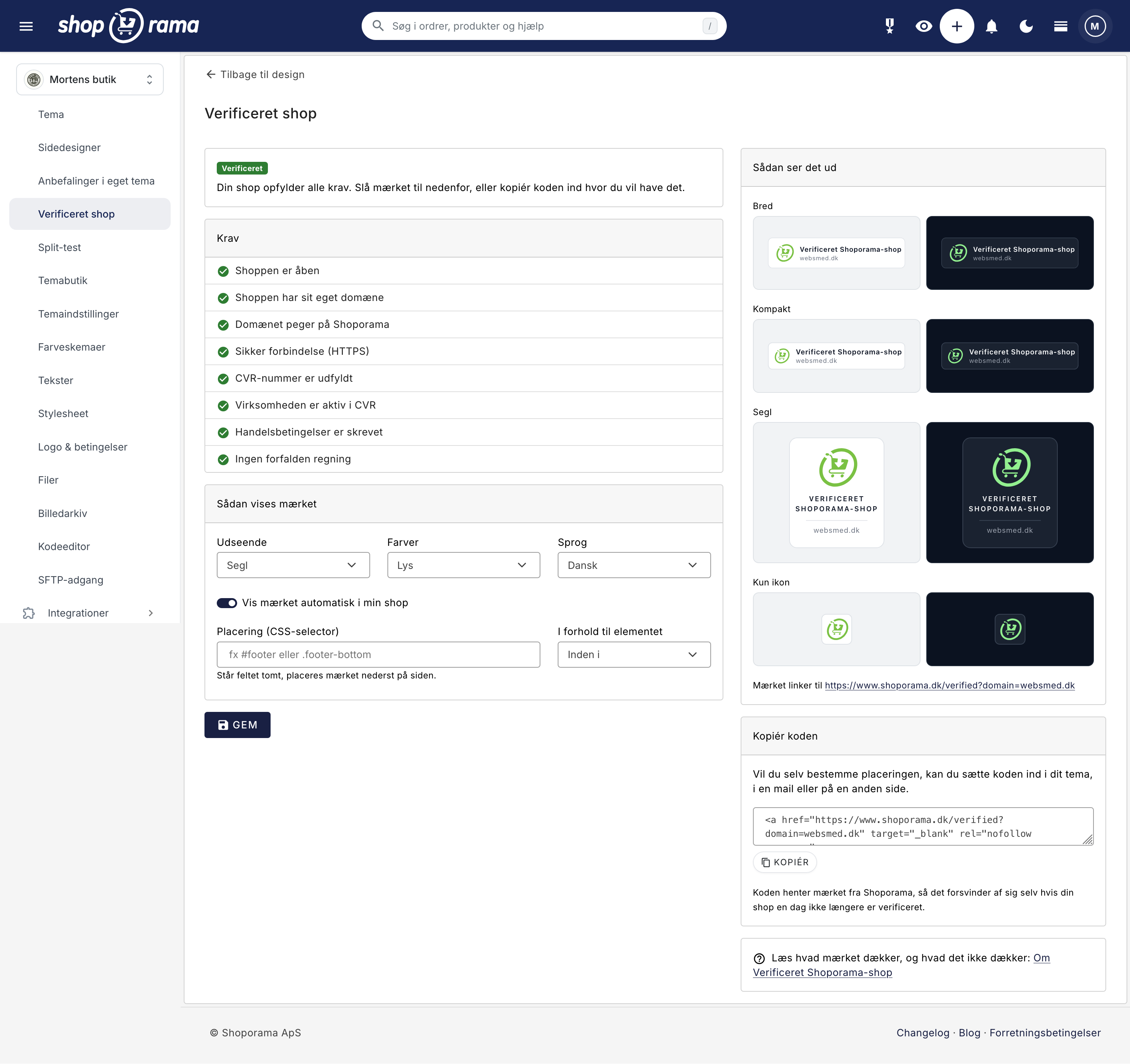
All seven points must be green before you can enable the badge. If anything is missing, there will be a “Fix this” button next to the point, which takes you directly to the correct page.
- The store is open. The badge can only be displayed on a store that is live. Demo stores and closed stores are not included.
- The store has its own domain. An address under shoporama.dk is a development address, not a store address. Read more in Move your store to your own domain.
- The domain points to Shoporama. We verify this in two ways, so it works even if you have a CDN in front of the store. See “DNS Setup for Your Domain.”
- Secure connection. Your store must run on HTTPS. See “SSL and HTTPS for Your Web Store.”
- The CVR number has been entered. The number is retrieved from your company information under Company > Company Information.
- The company is active in the CVR registry. We look up the number in the registry. If the company has been dissolved or is in bankruptcy, we cannot maintain the badge.
- No overdue invoices. If an invoice to Shoporama has been overdue for more than 14 days, the badge will be deactivated. You will receive a notification in the admin panel well in advance.
Choose a Style
The badge is available in four variations, each in a light and a dark version. Choose the one that matches your theme. The dark version is designed for dark footers, and the light version for light footers.
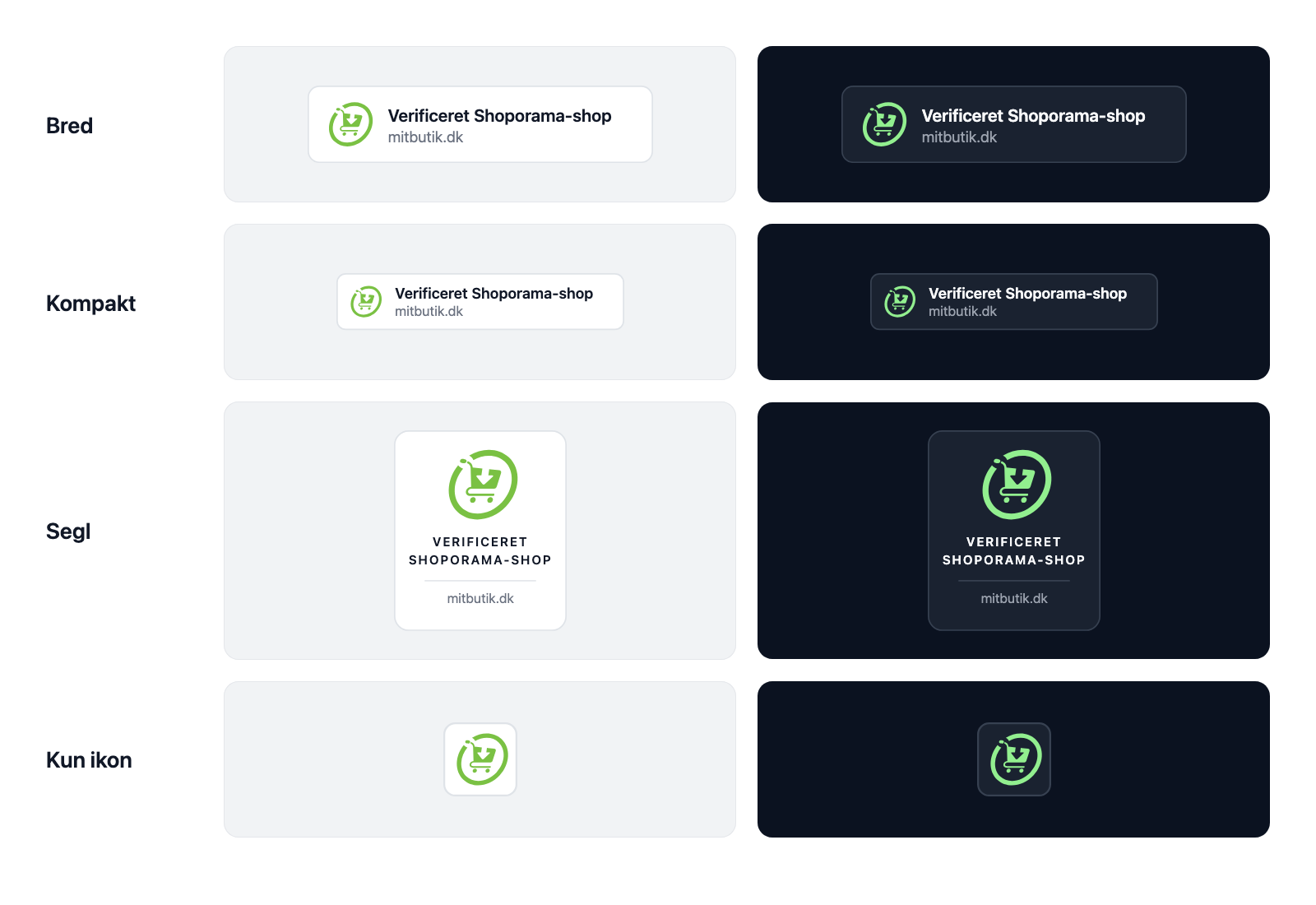
- Wide is the standard and works in most footers
- Compact presents the same information in a smaller space
- "Seal " is vertical and suitable for a column or the checkout page
- Icon Only is for very tight spaces, typically on mobile
The label can be displayed in Danish, English, German, Swedish, and Norwegian. By default, the language follows your shop’s own language, but you can choose a different one.
How to display the badge
First, check the box next to “Enable badge.” This is how you enable the badge. From that moment on, the public site will verify your shop, and you can download the badge to use wherever you want. Then you choose whether we should place it for you or if you’ll do it yourself.
1. Let Shoporama place it
If you leave the “Placement” field blank, the badge will be placed at the bottom of the page with some space around it. This works in all themes, including those we haven’t created.
If you want it in a specific location, enter a CSS selector—such as #footer or .footer-bottom—and choose whether the badge should appear before, after, or inside that element. This follows the same procedure as in “Recommendations” for your own theme.
The automatic placement does not affect your shop’s speed. The badge is rendered directly into the page, so no external files are loaded, and therefore there’s nothing for a cookie banner to prompt about.
2. Place it yourself
If you want to control the placement down to the smallest detail, select “I’ll place it myself” in the “Placement” field. Then we won’t make any changes to your shop. Instead, you’ll paste the code from the “Copy the code” box exactly where you want it.
The same code can be used in an email or on another page. It retrieves the tag from Shoporama, so it will disappear on its own if your shop is ever no longer verified.
What the customer sees when they click
The badge links to a page on shoporama.dk that verifies your specific domain. The page displays your company name, your CVR number with a link to datacvr.virk.dk so the customer can look up the company themselves, and your website address. In addition, it clearly states in black and white what the badge covers and what it does not cover.
The customer can also report your store to Shoporama from that page. This is intentional. A trust seal without a complaint process isn’t a trust seal—it’s an advertisement. We cannot mediate a dispute between you and the customer, but we review all reports and may revoke the seal.
What happens if a requirement is no longer met
Your shop is rechecked every night, and every time you open the “Verified Shop” page in the admin panel. If a requirement is no longer met, three things happen: the badge disappears from your store, the public page stops verifying the store, and you receive a message under “Messages” in the admin panel.
The public site never tells the customer why. It simply states that the shop cannot be verified at this time. Your finances and internal affairs are not something your customers or competitors should be able to see.
If you correct what’s missing and reopen the page in the admin panel, the badge will return immediately.
Frequently Asked Questions
Do I need to do anything every year to keep the badge?
No. There’s no renewal and no application required. As long as your store meets the requirements, the badge will remain active, and we check it automatically every night.
Does the badge slow down my store?
No. When you use the automatic placement feature, the badge is rendered directly into the page instead of being loaded as an external image. There are no extra requests, and the page doesn’t stutter while loading.
I have multiple online stores. Does the badge apply to all of them?
The badge is enabled per store, and each store must meet the requirements individually because the domain and HTTPS differ from store to store. The payment requirement, however, applies to the company, so an overdue bill affects all stores under the same company.
My badge has disappeared. What should I do?
Go to Design, Verified Shop. The page runs a fresh check when you open it and highlights in red which requirements haven’t been met. There’s a “Fix this” button next to each item.
What if I’m late with a payment?
There’s a 14-day grace period from the due date before the badge is deactivated, and you’ll receive a notification in the admin panel along the way. If you pay before then, nothing happens. If the badge is deactivated, it will be restored once the bill is paid.
Does the link to Shoporama hurt my Google ranking?
No. The link is marked as “nofollow,” specifically so that neither your store nor Shoporama runs into problems with Google’s rules regarding links that appear on every page of a website.
We’re not VAT-registered in Denmark. Can we get the badge?
The CVR check applies to Danish companies. If your store is registered in another country, we’ll skip that check, and the other requirements apply as usual.
Can someone else copy my badge onto their site?
They can copy the image, but not the verification. The badge links to a page that verifies a specific domain, so a click immediately reveals that the address is incorrect. If they use the code that retrieves the badge from Shoporama, we’ll stop issuing it.
Can I be verified without displaying the badge in my store?
Yes. Turn on the badge and select “I’ll place it myself ” under “Placement.” That way, we won’t add anything to your store, but the public page will still verify your store, and the code in the “Copy code” box will work.
Can I use the badge in my emails or on Facebook?
In emails, yes. Use the code from the “Copy Code” box, which retrieves the badge from Shoporama. On social media, you can’t insert HTML, so it’s not possible there.
Related articles
E-label in your webshop, badge and compliance guide
Complete guide to setting up the e-label badge in Shoporama and fulfilling the e-label compliance checklist with responsibilities and FAQ.
Logo, Favicon, and Terms and Conditions
Here's how to upload your logo and favicon and enter your terms and conditions in Shoporama. See where the content appears in the store, at...
SSL / HTTPS on your webshop
All about SSL/HTTPS in Shoporama - automatic certificates, troubleshooting SSL issues and DNS configuration.
DNS setup for your domain
Step-by-step guide to DNS setup so you can use your own domain with your Shoporama online store.
Move your shop to your own domain
Guide to moving your Shoporama online store to your own domain with DNS setup, SSL and domain validation.
Recommendations in Your Own Theme
Here's how to add recommendations to a theme that isn't one of Shoporama's own: either using a CSS selector from the admin panel or using the...