Sådan viser du fri fragt-bjælke og forslag i dit eget tema
Bjælken for fri fragt og forslag til varer, der giver fri fragt, er nu bygget ind i standardtemaerne. Bygger du dit eget tema, kan du vise det samme med én variabel, én metode, og en lille formular, og her er guiden trin for trin.
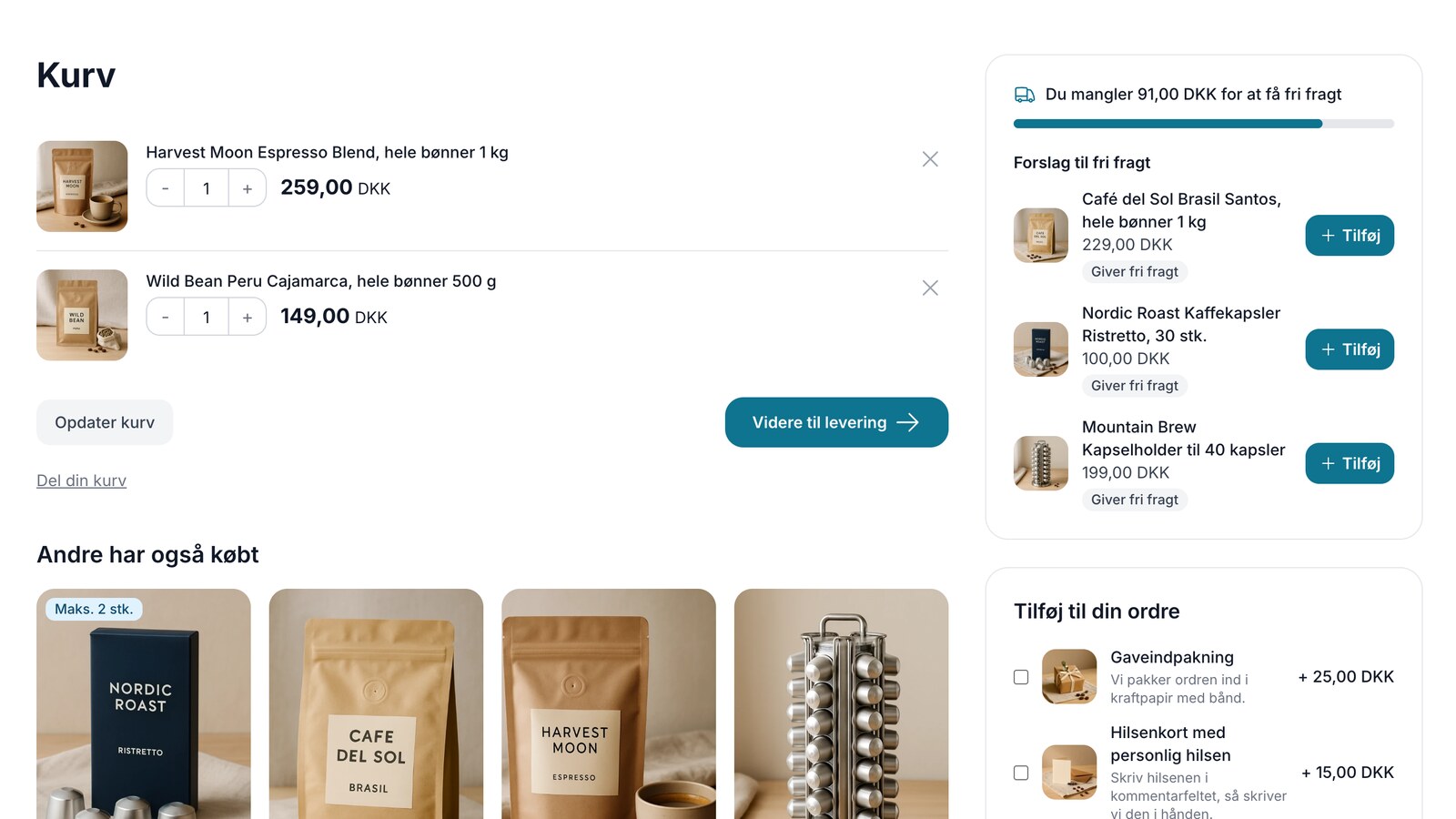
"How much more do I need to spend to qualify for free shipping?" That’s the question customers ask themselves in their shopping cart, and the answer often determines whether they’ll add one more item to their cart or pay for shipping. Store owners have requested a bar that displays this information. It’s now built into the standard themes along with product suggestions that fill the gap with a single click.
Montana, MontanaB2B, Delaware, DelawareDK, Alaska2, and California have this feature behind two theme settings. If you build custom themes, your themes won’t get this automatically. However, most of the work is done on the server: Shoporama calculates the distance for free shipping using the same rules as the checkout and selects the suggestions. Your theme just needs to display them. Here’s the step-by-step guide.
How to Implement It
1. Read the process
It all starts with the variable $free_shipping_progress. It’s set on all pages in the online store, but use it only in the cart and on the shipping step, which are never cached. Other pages may be stored in the shared page cache—for example, in themes built on Montana—and in that case, all visitors will see the first visitor’s count. The examples here are written for Smarty 4. $webshop->getFreeShippingProgress() returns the same value as the variable if you need to use it somewhere where the variable isn’t set. When there’s something to display, it’s an array with five fields:
- limit: the threshold for free shipping (“Free shipping over”) for the delivery country or the selected shipping method, in the country’s currency.
- price: the amount used to calculate whether the threshold is met, as calculated at checkout. Add-ons that are exempt from the threshold do not count toward it; a discount code marked “Do not include in free shipping threshold” (e.g., a gift card) is not deducted; and the value of redeemed points is deducted.
- remaining: how much the customer still needs to spend. 0 when free shipping has been reached.
- percent: an integer from 0 to 100 for the progress bar.
- reached: true when the customer qualifies for free shipping, including when it’s due to a discount code or the loyalty program.
The variable is null when there is nothing to display: when the cart is empty or contains only add-ons; when there is no threshold for the country or shipping method; when the shipping method has “Never Free Shipping”; and when an item in the cart has “Never Free Shipping.” Therefore, start the component with a null check and the text for the customer. The separators and currency follow the customer’s country, so the numbers also look correct in a store that sells in multiple countries:
<{if $free_shipping_progress}>
    <{$fs = $free_shipping_progress}>
    <{$fs_decimal = $webshop->getDecimalSeparator()}>
    <{$fs_thousand = $webshop->getThousandSeparator()}>
    <{$fs_currency = $webshop->getCurrency()}>

    <{if $fs.reached}>
        <p><{t}>You qualify for free shipping<{/t}></p>
    <{else}>
        <{$fs_amount = $fs.remaining|number_format:2:$fs_decimal:$fs_thousand}>
        <p><{t x=$fs_amount y=$fs_currency}>You need {x} {y} more to qualify for free shipping<{/t}></p>
    <{/if}>
<{/if}>
2. Display the progress bar
"percent" can be used directly as the width. It has a maximum value of 99 until free shipping is reached, so the bar never appears full while the customer is still paying for shipping. Place the bar below the text, inside the null check:
<div class="free-shipping__bar" role="progressbar" aria-valuenow="<{$fs.percent}>" aria-valuemin="0" aria-valuemax="100" aria-label="<{t}>Free shipping<{/t}>">
    <div class="free-shipping__fill" style="width: <{$fs.percent}>%"></div>
</div>
Set a height and background color for it in your stylesheet. The `role="progressbar"` and `aria` attributes ensure that screen readers can also indicate how far along the customer is.
.free-shipping__bar { height: 8px; border-radius: 4px; background: #e8e8e8; overflow: hidden; }
.free-shipping__fill { height: 100%; border-radius: 4px; background: #111827; transition: width .3s; }
3. Retrieve the suggestions
$webshop->getFreeShippingSuggestions($limit) returns items that qualify for free shipping or bring the customer closer to the threshold. The default is 3, and you can get up to 12. The method reads the cart itself, so you don’t need to pass anything else to it, and the list is empty once free shipping is reached. Each element has:
- product: the item, with the same methods as in the rest of the theme.
- price: the price per item, including the same sales tax as the cart, which the customer pays, along with the customer group, country, and currency, and a single-item promotion factored in.
- reaches: true when the item alone qualifies for free shipping.
- attribute and values: the variant attribute and the available variants. attribute is null when the item has no variants.
Shoporama selects items in a fixed order: first, items frequently purchased together with the items in the cart; then, the best-sellers in the same category; and finally, the store’s best-sellers. If none of them qualify for free shipping on their own, the search continues within the price range among items in the main category of the items in the cart and finally throughout the entire store, including non-sale items (only those that qualify for free shipping, with the cheapest listed first). Items that qualify for free shipping on their own are listed first, and items that are significantly more expensive than the remaining balance are filtered out. Items already in the cart, sold-out items, items marked “Never Free Shipping,” add-ons, gift cards, bundle deals, and items with customer input fields are never included. You can therefore count on all suggestions being added to the cart directly from the card, and items with variants after a selection from the dropdown list. Include the suggestions inside the null check from step 1, because they use $fs.
<{$fs_suggestions = []}>
<{if !$fs.reached}>
    <{$fs_suggestions = $webshop->getFreeShippingSuggestions(3)}>
<{/if}>

<{if $fs_suggestions}>
    <p><{t}>Free Shipping Suggestions<{/t}></p>
    <ul>
        <{foreach $fs_suggestions as $fs_item}>
            <{$fs_product = $fs_item.product}>
            <li>
                <a href="<{$fs_product->getRemoteUrl()}>"><{$fs_product->getName()|escape}></a>
                <{$fs_item.price|number_format:2:$fs_decimal:$fs_thousand}> <{$fs_currency|escape}>
                <{if $fs_item.reaches}><span><{t}>Offers free shipping<{/t}></span><{/if}>
            </li>
        <{/foreach}>
    </ul>
<{/if}>
4. Build the add-to-cart form
Each suggestion is its own small form that posts to /, just like a regular “Add to Cart” action. It sends the product_id, amount, and redirect so the customer returns to the same step. If the item has variants, you also send attributes[attribute-id] with the value’s ID. If there is only one variant to choose from, send it as a hidden field. Otherwise, display a dropdown list marked as required so the customer cannot click “Add” without making a selection. Replace <li> from step 3 with:
<li>
    <form action="/" method="post">
        <input type="hidden" name="product_id" value="<{$fs_product->getProductId()}>">
        <input type="hidden" name="amount" value="1">
        <input type="hidden" name="redirect" value="<{$return|default:'/basket'|escape}>">

        <a href="<{$fs_product->getRemoteUrl()}>"><{$fs_product->getName()|escape}></a>
        <{$fs_item.price|number_format:2:$fs_decimal:$fs_thousand}> <{$fs_currency|escape}>
        <{if $fs_item.reaches}><span><{t}>Offers free shipping<{/t}></span><{/if}>

        <{if $fs_item.attribute}>
            <{if $fs_item.values|@count == 1}>
                <input type="hidden" name="attributes[<{$fs_item.attribute->getAttributeId()}>]" value="<{$fs_item.values[0]->getAttributeValueId()}>">
            <{else}>
                <select name="attributes[<{$fs_item.attribute->getAttributeId()}>]" required>
                    <option value=""><{t}>Select<{/t}> <{$fs_item.attribute->getName()|escape}></option>
                    <{foreach $fs_item.values as $fs_value}>
                        <option value="<{$fs_value->getAttributeValueId()}>"><{$fs_value->getVal()|escape}></option>
                    <{/foreach}>
                </select>
            <{/if}>
        <{/if}>

        <button type="submit" value="1"><{t}>Add<{/t}></button>
    </form>
</li>
values contains only variants that can be purchased: those in stock, or all variants if the product allows negative stock. If no variant is available for purchase, the product is not included in the suggestions at all. You set $return when you include the component (see the next step).
5. Place the component
Combine steps 1 through 4 in, for example, components/free-shipping.html, and include it in the shopping cart (basket.html) and on the shipping step (shipping.html). These two pages are never cached, so the suggestions can be rendered on the server and will always match the customer’s shopping cart.
The most important thing is that the component is placed outside the step’s own form. The shopping cart and shipping step are typically one large <form>, and HTML does not allow forms inside forms. Therefore, place the component before or after it:
<{* basket.html: before the shopping cart’s <form> *}>
<{include file="components/free-shipping.html" return="/basket"}>

<{* shipping.html: before the step’s <form>. The wrapper is always there *}>
<div id="checkout-free-shipping">
    <{include file="components/free-shipping.html" return="/shipping"}>
</div>
The threshold may depend on the shipping method, because a shipping method can have its own “Free shipping over” threshold. If your theme reloads the shipping step when the customer selects a different shipping method, there’s nothing to do. If the theme saves the selection using AJAX, replace the card with the new one from the response. That’s why the wrapper is always there, even when the card is empty, so the card can appear when the customer selects a method with a threshold:
// When the customer selects a different shipping method: save the selection without proceeding
var data = new FormData(form);   // the shipping step’s form
data.delete('next');

fetch(window.location.pathname, { method: 'POST', body: data, credentials: 'same-origin' })
    .then(function(response) { return response.text(); })
    .then(function(html) {
        var doc = new DOMParser().parseFromString(html, 'text/html');
        var fresh = doc.getElementById('checkout-free-shipping');
        var current = document.getElementById('checkout-free-shipping');
        if (fresh && current) current.replaceWith(fresh);
    });
If you want to let the store owner toggle the banner and suggestions on and off, use the same keys as Montana and Delaware. Add the fields under ` fields` in the `checkout_cart ` group (create the group if the theme doesn’t have it) in ` theme_settings.json`. By default, they are turned off until the store owner turns them on:
{
    "path": "enable_free_shipping_bar",
    "name": "Show free shipping bar",
    "description": "Displays in the cart and on the shipping step how much the customer needs to spend to qualify for free shipping.",
    "type": "bool"
},
{
    "path": "enable_free_shipping_suggestions",
    "name": "Suggest items that qualify for free shipping",
    "description": "Suggests up to 3 items that can be added to the cart with a single click.",
    "type": "bool"
}
Include the component when either of these is enabled, and pass them as parameters. Inside the component, wrap the bar in <{if $show_bar}> and only fetch suggestions when $show_suggestions is true:
<{if $settings.checkout_cart.enable_free_shipping_bar || $settings.checkout_cart.enable_free_shipping_suggestions}>
    <{include file="components/free-shipping.html" show_bar=$settings.checkout_cart.enable_free_shipping_bar show_suggestions=$settings.checkout_cart.enable_free_shipping_suggestions return="/basket"}>
<{/if}>
6. Avoid the pitfalls
Strictly speaking, the checkout only offers free shipping once the cart total exceeds the threshold. A cart totaling exactly 499 kr. with a threshold of 499 kr. will incur shipping charges, and the remaining amount is 0.01. Never compare the price and the threshold yourself. Use "reached " and "remaining" so that the bar always matches the checkout page.
Null check. `$free_shipping_progress` can be null, even when the cart contains items—for example, when one of them has “Never free shipping.” Check it before reading the fields, and display nothing when it is null.
B2B, including and excluding VAT. The limit is calculated based on the cart’s price including VAT, just like at checkout, and the same applies to the price in the suggestions. If the customer is shopping without VAT—for example, a business customer with a VAT number— $vat is 0, and the amount is calculated without VAT. If your theme displays prices excluding VAT, simply recalculate the display and only add "(incl. VAT)" next to the missing amount when the customer pays VAT. Here’s how MontanaB2B does it, slightly simplified:
<{* B2B: item price excluding VAT for display *}>
<{$fs_price = $fs_item.price}>
<{if $b2b}>
    <{$fs_vat_factor = 1 + ($fs_product->getProductVat() / 100)}>
    <{if $fs_vat_factor > 0}><{$fs_price = $fs_price / $fs_vat_factor}><{/if}>
<{/if}>
<{$fs_price|number_format:2:$fs_decimal:$fs_thousand}> <{$fs_currency|escape}>

<{* The amount shown includes tax, as at checkout. Without VAT ($vat 0), it is calculated excluding VAT *}>
<{t x=$fs_amount y=$fs_currency}>You need {x} {y} to qualify for free shipping<{/t}><{if $b2b && $vat > 0}> <{t}>(including tax)<{/t}><{/if}>
Separate form per item. Assign each suggestion its own form, and never place the component inside the cart or checkout form. Otherwise, the button will submit the wrong form.
Server-side tracking. When the store uses server-side tracking, the customer previously always followed the setting “When the customer adds an item to the cart, they should go to:” and ignored the redirect. Now, the customer is redirected back to /basket or /shipping when the redirect is one of those, with the tracking parameters included in the URL. The theme should not modify these parameters. Other redirect values work as before.
The older variables. $free_shipping_limit and $free_shipping_price still exist and work as before, but they do not account for gift cards, redeemed points, items marked “Never Free Shipping,” or free shipping from a discount code or the loyalty program. Build new themes based on $free_shipping_progress.
Read more
The complete component, all fields, and rules are documented in the developer documentation under Free Shipping: Bar and Suggestions. If you want to see it in an actual theme, Montana is the reference. How store owners implement this in the default themes and how the suggestions are selected is explained in the support article about the free shipping bar and suggestions. If you have any questions, please email support@shoporama.dk.
Related articles
Free Shipping Bar and Suggestions for Items in the Cart
Show customers how much more they need to spend to qualify for free shipping by displaying a bar in the cart and on the checkout page, and suggest...
Free shipping over a certain amount
Here's how to set up free shipping for orders over a certain amount in Shoporama. The threshold is set per country under Shipping → Countries or...
Add to Cart and Checkout
Here's how to offer gift wrapping, greeting cards, delivery, and other add-ons with a single checkbox in the shopping cart and on the final step...
More from the blog
Address suggestions at checkout: The customer selects the address, and the ZIP code and city are filled in automatically
Now, six of the built-in themes can suggest Danish addresses as the customer types. The customer selects their address from the Danish Address...
10. november 2026
Now Claude can change your theme, and you'll see it before your customers do
Ask Claude to add a "Only 3 left" message to the last few items, a countdown to Black Week, or a Christmas theme that you can turn off again in...
07. november 2026
Order Check flags incorrect ZIP codes and potential credit card fraud before you submit your order
An incorrect ZIP code can result in a fee from the shipping company, and a string of nearly identical orders placed in quick succession could...
06. november 2026