Order Check flags incorrect ZIP codes and potential credit card fraud before you submit your order
An incorrect ZIP code can result in a fee from the shipping company, and a string of nearly identical orders placed in quick succession could indicate that someone is testing stolen cards. Now, Shoporama checks every new order from the online store and flags it in the order overview if something looks suspicious. The customer doesn’t notice a thing, and you decide what to do.
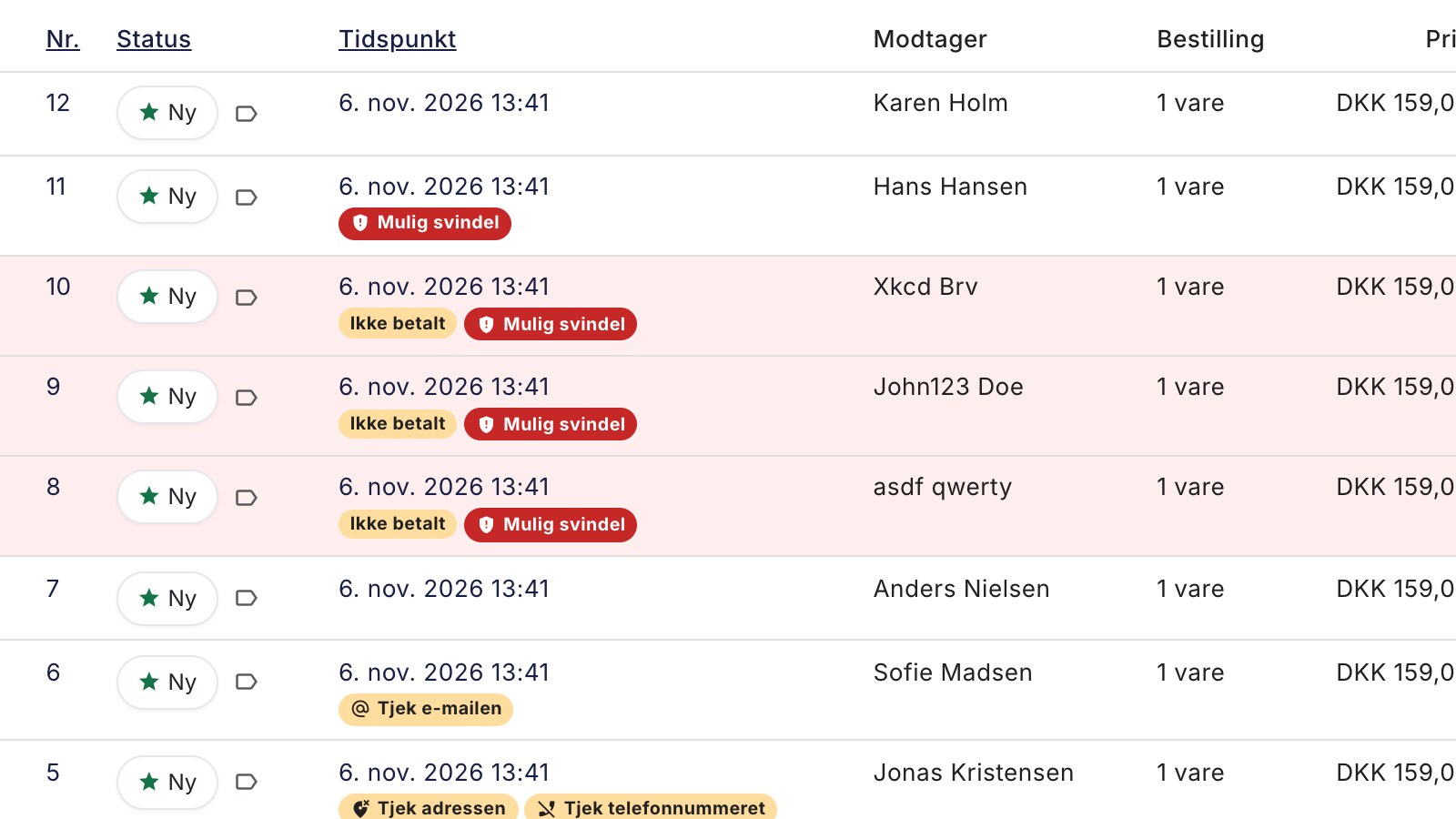
A customer wrote "5720 Glamsbjerg" in their address. The order looked completely normal, and the package was shipped via GLS. But the ZIP code 5720 doesn’t exist. Glamsbjerg’s ZIP code is 5620. GLS corrected the address and charged 67 DKK + tax to redirect the package.
An incorrect ZIP code is rarely more than a single digit that was entered incorrectly, and it’s hard to spot when you’re packing many orders at once. That’s why Shoporama has now implemented an order check. Every new order from the online store is checked for incorrect ZIP codes, missing house numbers, spelling errors in the email, incorrect phone numbers, and patterns that resemble attempts to use stolen credit cards. If something looks off, the order is flagged so you can correct it before ordering the shipping label.
How the order check works
The check runs in the background immediately after the order is created and is typically completed within a minute. Nothing is blocked. The customer doesn’t notice a thing—the order goes through as usual—and you’re the one who makes the final decision. Nothing has changed in the checkout, so it works with all themes.
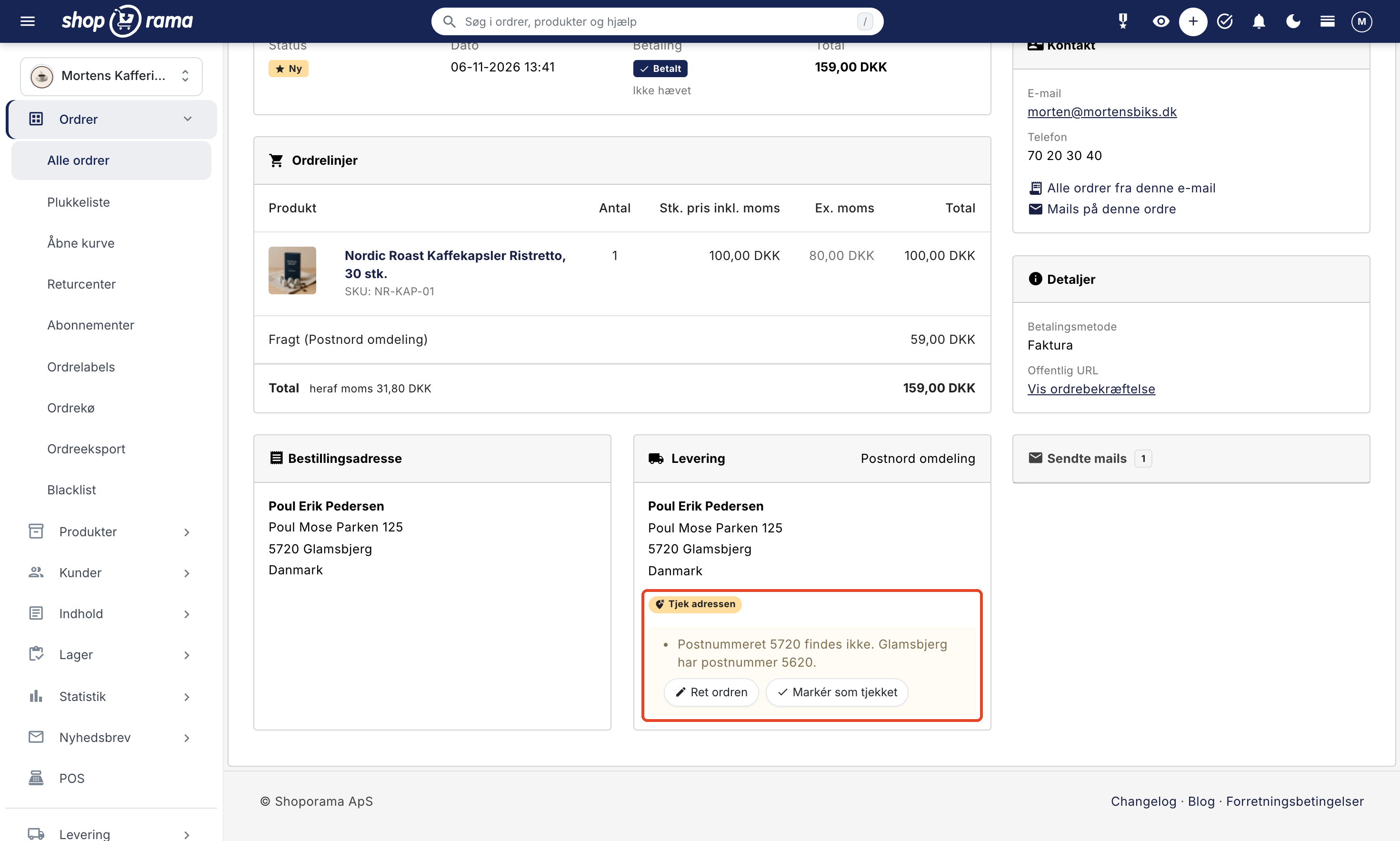
There are four indicators. Three are yellow: Check the Address, Check the Email, and Check the Phone Number. The fourth is red: Possible Fraud. The flag appears below the time stamp in the order overview, both on desktop and mobile, and on the order in the “Delivery” section. If you hover your mouse over the flag, you can see what’s wrong.
Incorrect ZIP code and missing house number
Order Check recognizes all ZIP codes in Denmark, Sweden, Norway, Germany, and the Netherlands. The ZIP code triggers the “Check the Address ” label in three cases:
- The ZIP code does not exist: “The ZIP code 5720 does not exist. Glamsbjerg has the ZIP code 5620.”
- The ZIP code is in the wrong format, e.g., a German ZIP code missing the leading zero, or a Dutch one missing the two letters.
- The city is more than 50 km from the ZIP code: “The ZIP code 5000 belongs to Odense C, approximately 84 km from Aarhus. Aarhus has the ZIP codes 8000, 8100, 8200, and 8210.”
Neighborhoods, villages, municipality names, and neighboring towns do not trigger a warning as long as the ZIP code is correct. "2500 Copenhagen" (Valby), "8260 Aarhus" (Viby J), and "2900 Gentofte" (Hellerup) are accepted without issue because the package will be delivered. If the address is missing a house number, the order is also flagged. If the customer simply writes “Vestergade,” it will indicate that the address is missing a house number.
The address is checked when the package is shipped to an address in Denmark, Sweden, Norway, Germany, or the Netherlands. In Germany, the city isn’t checked because many German cities have the same name. The address isn’t checked for delivery to a package shop, in-store pickup, or orders without a shipping method, such as digital goods.
Spelling errors in the email and incorrect phone number
The “Check Email” prompt appears when the email address appears to be misspelled for major providers, such as gmial.com or gmail.dk (Gmail addresses always end in .com), or when the domain extension is incorrect, such as .con or .dkk. The notification suggests the correct address: If the customer typed hotmail.dkk, it asks if the customer meant hotmail.dk. The notification also appears when the domain cannot receive emails at all.
The order confirmation has already been sent by the time the flag appears, so it has gone to the wrong address. But you’ll notice it and have time to take action. Call the customer, correct the email address on the order, and check the box next to “Resend order confirmation” before saving. Instructions on how to do this are provided under “Resend order confirmation.”
Checking the phone number is about the number of digits. A Danish and a Norwegian number have 8 digits, a Dutch number has 9 after +31, and the country code doesn’t count: “The phone number 2970159 has 7 digits. A Danish number has 8.” In Sweden and Germany, the length varies, so no check is performed. Numbers with a different country code do not trigger a warning, nor does an empty field.
Possible fraud: when someone tests stolen cards
Several stores have encountered fraudsters who test stolen payment cards by making many small purchases in a short period of time. This can result in goods being shipped to fraudsters, payments being reversed, and chargeback fees.
The red “Possible Fraud” flag appears when there are at least 4 orders within 60 minutes from the same IP address, email, or phone number, and the orders either have at least 2 different names or at least 2 of them remain unpaid. All orders in the group receive the flag, not just the last one. The explanation also mentions names that do not resemble a real name, but a strange name alone never triggers a flag.
Only orders paid by card or another online payment method count. Orders on invoice, with the payment method “Other payment” (e.g., bank transfer), and with an EAN number do not count, because business customers often place multiple orders in a row. An IP address with many paid orders in the past week—such as an office—is also not used. At the same time, you’ll receive a message below the clock at the top of the admin panel, in “Notifications,” from the sender “Order Check.”
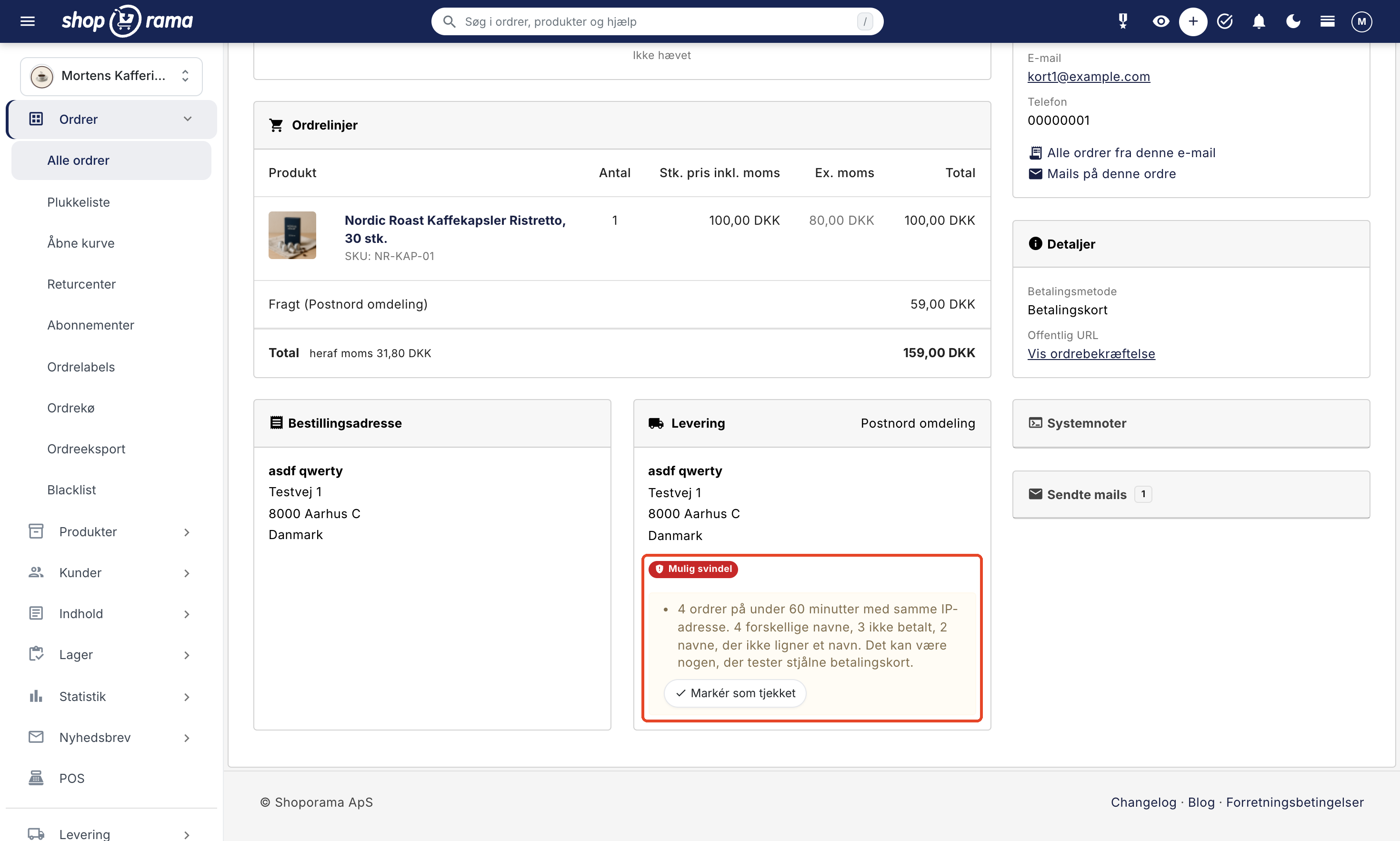
The flag won’t stop the scammers. Do not ship anything until you have reviewed the orders. If it looks like a scam, check the boxes next to the orders in the order overview and select More → Blacklist. This will cancel the orders, and the email address and phone number will be added to the blacklist so they are rejected next time. If the description says “same IP address,” also blacklist the IP address from one of the orders (Blacklist in the Customer card in the edit view), since it won’t appear in the order overview. The blacklist must first be enabled under Orders → Blacklist. If you use QuickPay, you can stop card attempts right at the time of payment using QuickPay’s Fraud Filter. See also the guide “Protect Your Online Store from Spam Orders.”
Overview in the order list and a warning before labels
In the order overview, you can see all the flags at once.
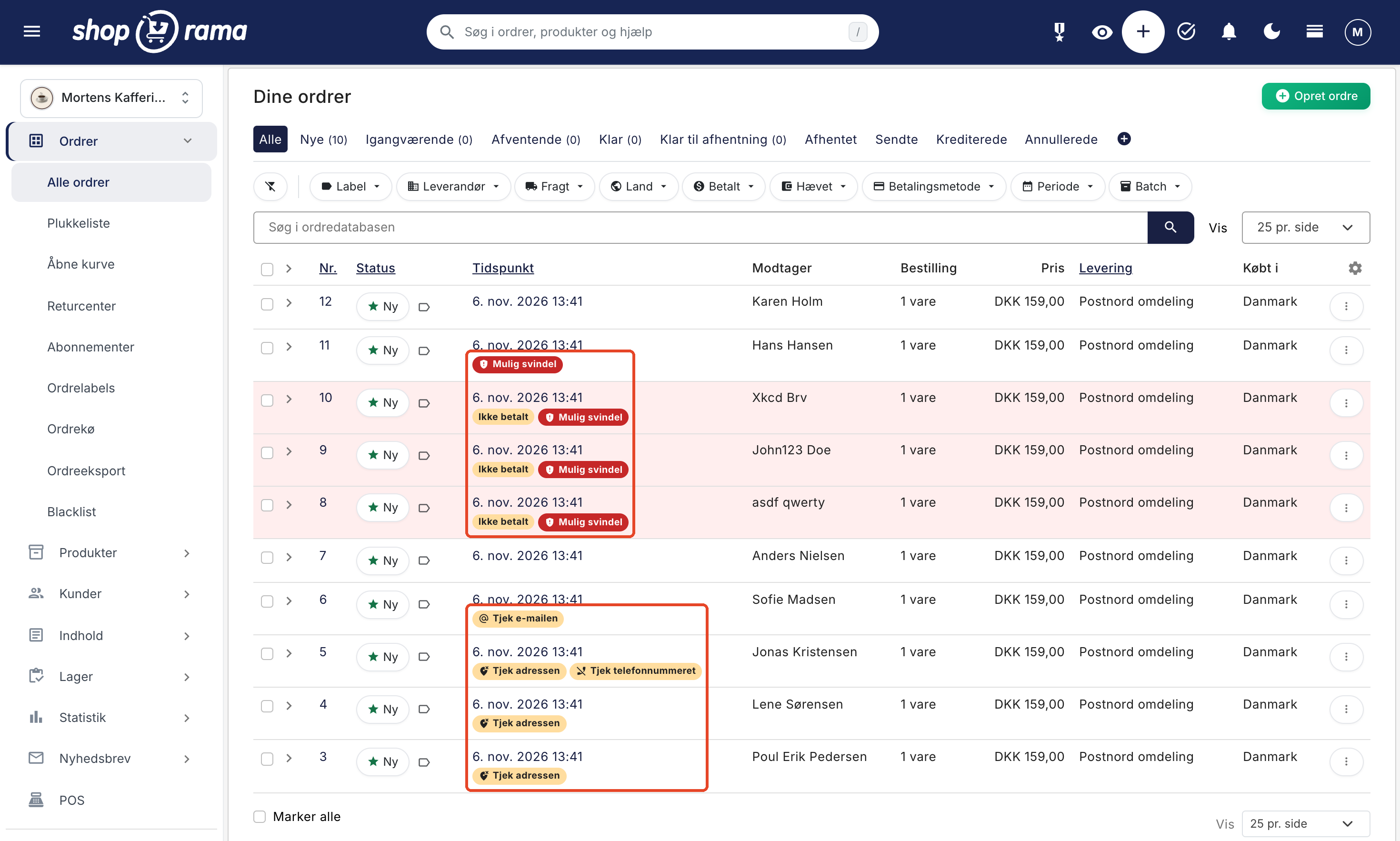
If you order shipping labels from the order overview for an order with a flag, Shoporama will first ask: “This order has potential errors, such as in the address. Check the flag on the order. Do you still want to order a label?” This applies to the buttons for GLS, PostNord, DAO, and Burd at the bottom of the overview and the label button in the row for each individual order. If you’ve selected multiple orders, it will show how many of them have potential errors. You can still proceed. The prompt only appears in the order overview.
Correct the order or mark it as checked
Below the checkmark on the order, the explanation appears in a yellow box with two buttons. “Correct the order ” opens the editing screen, where the same explanations appear at the top of the “Customer” tab under the heading “The order does not appear to be correct.” Correct the fields and save. The order will then be rechecked immediately, and if it’s correct now, the flag will disappear. “Possible fraud” does not disappear when you correct the order, because there is nothing to correct. You can remove that flag by selecting “Mark as Checked” once you’ve reviewed the orders.
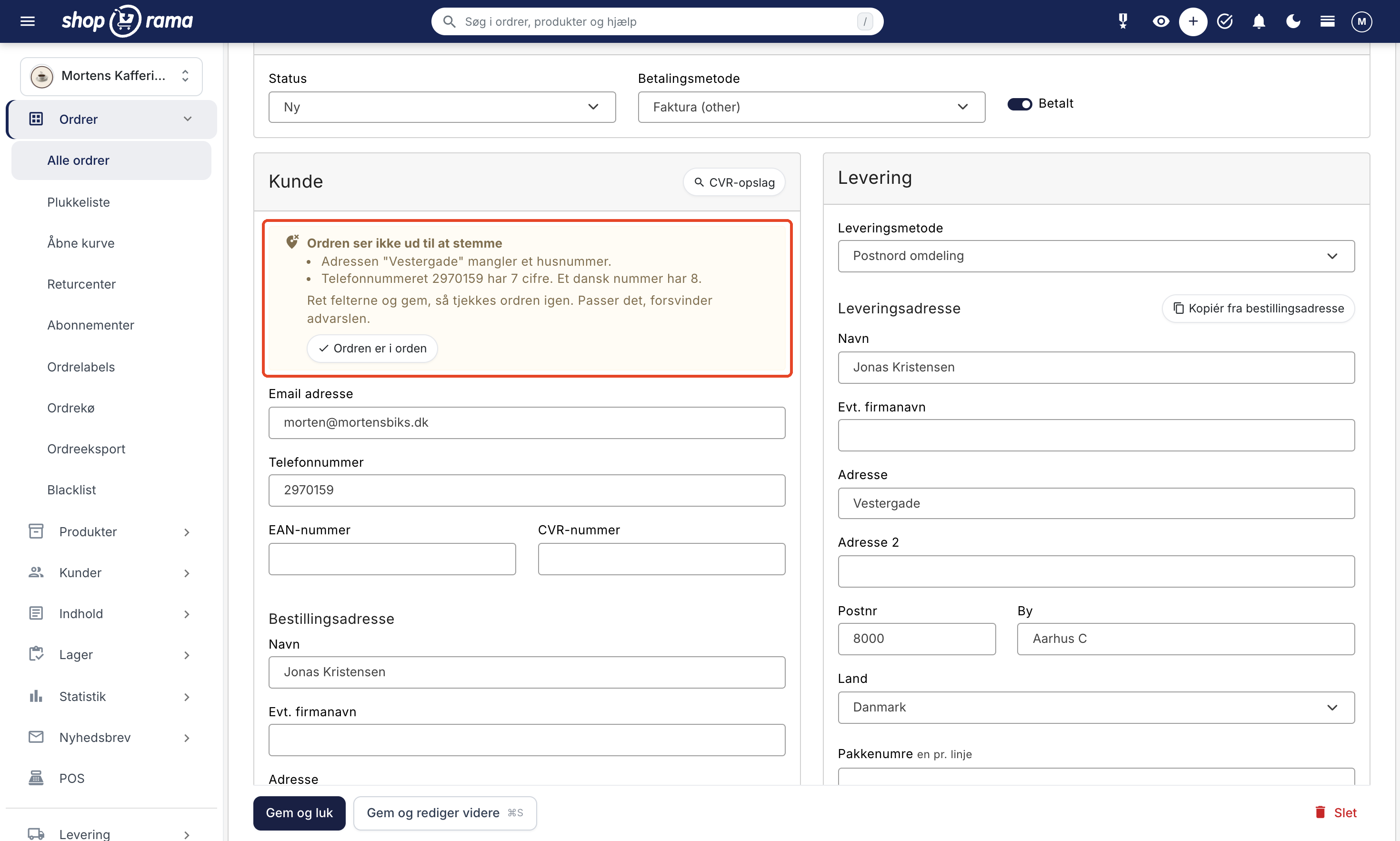
If everything is in order after all, click “Mark as Checked” on the order or select “Order is OK ” in the edit screen. The flag and explanation will disappear, and the order won’t be checked again—even if you make changes to it later. However, if several nearly identical orders come in within an hour, it may be flagged as “Possible Fraud” again.
Order checking is enabled by default
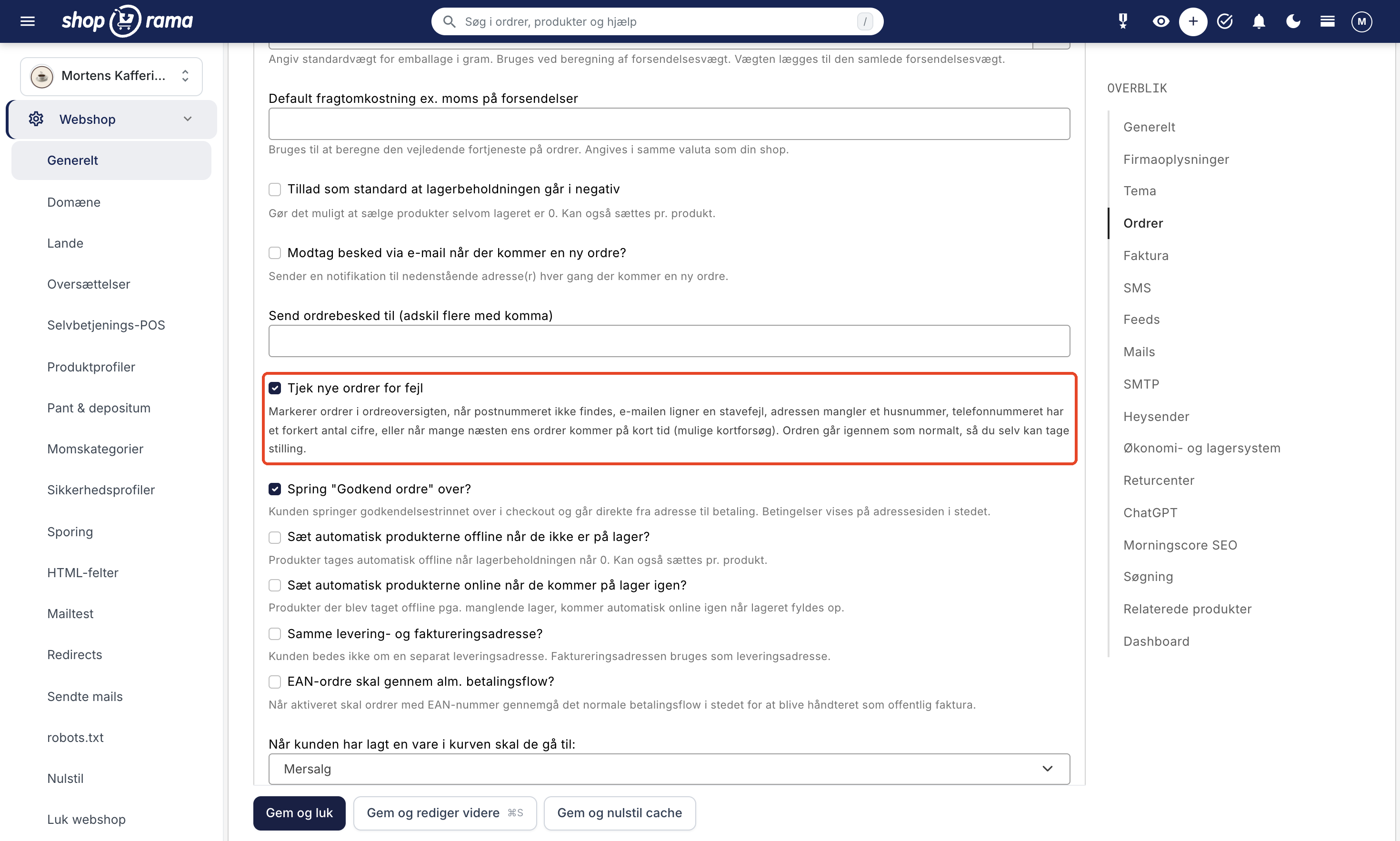
There’s nothing to set up. Order checking is enabled in all stores. If you don’t want to use it, you’ll find the setting under Web Store → General in the Orders section. Uncheck the box next to “Check new orders for errors” and save the page.
The order check does not check
- Orders you create yourself in the admin panel, orders from the register (POS), the self-service POS, and other systems that create orders via the API, as well as imported orders. Credit memos and exchange orders are also not checked.
- The brands are not listed in the email you receive about new orders. You can view them in the admin panel.
- You cannot filter the order overview by these flags.
- Not all errors are caught. The rules are designed so that they almost never make mistakes. When in doubt, they’d rather not issue a warning.
Frequently Asked Questions
Can the customer see the tag?
No. The tags are only visible in the admin panel, and the purchase process remains exactly the same as before.
What about old orders?
They won’t be checked. Only orders placed after the launch can receive a label.
Does it work with my own theme?
Yes, even with custom and modified themes. The check happens only after the order is created, so you don’t need to change anything in the theme.
Does it check international addresses?
Yes, in Sweden, Norway, Germany, and the Netherlands—but only what can be verified without triggering false warnings. The city isn’t checked in Germany, and the phone number isn’t checked in Sweden or Germany. In other countries, only the email address and any attempted card payments are checked.
Why was a legitimate order flagged?
The system can’t see what’s behind the order. For example, if the same customer placed four orders in an hour and two of them aren’t paid for, it looks like a credit card attempt. The entire group gets flagged. Read the explanation, and click “Mark as Verified” on each of the orders if everything is in order.
Can I turn this off?
Yes. Then new orders won’t be flagged. Orders that are already flagged will remain flagged until you mark them as checked.
Related articles
Blacklist - Block unwanted orders
Learn how to use Shoporama's blacklist feature to block spam orders and unwanted customers by blacklisting email, phone number or IP address.
Protect your webshop from spam orders
A guide to protecting your Shoporama online store from spam orders and fraud using blacklists, order checks, CAPTCHA, and 3D Secure.
Resend the order confirmation
Guide to resend the order confirmation to a customer in Shoporama.
Notifications: What the Admin Warns You About
Shoporama collects messages from all background processes on the notifications page. Find out where to locate it, what the messages regarding...
Order Check: View orders with incorrect ZIP codes or potential fraud
Shoporama checks every new order from the online store for incorrect ZIP codes, missing house numbers, spelling errors in the email, incorrect...
More from the blog
New Free App Sends Online Store Orders to Business Central
If you use Microsoft Dynamics 365 Business Central, Shoporama can now transfer orders from your online store as sales invoices or sales orders....
31. oktober 2026
New free Billy app replaces the built-in integration
Shoporama has a new, free app for Billy, now called Shine Accounting. It replaces the built-in Billy integration: customer information is reused,...
31. oktober 2026
New free Dinero app replaces the old integration
Shoporama has a new, free Dinero app that replaces the built-in Dinero integration. Your login is valid for one year at a time, errors appear...
30. oktober 2026