Free shipping over a certain amount
How to set up free shipping above a certain amount in Shoporama. The amount limit is set per country under Store, Shipping, Countries, and applies to all shipping methods except those you have marked as never free.
You can offer free shipping to customers who spend over a certain amount. This is one of the most effective ways to increase the average order value, because many customers add a little extra to their cart to reach the threshold.
Important: The threshold is set per country under Store → Shipping → Countries. It is not set for individual shipping methods. There is no field labeled “Minimum Order Amount” on the shipping methods.
How Free Shipping Works in Shoporama
When a customer’s cart exceeds the amount you’ve set for the delivery country, all shipping methods for that country become free at checkout. You can exclude specific shipping methods by marking them as “Never Free Shipping,” so they always incur a charge, regardless of the order size. This is typically relevant for express delivery or other value-added services.
Because the threshold is set at the country level, you can have completely different thresholds for, say, Denmark, Sweden, and Germany without having to create duplicate shipping methods.
How to set up free shipping
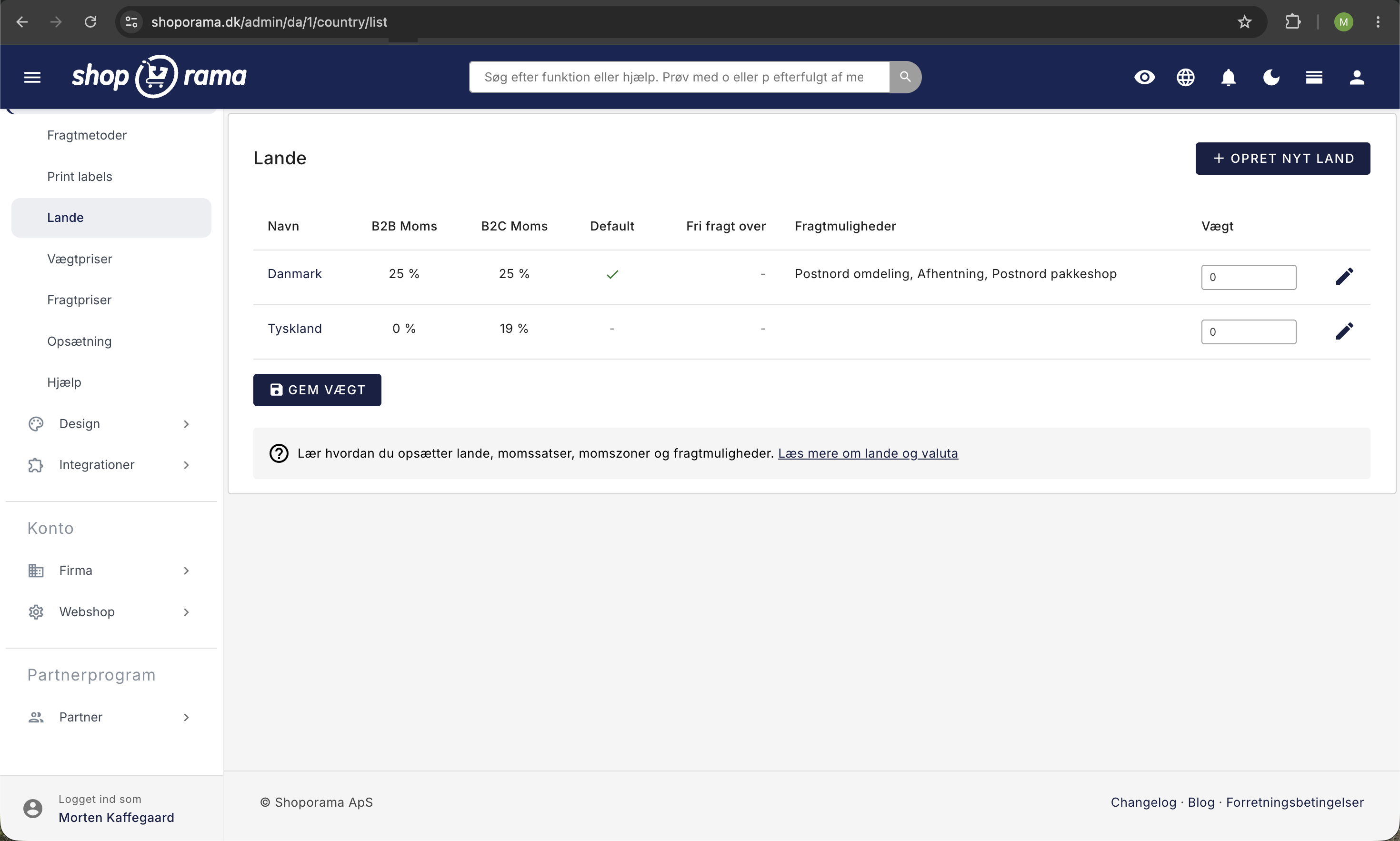
- Go to Store → Shipping → Countries in the left-hand menu
- Click on the country where you want to offer free shipping (e.g., Denmark)
- Find the Free Shipping field in the “Shipping” tab
- Enter the amount in the store’s currency (e.g., 499)
- Click Save
The amount also appears as a column in the country overview under Store → Shipping → Countries, so you can quickly see which countries have free shipping enabled. Leave the field blank if free shipping is not to be offered in that country.
Tip: Set the threshold slightly above your average order value. If customers typically spend 350 kr., a threshold of 499 kr. can give a nice boost to order size.
Does VAT count toward the threshold?
Yes. The comparison is based on the total price in the cart, and for regular B2C customers, that price includes VAT. If the customer is shopping VAT-free (typically B2B to EU countries with a valid CVR number), the price excluding VAT is used in the comparison. Therefore, always enter the limit in the same price format as what the customer sees at checkout.
Different amounts per country
Because the threshold is set per country, you might have, for example:
- Denmark: Free shipping on orders over 499 DKK
- Sweden: Free shipping over 800 SEK
- Germany: Free shipping on orders over 75 EUR
- Norway: Free shipping on orders over 1,000 NOK
This allows you to account for the fact that shipping typically costs more internationally, so the threshold can be higher for those countries.
Exclude a specific shipping method
If you want a specific shipping method (e.g., express delivery) to never be free—regardless of the order value—you can check the “Never free shipping” box for that specific shipping method. You can do this under Store → Shipping → Shipping Methods by opening the shipping method and locating the checkbox on the Settings card.
Display a free shipping message in the theme
Many themes can display a message such as “Free shipping on orders over 499 kr.” or “You’re 79 kr. short of free shipping.” The message is typically configured via theme settings or directly in the theme’s code. Check your specific theme’s documentation or contact your theme designer.
How to test the setup
- Add products to the cart until the total is below the threshold, then proceed to checkout. Check that a shipping fee is displayed.
- Add more products so that the cart total exceeds the threshold. Verify that the shipping cost is now 0 kr.
- If you’ve marked a shipping method as “Never free,” check that it still has a cost.
- Remember to select the country you’re testing for at checkout. The threshold is set per country.
Frequently Asked Questions
Where can I find “Free Shipping Over” in the admin panel?
It’s located within each individual country. In the left-hand menu, go to Store → Shipping → Countries, click on the country, and find the “Free Shipping Over” field in the Shipping card. It’s not located on the individual shipping method page.
Does VAT count toward the order amount threshold?
For regular B2C customers, yes. The comparison is based on the order price including VAT. If the customer is VAT-exempt (e.g., B2B to the EU with a valid CVR number), the price excluding VAT applies. Enter the threshold in the same price format as what the customer sees in the store.
What happens if the customer uses a discount code that brings the order below the threshold?
The comparison is made after the discount is applied. If the discount code brings the cart total below the threshold, the free shipping discount is removed, and the customer will see the standard shipping price again at checkout.
Can I offer free shipping on standard delivery but not on pickup or express delivery?
Yes. The order threshold applies to all shipping methods within the country, but you can mark specific shipping methods as “Never Free Shipping” under Store → Shipping → Shipping Methods. Then, the shipping cost for those methods will never be 0 kr., regardless of order size.
Do I have to set the same threshold for all countries?
No. You can and should set it individually. Shipping costs and customer behavior vary from country to country, and international markets typically require a higher threshold than the domestic market.
How do I test whether the setup works before customers see it?
Add products to the cart in your own store, proceed to checkout, and select the country you’re testing. First, check with a cart total below the threshold so the shipping cost is normal, and then with a total above the threshold so the shipping cost becomes 0 kr. Remember to select the correct delivery country.
Can I display a “You need X kr. more for free shipping” message?
Yes, if your theme supports it. It’s an effective conversion booster because it gives the customer a concrete incentive to add more items to their cart. Talk to your theme designer if the feature isn’t already built in.
Does free shipping affect my profits?
It depends on your shipping costs and how high the threshold is set. Most stores find that the increased order size more than offsets the shipping costs the store pays itself. Feel free to test different thresholds over a couple of weeks and keep an eye on both conversion rates and contribution margins.
How does this look in the books when I offer free shipping?
The shipping price is listed as 0 kr. on the order and is therefore not recorded as shipping revenue. You cover the shipping costs yourself through the price of the goods. In your accounting system, you’ll see lower shipping revenue and, at the same time, a higher order value per order.
Can I turn free shipping off again?
Yes. Go back to the country settings under Store → Shipping → Countries, clear the “Free Shipping” checkbox, and save. Then there will no longer be a minimum order amount, and the customer will always pay the standard shipping rate.
See also: Create a New Shipping Option and Countries and Currencies.
Need help? Contact us at support@shoporama.dk.
Related articles
Create a new shipping option
Guide to creating new shipping options and assigning them to countries in Shoporama.
Countries and currencies
Guide to setting up countries, VAT rates, VAT zones, shipping options and currency in your Shoporama online store.
Checkout flow and shipping calculation
Guide for developers to implement shipping in the checkout flow of a Shoporama theme.
GLS settings on shipping options
Explanation of the GLS-specific settings per shipping option in Shoporama: shipping module, DepositService, PrivateDelivery, FlexDelivery and...
Customize your checkout
Guide to customizing the checkout flow in your Shoporama online store, including payment methods, shipping, customer fields and gift cards.
Related features
Shipping options
Set up shipping with PostNord, GLS, DAO, DHL and Shipmondo. Parcel shops in checkout, tracking, free shipping and weight-based shipping calculation.
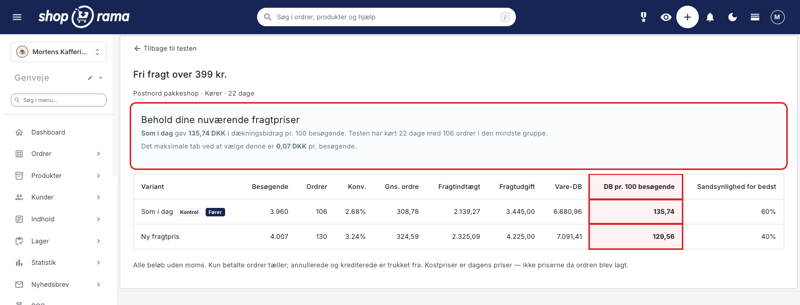
How much should shipping cost? Here's how to find the answer in your own store
A new shipping rate can improve conversion by 21% and still generate less revenue. That’s why A/B tests of shipping rates are determined by the...
A/B Testing of Shipping Rates
Compare two shipping rates in your own store. Shoporama measures the contribution margin per visitor, so you can see how the shipping rate actually...
New promotion types: Amount-based discount and Combination discount
Shoporama has two new automatic promotion types: amount-based discount for purchases of X amount and combination discount (buy A, get discount on...
Upselling after purchase
Display product recommendations on the receipt page and let customers continue shopping with a single click. Higher order amounts, no need to...
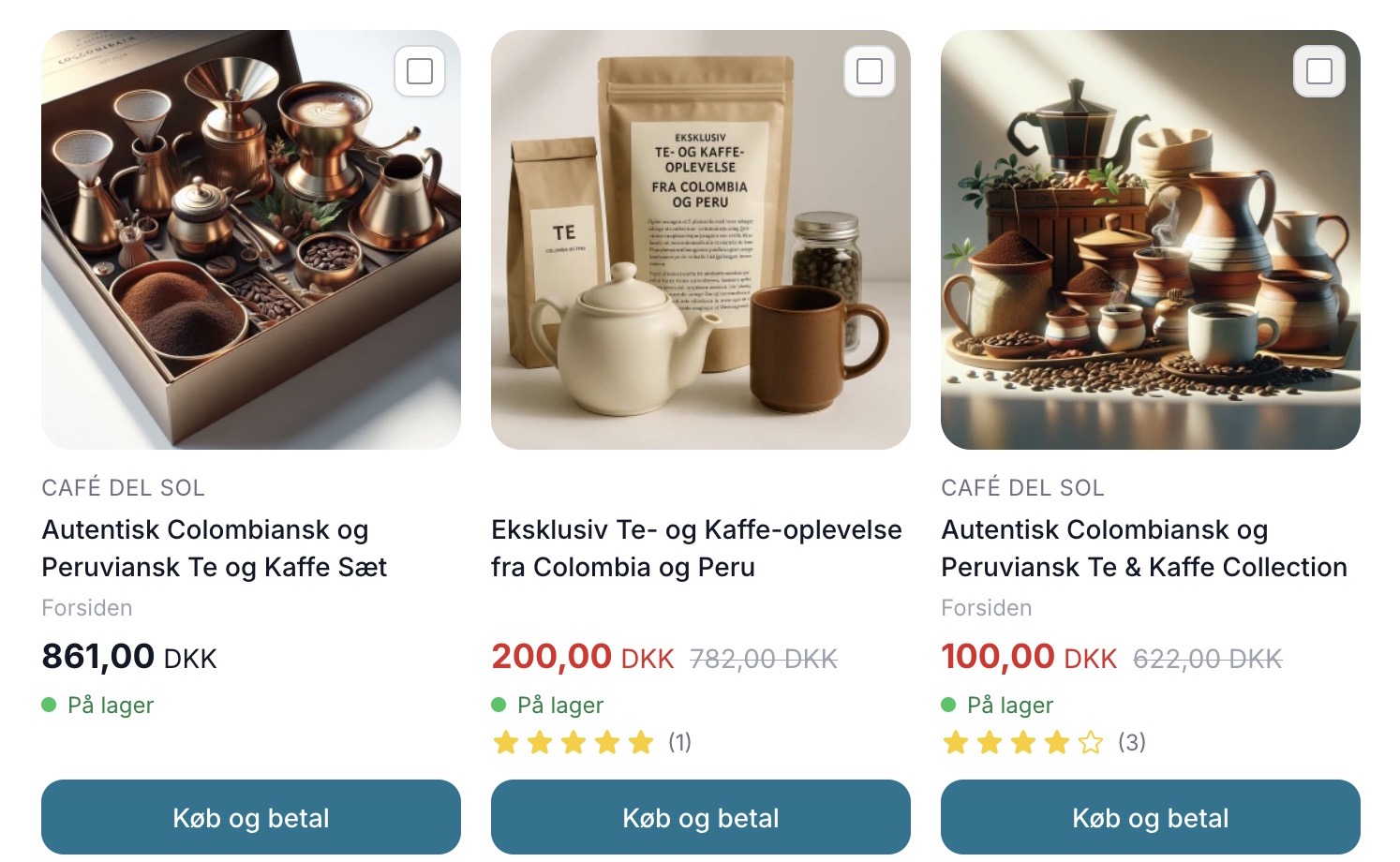
Sælg mere med Mersalg efter køb
Display suggested products on the receipt page that customers can add with a single click. Shoporama's built-in post-purchase upsell feature. No...