Apply for a settlement agreement with Clearhaus
Apply for a settlement agreement with Clearhaus directly from the Shoporama admin panel, save your API key, and have our support team link the settlement agreement to your payment gateway.
If your online store is going to accept credit cards, having a payment gateway isn’t enough. You’ll also need an acquiring agreement. With Shoporama, you can apply for an acquiring agreement with Clearhaus right from the admin panel, save your API key in the same place, and let our support team set it all up for you.
What is an acquiring agreement?
An acquiring agreement is the agreement with the company that collects funds from the customer’s payment card and deposits them into your bank account. This company is called an acquirer. It is the acquirer that authorizes your specific business to accept card payments.
A payment gateway and an acquiring agreement are two different things
This is where most people get confused. For card payments, you need both, and they each serve a different purpose:
- The payment gateway collects the card information at checkout and securely processes the payment.
- The acquiring agreement ensures that the funds are actually debited from the card and deposited into your account.
Without an acquiring agreement, the gateway cannot process a single card payment. If you’d like an overview of the entire setup, you can read about what it takes to accept online payments.
How to find the page in Shoporama
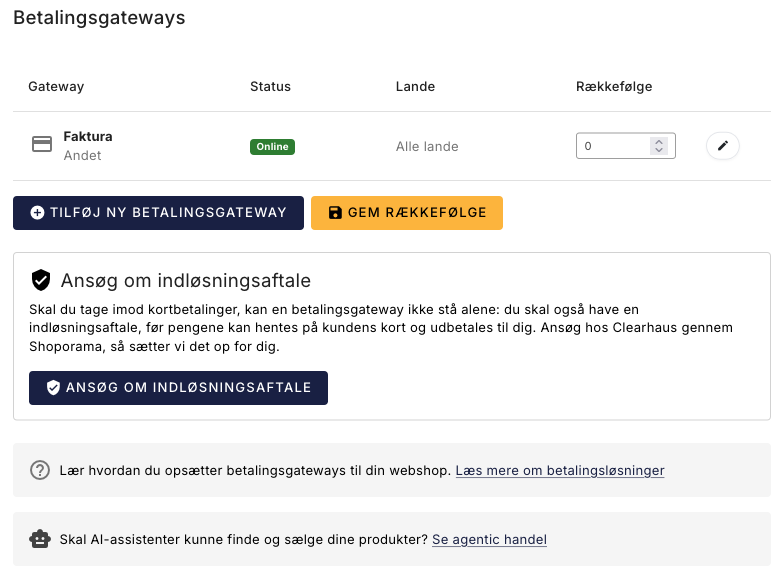
Go to Integrations and then Payment Gateways. At the bottom of the page, you’ll find the “Apply for an Acquiring Agreement ” box with a button that takes you to the guide.
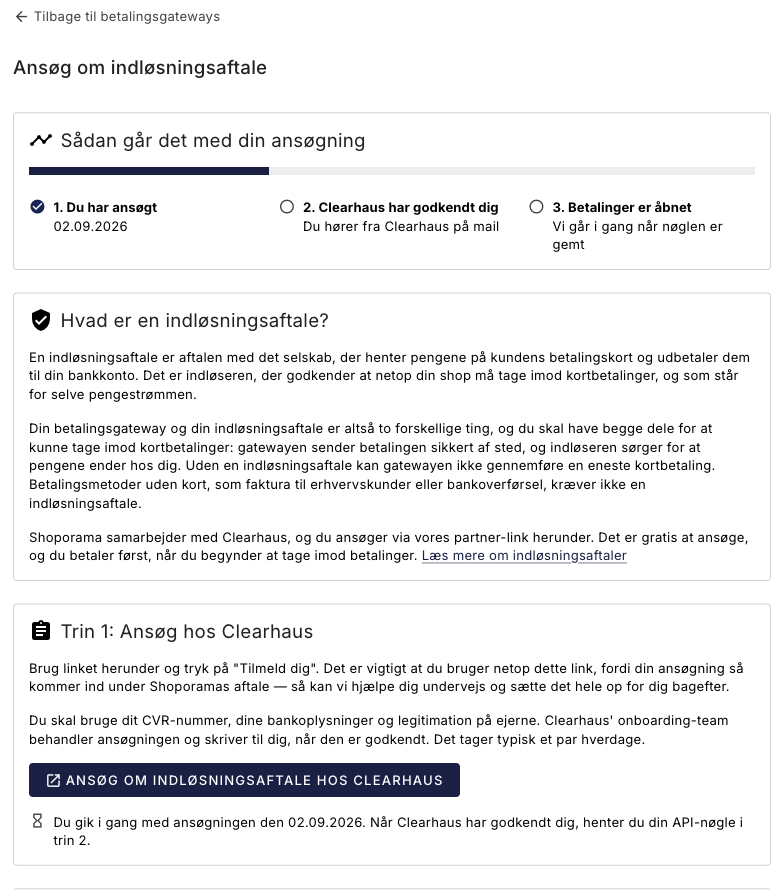
At the top of the page, there’s a progress bar with three steps, so you can always see how far along you are and who’s handling the next step. It fills in automatically as you apply, save your API key, and we enable payments. So you don’t need to guess or contact us to check the status.
Step 1: Apply with Clearhaus
Click the “Apply for a Merchant Agreement with Clearhaus” button and fill out the application. It’s important that you use the button within Shoporama and don’t just go to the Clearhaus website on your own. If you apply via the button, your application will be processed under Shoporama’s agreement, and we’ll be able to assist you throughout the process and set everything up for you afterward.
Clearhaus’s onboarding team will process your application and contact you once it’s approved. This typically takes a couple of business days. Applying is free, and you won’t be charged until you start accepting payments.
What you’ll need
- Your CVR number
- Your company’s bank information. The account must be in the company’s name, not in your personal name
- Proof of identity for the beneficial owners. All payment processors are required to ask for this, so it’s not something you can skip by choosing a different processor
- An online store that can be evaluated. The acquirer will review your actual website, so make sure your terms of service, delivery times, return policy, prices (including sales tax), and contact information—including your CVR number—are in place before you apply
Please note that your CVR number, bank information, and identification are sent to Clearhaus, not to Shoporama. We do not see your application or your account information.
Step 2: Get your API key from Clearhaus
Once Clearhaus has approved your application, you’ll need to retrieve an API key. This is what we use to link your merchant agreement to your payment gateway.
- Log in to my.clearhaus.com and select your account in the light blue field at the top left.
- Tap the three dots in the light blue box and select API Keys.
- Click “Click to reveal” and copy the key. Be sure to copy the entire key and avoid including any spaces when copying it.
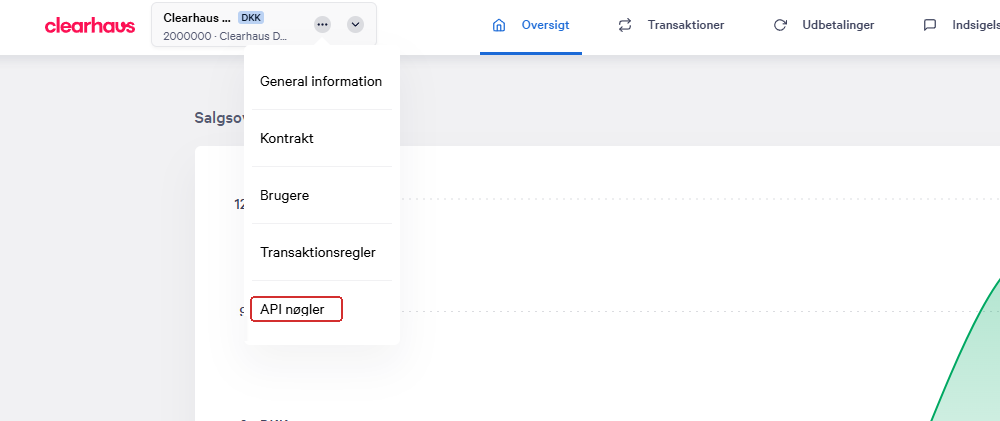
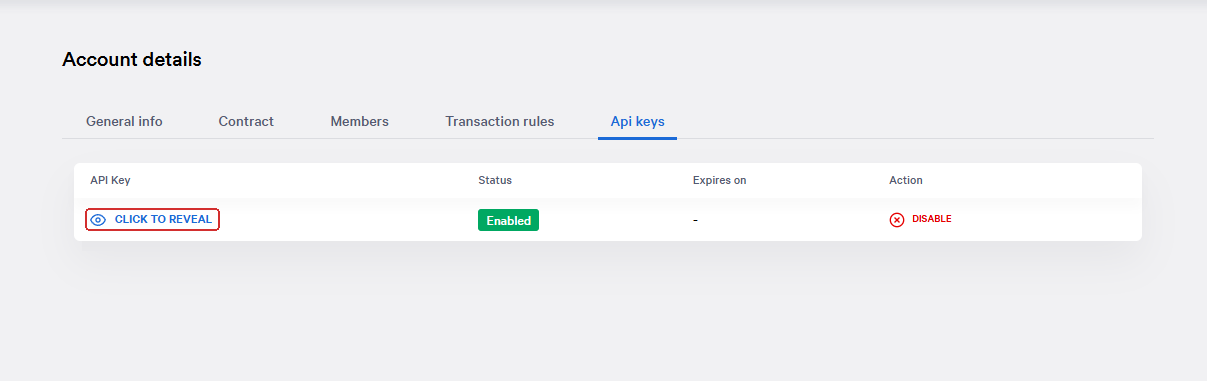
The API key is a technical access key to your Clearhaus account. It does not grant access to your bank account, but treat it like a password anyway, and do not share it in chat groups or on a shared screen.
Step 3: Save the key in Shoporama
Enter the key in the “Clearhaus API Key ” field at the bottom of the page and click “Save.” Our support team will be automatically notified, so you don’t need to contact us.
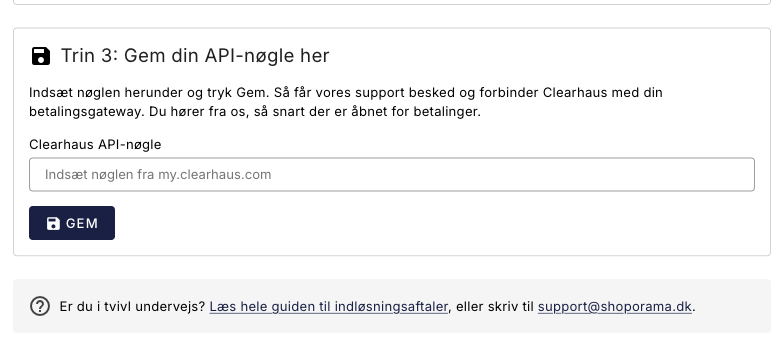
Once the key is saved, the page will show when you saved it and the last four characters of the key. The rest is hidden for security reasons. If you need to change the key, simply enter a new one and click Save again. The new one will replace the old one.
What happens next?
The application goes through four steps. Here’s what to expect and who’s handling each step:
- Clearhaus processes your application. You’ll hear from Clearhaus, not from us. If they need additional documentation, they’ll email you at the address you provided. Be sure to check your spam folder, as the process will be on hold until you respond.
- You retrieve your API key and save it in Shoporama. Nothing else happens until you’ve done that. If you skip this step, no one will know you’re waiting.
- We’ll link the merchant agreement to your payment gateway. Our support team will set this up for you as soon as the key is saved.
- You’ll be notified when payments are enabled. We’ll contact you once your store can process card payments.
Wait to announce the launch until payments are active. Place a test order in your own store using a real payment card, verify that the order goes through and appears as paid in the admin panel, and then refund the amount from the order.
How much does a merchant account cost?
It’s free to apply, and you don’t pay anything until you start accepting payments. That’s why you can safely start the application process early, while you’re still finishing up your shop.
The fee itself is typically charged per transaction, often as a percentage of the amount plus a fixed fee. The rates depend, among other things, on your revenue, your industry, and the types of cards you accept; thus, a foreign card or a corporate card usually costs more than a standard Danish consumer card. You’ll agree on the specific rates and other terms with Clearhaus, and they’ll be outlined in the application and the agreement. Shoporama does not set them.
When will you receive payment?
The money does not go directly from the customer to your bank account. It is collected by the acquirer and paid out at an agreed-upon frequency, as specified in your agreement with Clearhaus. Please note that a payment is not debited from the card until you withdraw it from the order. You can read more in the article about when you’ll receive your funds and about withdrawing payments.
When don’t you need an acquiring agreement?
You only need a merchant agreement if you want to accept payment cards. You do not need one if:
- You only sell on an invoice basis to business customers, or only accept bank transfers and cash on pickup. These payment methods are available in Shoporama as the gateway types “Invoice” and “Other Payment,” and they do not involve an acquirer.
- You already have a valid acquiring agreement. In that case, there’s no benefit to switching unless you’ve calculated the fees or are dissatisfied with your current arrangement.
- You’re using a payment solution where the acquiring is part of the same agreement. If you’re unsure whether this applies to your solution, please email support@shoporama.dk.
Frequently Asked Questions
Am I signing anything when I click the button?
No. The button simply opens Clearhaus’s application so you can see what information is requested. You do not enter into an agreement until you have completed the application and Clearhaus has approved it. You enter into the agreement with Clearhaus, not with Shoporama.
Will my store stop accepting payments in the meantime?
No. Applying and saving your API key won’t change anything in your current setup. The payment solution you’re using today will continue unchanged until the new agreement is activated and you’ve received a notification from us.
What is an API key, and can others use it to access my bank account?
No, it does not grant access to your bank account. An API key is a technical access key to your Clearhaus account, and it is used to link your merchant agreement to your payment gateway. Treat it like a password, and do not share it with anyone other than us.
Who can see my key, and what should I do if it has been compromised?
The key is stored on your online store and is only displayed in a masked form in the admin panel afterward. Our support team receives it because they are the ones who link the agreement to your payment gateway. If you suspect that the key has fallen into the wrong hands, generate a new key with Clearhaus, save it in Shoporama, and email support@shoporama.dk.
I saved the wrong key. Can I fix it?
Yes. Copy the correct key from my.clearhaus.com, paste it into the field, and click Save again. The new key will replace the old one, and our support team will be notified of the new one. You can’t break anything by saving again.
How can I tell if it went through?
Once you click Save, the page will display a message confirming that the key has been saved and that we’ve been notified. The page will then display the date and time you saved the key, along with its last four characters. You’ll receive an email from Clearhaus regarding the approval of your application.
Can I apply before the store goes live?
Yes, and it’s a good idea to do so well in advance. Keep in mind, however, that the acquirer will review your actual website as part of the approval process, so the store must be sufficiently developed to be evaluated. We recommend applying a couple of weeks before you plan to open, and allow a few business days for the final step, where we connect the agreement to your payment gateway.
Who am I signing the agreement with—Clearhaus or Shoporama?
You enter into the merchant agreement with Clearhaus. They are the ones who approve your business, set the fees, and deposit the funds into your account. Shoporama facilitates the application and ensures that the agreement is linked to your payment gateway.
Can I keep my current acquirer?
Yes. You only need to apply if you don’t have an acquiring agreement or if you’d like to switch. If you already have a working agreement, you can safely keep it.
Do I need a separate agreement for each of my online stores?
The API key is stored per online store in Shoporama, so each store must have its own key saved under its own Payment Gateways page. You’ll discuss with Clearhaus in the application how the agreements should be structured if you have multiple stores or multiple CVR numbers.
What if my application is rejected?
It happens, and it’s usually due to the industry or missing documentation. You have nothing to lose by trying. Email support@shoporama.dk, and we’ll help you figure out what’s possible for your specific store.
It’s been over a week, and I haven’t heard anything
First, check your email—including your spam folder—for a message from Clearhaus that you haven’t responded to. If you’ve stored your key with us and still haven’t heard anything, email support@shoporama.dk with your store’s address, and we’ll look into the status of your application.
Related articles
Related features
Payment: acquirer, gateway, and how long it takes
Understand the difference between a merchant and a payment gateway, apply for a merchant agreement, choose Stripe or Quickpay, and test card...
Company Information, Logo, and Terms and Conditions
Here's how to fill in your company information and CVR number, upload your logo and favicon, and write the terms and conditions that will appear at...