E-label in your webshop, badge and compliance guide
Complete guide to setting up the e-label badge in Shoporama and fulfilling the e-label compliance checklist with responsibilities and FAQ.
E-mærket is Denmark’s official certification program for responsible online retailers. Once your online store is approved, you’ll receive a visible badge that shows customers you meet E-mærket’s requirements for fair business practices, clear information, and proper customer service. Shoporama is designed from the ground up to support the E-mark checklist, so in practice, you simply need to fill in the correct fields in the right places in the admin panel.
This guide first explains how to display the official E-mærket badge on your online store. Next, you’ll find a comprehensive compliance checklist, a clear breakdown of responsibilities between you and Shoporama, and finally, answers to the questions that come up most often in day-to-day operations.
Insert the E-mærket code
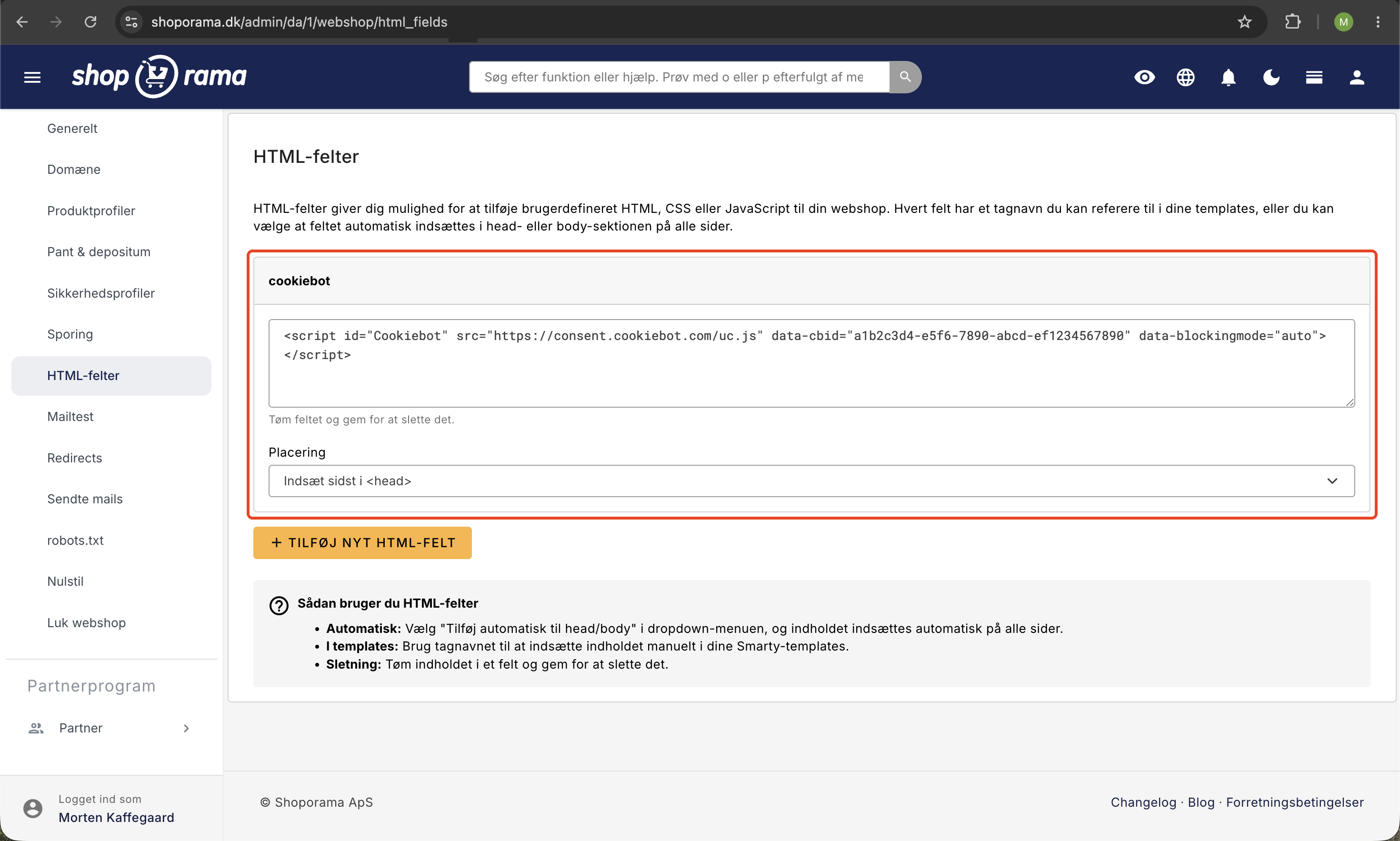
Once your online store has been approved by E-mærket, you’ll receive a piece of JavaScript code that must be inserted into your online store to display the badge. The easiest way to do this is through your settings:
- Log in to your Shoporama admin panel.
- Go to Webshop and find HTML fields.
- Click Add New HTML Field, insert the E-mærket code, and set Location to Insert at the end of <body>.
- Save your changes.
The badge will then automatically appear on all pages of your online store without you having to make any changes to your theme.
Tip: Always check your homepage in an incognito browser window after inserting the code. That way, you’ll see your online store just as a regular visitor would and can confirm that the badge is displayed correctly.
Alternative: Add the badge via your theme
If you want full control over exactly where the badge appears (for example, in the footer next to your payment icons), your designer or developer can instead insert the code directly into your theme. This requires access to the theme under “Design” in the admin panel.
Compliance Checklist: How to Meet e-mærket Requirements in Shoporama
E-mærket reviews a number of points before your online store is approved. Below is a handy checklist showing exactly where in Shoporama you can meet each individual requirement.
1. Correct contact information and CVR number
E-mærket requires that your company name, CVR number, address, phone number, and email address be easy for customers to find. In Shoporama, all of this is entered in one place under Settings, Company. Once the information is saved, it is automatically used in order confirmations, receipts, and on the page in your online store that displays company information.
2. Expected response time for customer inquiries
E-mærket wants customers to be able to see how quickly they can expect a response. Shoporama does not have a separate field for response time. Instead, include the response time in your terms and conditions and, preferably, at the bottom of your online store, for example, “We typically respond within 24 hours on weekdays.”
New as of June 19, 2026: Consumers must be able to cancel their purchase online. Shoporama has a built-in digital cancellation feature that meets this requirement without any setup. Read more in Digital Cancellation: Let Customers Cancel Their Purchase Online.
3. Link to the right of withdrawal on the homepage
Customers must be able to easily find the right of withdrawal. In Shoporama, your right of withdrawal is a fixed part of your terms and conditions, which are available at /terms. You can add the link to the menu or footer yourself under Design > Menus so that it is clearly visible on the homepage.
4. Customers see the entire order before purchasing
E-mærket requires that customers be given a clear overview of their order before payment is processed. Shoporama’s checkout is designed in several steps, and on the final step before payment, the customer sees the entire cart, the shipping address, the shipping method, the selected payment method, and the total amount. Only then do they click “Confirm and Pay.” You can customize the display via “Customize Your Checkout.”
5. Reserving Funds Instead of Charging
As a general rule, funds may only be withdrawn once the item is shipped. Shoporama fully supports this feature with payment solutions such as QuickPay, OnPay, Stripe, ePay, and Klarna. When an order is placed, the amount is reserved, and you can either manually collect it when you ship the item or have it collected automatically upon shipment. See " Collect Payments on Orders " for details.
6. Terms and Conditions in One Place and Always Up to Date
Your terms and conditions are entered in one place under Design, Logo, and Terms. They are automatically displayed at /terms, must be accepted by checking a box at checkout, and can be attached as a PDF to the order confirmation. Read how to do this in “Attach Terms and Conditions to the Order Confirmation.”
7. Required Content in the Order Confirmation
The customer must receive an order confirmation containing all essential information. Shoporama sends it automatically and includes company information, all order lines with prices, the shipping address, the selected payment method, and a link to the terms and conditions. You can also attach additional files, such as a PDF version of the Terms and Conditions, as described in “Attach a File to the Order Confirmation.”
8. Bank Transfer and Invoice Payment
E-mærket prefers that you offer a fee-free payment method, such as bank transfer. Invoice payment is a standard payment method in Shoporama and is enabled under Settings, Payment. The customer automatically receives your bank details in the order confirmation. See the setup instructions in “Set Up Invoice Payment.” We recommend that you also enable automatic cancellation of unpaid orders so that inventory is released again.
9. Secure Email Delivery (SPF, DKIM, DMARC)
Order confirmations and other store emails are sent via an external email delivery system used by Shoporama. To ensure that emails are delivered securely and do not end up in spam, you must set up a few technical DNS records on your own domain. Shoporama Support is happy to assist, but the actual setup must be done with the provider where your domain is registered.
The Shop Owner’s Responsibilities vs. Shoporama’s Responsibilities
It’s important to know what Shoporama handles for you automatically and what you need to fill out or decide on your own. Here’s an overview.
| Area | Your responsibility as a store owner | Shoporama handles this |
|---|---|---|
| Company Information and CVR | Fill out the fields correctly and keep them up to date | Displays them automatically on the website, in emails, and on receipts |
| Terms and Conditions | Write the content and ensure it complies with the law | Publish them, display them at checkout, and attach a PDF |
| Response Time | Describe the expected response time in the terms and conditions or footer | No separate feature; you control the text yourself |
| Link to the right of withdrawal | Add a link in the menu or footer | The page is available at /terms |
| Checkout view | Choose any design customizations | Provides a multi-step checkout with a full overview before payment |
| Reservation and payment | Select a payment gateway and process payment upon shipment | Supports pre-authorization and both manual and automatic capture |
| Bank transfer | Enable the method and enter bank details | Automatically includes the information in the order confirmation |
| Order Confirmation | Enter any introductory text in the email template | Automatically sends the email with all legally required information |
| SPF, DKIM, and DMARC | Set up DNS records with your domain provider (preferably with help from support) | Send via an approved sender system and provide the necessary records |
| The E-mærket badge | Insert the code provided by E-mærket | Display the badge on all pages once the code has been added |
Frequently Asked Questions
Where can I find the fields for my company name and CVR number?
Log in to the admin panel, go to Settings, and then select Company. Here, enter your company name, CVR number, address, city, country, phone number, and email address. Click Save. This information will automatically be used in your order confirmations and receipts, so you don’t need to enter it in multiple places.
As an accountant, how can I verify that the CVR number is included on the receipt sent to the customer?
When you create a test order and open the corresponding order confirmation or PDF receipt, you’ll see your company information—including the CVR number—at the top. The information is retrieved directly from Settings > Company, so there’s always just one place to make changes if anything changes. This simplifies accounting work and ensures that your documents are accurate.
I run several online stores. Do I need to set up the badge in each one?
Yes. E-mærket approves each online store separately, and you’ll receive a unique code for each store. In Shoporama, log in to the individual shop’s admin panel and enter the code under “Webshop,” “HTML Fields.” The contact information, terms of sale, and payment settings must also be maintained for each shop, as they are specific to each CVR number and each store.
What should I do if E-mærket says that the right of withdrawal isn’t visible enough?
Make sure there is a visible link to your terms and conditions on the homepage. Go to Design, Menus, and add a menu item to the address /terms. Many people choose to place the link in the footer. You can edit the text regarding the right of withdrawal under Design, Logo, and Terms.
Is the money charged immediately when the customer places an order?
No, not by default. When you use one of the standard payment solutions, the amount is reserved on the customer’s card when the order is placed and isn’t charged until the item is shipped. You can choose whether the charge should be processed automatically upon shipment or manually from the order. This means you comply with the rule that the money is only charged once you have the item ready.
How do I ensure that my order confirmations don’t end up in the customer’s spam folder?
Set up SPF, DKIM, and DMARC for your domain. The SPF record must include our sending system so that recipient servers accept emails sent from your domain. DKIM requires that one or more keys—which we provide—be published. DMARC sets a policy for how recipients should respond if an email fails SPF or DKIM validation. All three are TXT records that are added through your domain provider. Contact support, and we’ll send you the exact values you need to enter.
Do I need to offer fee-free payment options?
E-mærket recommends that you offer at least one fee-free payment method. Bank transfer or invoice payment is a simple solution, and it’s built into Shoporama by default. Enable it under Settings > Payment, and the customer will receive your bank details in the order confirmation. Consider combining this with automatic cancellation of unpaid orders so that items don’t remain reserved in your inventory for too long.
What should I include regarding response time, and where do I put it?
Customers should have a clear expectation of how quickly you’ll respond. Shoporama doesn’t have a separate field for response time, so include this information in your terms and conditions and, ideally, in the footer as well. A good way to phrase this is, for example, “We respond to inquiries within 24 hours on weekdays.” Avoid promising faster responses than you can actually deliver.
Can the customer see the entire order before paying?
Yes. On the final step of checkout before payment, Shoporama displays the shopping cart, delivery address, shipping method, selected payment method, and total amount. The customer must also check the box to accept the terms and conditions before clicking the “Confirm and Pay” button. This ensures a complete overview before the funds are reserved.
Where can I find help if I get stuck?
We have support articles on the topics that come up most often in connection with e-mærket, such as customizing the checkout, reversing payments, attaching terms and conditions, invoice payments, and protection against spam orders. If you can’t find the answer, you’re always welcome to contact support.
Need help? Contact us at support@shoporama.dk.
Related articles
Attach terms and conditions to the order confirmation
Sådan vedhæfter du dine handelsbetingelser som PDF til ordrebekræftelsen i Shoporama.
Attach file to the order confirmation
Guide to attaching a file (e.g. terms and conditions) to the order confirmation in Shoporama.
Create invoice payment
Guide to setting up invoice payment as a payment method in Shoporama.
Collect payments on orders (capture)
Guide to capture payments on orders in Shoporama. Understand the difference between authorization and capture and learn how to capture manually or...
Customize your checkout
Guide to customizing the checkout flow in your Shoporama online store, including payment methods, shipping, customer fields and gift cards.
Protect your webshop from spam orders
Guide to protecting your Shoporama webshop from spam orders and fraud using blacklist, captcha and 3D Secure.
Related features
E-marked
The e-mark is Denmark's most widely used certification scheme for webshops. Learn what it requires, what it costs and if it's necessary for your...
Verified Shoporama Store
Verified Shoporama Store: The Trust Seal You Don't Have to Apply For
We've created a trust badge for Shoporama stores. It verifies seven aspects of the store behind the listing, and it clearly states what it does not...