Opsæt TradeTracker-feed i Shoporama
Sådan aktiverer du TradeTracker-feedet i Shoporama, så dit affiliate-netværk kan hente dine produkter.
TradeTracker is an affiliate marketing network where other websites can promote your products in exchange for a commission. With the TradeTracker feed in Shoporama, you automatically deliver your products to the network, ensuring your affiliate partners always have the correct products, prices, and links to work with. In this guide, we’ll show you how to activate the feed, what it contains, and how to protect it.
What is TradeTracker?
TradeTracker is an affiliate marketing network in the same category as Partner-Ads. In short, affiliate marketing involves other websites, bloggers, and media outlets promoting your products to their own visitors. When one of their visitors clicks through to your online store and makes a purchase, the affiliate receives an agreed-upon commission on the sale.
In order for partners to promote your products, they need an up-to-date list of your product range, including names, prices, and links. The TradeTracker feed automatically provides this list. You set up the feed once, and then TradeTracker automatically retrieves the latest information as needed.
If you’re already using another affiliate network, you can easily run multiple networks in parallel. Shoporama, for example, also has a Partner Ads feed that works the same way.
How to activate the TradeTracker feed
You can activate the feed directly in the admin panel. Follow these steps:
- Go to Settings → Webshop.
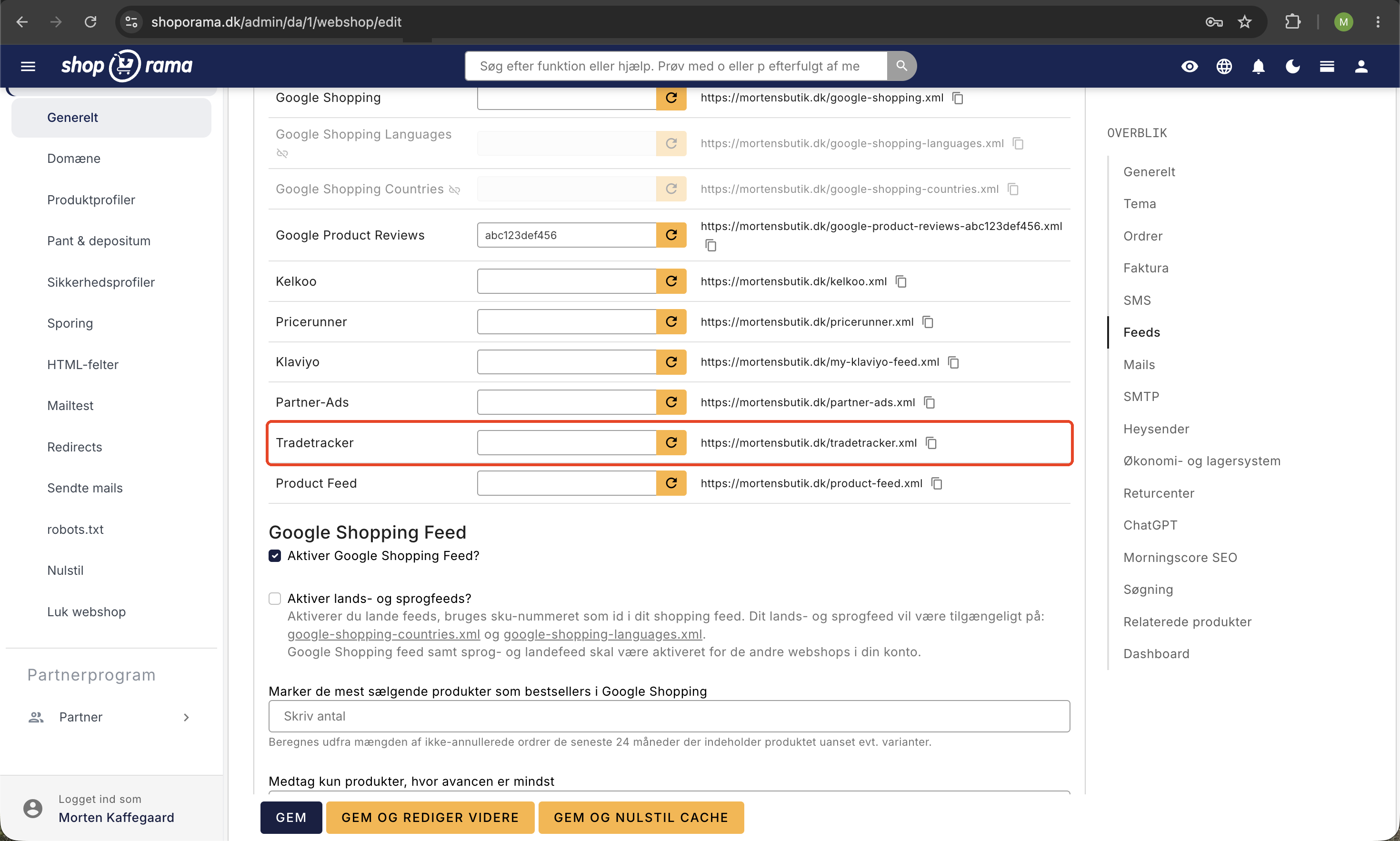
- Click the Feeds tab.
- Find the TradeTracker section.
- Check the box next to " Enable TradeTracker feed."
- Save your settings.
Once the feed is enabled, it will be available at the following address, where you replace your-domain.dk with your own online store address:
your-domain.dk/tradetracker.xml
This is the address you provide to TradeTracker so the network can retrieve your products.
What does the feed contain?
For each product in your online store, the TradeTracker feed contains the following information:
- Product ID: a unique identifier for the product.
- Name: the product’s title.
- Price: the product’s current price.
- URL: the direct link to the product page in your online store.
This information is what your affiliate partners need to refer their visitors to the right products at the right prices.
Protect your feed (optional)
By default, a product feed is publicly accessible if you know the address. If you want only TradeTracker to be able to retrieve it, you can protect the feed with a feed key. The key keeps the feed address private, so the feed can only be retrieved with the correct key in the URL.
Note: If you protect your feed with a key, you must provide TradeTracker with the full address, including the key. Otherwise, the network won’t be able to retrieve your products.
Read more about how feed keys work in the article on feed keys.
Frequently Asked Questions
I’m not technical at all. Do I need to write any code to use the feed?
No. Simply check the box under Settings → Webshop → Feeds and save. You’ll then have a ready-to-use feed address to share with TradeTracker. No coding is required.
How much does it cost to use the feed, and how much do I earn from affiliate commissions?
The feed itself is part of Shoporama. What you pay in commission and earn from sales depends on your agreement with TradeTracker and your partners. We can’t promise specific earnings figures, as they vary from store to store.
Do I need to update the feed every time I change a price?
No. The feed always retrieves the most current information from your online store. When you change a price or a product name, it’s automatically reflected the next time TradeTracker retrieves the feed.
Can I use TradeTracker alongside Partner-Ads or Google Shopping?
Yes. The different feeds operate independently of one another, and you can have multiple active feeds at the same time. See, for example, the guides for Partner-Ads and the Google Shopping feed.
Can others view my feed if they know the address?
Yes, a feed is public by default if someone knows the exact address. If you want to prevent this, you can protect the feed with a feed key so that it can only be retrieved using the secret address. You’ll find instructions in the article about feed keys.
What should I do if TradeTracker can’t retrieve my feed?
First, check that the “Enable TradeTracker feed” checkbox is selected and that you’ve saved the settings. If you’ve protected the feed with a key, make sure TradeTracker has the full address, including the key. If that doesn’t help, feel free to contact us at support@shoporama.dk.
Related articles
Build your own feeds
Guide to building your own product feeds in CSV, XML or JSON format with Shoporama's custom feed feature.
Opsæt Kelkoo-produktfeed i Shoporama
Guide til Kelkoo-produktfeedet i Shoporama: aktivering, feed-adresse, styring af Kelkoo-kategori, og beskyttelse med en feed-nøgle.
Opsæt Pricerunner-produktfeed i Shoporama
Guide til at aktivere og tilpasse Pricerunner-produktfeedet i Shoporama, så Pricerunner kan hente dine varer.
Feed-nøgler: Beskyt dine produktfeeds med en hemmelig nøgle
Sådan slår du feed-nøgler til i Shoporama og beskytter dine produktfeeds, så kun Google, Pricerunner, og andre godkendte tjenester kan hente dine...
Set up Partner Ads in Shoporama: getting started
Introduction to Partner Ads in Shoporama. Understand what it is, what you get out of it, and get started quickly with product feed and tracking.
Related features
Affiliate marketing
Affiliate marketing is a performance-based model where you pay commission for sales through partners. Learn about networking, benefits and how to...
Feeds
Ready-made feeds for Google Shopping, Pricerunner, Partner Ads, Kelkoo and TradeTracker. Or build your own custom feeds in XML or CSV.
Custom Feeds
Build customized product feeds in XML, JSON or CSV. Select fields, filter products, expand variants and split feeds into pages.