Emergency situation

In case of emergencies or breakdowns, you can send an SMS to our emergency hotline

On-call phone (SMS only)

+45 29 70 15 95

Send an SMS with the following information:

  • Your name and webshop
  • Description of the problem
  • Your callback phone number

Notes: This service is only for critical situations where your webshop is down or has serious problems. For regular support, please use our normal support channels.

Sales reports and revenue in dashboard

Guide to the Shoporama dashboard: view revenue, orders, and visitors on the home page; customize the dashboard with the modules you need; and find detailed reports under "Statistics."

Reading time: approx. {eight} minutes
Shopejer

The dashboard is the home page you land on when you log in to Shoporama’s admin panel. It gives you a quick overview of your online store’s revenue, orders, visitors, and the items that currently require your attention. The dashboard is made up of small cards—which we call modules—and you decide which ones to display on your dashboard.

Here’s what you’ll see by default

A new user starts with twelve modules enabled. They’re selected so you get both today’s figures and the alerts you can’t afford to miss:

  • Sales: Today’s Revenue, This Month’s Revenue, and the Sales Trend graph.
  • Orders: New Orders, Today’s Orders, This Month’s Orders, and Packages Due for Return Soon.
  • Visits and Traffic: Visitors Today.
  • Store Status: References to deleted products, No products, and Broken ad links.
  • Yours: A shared board where you and your colleagues can share messages.

The revenue and orders cards have fixed time periods built in, namely “today” and “this month.” There is no single date selector for the entire front page. If you want to choose a custom time period, you’ll need to use the chart modules or the detailed reports under Statistics.

The dashboard is built from modules, and you decide which ones to use

There are a total of 43 modules divided into eight groups: Sales, Orders, Visits and Traffic, Inventory, Marketing, Customers, Store Status, and Your Own. This means you can customize the homepage to show exactly the numbers you’re looking for every morning and leave the rest out.

How to customize the dashboard

  1. Click “Customize” in the top-right corner of the dashboard. You’re now in edit mode, and three buttons will appear: “Add Module,” “Reset,” and “Done.”
  2. Remove a module by clicking the X (“Remove Module”) on the card you’re not using.
  3. Move a module using the “Move Left” and “Move Right” arrows on the card. You can also drag the card to where you want it using the mouse.
  4. Add a module using the “Add Module” button. A panel will open on the right-hand side showing all modules organized into eight groups, along with a search bar if you want to quickly find a specific one. If you already have all modules on your front page, it will say "All modules are already on your front page."
  5. Click “Done” when you’re satisfied.

Tip: There is no “Save” button. The front page saves automatically with every change, and you’ll see a small status message that says “Saved.” If something goes wrong, it will say “Could not save.” The “Done” button simply exits edit mode.

Your homepage is personalized

The setup is saved to your own user account. If you have colleagues in the same store, you can each have your own homepage. The bookkeeper can have revenue and contribution margin at the top, while the person who packs orders can have new orders and returns at the top. New users start with the store’s default layout and can then customize their own.

If you’ve accidentally messed things up too much, you can click “Reset” in edit mode. You’ll be asked, “Reset the homepage to the default layout? Any modules you’ve added or removed will be lost.” If you confirm, the homepage will return to its original state.

Modules You Can Add Yourself

The remaining 31 modules are available in the panel under “Add Module”:

  • Sales: Revenue, Year-to-Date Revenue, Revenue Compared to Same Month Last Year, Contribution Margin, Average Order Value, Average Order Value and Profit, Best-Selling Products, Best-Selling Variant.
  • Orders: Number of Orders, Shipped Orders, Shipped Today, New Returns, Average Number of Products per Order, Shipping Methods, Payment Gateways, Credit Cards.
  • Visits and Traffic: Visitors, Traffic Sources, Countries, Conversion Rate This Month, Conversion Rate, Empty Searches.
  • Inventory: Declared inventory value, Products below minimum stock.
  • Marketing: Revenue from referrals, Newsletter subscribers.
  • Customers: New Reviews.
  • Store Status: Next 7 Days, 404 Errors.
  • Your Own: Post-it and Countdown. These two can appear on the front page multiple times, so you can, for example, have a reminder note and a countdown for each of your campaigns.

Note that Average Order Value is not enabled by default. If you want to track your average order value daily, you’ll need to enable the module yourself.

Modules that require certain conditions before displaying data

None of the modules require a specific subscription or add-on purchase. However, a few require that a feature be enabled or that data be available to display:

  • Visitors Today, Conversion Rate This Month, and Revenue from Recommendations: Require that visitor statistics be enabled. You can do this under Webshop → General, where you check the box next to “Enable visitor statistics.” Data is only available from the day you enable the statistics; there is no historical data. Learn more about visitor statistics and conversion rates.
  • Newsletter Subscribers: Requires that you use Shoporama’s own newsletter module.
  • Contribution Margin: Based on your cost of goods sold and a calculation run overnight. The chart shows the most recent month calculated, not necessarily the current month.
  • New Returns and New Reviews: Displayed only when there are actually new ones.

Good to know about the front page

  • Modules you’ve added yourself remain visible, even when they’re empty. The standard warning modules, such as “404 Error” and “New Returns,” however, hide automatically when there’s nothing to draw attention to.
  • If we create new default modules later, they’ll automatically appear on your site. A module you’ve removed yourself, however, won’t reappear on its own.
  • If you remove all modules, the message “You have removed all modules from your front page” will appear, along with an “Add Modules” button, so you can easily get started again.
  • The charts are loaded continuously after the page has loaded. That’s why you might see some gray placeholders for a moment before the numbers appear.

Select a time period in the chart modules

Each chart module has its own period selector in the corner of the chart. You can choose Last 7 Days, Last 30 Days, Last 90 Days, Last 365 Days, This Year, Last Year, or a custom period with your own dates.

Several of the charts also allow you to compare with the previous year, so you can see whether the trend is due to seasonality or actual growth. Use the download button in the same corner to save the chart as an image that you can insert into a report or share.

With or without VAT

By default, the dashboard’s revenue figures are displayed without VAT. If you want to see them with VAT, click “Customize” and check the box next to “Show dashboard incl. VAT.” Checking this box updates both the key metrics cards and the charts at once, and your selection is saved in your browser until you change it again.

Tip: Always check the checkbox before comparing the dashboard figures with your accounting records. Read more in “Are the figures in the backend with or without VAT?” and “How the figures in the backend are calculated.”

Detailed reports under “Statistics”

The dashboard gives you the big picture. If you need to dig deeper into the numbers, the right reports are in the menu under Statistics. The most important ones are:

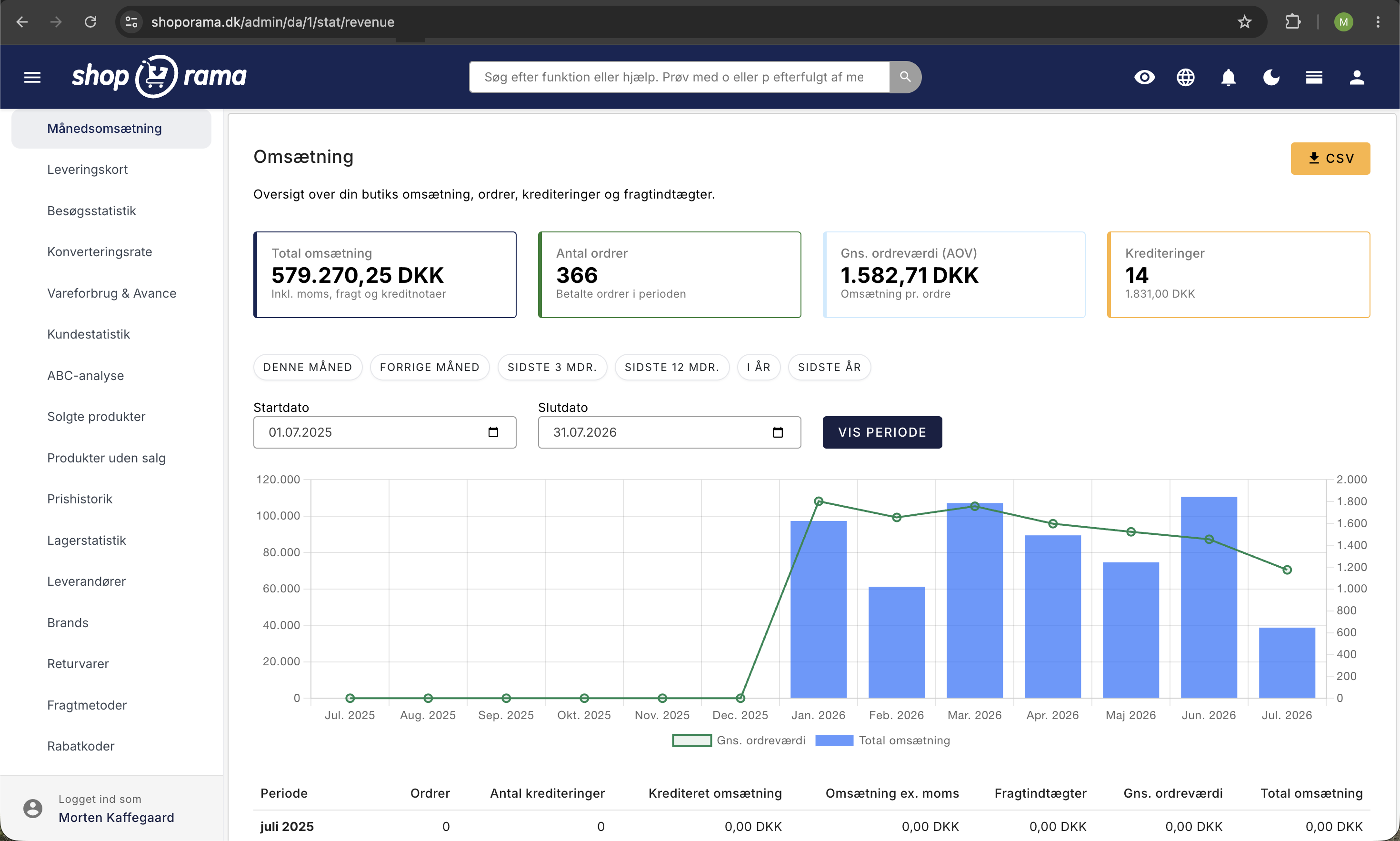
  • Monthly Revenue: Your revenue month by month, including the number of orders, average order value, and credits.
  • Products Sold: Which items are selling best. See Products Sold.
  • Cost of Goods Sold & Profit Margin: Your profit margin and what you’re actually earning.
  • Customer Statistics: New versus returning customers and your best customers. See Customer Statistics.
  • Visitor Statistics and Conversion Rate: Traffic and what percentage of visitors make a purchase.
  • ABC Analysis: Identify the products that are making you money.
  • Sales by Channel, Abandoned Carts, Returns, Shipping Methods, Discount Codes, Inventory Statistics, Suppliers, Brands, Time Analysis, Customer Retention, Bundled Purchases, and Recommendations: Custom reports to answer the questions that arise along the way.
Omsætningsrapporten i Shoporama med nøgletal for total omsætning, antal ordrer, gennemsnitlig ordreværdi, og krediteringer samt månedsgraf
The “Monthly Revenue” report under “Statistics” shows total revenue, number of orders, average order value, and credits for the selected period. The graph compares monthly revenue with the average order value.

You can find a comprehensive overview of all reports in the article “Statistics and Analysis in Shoporama.” If you need the numbers in a spreadsheet, you can export sales data from the product overview.

Three suggestions for a dashboard tailored to your work

If you’re having trouble choosing between the modules, you can start with one of these layouts and adjust it from there:

  1. Daily Operations: New Orders, Today’s Orders, Today’s Revenue, Shipments Today, Packages Due for Return Soon, and New Returns. This layout focuses on what you need to accomplish today, not how the year is going.
  2. Growth and Marketing: Revenue compared to the same month last year, Conversion rate this month, Traffic sources, Empty searches, Best-selling products, and Revenue from recommendations. The comparison to last year is the metric that shows whether you’re actually growing.
  3. Inventory and Purchasing: Products Below Minimum Stock, Reported Inventory Value, Best-Selling Variant, Contribution Margin, and Average Number of Products per Order. The best-selling variant reveals, for example, that it’s size M that’s selling, not just the model.

Frequently Asked Questions

Where is the date picker for the entire dashboard?

There isn’t one. The key metrics cards have fixed time periods built in, such as “today” and “this month.” If you want to choose a period yourself, use the period selector in the corner of a chart module or one of the reports under Statistics, where you can set the start and end dates.

Will I mess things up for my coworkers if I move the modules around?

No. The setup is personal and saved to your own user account. Your coworkers will keep their own home screen, no matter what you do to yours. If you change your mind, click “Customize” and then “Reset” to return to the default setup.

Where is the save button?

There isn’t one. Everything is saved automatically every time you move, remove, or add a module, and you’ll see the status “Saved.” If you see “Could not save” instead, the change wasn’t saved, and you should try again. The “Done” button simply exits edit mode.

Why is my "Visitors Today" card empty?

Because visitor statistics aren’t enabled. Go to Webstore, General, and check the box next to “Enable visitor statistics.” Note that statistics will only be available starting from the day you enable it, so you won’t have any retroactive history. The same applies to “Conversion Rate This Month” and “Revenue from Recommendations.”

Do the extra modules cost anything?

No. None of the dashboard modules require a specific subscription or an additional purchase. However, some modules only display data once the feature they’re based on is in use—for example, visitor statistics, the newsletter module, or cost of goods sold.

Are the dashboard figures shown with or without sales tax?

They are shown excluding VAT by default. Click “Customize” and check the box next to “Show dashboard including VAT” if you want to see them including VAT. This setting applies to both charts and graphs and is saved in your browser. Always check the box before comparing the figures with your accounting records.

What happens to my setup when Shoporama releases new modules?

New standard modules automatically appear on your home page so you don’t miss them. Modules you’ve removed yourself won’t reappear on their own. If you want to start from scratch, use “Reset,” but keep in mind that any modules you’ve added or removed will be lost.

Why are some of my cards empty?

Modules you’ve added yourself remain visible, even when there’s nothing to display. This is intentional, so that a click always provides a visible response. Conversely, the warning standard modules—such as 404 errors and New Returns—hide themselves when everything is as it should be.

How up-to-date are the figures on “Contribution Margin”?

Contribution margin is based on your cost of goods sold and a report that runs overnight. The card shows the most recent month for which data has been calculated, not the current month, so don’t use it to measure this week’s campaign. For that purpose, the “Cost of Goods Sold & Profit” report under “Statistics” is better.

Can I include the dashboard’s graphs in a report?

Yes. Each chart module has a download button in the corner that saves the chart as an image. If you need the actual numbers for a spreadsheet, you can retrieve them from the reports under “Statistics” or by exporting sales data from the product overview.

Related articles

Do you have any questions? Email us at support@shoporama.dk.