Why are DanDomain customers looking for an alternative?
DanDomain is one of the best-known Danish e-commerce platforms. It was founded in 1999 and is now part of the European hosting group team.blue. As of October 2026, DanDomain has a 4.7-star rating on Trustpilot based on 2,246 reviews, with its phone support receiving particular praise.
When DanDomain customers do look elsewhere, it’s often for three reasons:
- Price. The packages have increased in price since 2024 and are paid for half a year or a full year in advance. As of October 2026, 14 of the 20 most recent 1-star reviews on Trustpilot mention price increases, but the reviews also cover domains, email, and hosting—not just online stores.
- The desire for more flexibility in design and themes. This is one of the arguments agencies most often cite for switching.
- Two systems at DanDomain. DanDomain has two online store systems: Webshop Classic and the new DanDomain Webshop, which is based on the former SmartWeb platform; DanDomain offers to migrate Classic stores to the new system. SmartWeb became part of DanDomain in 2021, so if you have a SmartWeb store, you’re currently a DanDomain customer. If you’re considering migrating your Classic store, now is a good time to also look at the alternatives.
How much does DanDomain actually cost?
DanDomain Webshop offers four pricing plans. The number of orders per month—calculated as an average over 180 days—determines which plan you should choose. Prices are exclusive of VAT and as of October 2026:
| Package | Orders per Month | Introductory Price | Thereafter per month | Annual Fee |
|---|---|---|---|---|
| Start-up | Under 100 | 9 DKK/month | 249 DKK | 2,988 DKK |
| Growth | Under 250 | 9 DKK/month | 699 DKK | 8,388 DKK |
| Advance | Under 1,000 | 9 DKK/month | 1,199 DKK | 14,388 DKK |
| Success | Under 2,500 | 39 DKK/month | 2,199 DKK | 26,388 DKK |
The introductory price appears to apply for the first six months. In February 2024, the same packages cost 199, 549, 999, and 1,999 DKK/month. For more than 2,500 orders per month, a surcharge applies per order.
Prepayment and renewal. According to DanDomain’s terms of service as of October 2026, DanDomain bills 6 or 12 months in advance. The agreement renews automatically unless you cancel at least 30 days before the end of the period, and a paid period is non-refundable. Prices may be adjusted with at least one month’s notice starting from the next period.
On top of that, there are payment and accounting costs. As of October 2026, the OnPay payment solution costs either 1 DKK per transaction (up to 100 transactions per month) or 99 DKK/month with 300 transactions included. MobilePay costs 49 DKK per month plus 1.02 DKK per transaction. e-conomic runs via an app, such as Pairy Premium, starting at 149 DKK per month.
Shoporama Pro costs 1,400 DKK/month, excluding VAT (16,800 DKK per year), even as the number of orders increases. Flex costs 0 DKK/month + 5% of sales (including tax and shipping) through December 31, 2026, and from January 1, 2027, a minimum of 249 DKK/month, excluding tax. Based on the prices as of October 2026, here’s what it looks like after the introductory period:
- For fewer than 100 orders per month, DanDomain’s Start-up plan at 249 DKK/month is hard to beat on price.
- With 300 orders per month, you’re on the Advance plan, and with Pairy for e-conomic, DanDomain costs approximately 16,176 DKK per year. The Pro plan costs 16,800 DKK, and the e-conomic app is free. It’s almost the same, but with Shoporama, you pay month-to-month.
- With 1,500 orders per month (Success), DanDomain costs 26,388 DKK per year. Pro still costs 16,800 DKK.
You also pay for card fees and MobilePay with Shoporama, directly to your payment gateway and acquirer. See also what a web store costs in total.
Shoporama as a DanDomain Alternative
Shoporama is a Danish online store platform based in Odense and owned by its founder. You get 30 days free without a credit card, no setup fee, and no long-term commitment. Price changes are announced at least three months in advance. Here’s what you get, among other things:
- Dankort and MobilePay via payment gateways such as Quickpay, ePay, PensoPay, and Nets Easy
- Shipping with PostNord, GLS, and DAO
- e-conomic, Dinero, and Billy: Dinero and Billy are built-in, and the e-conomic app is free
- Page builder, AI text assistant, point-of-sale (POS) system, loyalty program, and blog—all without apps
- Danish support via email, and with the Pro plan, phone support and unlimited users
If you’d like to see the platforms side by side, read the comparison of Shoporama and DanDomain.
What does the DanDomain import include?
Shoporama has an import feature designed for DanDomain. It’s located alongside Shoporama’s other import tools under Products → Import/Export.
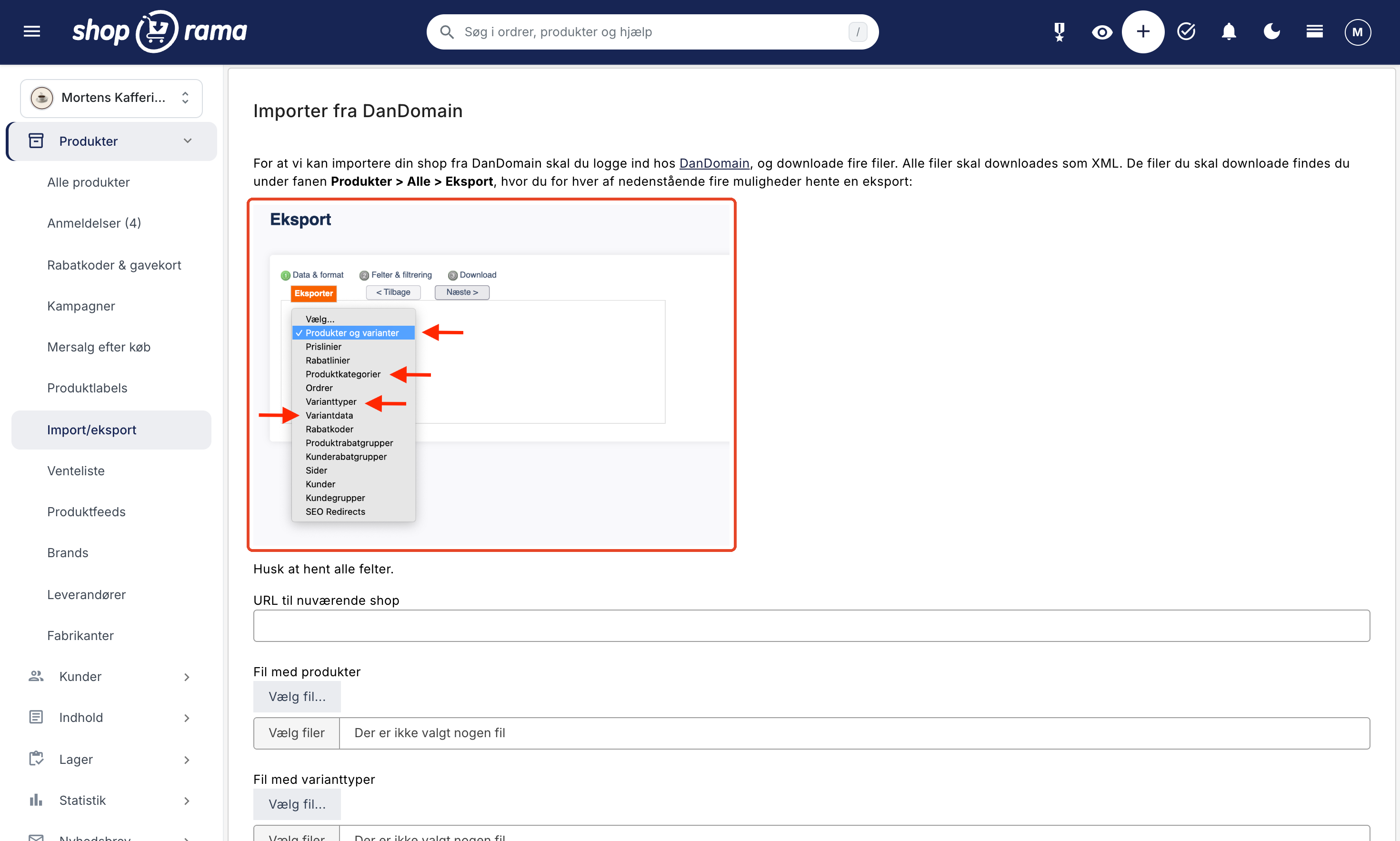
- In DanDomain, go to Products → All → Export and download four XML files: products, variant types, variant data, and categories. Be sure to download all fields.
- In Shoporama, select “From DanDomain,” enter the URL of your current store, and upload the files.
- The import runs in the background, and you’ll receive an email when it’s complete. The images are retrieved from DanDomain’s image server in batches, so they may appear a little while after you receive the email.
| Data | Included in the import? |
|---|---|
| Products | Yes: name, descriptions, price, sale price, cost price, item number, EAN, inventory, and weight |
| Variants | Yes, one variant type per product, with its own price, stock, and EAN |
| Categories | Yes, with subcategories and descriptions |
| Images and SEO texts | Yes, SEO titles and descriptions for both products and categories |
| Related products | Yes |
| Customers | No, they are imported separately via CSV |
| Orders, pages, blog, and menus | No |
| Reviews, discount codes, volume discounts, and newsletter subscribers | No |
| Brands, suppliers, and languages other than Danish | No |
| Redirects | No, but the addresses are often reused |
If an item has both a size and a color, you’ll need to adjust it, as the import process accepts only one variant type per product. If you run the import again, products and categories are usually updated rather than created twice, but two categories with the same name under different parent categories will be merged.
If Shoporama cannot find DanDomains’ image server on your homepage, the import will stop with an error. In that case, please email support@shoporama.dk. According to DanDomain’s pricing page, the export module is not included in the Start-up plan as of October 2026, so if you’re on that plan, you should ask DanDomain how to export your data. Read more in the guide to the DanDomain import and the lesson on importing products.
What happens to your URLs and your Google rankings?
Your rankings depend, among other things, on the URLs that Google recognizes. The goal is therefore for each old URL to either work as before or redirect to the new page.
This is where the DanDomain import has an advantage: it reuses the URLs for products and categories from the DanDomain files as URLs in Shoporama. The import only corrects a few characters, such as capital letters to lowercase and æ, ø, and å to ae, oe, and aa. If your domain moves with the site, the old links will therefore often work without a redirect. This isn’t a guarantee, so check your most important URLs after the switch.
The rest is handled with 301 redirects, which tell Google that a page has been permanently moved. The import process does not create these automatically. You must set them up for URLs that have changed, for pages and blog posts you’re rebuilding, and for products you’re not transferring. In Shoporama, you can create them one at a time, import them from a CSV file, or create them directly from the 404 log. If you’re using the new DanDomain Webshop, your SEO redirects can be exported from there and used as the basis for the CSV import.
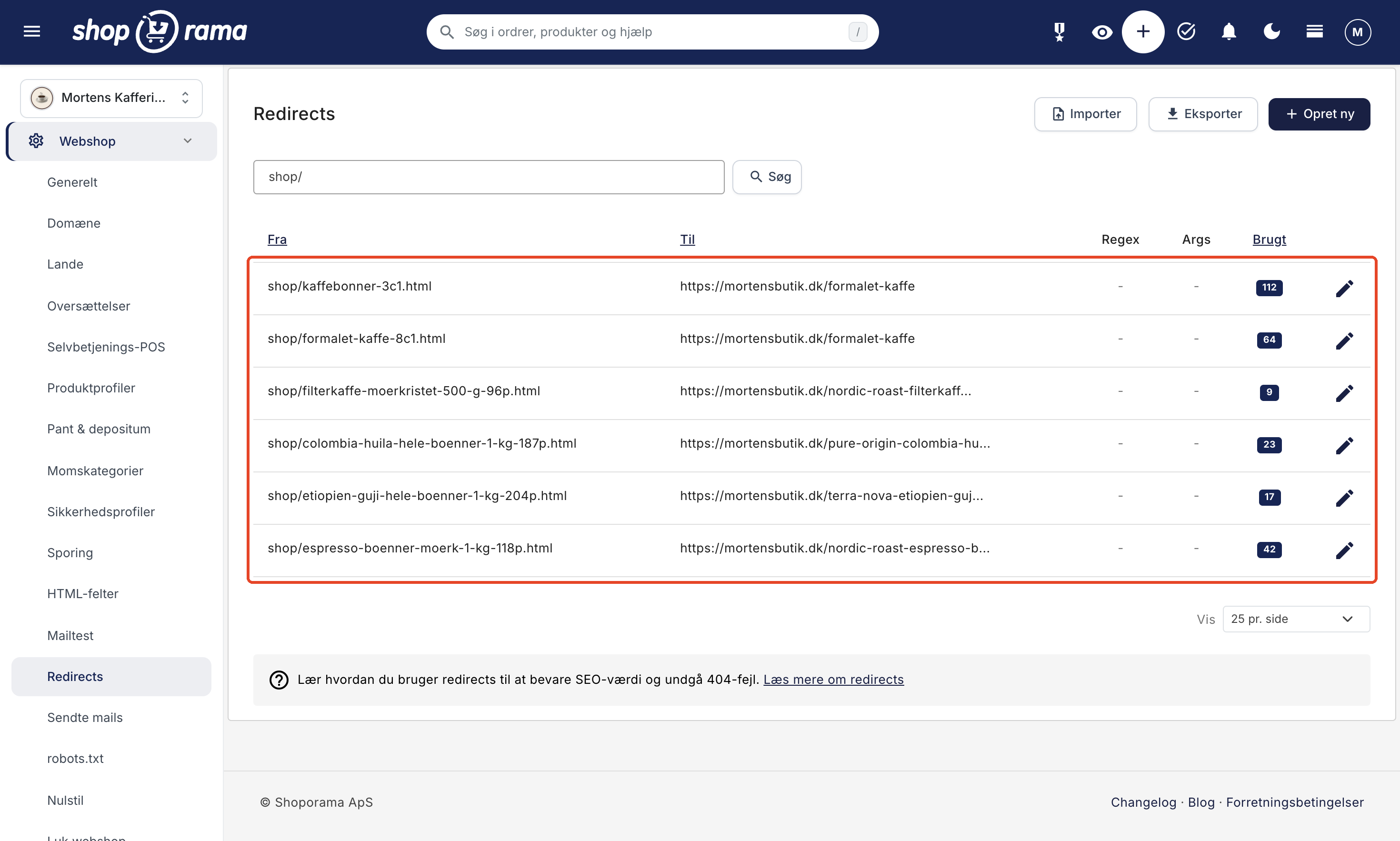
Read how to set up 301 redirects step by step, and check out the articles on redirects when moving a store, avoiding the loss of Google rankings, and 404 errors in the admin panel.
Customers and Orders: What You Need to Know
Customers are not included in the DanDomain import. You’ll need to export them from DanDomain and import them via CSV.
- Passwords cannot be transferred. Customers must create a new one using the “forgot password” option or the welcome email.
- Customer groups, EANs, business accounts, and newsletter subscriptions are not included in the customer import and must be set up again.
- Orders are not included in the DanDomain import, but you can import them separately as historical orders using the AI tool Claude or via the REST API. Import the customers first so they can view their old orders when they log in to the new store. Export your orders from DanDomain before canceling your account, and save the file along with your accounting records. On Webshop Classic, order lines are only included in the XML export.
How long does the transition take?
Typically a couple of weeks, depending on the size of the store. The import runs in the background, and the rest of the time is spent on everything else: design, pages, payment, shipping, and testing.
Your DanDomain store will continue to run in the meantime. You’ll build the new one during the trial period, and the domain won’t be transferred until the very end. Keep the old store online until all images have been downloaded, as they’re retrieved from DanDomain. Also, check when your DanDomain subscription expires. As of October 2026, you must cancel it at least 30 days in advance. See the entire process step by step.
Help with the migration and what it costs
You can handle the migration yourself, and we’ll guide you through it at no charge. If you’d rather have us do it, we’ll migrate products, categories, and customers and set up 301 redirects as part of the onboarding package. It normally costs 10,000 DKK (excl. tax), is free on the Pro plan if you prepay for the first three months (4,200 DKK), and costs 4,995 DKK on the Flex plan. Larger stores are priced separately, and custom themes are not included. Past orders are also not part of the package, but you can import them yourself as historical orders using the AI tool Claude. See pricing and the onboarding package.
Is Shoporama the right option for you?
Shoporama is a good fit if you want to pay month-to-month, have a fixed price as your order volume increases, and build pages and campaigns yourself. It’s less suitable if:
- you sell in multiple languages. The import feature only supports Danish text, and adding additional countries incurs extra costs in Shoporama.
- phone support in the smallest package is your top priority. As of October 2026, DanDomain includes it in all packages, while Shoporama offers it only in the Pro package.
- you have fewer than 100 orders per month, and price is the only factor that matters.
Many of the agencies that write about switching from DanDomain recommend Shopify or WooCommerce. If you’re considering Shopify instead, read our review there, or check out the other platforms in our comparison.
Try Shoporama free for 30 days. No credit card and no commitment. Run the DanDomain import in your test store and see your own products in Shoporama before you decide. Create a test store.
Frequently Asked Questions
Can I move my online store from DanDomain to Shoporama?
Yes. You download four XML files from DanDomain and upload them to Shoporama along with the URL of your current store. The import includes products, variants, categories, images, and SEO texts. Customers and past orders are migrated separately—customers via CSV and orders as historical orders—while pages and the blog are not included.
How much does DanDomain cost per year, all-in?
As of October 2026, the packages cost 249, 699, 1,199, or 2,199 DKK/month (excl. tax) once the introductory price has expired. By all accounts, the introductory price applies for the first six months. That’s 2,988 to 26,388 DKK per year, paid half a year or a full year in advance. On top of that, there are MobilePay fees (49 DKK/month plus 1.02 DKK per transaction), card processing fees, and accounting apps.
How much does it cost to switch to Shoporama?
Data import is handled in the admin panel; there’s no setup fee, and we provide guidance at no charge. If you’d like us to handle the migration, the onboarding package costs 10,000 DKK, excluding tax. It’s free on the Pro plan if you prepay for the first three months (4,200 kr.), and costs 4,995 kr. on the Flex plan. Larger shops are priced separately.
Will I lose my Google rankings when I switch from DanDomain?
No one can guarantee rankings, but you can ensure that all old URLs continue to work. The import often reuses DanDomain’s URLs for products and categories, and your domain moves with them. For URLs that change, you can set up 301 redirects, and the 404 log shows any you may have overlooked.
Will my customers and old orders be included?
Customers can be imported via CSV, but their passwords cannot be transferred, so they’ll need to create a new one using the “forgot password” feature. Orders are not included in the DanDomain import, but you can import them separately as historical orders using the AI tool Claude or via the REST API. They’ll be included in customer value and order history, and no emails will be sent. Import the customers first, and the orders will be linked to them. Export your orders from DanDomain before you cancel your account, and save the file along with your accounting records.
Will my product descriptions, images, and SEO texts be transferred?
Yes. The import retrieves product descriptions, category descriptions, SEO titles, and descriptions for products and categories, as well as images from DanDomain’s image server. Only the Danish texts are included; if you sell in multiple languages, the other languages must be set up again.
Can I keep the same design?
No, the design isn’t transferred. You choose one of Shoporama’s themes and build the homepage and landing pages in the page builder without writing code. The product texts and images are included in the import. On the Pro plan, you can also use your own theme, but a custom theme isn’t included in the onboarding package.
How long does it take, and can the store remain open during this time?
Typically a couple of weeks, depending on the size of the store. Your DanDomain store will continue to run while you build and test the new one during the trial period, and the domain will be transferred at the very end. Remember that your DanDomain subscription is prepaid, and as of October 2026, it must be canceled at least 30 days before expiration.