Agentic Trading with Google UCP
Let AI assistants like Gemini and Google AI Mode find and purchase your items directly. Shoporama already supports Google's Universal Commerce Protocol.
30 days free with no credit card required.
- Danish e-commerce platform since 2013
- Danish support
- No binding
Here's what you get with Shoporama
- 30 days free. No credit card required and no commitment.
- Fixed price on Pro. We don't take a percentage of your sales.
- Everything is built in. Payment, shipping, accounting, and feeds are ready to go.
- Danish support. Responses from people familiar with Danish e-commerce.
Page Content
- A Brand-New Sales Channel: The AI Assistant
- Here’s how it works
- You remain in control
- Same rules as at checkout
- Payment: Stripe, payment link, or invoice
- Business and Government Customers
- Customer login is an optional feature
- Status: beta, ready for EU rollout
- Get started with one click
- Frequently Asked Questions
Get your online store ready to be discovered and shopped by AI assistants like Google AI Mode and Gemini. Shoporama supports Google’s Universal Commerce Protocol (UCP), so agents can find your products and complete purchases directly through your store. You can enable it with a single click, and you retain full control over prices, inventory, and customer relationships.
A Brand-New Sales Channel: The AI Assistant
Agentic commerce means that an AI assistant shops on the customer’s behalf. It finds the product, adds it to the cart, and pays for it—all without the customer having to click around on a website. AI assistants like Gemini and Google AI Mode are becoming a new place where people shop, and with the Universal Commerce Protocol (UCP), they can shop directly with you.
UCP is an open standard from Google that provides AI assistants with a common way to find products, build a cart, and complete purchases. It builds on your existing product data—the same product information you already use for your Google Shopping feed.
Here’s how it works
- The customer asks their AI assistant to find and buy an item.
- The assistant searches your product listings and finds them with your current prices and real-time inventory status.
- The customer selects shipping and, if desired, a pickup location, and the payment is processed.
- The order arrives in Shoporama as a regular order, ready to be packed and shipped.
You remain in control
You’re still the business behind the transaction. The money goes into your own account, the customer is yours, and the order arrives as a regular order with the customer’s name, email, phone number, and shipping address. The assistant always displays your current prices and inventory status in real time—that is, whether an item is in stock, available for order, or sold out. The actual stock quantity is never displayed—only whether the item is available for purchase. Your automatic promotions, sale prices, and volume discounts are applied, and if the customer uses a discount code, it can also be redeemed.
Try it out on your own online store
30 days free. No credit card required, and no commitment.
Same rules as at checkout
The assistant must provide the same information that the customer enters in your checkout: name, address, ZIP code, city, email, and phone number. It can only select the shipping methods you offer in the destination country, and not methods for which you’ve enabled “Do not show” in Express Checkout. It must select a pickup location when the shipping method requires it. If an item has variants or fields that the customer must fill out themselves—such as text for engraving—those must also be completed. Your minimum order amount, your limit on the maximum number of items per order, and your blacklist also apply.
If anything is missing, the assistant will be notified of exactly what’s missing so it can ask the customer before the order is created. This means you won’t receive orders without a phone number or shipping information.
Payment: Stripe, payment link, or invoice
If you have Stripe connected, the payment is processed directly while the customer is in the assistant. If you don’t have Stripe, the customer receives a secure payment link to complete the purchase. If you offer invoicing or bank transfer, the assistant can also select those options, and the order will be placed without online payment. However, this does not apply to methods where new orders are automatically marked as paid; for those, your checkout does not support customers without a login either. The experience is smoothest with Stripe.
Business and Government Customers
If the assistant is shopping on behalf of a business or a public institution, they can enter the company name, CVR number, EAN number, an invoice address that differs from the shipping address, and a purchase order number. The purchase order number appears in the order notes. If you have an invoicing method set up, it will be selected automatically when the customer enters an EAN number, unless the assistant chooses a different payment method. The order will then be placed using the EAN number and without a card payment. If you have enabled the option for EAN orders to go through the standard payment flow, the customer pays just like any other customer.
Customer login is an optional feature
If you want to let customers use their account with you through the assistant, you can enable “Let customers connect their account” on the same page and click Save. This requires that Agentics Commerce is enabled. Then the customer can log in to your system, and the assistant can see the customer’s name, address, and orders. The login page always shows who is requesting access. Access expires after 90 days at the latest, or immediately if the customer changes their password. This option is turned off until you turn it on yourself.
Status: beta, ready for EU rollout
UCP is live in the U.S. via Google’s AI platforms, but Google has not yet fully rolled it out in Europe. That’s why the feature is in beta here. The good news is that Shoporama already supports the protocol, so you can enable it now and be ready from day one as soon as Google rolls it out in Europe. There’s no extra cost to enable it.
Get started with one click
You can enable agentic commerce under Integrations → Agentic Commerce. Turn on “Enable agentic commerce for this shop” and click Save. You can turn it off again in the same place.
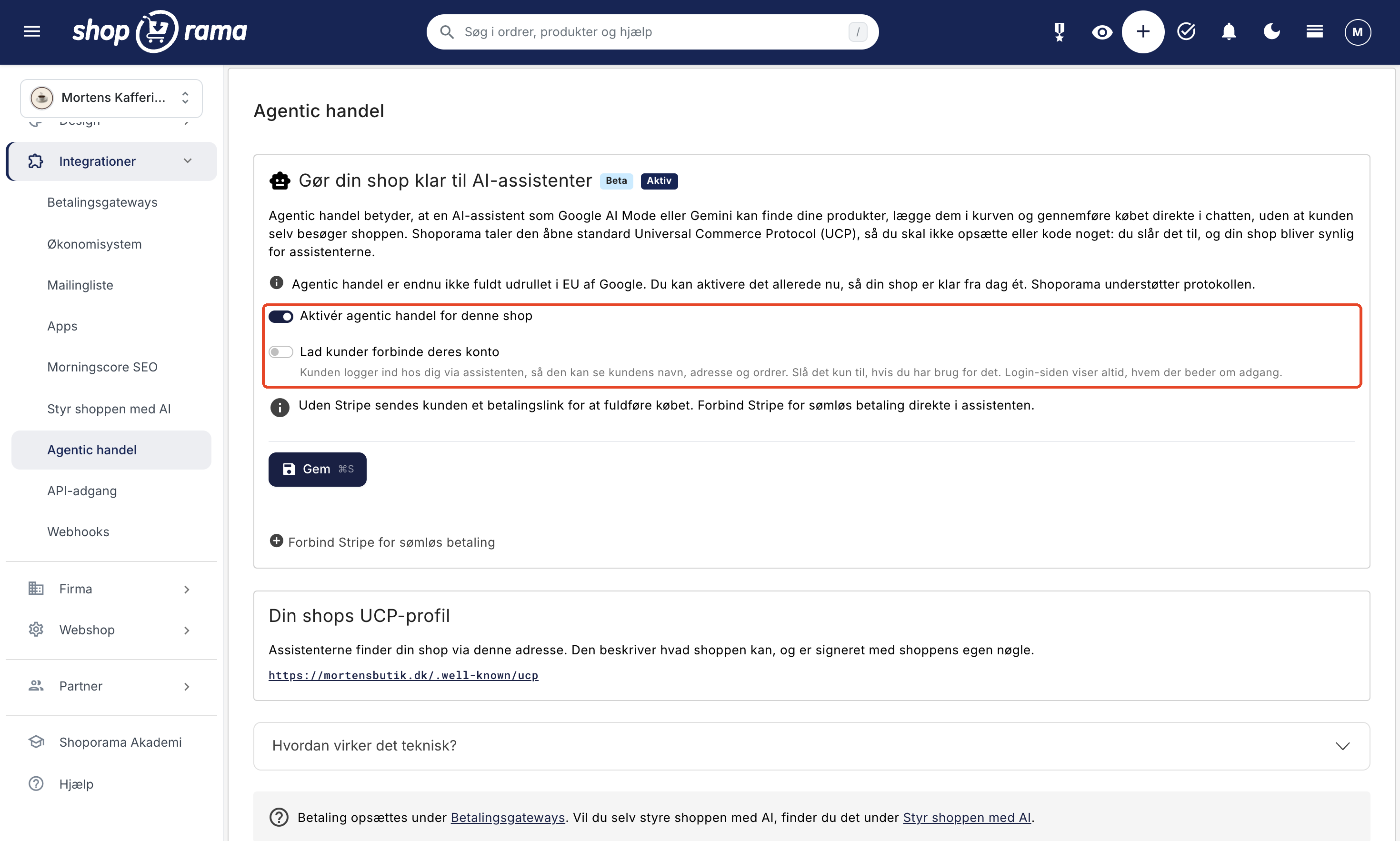
If you’d like to read the full background and see the frequently asked questions, check out our blog post about agentic commerce.
Frequently Asked Questions
Do I need to know how to code to use this?
No. You can enable it with a single click in your Shoporama admin panel, and you can disable it just as easily.
Do I lose control over prices and inventory?
No. Your current prices and inventory status are displayed in real time, and the actual inventory count is never shown—only whether the item is in stock, available for order, or sold out.
Who receives the money, and who owns the customer?
You do. The payment goes into your own account, and the customer is yours. The order appears as a regular order in Shoporama.
Can all my products be purchased through an assistant?
Almost. Add-on items and items from exclusive brands are not displayed, and items involving rentals, tickets, or file uploads must be purchased in the shop.
Can government customers place orders using an EAN number?
Yes, if you offer an invoicing method that does not automatically mark orders as paid. The order will then be placed without a card payment, unless you have enabled the option for EAN orders to go through the standard payment flow.
Can the assistant see my customers’ information?
Only if you enable “Let customers link their account” and the customer logs in and grants access themselves. Without that, the assistant only sees the information the customer provides for the current order.
Does it also work with ChatGPT?
Not via UCP. ChatGPT uses a competing standard from OpenAI, while UCP supports Google’s interfaces, namely Gemini and Google AI Mode.
How much does it cost?
Enabling UCP doesn’t cost anything extra. If you use Stripe for payment, the same fees apply as for all your other Stripe orders in Shoporama.
Support articles
Stripe payment gateway Learn how to set up and use Stripe as a payment gateway in your Shoporama online shop. Stripe supports card payment, MobilePay, Klarna,... Set Up a Google Shopping Feed Guide to Setting Up a Google Shopping Feed in Shoporama: categories, custom labels, product IDs, and catalog matching; feeds by country...You'll get that with Shoporama, too
Fixed Price on Pro
No transaction fees, no app subscriptions, and no setup fee.
12 payment solutions
For example, Quickpay, OnPay, Stripe, and Flatpay—ready to take action.
Shipping and Accounting
PostNord, GLS, DAO, e-conomic, and Dinero are integrated.
Feeds for Google and Meta
Product feeds for advertising and Google Shopping are included.
Danish support
Responses from people familiar with Danish e-commerce.
No binding
30-day free trial and full data export at any time.