With rentals on Shoporama, customers can rent your items for a specific period directly through the online store—even in the evenings and on weekends—without having to call first. You enable rentals on a product profile, and all products in that profile become available for rent. The price listed for the product is the price per day, and the quantity is the number of items you own. The customer selects dates on the product page and pays as they would for a regular purchase; the booking becomes a standard order with the rental period listed on the line item.
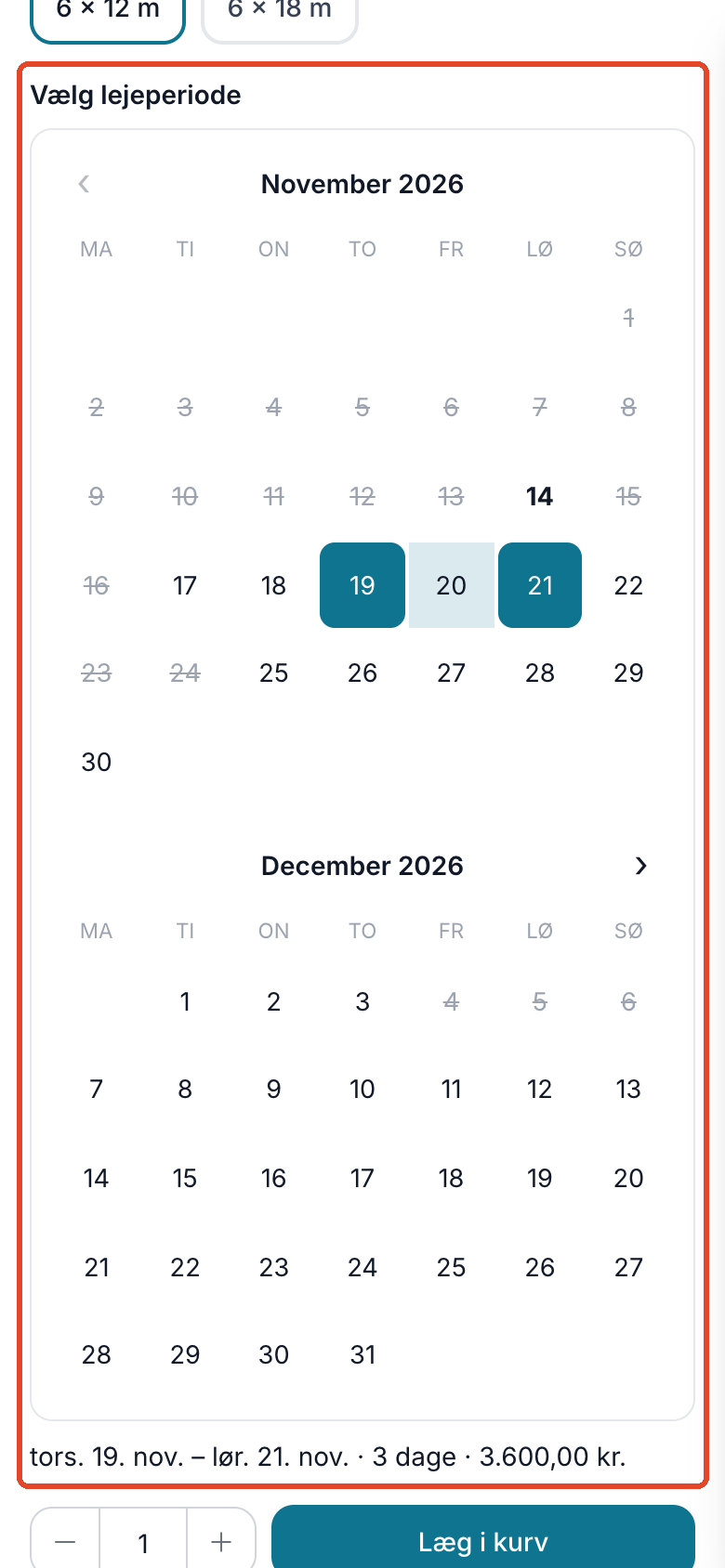
Here’s what you get from rentals
- Bookings without phone calls or emails. The customer sees for themselves which days are available and books and pays in the online store. You don’t have to answer whether the tent is available on the 12th or enter the booking into a spreadsheet.
- Keep track of what’s available. The calendar tracks the maximum number of units that can be rented out on any single day during the period. If you have 2 tents, and one is rented from Monday to Tuesday and the other from Thursday to Friday, there’s still 1 available from Monday to Friday, because there’s never more than one out at a time. The period is checked again when the customer adds the item to the cart and proceeds to checkout. If two customers pay for the last unit at exactly the same moment, it will be marked as “Overbooked” under Orders → Rentals.
- Price per day. The line item’s price is the daily rate multiplied by the number of days multiplied by the quantity. Days are counted including both the first and last days, so Friday through Sunday is 3 days. You can set a minimum rental period for each product.
- Inventory refers to your units. The inventory count is the number of units you own, and a rental never reduces the inventory. When the rental period ends, the unit becomes available again. If a tent comes in multiple sizes, each size has its own inventory count and can have its own price.
- Sell and rent items in the same cart. The customer can rent a draft beer system and buy regular items in the same order, and everything is paid for at checkout.
- The rental period is displayed everywhere. It appears in the shopping cart, at checkout, in the order confirmation, on the invoice, and on the picking list and packing slip, so everyone can see when items are due back.
See what’s due out and what’s coming back
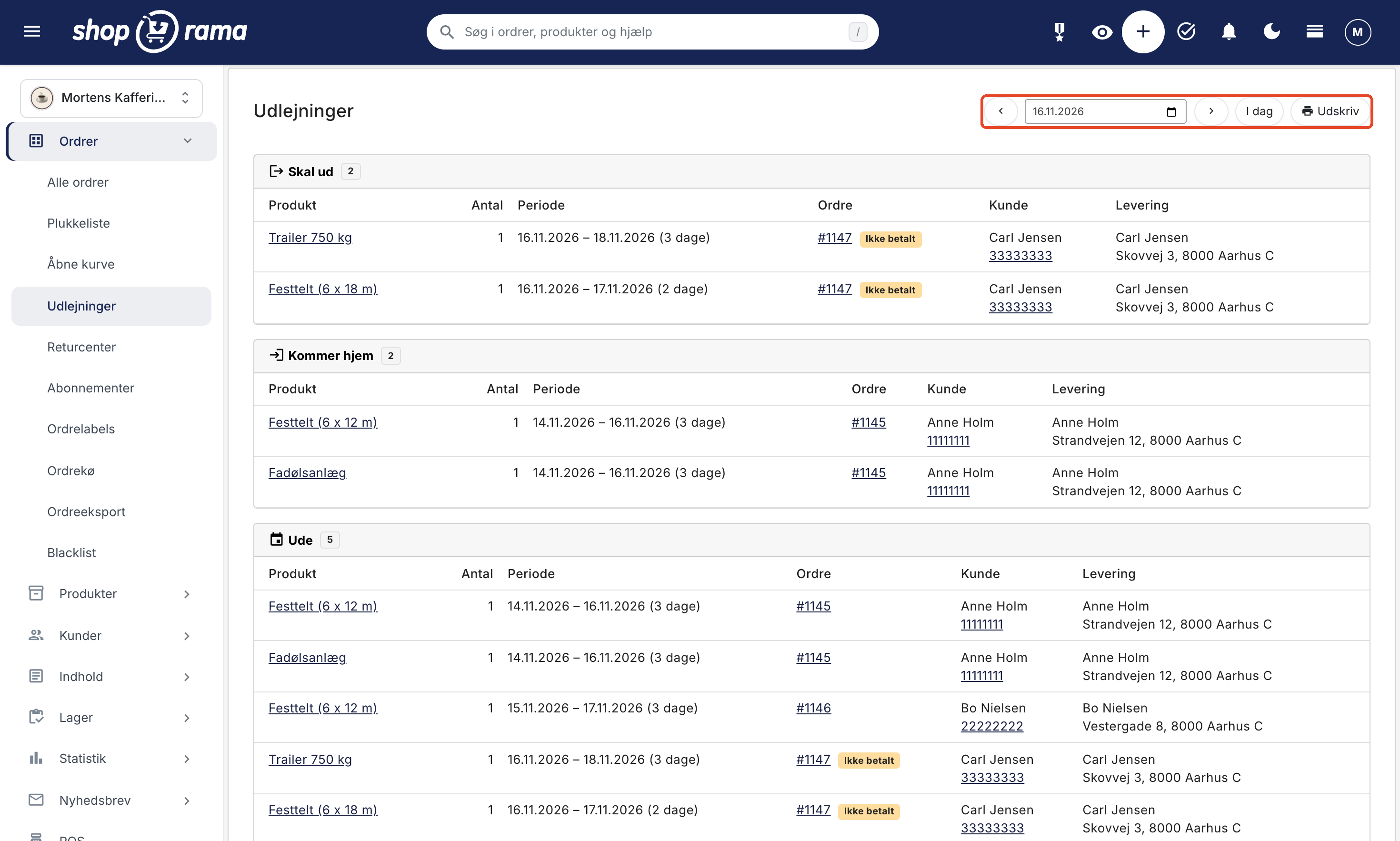
Under Orders → Rentals, select a date to view three lists: Due Out, Returning, and Out. Each line shows the product, quantity, rental period, order number, customer name and phone number, and delivery address; unpaid orders are marked as “Unpaid.” The list can be printed and taken to the warehouse or out to the van. If more units have been rented out than you have available on a given day within the next 30 days, this will be indicated at the top in a red box labeled “Overbooked.”
Utilization Rate: How Much Are Your Items Earning?
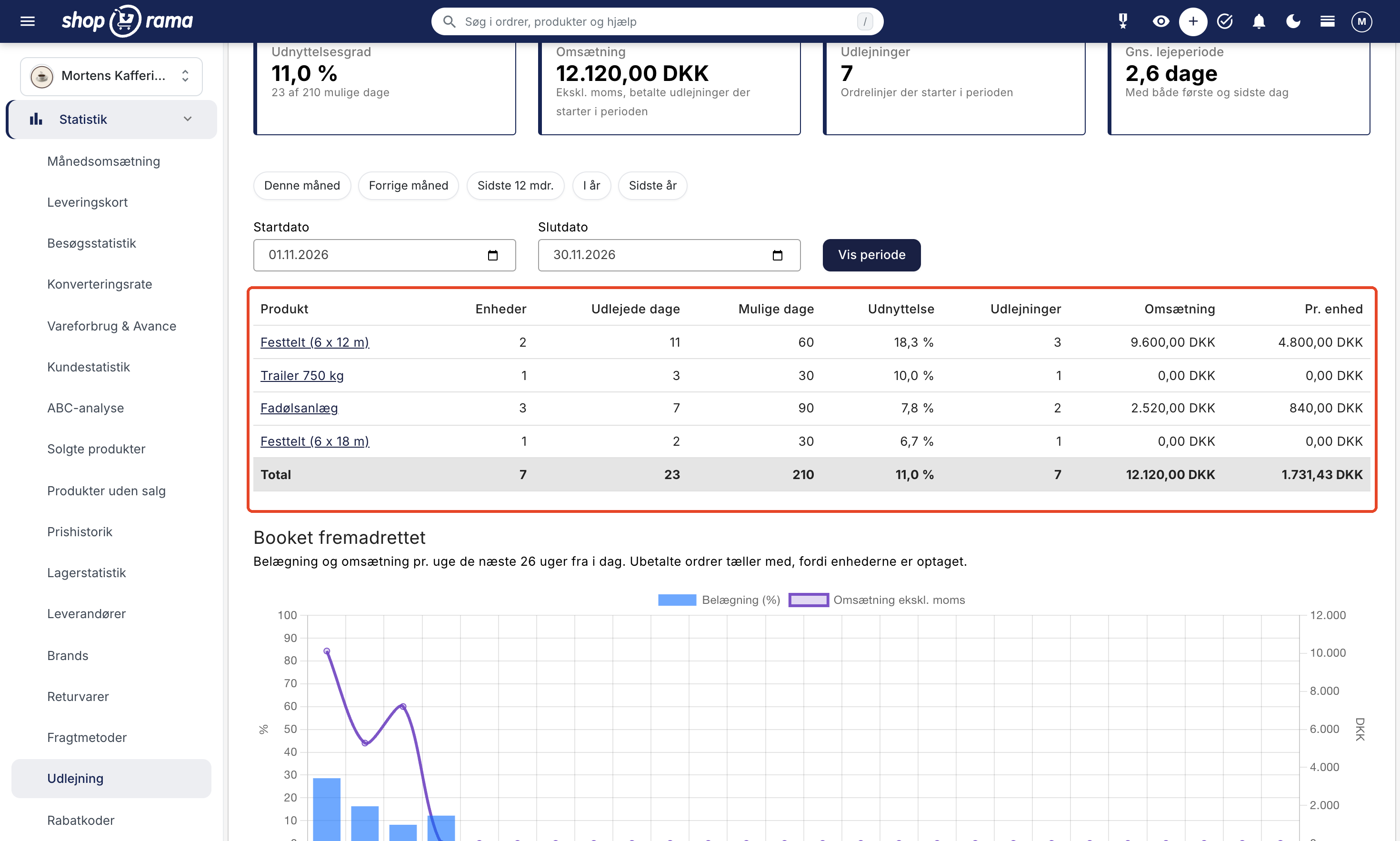
Under Statistics → Rentals, you can see how much of the time your items are rented out. The utilization rate is the number of rental days divided by the total number of possible days, and you’ll see this figure both overall and for each product and variant, along with the revenue per unit. The “Future Bookings” graph shows occupancy and revenue per week for the next 26 weeks. This lets you see whether it’s time to buy another tent or if the trailer will be idle for most of the month.
How to Get Started
- Enable rentals on a product profile. Go to Webshop → Product Profiles, create or open a profile, and check the box next to “Rental.” If the customer needs to select a size, for example, assign one variant to the profile.
- Create the products in the profile. Set the price per day and set the stock quantity to the number of items you own for each variant, if the profile has one. In the Rentals tab on the product, you can set a minimum rental period and view upcoming rentals.
- Check your theme. The date picker is available in the Montana, MontanaB2B, Delaware, and DelawareDK themes. If you’re using a different theme, the profile will display a warning.
- Keep track of your bookings. View today’s check-outs and check-ins under Orders → Rentals, and view occupancy rates under Statistics → Rentals.
The complete guide, covering all fields and messages, is available in the article on rentals.
What You Need to Know
- There is no security deposit that the customer receives back when the item is returned in good condition. If you want part of the rental fee paid at the time of booking and the rest later, enable “Installment Payment” in the rental profile.
- There is no buffer between two rentals, such as a day for cleaning. The return date counts as a rental day, so the item can be rented out again no sooner than the following day.
- The price is per day. There is no weekend or weekly rate.
- Delivery is not calculated based on distance. You use the standard shipping methods.
- Shoporama tracks the quantity, not the individual unit—for example, which trailer the customer receives.
- Rentals cannot be sold at the POS, via the Headless API, as a bundle, or as a subscription.
- The customer cannot change the rental period in the cart; instead, they must remove the line item and select the dates again.
- Rental products are not included in product feeds such as Google Shopping and PriceRunner. They still appear in the online store’s categories and search results.
- The date picker is only available in Montana, MontanaB2B, Delaware, and DelawareDK. If you have your own theme, please email support@shoporama.dk.
If you’d like to learn more about what rentals can mean for your business and how they fit into your daily operations, read “Online Store for Rentals.”