Age Verification: Mandatory Age Verification in Your Online Store
Do you sell alcohol, tobacco, or e-cigarettes online? Set the age restriction for the item so that the buyer’s age can be verified using MitID via ePay or in the Vipps MobilePay app.
30 days free with no credit card required.
- Danish e-commerce platform since 2013
- Danish support
- No binding
Here's what you get with Shoporama
- 30 days free. No credit card required and no commitment.
- Fixed price on Pro. We don't take a percentage of your sales.
- Everything is built in. Payment, shipping, accounting, and feeds are ready to go.
- Danish support. Responses from people familiar with Danish e-commerce.
Page Content
- A checkmark isn't enough when selling alcohol online
- The age restriction applies to the product all the way through checkout
- Age Verification with MitID or Vipps MobilePay
- Overview when orders need to be packed
- Age is not verified here
- How to set up age verification
- Frequently Asked Questions
- Read more
Age verification is built into Shoporama. You select 15, 16, or 18 years for the item, and the age limit is automatically sent along when the customer pays with ePay or Vipps MobilePay directly in Shoporama, so that the customer’s age can be verified before the sale is processed.
A checkmark isn't enough when selling alcohol online
As of October 1, 2024, online retailers selling alcohol, tobacco, nicotine products, or e-cigarettes to consumers must have an effective IT system for age verification. The customer’s age must be verified before the sale is completed. A pop-up or a checkbox where the customer confirms they are old enough does not meet this requirement. Neither does a verification at the time of delivery or shipment, since the sale has already taken place by then.
At the same time, the age limits for alcohol have been tightened. Effective April 1, 2025:
- 16 years of age for beverages containing 1.2% alcohol or more.
- 18 years of age for beverages containing more than 6% alcohol.
Tobacco, nicotine products, and e-cigarettes may not be sold to anyone under 18 years of age.
The age restriction applies to the product all the way through checkout
In Shoporama, you set the age restriction once for each individual product: None, 15 years, 16 years, or 18 years. Shoporama then passes this restriction along when the customer pays via ePay (with age verification enabled on ePay) or via Vipps MobilePay set up directly in Shoporama, and the customer’s age is verified before the purchase is processed.
- The highest age limit applies. If the cart contains both a cider (16 years) and a bottle of red wine (18 years), the customer must be at least 18 years old. Shoporama calculates this automatically.
- This is something the customer already knows. The verification is done via MitID or in the Vipps MobilePay app. The customer does not need to create an account or send a photo of their ID.
- There are no restrictions on other items. If the customer purchases only items with no age restriction, no age restriction is applied, and the payment process proceeds as usual.
- The verification happens automatically. You don’t need to ask the customer for ID yourself when the order is paid for with Vipps MobilePay directly in Shoporama or with ePay with age verification enabled. The customer’s age is verified before the order reaches you.
Age Verification with MitID or Vipps MobilePay
Shoporama sends the age limit to two payment solutions that verify the customer’s age. You can use one or both.
ePay: MitID in the payment window
If you use ePay as your payment gateway, the age limit is sent to ePay’s payment window, and the customer confirms their age with MitID before the payment is processed. If the customer selects MobilePay in the ePay window, ePay uses the age that MobilePay already has on file, so the customer does not need to use MitID. Age verification must be enabled in your ePay account, and ePay charges a fee per verification. Contact ePay to have it activated, and see Set up ePay as a payment gateway.
Vipps MobilePay Directly in Shoporama
If you’ve set up Vipps MobilePay directly in Shoporama, the age limit is included as a minimum age, and the app rejects customers who are too young. If the customer is old enough, they pay as usual. This applies wherever the customer pays with Vipps MobilePay through Shoporama:
- at checkout
- with Express in the cart and “Buy Now” on the product page
- via payment links you send from an order
- at the checkout in your physical store when the customer pays with Vipps MobilePay at the POS
Here’s how to get started with the MobilePay payment method on your online store.
Try it out on your own online store
30 days free. No credit card required, and no commitment.
Overview when orders need to be packed
In the order list, orders containing age-restricted items are marked with a red label showing the highest age restriction in the order, e.g., 18+. This allows the person packing the order to immediately see which orders contain alcohol, tobacco, or other age-restricted items—even when multiple staff members are packing orders.
In your physical store, the POS displays a small red “16+” or “18+” on the item when it is scanned or retrieved, so staff remember to check ID. At the self-service POS, the label appears on the item in the cart, so the customer knows that an age restriction applies.
Age is not verified here
Age is only verified when the customer pays with ePay or with Vipps MobilePay set up directly in Shoporama. Other payment methods do not transmit the age restriction, e.g.:
- cards processed through a different payment gateway, such as Flatpay or QuickPay
- MobilePay through a gateway other than ePay
- invoice and bank transfer
Shoporama cannot hide other payment methods when the cart contains age-restricted items. If the customer selects one of these methods, age verification will not occur until the sale is completed. If you want to ensure that all purchases of age-restricted items are verified, make sure that ePay, Vipps, or MobilePay—or a combination of these—are the only payment methods available in your store.
How to set up age verification
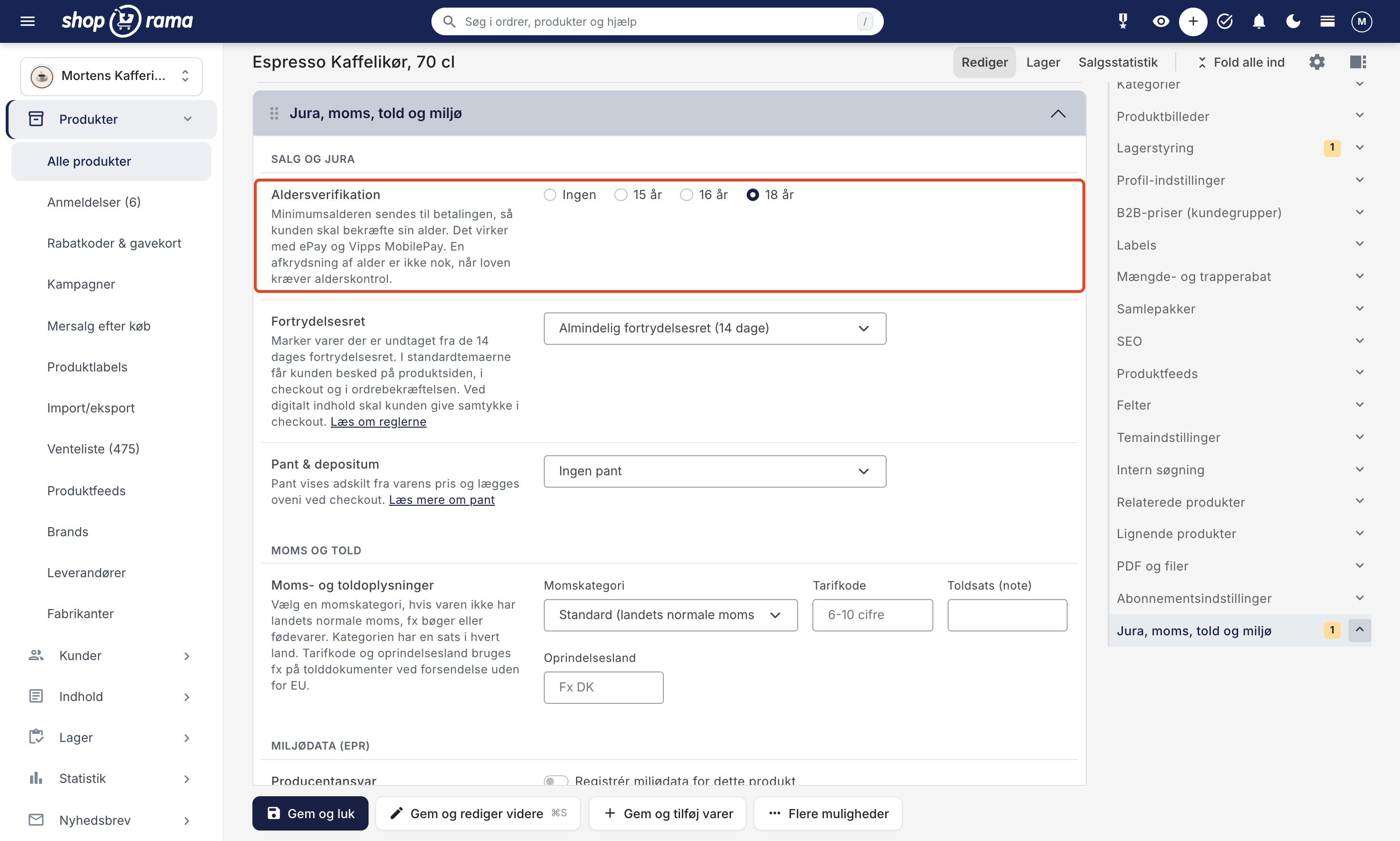
- Go to Products → All Products, and click on the item.
- Expand the Legal, VAT, Customs, and Environment tab.
- Select None, 15 years, 16 years, or 18 years under Age Verification in the Sales and Legal section.
- Click Save and Close.
- Make sure the customer can pay with ePay with age verification enabled (contact ePay), or with Vipps MobilePay set up directly in Shoporama. Other payment methods do not verify age.
Feel free to include the age restriction in the product description and in your terms of sale so the customer knows before they reach checkout. The full guide is available under “Age Verification on Products.”
Frequently Asked Questions
I also sell non-alcoholic wine and cider. Do they need an age restriction?
It depends on the alcohol content. For products with an alcohol content below 1.2%, there is no age limit, so select “None” in this case. For example, a cider with 4.5% alcohol content requires the buyer to be 16 years old, and regular wine with over 6% requires the buyer to be 18 years old. Check the alcohol content on the label for each item.
I only sell e-cigarettes and e-liquids. How do I ensure that all purchases are verified?
Set the age requirement to 18 for all products, and make ePay, Vipps, MobilePay directly in Shoporama, or both the only payment methods available at checkout. That way, no customer can choose a payment method that bypasses the age verification. If you use ePay, remember to enable age verification with ePay.
Can I set the age restriction for my entire product range all at once?
Not at this time. The age restriction is set for each individual product and cannot be applied via bulk editing, CSV import, or the API. It only takes a moment per product, but remember that the restriction must be in place before the product is sold.
I also have a physical kiosk with Shoporama’s POS. Is age verified at the counter?
If the customer pays with Vipps MobilePay at the POS, the age restriction is included, and the app rejects customers who are too young. If the customer pays another way at the register, there’s no automatic check, but the item will be marked as 16+ or 18+ in the POS system, so you’ll remember to check ID at the register.
Can I use age verification for over-the-counter medications?
Yes. Over-the-counter medications typically have an age limit of 15, while oral over-the-counter pain relievers require the customer to be 18 or older. Select the age limit for each item. The rules for selling over-the-counter medications outside of pharmacies are outlined in “Age Verification for Products.”
I sell fireworks leading up to New Year’s Eve. What age limit should apply to these items?
Fireworks in category F1, such as sparklers and table bombs, require a minimum age of 15, while standard New Year’s fireworks require a minimum age of 18. See also “Age Verification on Products.”
Does “18+” in the order list mean that the customer’s age has been verified?
No, the label only indicates that the order contains products with an age restriction. Whether the age has been verified depends on the payment method. If the order is paid for via ePay with age verification enabled, or via Vipps MobilePay directly in Shoporama, the age is verified before the purchase. If paid for in any other way, it is not.
Read more
- Age verification for products: the complete guide and age restrictions for various product types
- Set up ePay as a payment gateway
- MobilePay on your online store
- Vipps MobilePay in-store
- Online store for wine retailers
If you have any questions about age verification, please email us at support@shoporama.dk.
Support articles
Set up ePay as a payment gateway Step-by-step guide to setting up ePay as a payment gateway in your Shoporama webshop. Fill in Merchant ID, Secret (MD5) and Password for... Setting Up Flatpay Step-by-step guide to setting up Flatpay as a payment gateway on your Shoporama online store. Age verification on products Here's how to set an age restriction of 15, 16, or 18 for products in Shoporama so that the customer's age is verified when paying with... MobilePay on Your Online Store: Setup, Express, and Buy Now Here's how to accept MobilePay directly on your Shoporama online store using Vipps MobilePay: registration with your CVR number, pricing,... Vipps MobilePay in-store: Payment at the register using a POS terminal Here’s how to accept Vipps MobilePay in your brick-and-mortar store using Shoporama POS: QR code on the screen, payment sent to the...You'll get that with Shoporama, too
Fixed Price on Pro
No transaction fees, no app subscriptions, and no setup fee.
12 payment solutions
For example, Quickpay, OnPay, Stripe, and Flatpay—ready to take action.
Shipping and Accounting
PostNord, GLS, DAO, e-conomic, and Dinero are integrated.
Feeds for Google and Meta
Product feeds for advertising and Google Shopping are included.
Danish support
Responses from people familiar with Danish e-commerce.
No binding
30-day free trial and full data export at any time.