Order Check: View orders with incorrect ZIP codes or potential fraud
Shoporama checks every new order from the online store for incorrect ZIP codes, missing house numbers, spelling errors in the email, incorrect phone numbers, and potential credit card fraud. Here you can see what the markers mean and how to correct the order or mark it as checked.
The order checker reviews every new order from your online store for incorrect ZIP codes, missing house numbers, spelling errors in the email address, incorrect phone numbers, and patterns that resemble attempts to use stolen credit cards. If something looks suspicious, the order is flagged so you can correct it before shipping the package.
Nothing is blocked. The customer won’t notice a thing, and you decide what to do. Order Check is enabled by default in all stores. Read the blog post about Order Check as well.
How the Order Check Works
The check runs in the background immediately after the order is created and is typically completed within a minute. Nothing has been changed in the checkout, so it works with all themes, including custom ones.
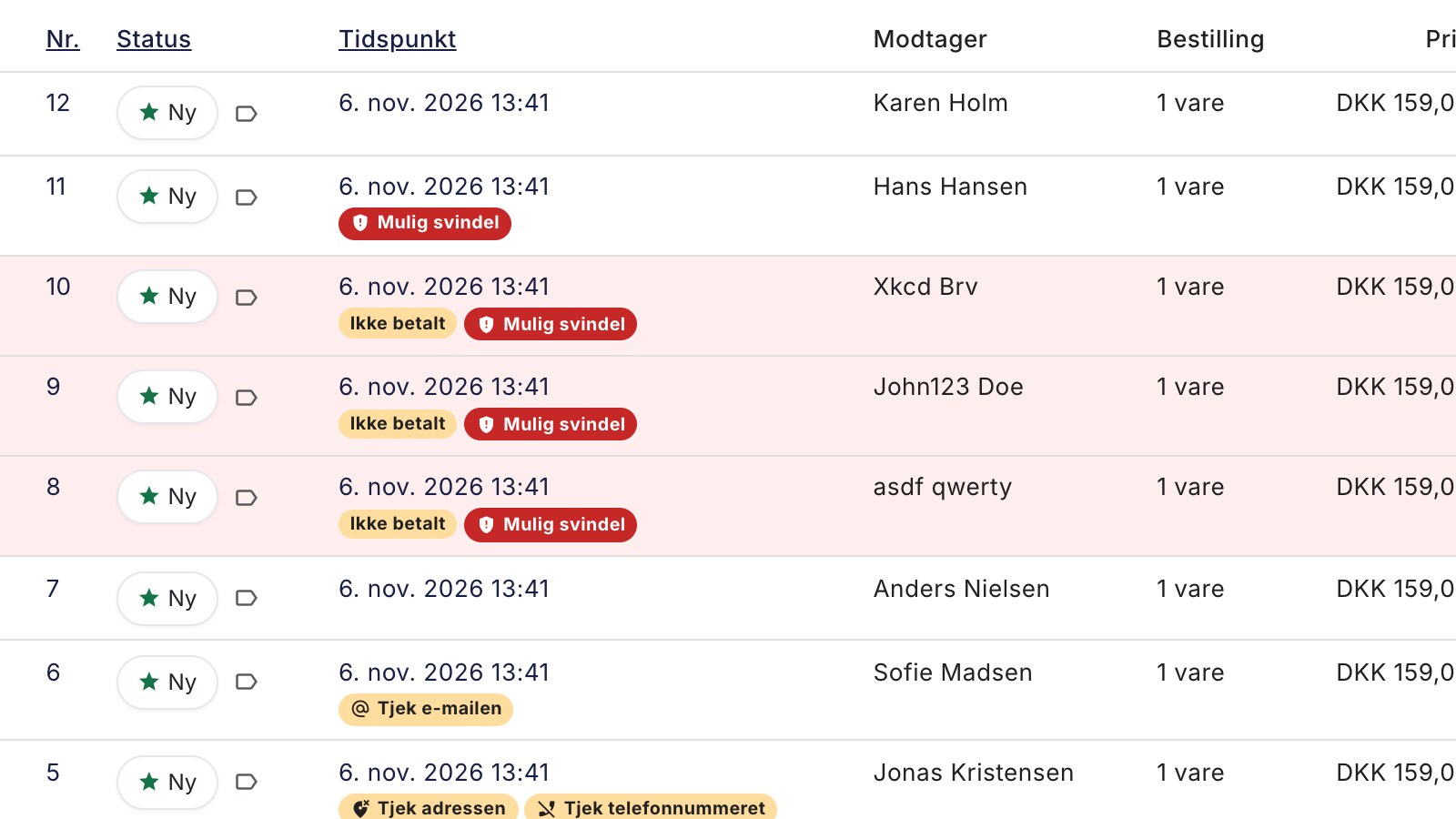
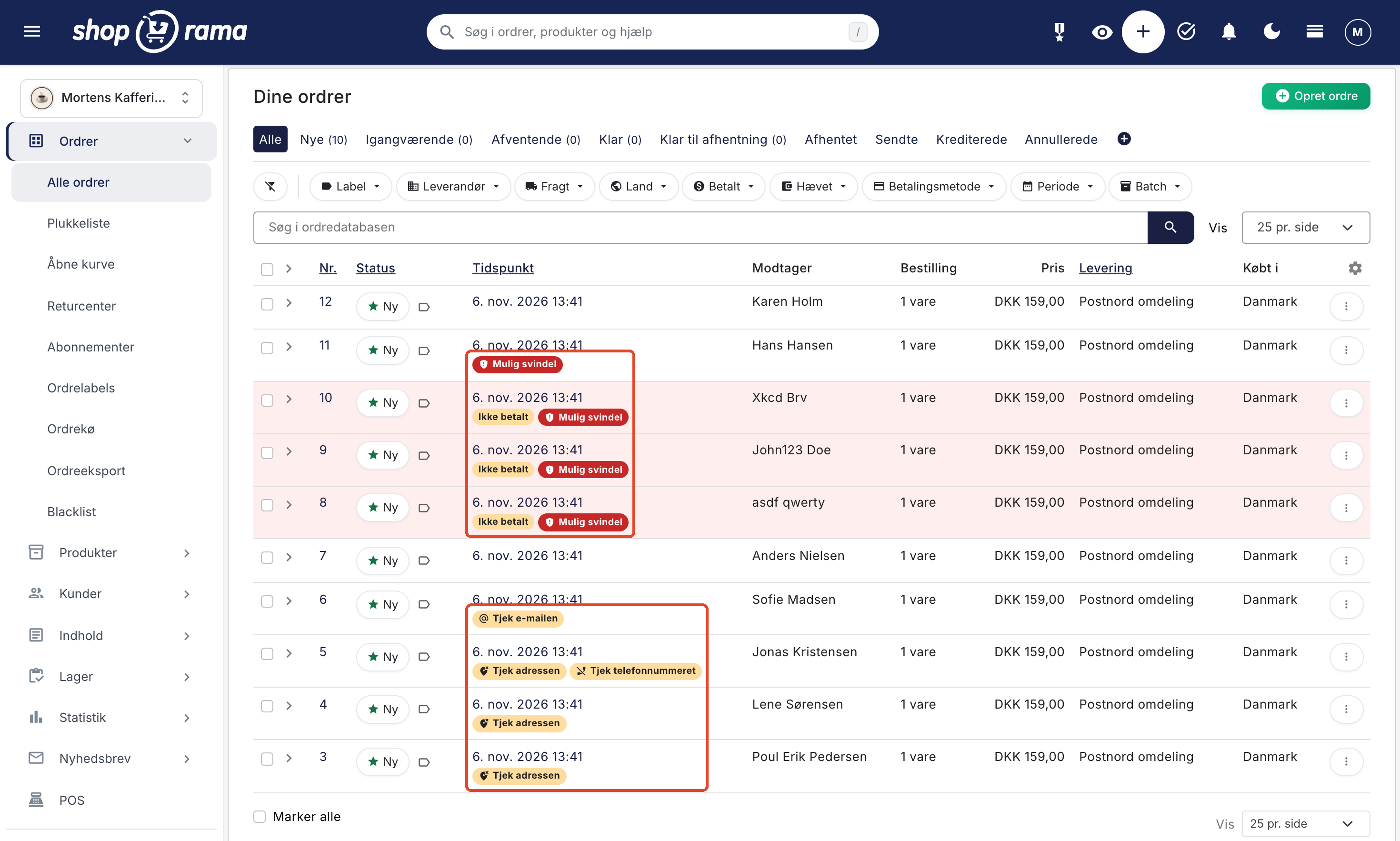
There are four indicators. Three are yellow: Check the Address, Check the Email, and Check the Phone Number. The fourth is red: Possible Fraud.
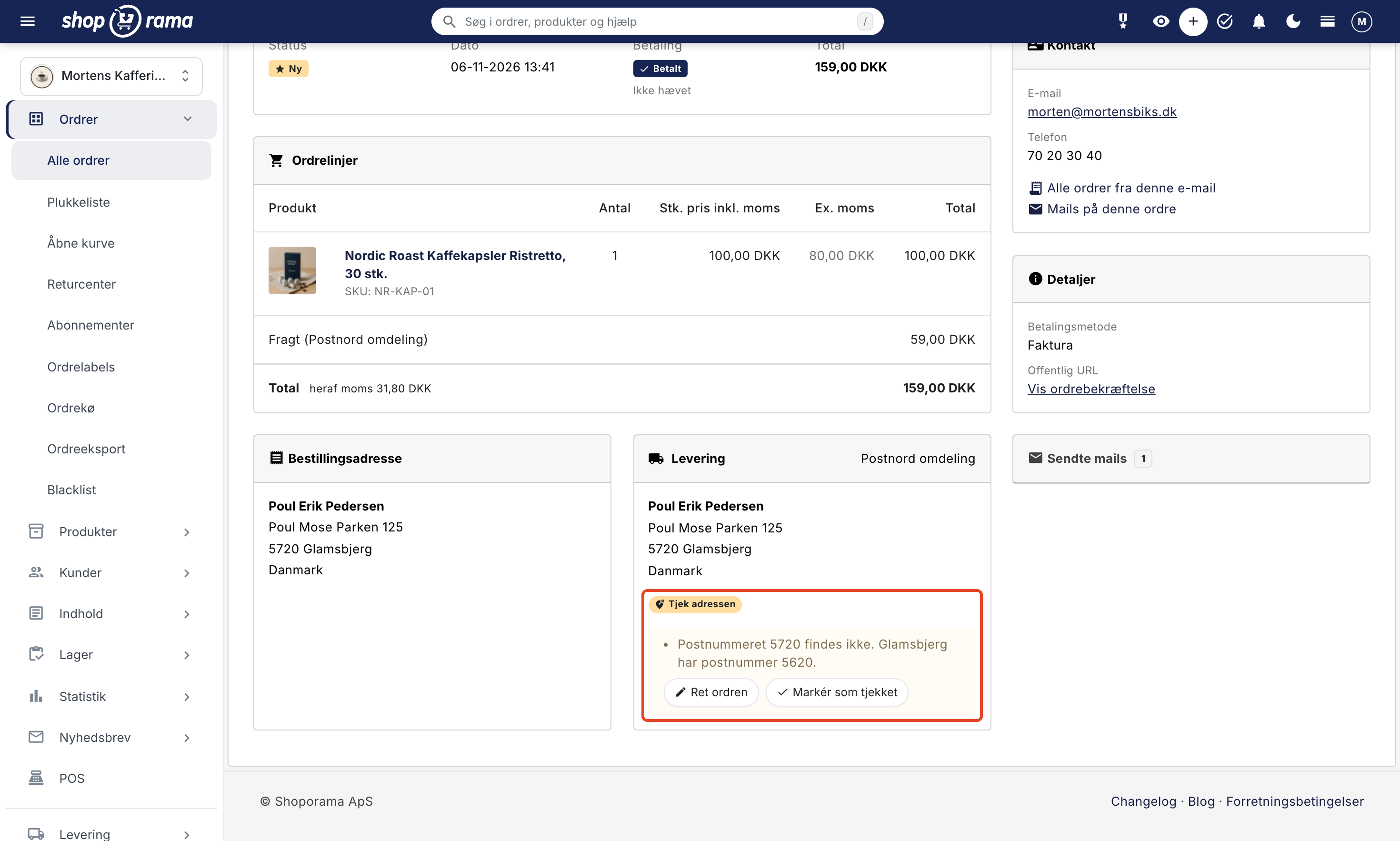
In the order overview, the flag appears below the time stamp (on mobile, at the top of the order card), and if you hover your mouse over it, you’ll see the explanation. On the order itself, it appears in the “Delivery” box with the explanation below.
What the icons mean and what to do
Check the address
This icon appears when the ZIP code doesn’t exist, when it’s in the wrong format, when the city is more than 50 km from the ZIP code, or when the address is missing a house number. If Shoporama recognizes the city, the explanation will suggest the correct ZIP code, e.g., “ZIP code 5720 does not exist. Glamsbjerg has the ZIP code 5620." or "The ZIP code 5000 belongs to Odense C, approx. 84 km from Aarhus."
City districts, villages, municipalities, and neighboring towns with the correct ZIP code, e.g., “2500 Copenhagen” (Valby), do not trigger a warning. The address is not verified for delivery to a package shop, in-store pickup, or orders without a shipping method.
What is verified depends on the country of delivery:
- Denmark and Norway: ZIP code, city, house number, and phone number (8 digits).
- Sweden: ZIP code (5 digits, e.g., 111 51), city, and house number.
- Netherlands: ZIP code (4 digits and 2 letters, e.g., 1012 AB), city, house number, and phone number (9 digits after +31).
- Germany: ZIP code (5 digits, even when the leading zero is missing) and house number. The city is not verified because many German cities share the same name.
Here’s what to do: Correct the address before ordering the label, as an incorrect address may result in a fee from the shipping company. If in doubt, ask the customer.
Check the email
This warning appears in case of spelling errors with major providers, such as gmial.com or gmail.dk (Gmail addresses always end in .com), incorrect domain extensions like .con or .dkk, or when the domain cannot receive emails. If the email ends in hotmail.dkk, the explanation asks whether the customer meant hotmail.dk.
Here’s what to do: The order confirmation has typically already been sent to the incorrect address. Contact the customer—for example, by phone—correct the email address on the order, check the box next to “Resend order confirmation,” and save. See “Resend order confirmation.”
Check the phone number
The phone number is checked when the shipping address is in Denmark or Norway (8 digits) or the Netherlands (9 digits after +31, 10 with a leading 0). The country code is not included. The explanation might read, for example: “The phone number 2970159 has 7 digits. A Danish number has 8.” In Sweden and Germany, the length varies, so no check is performed. Numbers with a different country code—such as a Danish number at a Norwegian address—and an empty field do not trigger a warning.
Here’s what to do: Correct the number or ask the customer via email.
Possible Fraud
The red flag appears when, within 60 minutes, there are at least 4 orders with the same IP address, email, or phone number, and the orders either have at least 2 different names or at least 2 of them are unpaid. All orders in the group are flagged. Only orders with a credit card or other online payment method count; payment methods such as Invoice or Other Payment, as well as EAN orders, do not count.
At the same time, you’ll receive a notification from the “Order Check” source in the clock icon at the top of the admin panel, under “Notifications.”
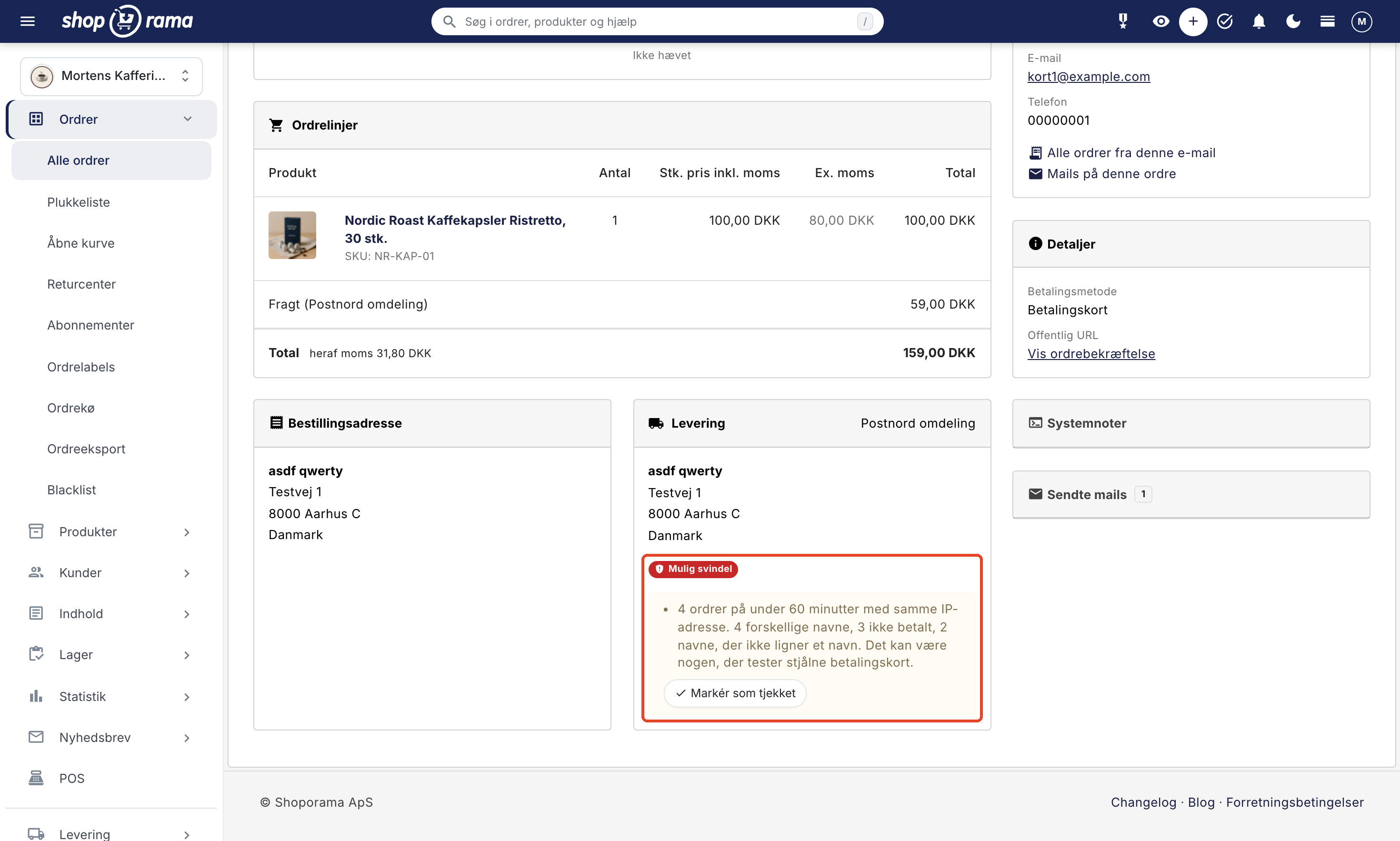
Here’s what to do: Don’t ship anything until you’ve reviewed the orders, because the badge doesn’t stop scammers. If it looks like a scam:
- Check the boxes next to the orders in the order overview.
- Select More → Blacklist in the bar at the bottom, and confirm. The orders will be canceled, and the email address and phone number will be rejected the next time.
- If the description says “same IP address,” open one of the orders in the edit view, tap Blacklist in the Customer tab, and blacklist the IP address. It won’t be included when you blacklist from the order overview.
Canceling the order does not reverse the payment. If any of the orders have been paid, issue a refund for them.
This option only appears in the menu when the blacklist is enabled under Orders → Blacklist. Read more in Blacklist and Protect Your Webshop from Spam Orders.
Edit the order or mark it as checked
Below the order label, you’ll find the buttons Edit Order and Mark as Checked.
- Click Edit Order. The explanations are at the top of the Customer card under “The order doesn’t seem right.”
- Correct the address, email, or phone number.
- Click Save and continue editing or Save and close. The order will be rechecked immediately, and if everything is correct now, the flag will disappear.
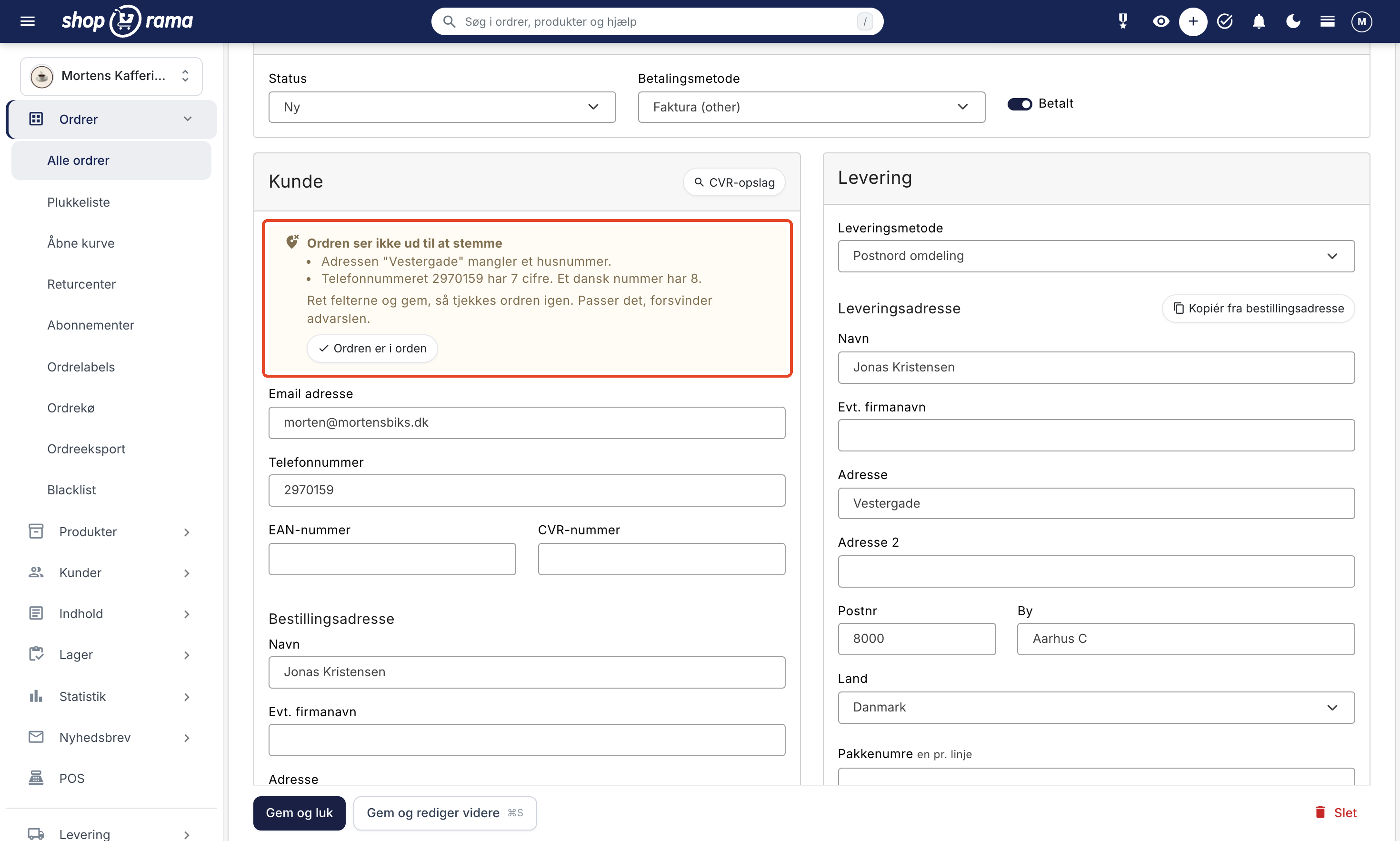
If everything is in order, click “Mark as Verified” on the order or “Order is OK” in the editing screen. The button does not save automatically, so if you’ve made any changes, save first. The flag will disappear, and the order will not be rechecked; however, if several nearly identical orders arrive within an hour, it may be flagged as “Possible Fraud” again.
"Possible Fraud " does not disappear when you save, because there is nothing to correct, and if the order has only that flag, there is no "Edit Order" button. Remove it by clicking "Mark as Checked" once you have reviewed the orders.
A warning before you order shipping labels
If you order labels in the order overview for orders with a flag, Shoporama will first ask if you want to proceed with the order anyway. This applies to the buttons for GLS, PostNord, DAO, and Burd at the bottom, as well as the label button or menu in the row. You can proceed. This prompt only appears in the order overview.
Turn order verification on and off
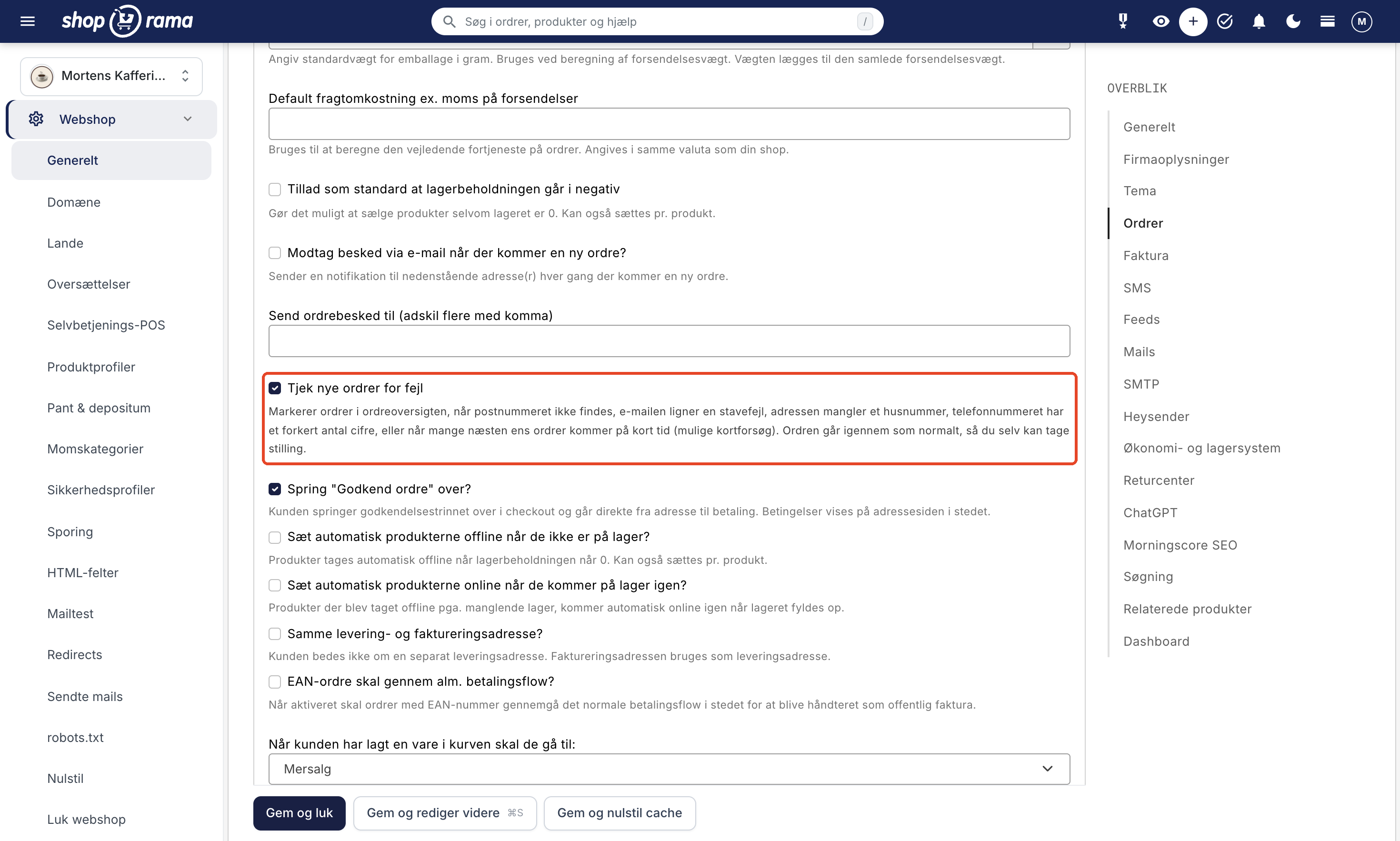
- Go to Webshop → General, and find the Orders section.
- Uncheck or check the box next to “Check new orders for errors.”
- Click Save and Close.
If you turn it off, new orders won’t be checked, but existing flags will remain until you mark the orders as checked.
The following are not checked
- Addresses in countries other than Denmark, Sweden, Norway, Germany, and the Netherlands. Email addresses and potential fraud are checked in all countries.
- Orders you create yourself in the admin panel, orders from the register (POS), the self-service POS, and other systems via the API, imported orders, credit memos, and exchange orders.
- Orders placed before the order check was launched.
Not all errors are caught, as the rules prioritize no warning over a false one.
Frequently Asked Questions
Will I be notified, or do I have to check for the flags myself?
You’ll see them in the order overview and on the order itself. No email or webhook will be sent, and you cannot filter by these flags. You’ll only receive a notification in the admin panel in cases of suspected fraud.
A regular customer always ships to their daughter’s address. Will this be flagged as fraud?
No. The delivery address is only checked for the ZIP code and house number, and potential fraud requires many orders in a short period of time.
I’m ordering labels for 40 orders at once. Will that stop the entire batch?
You’ll see a single prompt for the entire selection. If you continue, all 40 will be ordered; if you cancel, none will be ordered. If you want to ship the rest now, uncheck the boxes next to the marked orders.
My B2B customers place orders several times a day and pay by invoice. Can they trigger a “Possible Fraud” alert?
No, not when they order using a payment method such as Invoice or Other Payment, or with an EAN number. The address, email, and phone number are still verified.
If I correct the ZIP code, will a label that has already been ordered be corrected as well?
No. An ordered label is not changed just because you correct the order. Therefore, correct the order before you order the label.
Can the order check cancel orders and blacklist scammers on its own?
No, not intentionally. The order checker only flags potential issues so that a legitimate customer is never rejected by mistake. You decide for yourself and use More → Blacklist.
Are orders from a headless store or from the point of sale (POS) checked?
Headless storefronts: yes, they go through the same checkout process. The checkout counter, self-service POS, and other systems that create orders via the API: no.
Can I change the limits or disable individual checks?
No, you can only disable the entire order check. However, an IP address with many paid orders—such as an office—is not considered a sign of fraud.
Related articles
Blacklist - Block unwanted orders
Learn how to use Shoporama's blacklist feature to block spam orders and unwanted customers by blacklisting email, phone number or IP address.
Protect your webshop from spam orders
A guide to protecting your Shoporama online store from spam orders and fraud using blacklists, order checks, CAPTCHA, and 3D Secure.
Resend the order confirmation
Guide to resend the order confirmation to a customer in Shoporama.
Notifications: What the Admin Warns You About
Shoporama collects messages from all background processes on the notifications page. Find out where to locate it, what the messages regarding...