If you’ve considered selling in Sweden, Finland, or Germany, you probably know the math: one more online store per country, products listed twice, inventory that needs to be kept in sync, and a translator to pay. With Lande, you can instead launch in that country through the online store you already have. Customers in that country shop in their own language and currency, and you manage it all from the same admin panel.
One online store, multiple countries
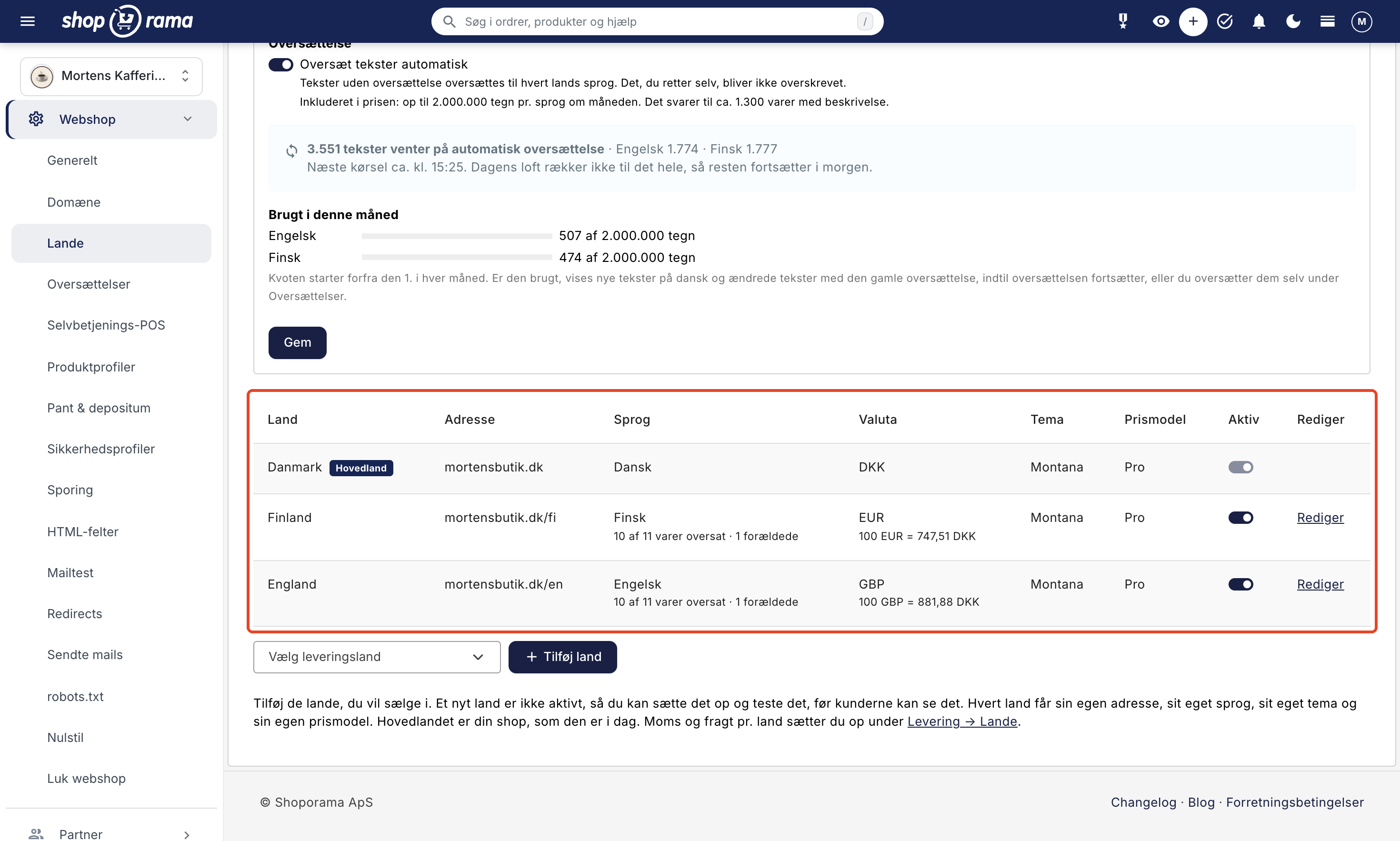
Under Online Store → Countries, you add the countries you want to sell in. Your store, as it is today, is the main country and continues exactly as before. For each new country, you choose:
- Address: a path on your domain, e.g., dinshop.dk/se, or a separate domain such as dinshop.se.
- Language: 22 European languages, including Swedish, Norwegian, Finnish, German, English, and French.
- Currency: 14 currencies, including the euro, Swedish and Norwegian kroner, British pounds, and Swiss francs.
- Theme: the same theme as the main country or a different theme for that country.
- Pricing model: Pro or Flex, selected for each country.
A new country is not active, so you can set it up and test it before customers can see it. When everything is ready, you can enable the country using the "Active" toggle. You can always disable it again, and the settings will be saved.
Translation is included in the price
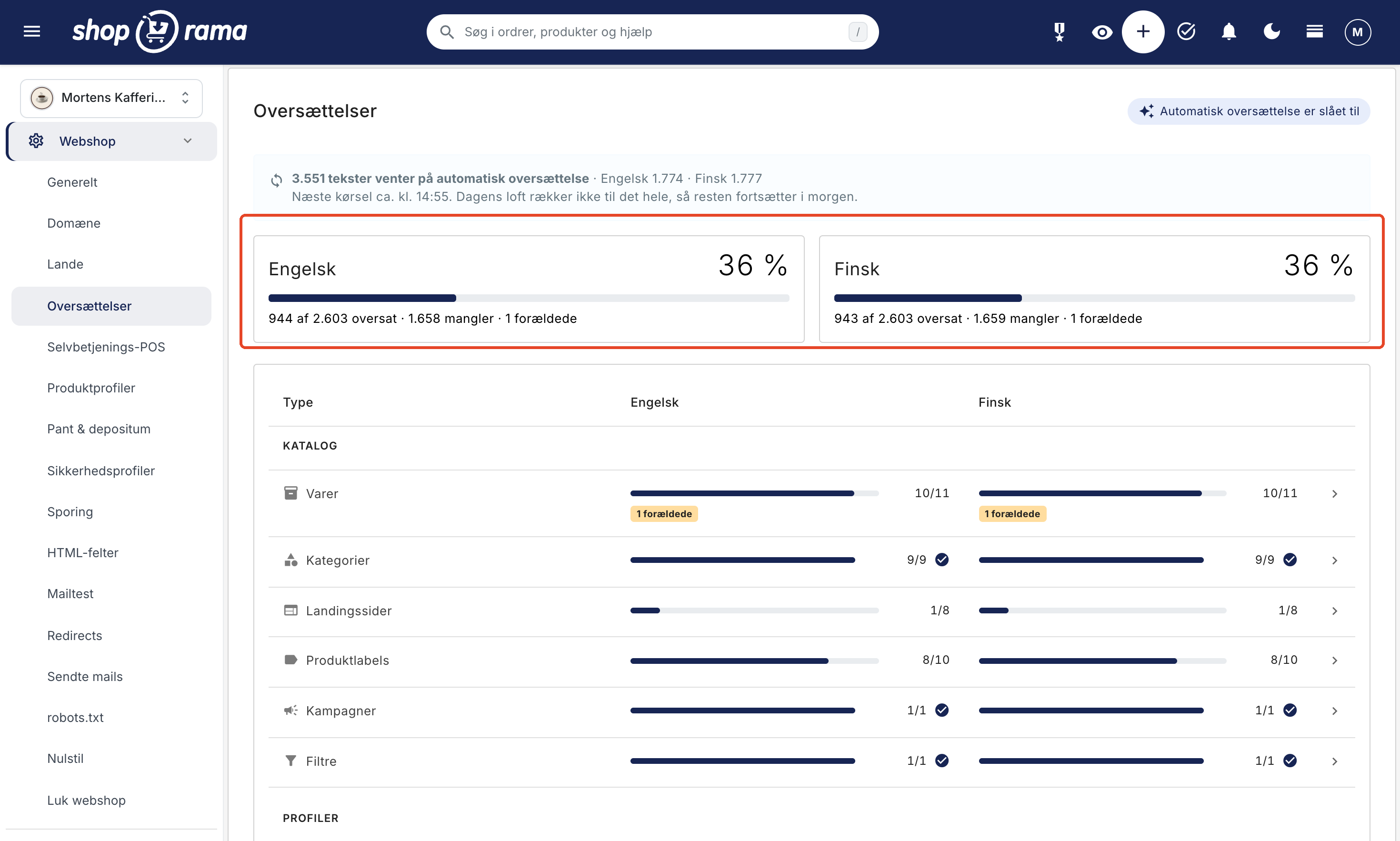
The most challenging part of entering a new market is the text. With Countries, products, categories, menus, pages, and the theme’s own text are automatically translated into the country’s language. Up to 2,000,000 characters per language per month are included. This corresponds to approximately 1,300 products with descriptions.
The translation only processes texts that are missing or where the Danish text has been changed since the last translation. Anything you’ve edited yourself will never be overwritten. New and updated texts are translated within a few minutes. If you have a large number of products, the initial translation may take a few days because there is a daily limit on the amount that can be translated.
Under Webshop → Translations, you can see how far each language has progressed. Here, you can correct a translation or download the texts as a CSV file for a translator and import them again.
Prices Tailored to the Country
Your prices are converted to the country’s currency using the current exchange rate from the National Bank, or a fixed rate of your choosing. You can add or subtract a percentage and round the prices so they end in .95 or .99 or become whole amounts. If the country has its own prices, they’ll include the country’s sales tax, which you’ve set up under Shipping → Countries.
If an item is to cost exactly 199 SEK, enter a fixed price in the item’s currency. This applies in all countries using that currency. Shipping, free shipping thresholds, discount codes, and gift cards are converted using the exchange rate.
The customer shops in their own language throughout the entire process
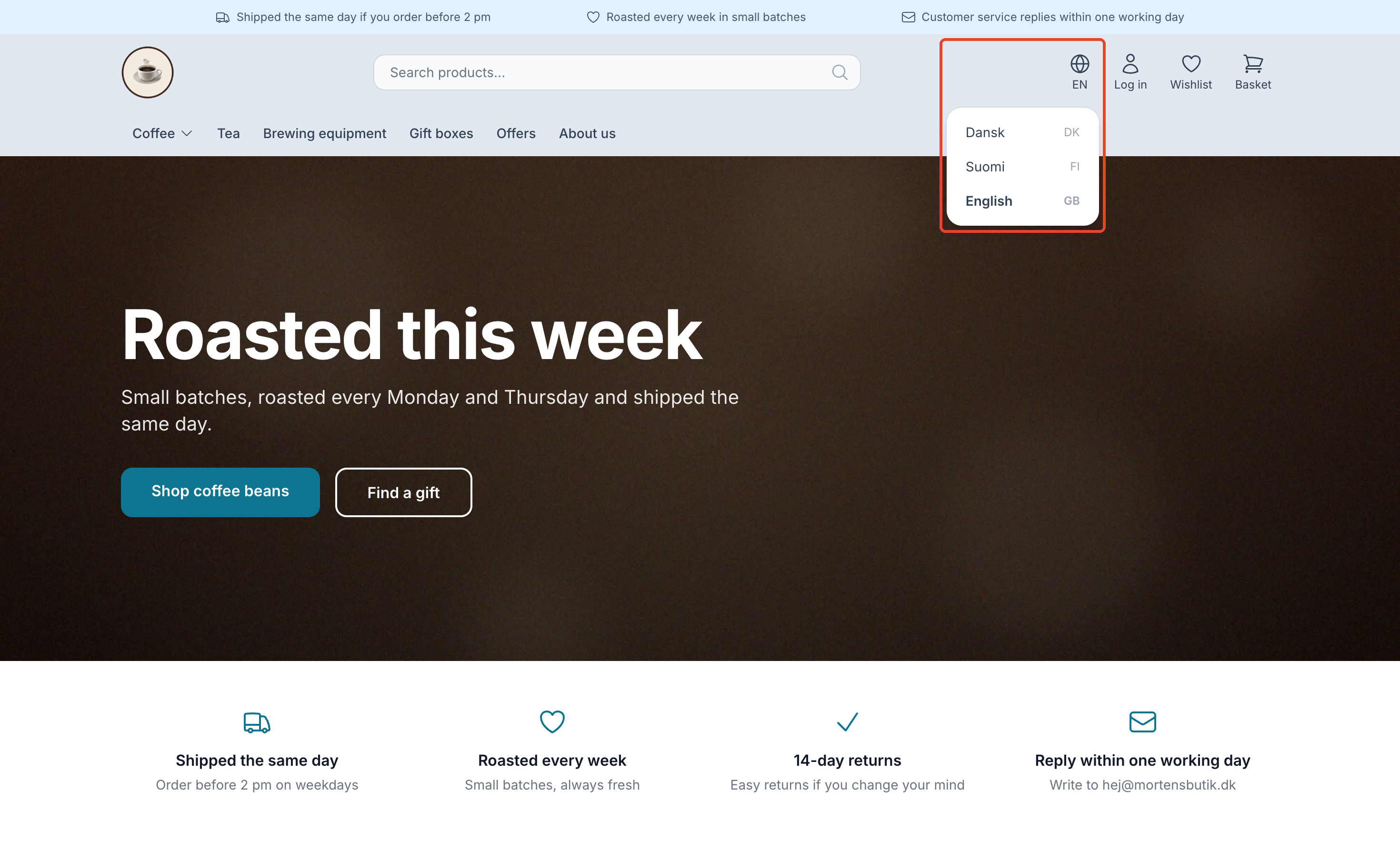
The customer changes the country in the language selector and is taken to the same page in the other country. Products, categories, and pages have translated addresses, and the shopping cart follows the customer as they switch. The checkout and order confirmation emails are in the country’s language and currency, and the payment window is in the country’s language if your payment solution supports it.
You determine shipping and payment options for each country
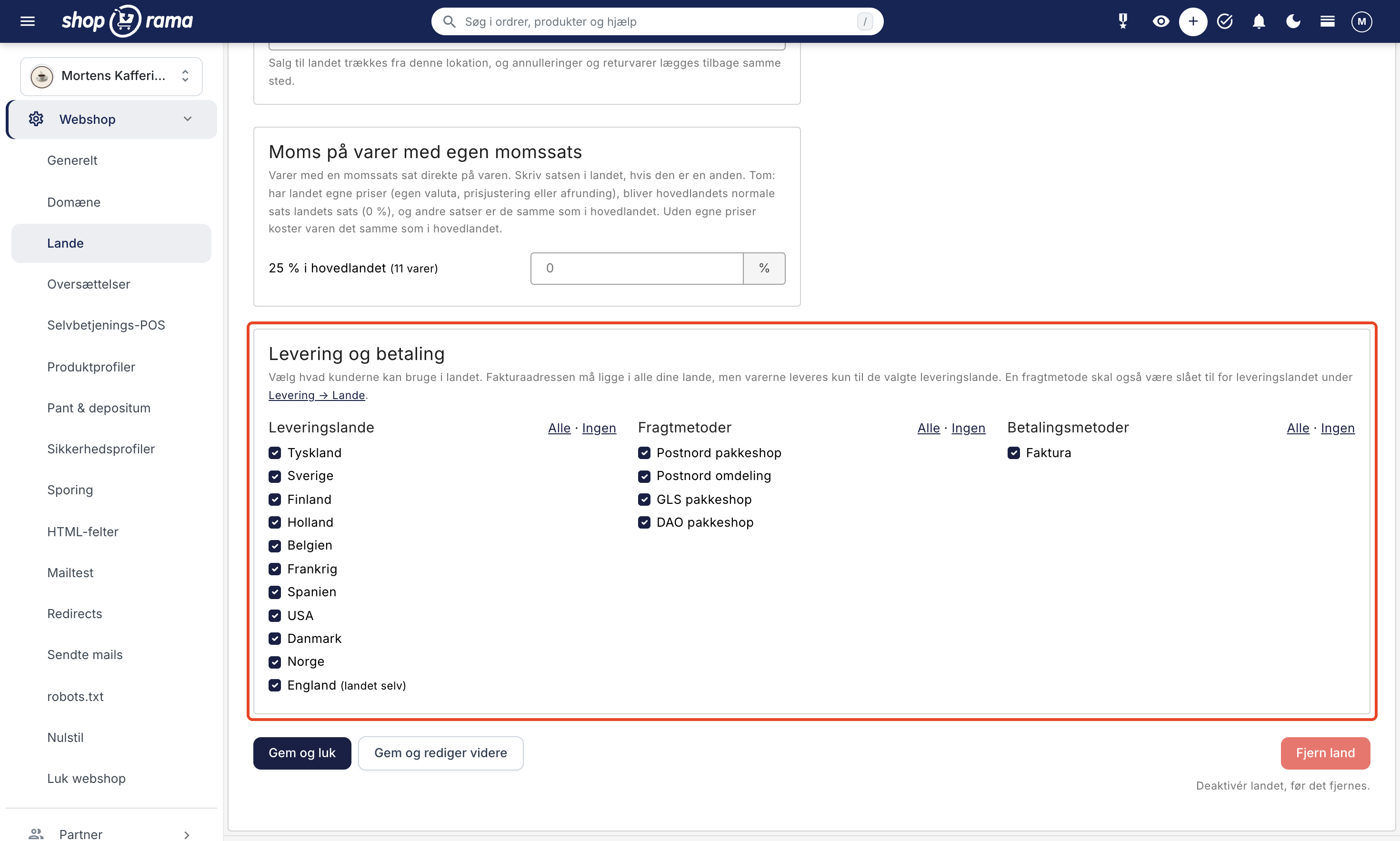
For each country, you select the delivery destinations, shipping methods, and payment methods that customers can use. The billing address must be located in any of your countries so that you comply with EU rules against geoblocking, while products are only delivered to the countries you’ve selected. If you have multiple warehouses, each country can draw products from its own warehouse.
Google knows which country the page belongs to
Shoporama automatically sets up hreflang links between the language versions so that Google can display the Swedish page to Swedish searchers and the Danish page to Danish searchers. Each country gets its own sitemap, and your Google Shopping feed is also available in each country with that country’s language, currency, and prices. The same applies to the feeds for PriceRunner, Kelkoo, and Partner Ads. The country’s sitemap and feeds include only those products that have been translated into the country’s language.
Pages that haven’t been translated yet are displayed in Danish and are excluded from Google in that country until they’re translated. This ensures that no half-finished pages appear in search results.
See what each country is selling
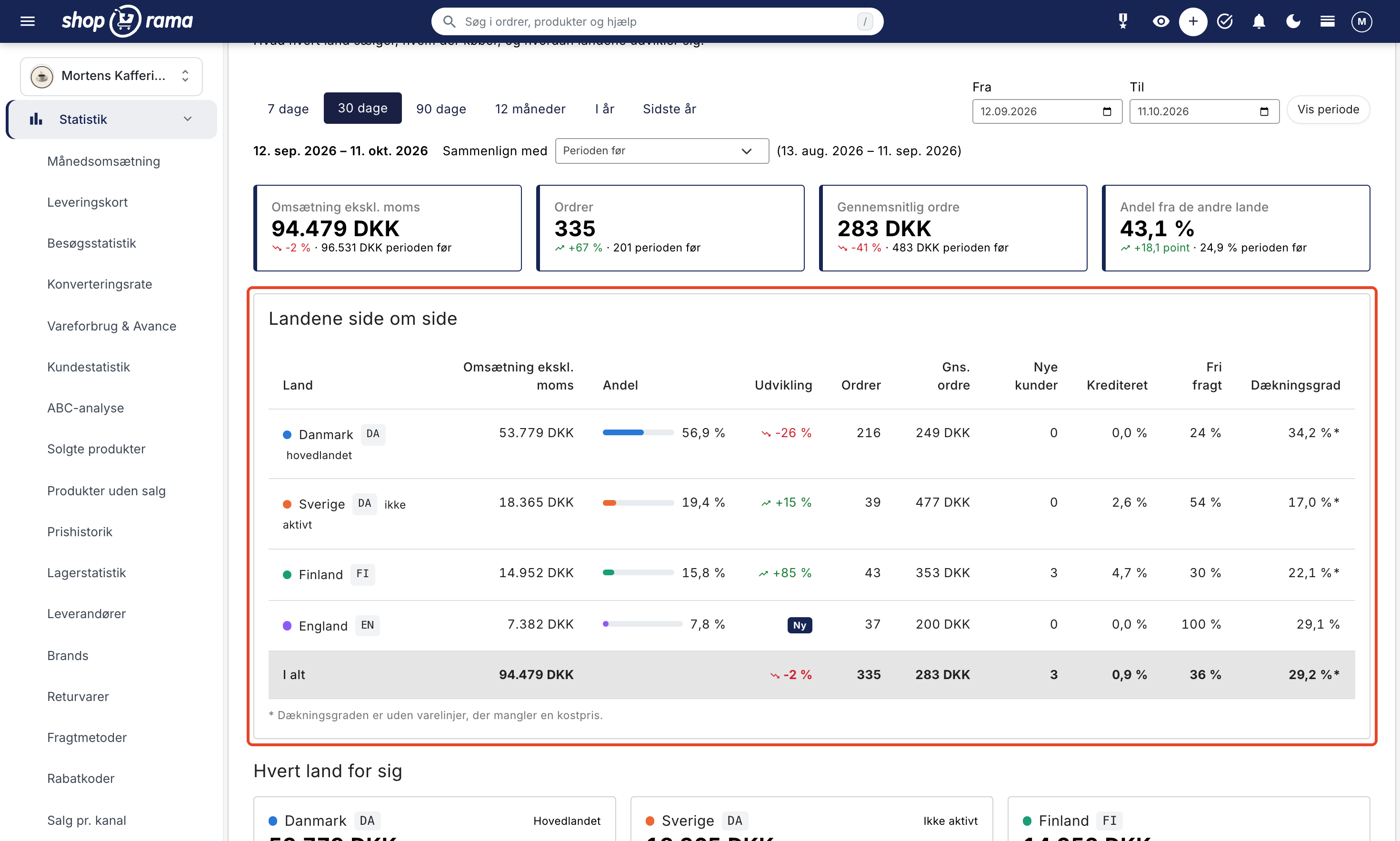
Under Statistics → Sales by Country, you’ll see the countries side by side with revenue, orders, average order value, new customers, and coverage rate, compared to the previous period. All amounts are listed in your shop’s currency, so you can compare countries directly. On the admin dashboard, the “Sales from Other Countries” chart shows how the last 30 days have gone, and in the order overview, you can see which country an order was placed in.
How much does it cost?
Your store, as it is today, is the main country and doesn’t cost extra. For each country you activate, you choose a pricing model:
- Pro: 1,400 DKK per month per country.
- Flex: 0 DKK + 5% of the country’s revenue; however, starting January 1, 2027, the minimum is 249 DKK per month per country.
Prices exclude VAT and are billed monthly in arrears for the days the country has been active, and only after your store has gone live. Automatic translation is included. If a country uses a custom-built theme, it must be on the Pro plan. See all prices on the pricing page.
Available in Shoporama’s themes
Montana, MontanaB2B, Delaware, DelawareDK, California, Washington, Alaska2, and Alaska are ready for countries with a language selector, the country’s currency, and the country’s number format. If you’re running a custom theme, your theme developer must prepare it first. The Countries page will let you know if your theme isn’t ready, and the guide “Prepare Your Theme for Countries” shows your developer what’s needed.
Get Started
- Create the country under Shipping → Countries with Sales Tax and Shipping if it doesn’t already exist.
- Go to Online Store → Countries, select the country in “Select Shipping Country,” and click “Add Country.”
- Select the address, language, currency, and pricing model, and choose the shipping and payment options for the country.
- Let the automatic translation run, and review the country settings.
- Enable the country by toggling the “Active” switch.
If the country needs its own domain, enter it yourself on the country’s page and have it point to Shoporama. With one click, you can order a free SSL certificate for the domain. Read the full guide in “Sell in Multiple Countries.”