Emergency situation

In case of emergencies or breakdowns, you can send an SMS to our emergency hotline

On-call phone (SMS only)

+45 29 70 15 95

Send an SMS with the following information:

  • Your name and webshop
  • Description of the problem
  • Your callback phone number

Notes: This service is only for critical situations where your webshop is down or has serious problems. For regular support, please use our normal support channels.

App Store

Learn how to use Shoporama's App Store to extend the functionality of your online store with apps from Shoporama and third-party developers.

Reading time: approx. {eight} minutes
Shopejer

The Shoporama App Store is a marketplace where you can find and install apps that expand your online store's functionality. Here you'll find both official Shoporama apps and apps developed by third-party developers.

Find Apps

You’ll find the App Store under IntegrationsApps in your Shoporama admin panel. Apps are organized into categories so you can easily find what you’re looking for. Official Shoporama apps are marked separately.
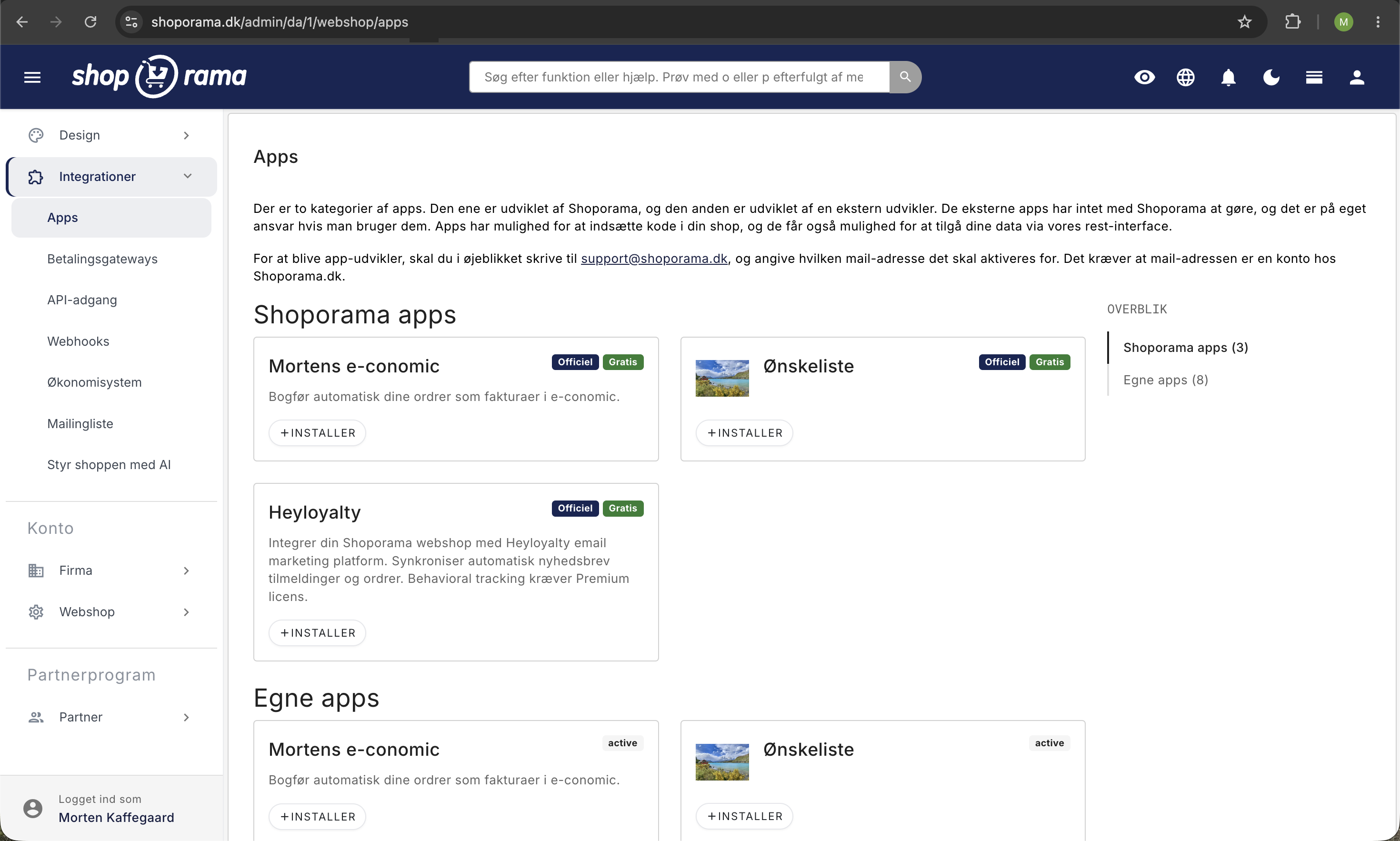
App Store i Shoporama med Shoporama-apps som Mortens e-conomic, Ønskeliste, og Heyloyalty samt egne apps med Officiel- og Gratis-mærkater
The App Store under Integrations displays both Shoporama apps and third-party apps on a grid with an “Official” label, a “Free” label, and an “Install” button. The overview panel on the right shows the number of apps in each category.

Install an app

  1. Go to IntegrationsApps
  2. Find the app you want to install
  3. Click Install
  4. Configure the app’s settings (if it has any)
  5. Save — your settings take effect immediately

Some apps are free, while others have a monthly fee. The price is displayed on the app card before you install it.

What happens when you install an app?

The app is installed the moment you click Install. You’ll be redirected directly to the app’s setup page, but the installation itself is already complete—even if you close the page without saving anything. The time is saved and displayed in the Installed column of the Installed Apps table.

Behind the scenes, three more things happen:

  • The app receives its own API token for your store. It’s created with the access level the app requests: Read-only, Write-only, or All. You’ll find it under IntegrationsAPI Access, where it’s labeled as an app token and therefore cannot be deleted from the list. If you click on the name, you’ll be taken to the app’s settings.
  • The app’s default values are saved as your settings. If the provider has set a default value for a field, it will be ready before you’ve even made any changes yourself.
  • The provider is notified. Shoporama sends an installation message to the app’s system with your online store’s ID, the store’s address, the new API token, and the current field values. This is how the app knows it should start working for your specific store.

An installation is therefore the same as granting an external provider access to your data. Only install apps you trust, and check the access level afterward so you know whether the app is only reading data or also writing to the store.

If nothing happens when you click Install

  • The app has not been released for your store. Some apps are locked to specific online stores, for example while they are being tested. If you click “Install” on such an app, nothing will happen, and you won’t be redirected to the setup page. Email support@shoporama.dk if you’d like to gain access.
  • Your store is running the old template engine. If your store uses Smarty 2, there will be a message at the top of the Apps page indicating this. Apps that insert elements into your theme will not work correctly until you upgrade to version 4 under Web StoreGeneral. The installation itself completes successfully, but the code the app inserts into the theme does not work.

The app’s daily call limit

By default, the app token has a limit of 1,000 API calls per day. This is sufficient for most apps, but if you have a large number of products or orders, you may reach the limit, and the app will stop fetching data for the remainder of the day. You can increase the limit under IntegrationsAPI Access by clicking the edit icon next to the token. Read more in Find or Create an API Key.

Configuration

Each app has its own settings that you can customize after installation. Typical setting types include:

  • Text fields — Enter API keys, account information, or other values
  • Checkboxes — Enable or disable features
  • Dropdown menus — Choose from predefined options
  • Color options — Customize the appearance
  • Text editor — Enter formatted content

You can always change the settings later via the Settings link next to the installed app.

An app’s setup page

You can open the setup for an installed app in two places: by clicking the gear icon in the Installed Apps table, or by clicking the Settings button on the app’s card. The page is composed of the fields defined by the provider, so it looks different from app to app, and the provider also determines the order.

Required fields

Fields marked with an asterisk must be filled in, and at the bottom of the page it says "* = required." The browser will stop you if you try to save without them and will jump to the missing field. Note that the app is installed regardless: an app can appear under “Installed Apps” without being fully set up, in which case it won’t work as intended.

More Field Types

In addition to the types mentioned above, an app can also use:

  • Number: fields that accept only whole numbers, such as an exchange rate or a number of days
  • Text area: a larger field for multiple lines of plain text without formatting
  • Code field: a field with line numbers and colored code for HTML and JavaScript, such as the button the app should display in your theme

Fields retrieved from the provider

Some fields you do not fill in yourself. They are retrieved in real time from the app’s own system every time you open the setup page:

  • Locked text fields appear grayed out with a copy button next to them and the text “This field is retrieved externally and cannot be edited.” This is typically an address or an ID that you need to use elsewhere, such as within the provider’s own portal.
  • Dropdown menus with external data retrieve their options from the provider. In the e-conomic app, for example, your product groups, customer groups, and payment terms are retrieved directly from your accounting system.

If the provider’s system is down, or if you haven’t yet saved the API key the app is requesting, such a field may appear empty. Save the key first, then reload the page, and the lists will be fetched again.

Save, Save and Close, or Remove App

At the bottom of the setup page, there are three buttons:

  • Save saves your changes and keeps you on the setup page. The keyboard shortcut Cmd+S, or Ctrl+S on Windows, does the same thing.
  • "Save and Close " saves your changes and takes you back to the list of installed apps.
  • "Remove App " uninstalls the app. You’ll be asked to confirm first, and any changes you haven’t saved will be discarded.

Every time you save, Shoporama sends the new settings to the app’s system so that the provider uses the same values as you. If the app has fields that are fetched from an external source, this happens immediately while you wait, so it may take a moment longer to save those specific apps.

Uninstall an app

If you no longer need an app, you can remove it by clicking “Remove” next to the app. All of the app’s settings will be deleted, and the app will be deactivated immediately.

What happens when you remove an app?

You can remove an app in three places: using the “Remove” button in the “Installed Apps” table, using “Remove” on the app’s card, and using “Remove App” at the bottom of the app’s settings page. All three options ask for confirmation first, and they do exactly the same thing:

  • The app is disconnected from your online store and disappears from Installed Apps
  • All your settings for the app are deleted
  • The app’s API token is deleted, so the app can no longer read or write data in your store
  • Any code the app has inserted into your theme is immediately removed from the store
  • The provider is notified that the app has been uninstalled

What is not deleted

Uninstalling the app does not affect the data the app has created. Orders, labels, customers, and other items the app has created in your store will remain, as will any invoices or contacts the app has added to the provider’s own system. If you want to remove them, you’ll need to clean up the relevant system and ask the provider to delete any information they may have stored about your shop.

If you change your mind

You can reinstall the app at any time, but it will start over with the app’s default settings. Your old settings will be deleted, and the app will receive a new API token. If you simply want to switch to a different account with the provider, it’s therefore faster to update the API key in the settings than to uninstall and reinstall the app.

Billing when you remove a paid app

Billing will stop going forward once the app is removed. The month in which the app was installed will still be billed as a full month on the following invoice, where it will appear as a separate line item with the app’s name. The price applies per online store per month and does not include tax.

What can apps do?

Apps can expand your online store in many ways:

  • Integrations — Connect to external systems such as accounting software, shipping solutions, marketing platforms, and more.
  • Widgets — Add functionality to your online store, such as chat, reviews, or social media
  • Tracking — Add tracking codes from Google Analytics, Facebook Pixel, and similar services
  • Automation — Receive notifications about orders, inventory changes, and other events

Pricing

Some apps are free, while others have a monthly subscription fee. The price is clearly displayed on each app card, so you know what it costs before you install it. Payment is billed together with your Shoporama invoice.

Develop Your Own App

Are you a developer? You can create your own apps for Shoporama’s App Store. Contact us at support@shoporama.dk to gain access to the developer features. As an app developer, you can:

  • Create apps with customizable settings fields
  • Receive webhooks for orders, inventory changes, and other events
  • Use Shoporama’s REST API to read and write data
  • Embed code on specific pages of the online store
  • Set a price and earn money from your app

Frequently Asked Questions

I clicked “Install” but didn’t get a chance to fill out anything. Is the app installed?

Yes. The app is installed the moment you click “Install,” and it now appears under “Installed Apps” with the date and time in the “Installed” column. It just won’t do anything yet if it’s missing your information. Click the gear icon next to the app and fill in the rest, or click "Remove" if you changed your mind.

Nothing happens when I click “Install.” What should I do?

In that case, the app probably hasn’t been released for your online store. Some apps are locked to specific stores, for example, while they’re being tested. Email support@shoporama.dk with the name of the app and your store, and we’ll see if we can make it available to you.

What access does an app have to my store?

The app receives its own API token with the access level it requests: Read-only, Write-only, or All. You can always view the access level under IntegrationsAPI Access, where app tokens are listed alongside your own. The app token cannot be deleted from the list, but it disappears automatically when you uninstall the app. If you want to see which calls the app makes, you can open the log for the token. Read more about tokens and limits in Find or Create an API Key.

How do I see the cost of an app on my invoice?

Paid apps appear as separate lines with the app’s name on your monthly Shoporama invoice, and they’re billed retroactively for the previous month. The price shown on the app card is per month and excludes tax. You won’t receive a separate bill from the provider for the app price itself, as it’s included on your Shoporama invoice.

We uninstalled a paid app in the middle of the month. Will we be charged for the entire month?

Yes. The price is not prorated by the number of days, so the month in which the app was installed is billed as a full month on the following invoice. After that, billing stops. If you need to document this for your accountant, you can see the app line item on the invoice and verify that the app no longer appears under “Installed Apps.”

Do I need to install the same app in each of my online stores?

Yes. Apps are installed per online store, and the setup is specific to each store, so you can easily run the same app with different keys and settings in two stores. If the app is a paid app, you pay the price for each shop it’s installed in. Switch between shops using the shop selector at the top and repeat the installation.

Does the app’s code disappear from the store when I remove the app?

Yes. The code that the app inserts into the theme is only displayed as long as the app is installed, so it disappears from customers’ pages immediately. However, if the app has forwarded data to a third party along the way—for example, to a marketing tool—that data is still stored with that service, and you’ll need to ask the service to delete it.

Who should I contact if an app is causing problems?

If it’s an official Shoporama app, email support@shoporama.dk. If it’s an app from a third-party developer, contact the developer—whose name appears as a link to their email address in the “Developer” column of the “Installed Apps” table. Third-party apps are developed outside of Shoporama, so it’s up to the developer to fix any issues with them.

If you have any questions about the App Store, feel free to contact us at support@shoporama.dk.